Keycloak Events
Overview
Keycloak is an open-source identity and access management solution that enables Single Sign-On (SSO), social login and standard protocols like OAuth2, OpenID Connect and SAML. It supports user federation, fine-grained authorization policies and multi-factor authentication. Easy to deploy and integrate, it secures applications and services with minimal coding.
- Vendor: Keycloak
- Supported environment: On-premise, Cloud
- Detection based on: Telemetry
- Supported application or feature: User Events
Warning
Important note - This format is currently in beta. We highly value your feedback to improve its performance.
Supported events
This integration supports the following event types:
- User Events
Configure
Prerequisites
- Administrator access to Keycloak Console
- Access to Sekoia.io Intakes page with write permissions
- A log concentrator to forward events to Sekoia.io
Create an intake
- Go to the intake page and create a new intake from the format Keycloak.
- Copy the intake key for later use in the forwarder configuration.
Enable User events in Keycloak
Step 1: Access Realm Settings
- Log in to the Keycloak Console as an administrator
-
Go to
Realm settings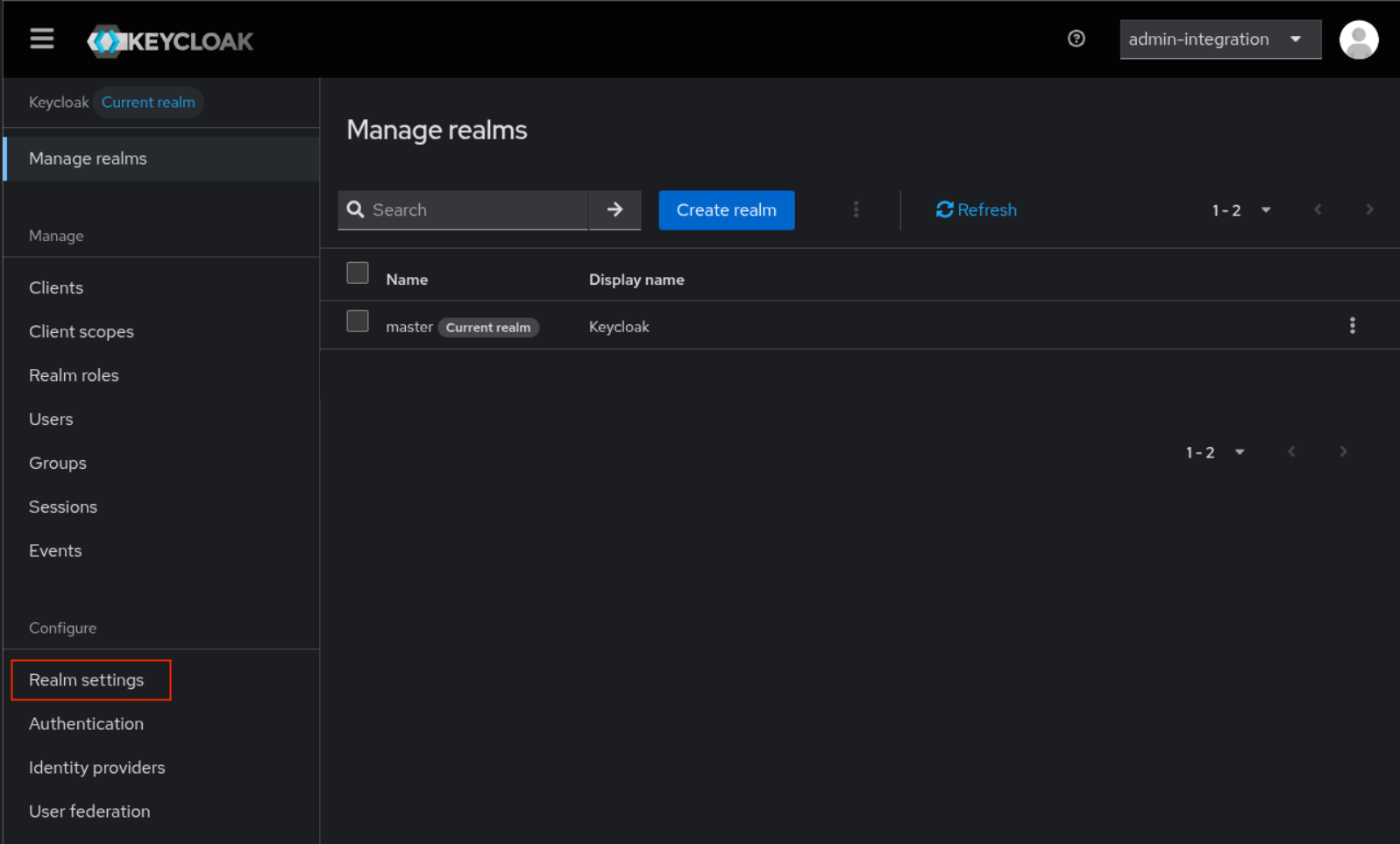
-
Click
Eventstab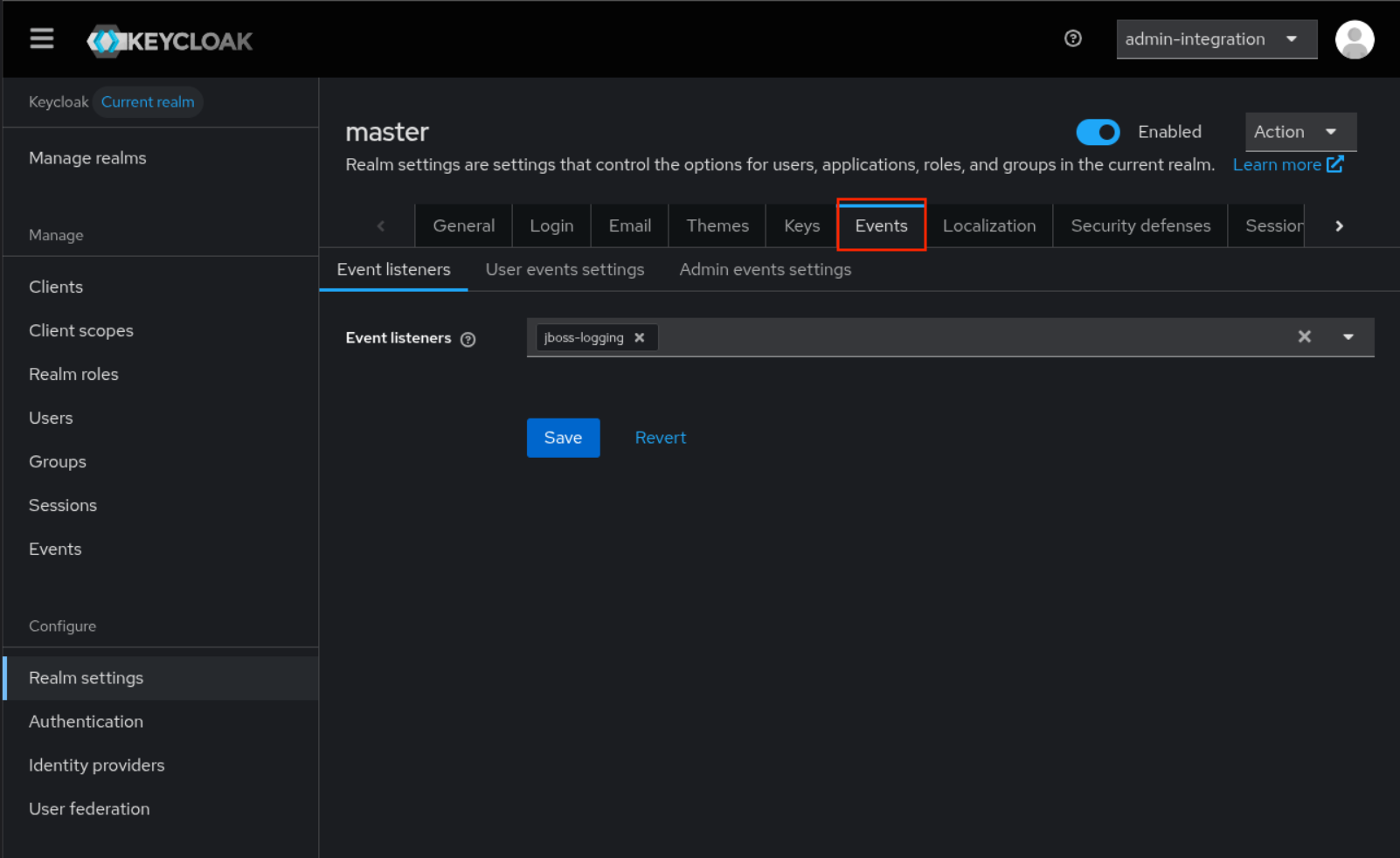
-
Select
jboss-loggingasEvent listeners -
Click
Save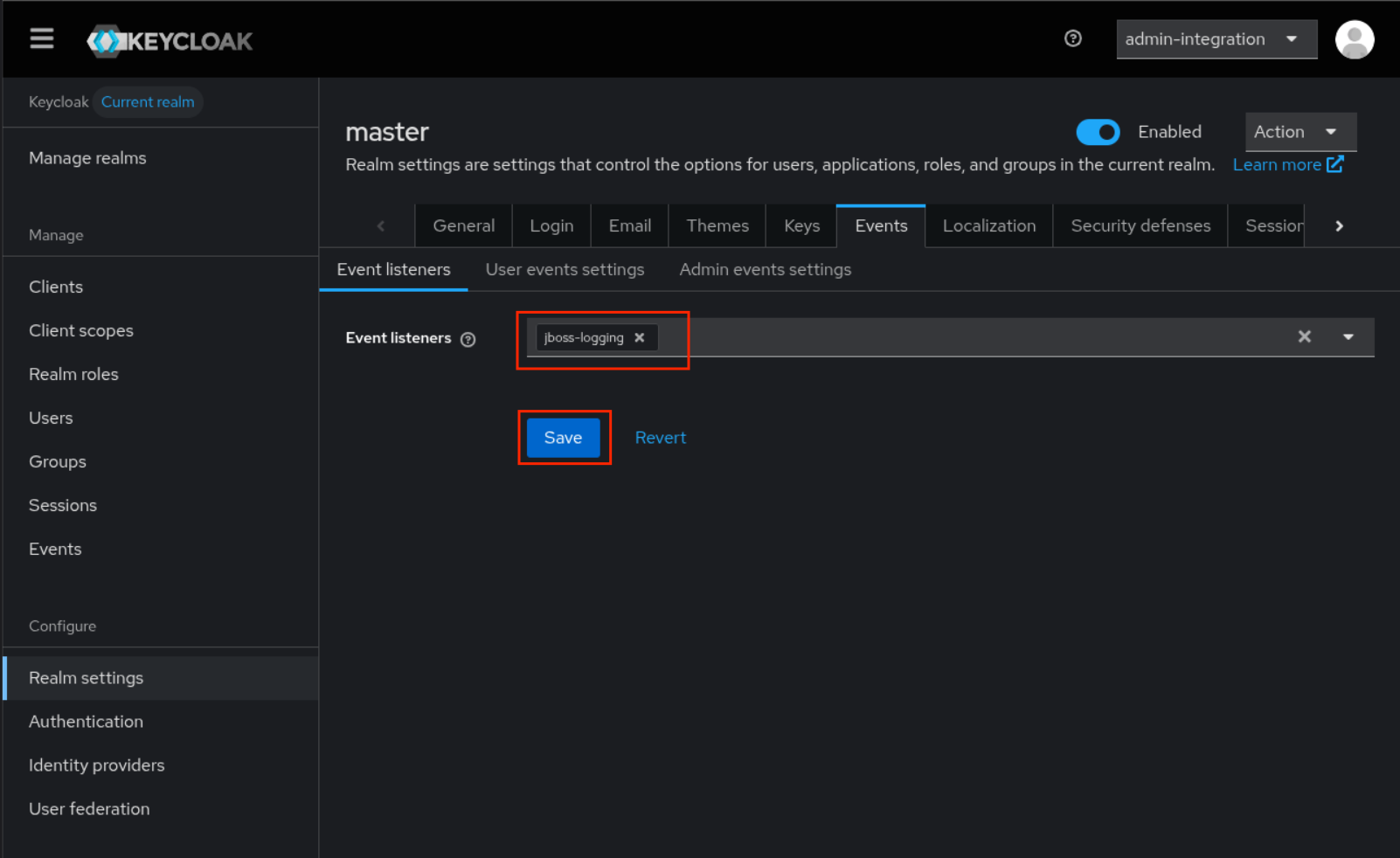
-
Click
User events settingsTab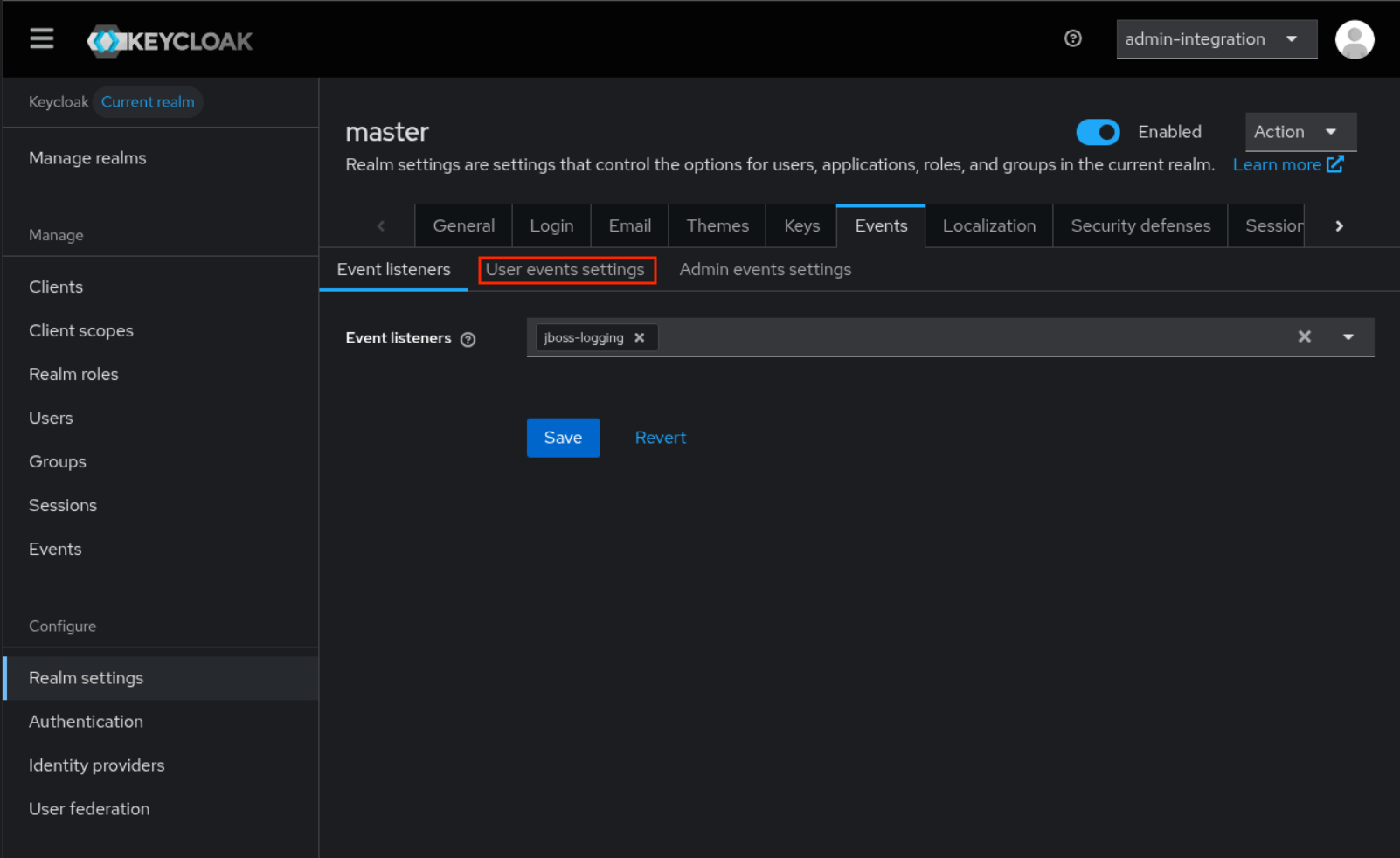
-
Enable
save events -
Click
Save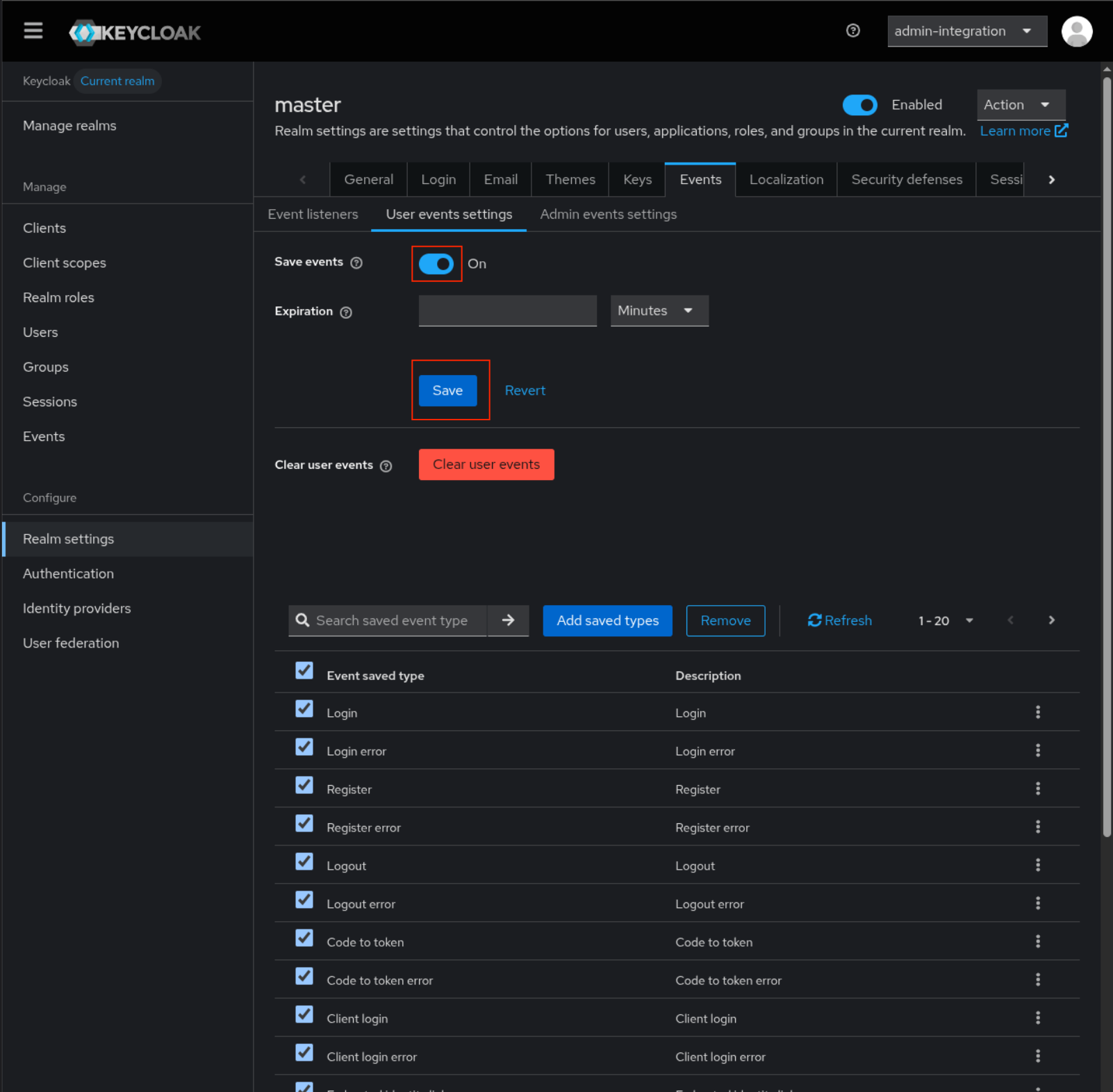
See Keycloak Documentation for more information.
Forward events to the concentrator
In the Keycloak configuration, set the following options to forward events to a log concentrator:
log(env:KC_LOG): addsyslogto the optionlog-syslog-endpoint(env:KC_LOG_SYSLOG_ENDPOINT): Set the IP address of the concentrator and the port dedicated for the intakelog-syslog-protocol(env:KC_LOG_SYSLOG_PROTOCOL): Set totcplog-syslog-output(env:KC_LOG_SYSLOG_OUTPUT): Set tojsonlog-syslog-json-format(env:KC_LOG_SYSLOG_JSON_FORMAT): Set toecsspi-events-listener--jboss-logging--success-level(env:KC_SPI_EVENTS_LISTENER_JBOSS_LOGGING_SUCCESS_LEVEL): Set toinfo
Using Environment Variables
export KC_LOG=syslog
export KC_LOG_SYSLOG_ENDPOINT=<ip_concentrator>:<intake_port>
export KC_LOG_SYSLOG_PROTOCOL=tcp
export KC_LOG_SYSLOG_OUTPUT=json
export KC_LOG_SYSLOG_JSON_FORMAT=ecs
export KC_SPI_EVENTS_LISTENER__JBOSS_LOGGING__SUCCESS_LEVEL=info
Using the keycloak.conf File
log=syslog
log-syslog-endpoint=<ip_concentrator>:<intake_port>
log-syslog-protocol=tcp
log-syslog-output=json
log-syslog-json-format=ecs

spi-events-listener-jboss-logging-success-level=info
Forward events to Sekoia.io
Please consult the Syslog Forwarding documentation to forward these logs to Sekoia.io.
Create a new configuration file in the ./extended_conf/ directory (create it if it does not exist):
vim ./extended_conf/12-keycloak.conf
with the following template:
module(load="imtcp")
input(type="imtcp" port="PORT" ruleset="remoteKeycloak")

template(name="SEKOIAIOTemplate" type="string" string="<%pri%>1 %timestamp:::date-rfc3339% %hostname% %app-name% %procid% LOG [SEKOIA@53288 intake_key=\"INTAKE_KEY\"] %msg%\n")
ruleset(name="remoteKeycloak"){
  if($msg contains "org.keycloak.events") then {
    action(
        type="omfwd"
        protocol="tcp"
        target="intake.sekoia.io"
        port="10514"
        TCP_Framing="octet-counted"
        StreamDriver="gtls"
        StreamDriverMode="1"
        StreamDriverAuthMode="x509/name"
        StreamDriverPermittedPeers="intake.sekoia.io"
        Template="SEKOIAIOTemplate"
    )
  }
}
Note
Please change INTAKE_KEY with your actual intake key, as well as the PORT number.
Update the docker-compose.yml file of the Sekoia.io Forwarder to mount the extended conf:
volumes:
    - ./intakes.yaml:/intakes.yaml
...
    - ./extended_conf:/extended_conf
Raw Events Samples
In this section, you will find examples of raw logs as generated natively by the source. These examples are provided to help integrators understand the data format before ingestion into Sekoia.io. It is crucial for setting up the correct parsing stages and ensuring that all relevant information is captured.
{
    "@timestamp": "2025-11-21T13:55:09.111222333Z",
    "event.sequence": 4420,
    "log.logger": "org.keycloak.events",
    "log.level": "WARN",
    "message": "type=\"CODE_TO_TOKEN_ERROR\", realmId=\"staging-realm\", realmName=\"staging\", clientId=\"test-client\", userId=\"null\", ipAddress=\"198.51.100.123\", error=\"invalid_code\", grant_type=\"authorization_code\"",
    "process.thread.name": "executor-thread-4",
    "process.thread.id": 30,
    "mdc": {},
    "ndc": "",
    "host.hostname": "example.com",
    "process.name": "/usr/lib/jvm/java-21-openjdk/bin/java",
    "process.pid": 1,
    "ecs.version": "1.12.2",
    "data_stream.type": "logs",
    "service.name": "Keycloak",
    "service.version": "26.4.2",
    "service.environment": "staging"
}
{
    "@timestamp": "2025-11-13T16:07:05.472632304Z",
    "event.sequence": 2951,
    "log.logger": "org.keycloak.events",
    "log.level": "WARN",
    "message": "type=\"LOGIN_ERROR\", realmId=\"00000000-0000-0000-0000-000000000000\", realmName=\"master\", clientId=\"security-admin-console\", userId=\"null\", ipAddress=\"1.2.3.4\", error=\"expired_code\", restart_after_timeout=\"true\"",
    "process.thread.name": "executor-thread-1",
    "process.thread.id": 25,
    "mdc": {},
    "ndc": "",
    "host.hostname": "example.com",
    "process.name": "/usr/lib/jvm/java-21-openjdk-21.0.9.0.10-1.el9.x86_64/bin/java",
    "process.pid": 1,
    "ecs.version": "1.12.2",
    "data_stream.type": "logs",
    "service.name": "Keycloak",
    "service.version": "26.4.2",
    "service.environment": "prod"
}
{
    "@timestamp": "2025-11-21T10:15:23.123456789Z",
    "event.sequence": 1001,
    "log.logger": "org.keycloak.events",
    "log.level": "INFO",
    "message": "type=\"LOGIN\", realmId=\"a1b2c3d4-e5f6-7890-abcd-ef1234567890\", realmName=\"production\", clientId=\"webapp-client\", userId=\"user-12345\", ipAddress=\"192.0.2.100\", auth_method=\"openid-connect\", redirect_uri=\"https://example.com/callback\"",
    "process.thread.name": "executor-thread-5",
    "process.thread.id": 42,
    "mdc": {},
    "ndc": "",
    "host.hostname": "example.com",
    "process.name": "/usr/lib/jvm/java-21-openjdk/bin/java",
    "process.pid": 1,
    "ecs.version": "1.12.2",
    "data_stream.type": "logs",
    "service.name": "Keycloak",
    "service.version": "26.4.2",
    "service.environment": "prod"
}
{
    "@timestamp": "2025-11-21T14:30:45.987654321Z",
    "event.sequence": 5500,
    "log.logger": "org.keycloak.events",
    "log.level": "INFO",
    "message": "type=\"LOGOUT\", realmId=\"a1b2c3d4-e5f6-7890-abcd-ef1234567890\", realmName=\"production\", clientId=\"webapp-client\", userId=\"user-67890\", ipAddress=\"198.51.100.50\", redirect_uri=\"https://example.com/\"",
    "process.thread.name": "executor-thread-3",
    "process.thread.id": 18,
    "mdc": {},
    "ndc": "",
    "host.hostname": "example.com",
    "process.name": "/usr/lib/jvm/java-21-openjdk/bin/java",
    "process.pid": 1,
    "ecs.version": "1.12.2",
    "data_stream.type": "logs",
    "service.name": "Keycloak",
    "service.version": "26.4.2",
    "service.environment": "prod"
}
{
    "@timestamp": "2025-11-21T11:45:12.555555555Z",
    "event.sequence": 3200,
    "log.logger": "org.keycloak.events",
    "log.level": "DEBUG",
    "message": "type=\"REFRESH_TOKEN\", realmId=\"test-realm-id\", realmName=\"test\", clientId=\"mobile-app\", userId=\"user-abc123\", ipAddress=\"203.0.113.25\"",
    "process.thread.name": "executor-thread-7",
    "process.thread.id": 55,
    "mdc": {},
    "ndc": "",
    "host.hostname": "example.com",
    "process.name": "/usr/lib/jvm/java-21-openjdk/bin/java",
    "process.pid": 1,
    "ecs.version": "1.12.2",
    "data_stream.type": "logs",
    "service.name": "Keycloak",
    "service.version": "26.4.2",
    "service.environment": "dev"
}
{
    "@timestamp": "2025-11-21T09:22:33.777888999Z",
    "event.sequence": 8750,
    "log.logger": "org.keycloak.events",
    "log.level": "DEBUG",
    "message": "type=\"USER_INFO_REQUEST\", realmId=\"prod-realm-uuid\", realmName=\"corporate\", clientId=\"api-service\", userId=\"employee-555\", ipAddress=\"192.0.2.200\"",
    "process.thread.name": "executor-thread-2",
    "process.thread.id": 10,
    "mdc": {},
    "ndc": "",
    "host.hostname": "example.com",
    "process.name": "/usr/lib/jvm/java-21-openjdk/bin/java",
    "process.pid": 1,
    "ecs.version": "1.12.2",
    "data_stream.type": "logs",
    "service.name": "Keycloak",
    "service.version": "26.4.2",
    "service.environment": "prod"
}
Detection section
The following section provides information for those who wish to learn more about the detection capabilities enabled by collecting this intake. It includes details about the built-in rule catalog, event categories, and ECS fields extracted from raw events. This is essential for users aiming to create custom detection rules, perform hunting activities, or pivot in the events page.
Related Built-in Rules
The following Sekoia.io built-in rules match the intake Keycloak Events [BETA]. This documentation is updated automatically and is based solely on the fields used by the intake which are checked against our rules. This means that some rules will be listed but might not be relevant with the intake.
SEKOIA.IO x Keycloak Events [BETA] on ATT&CK Navigator
Account Added To A Security Enabled Group
Detection in order to investigate who has added a specific Domain User in Domain Admins or Group Policy Creator Owners (Security event 4728)
- Effort: master
Account Removed From A Security Enabled Group
Detection in order to investigate who has removed a specific Domain User in Domain Admins or Group Policy Creator Owners (Security event 4729)
- Effort: master
Active Directory Data Export Using Csvde
Detects the use of Csvde, a command-line tool from Windows Server that can be used to export Active Directory data to CSV files. This export doesn't include password hashes, but can be used as a discovery tool to enumerate users, machines and group memberships.
- Effort: elementary
AdFind Usage
Detects the usage of the AdFind tool. AdFind.exe is a free tool that extracts information from Active Directory. Wizard Spider (Bazar, TrickBot, Ryuk), FIN6 and MAZE operators have used AdFind.exe to collect information about Active Directory organizational units and trust objects
- Effort: elementary
Adexplorer Usage
Detects the usage of Adexplorer, a legitimate tool from the Sysinternals suite that could be abused by attackers as it can saves snapshots of the Active Directory Database.
- Effort: advanced
Advanced IP Scanner
Detects the use of Advanced IP Scanner. Seems to be a popular tool for ransomware groups.
- Effort: master
Aspnet Compiler
Detects the starts of aspnet compiler.
- Effort: advanced
Backup Catalog Deleted
The rule detects when the Backup Catalog has been deleted. It means the administrators will not be able to access any backups that were created earlier to perform recoveries. This is often being done using the wbadmin.exe tool.
- Effort: intermediate
Bloodhound and Sharphound Tools Usage
Detects default process names and default command line parameters used by Bloodhound and Sharphound tools.
- Effort: intermediate
CVE-2017-11882 Microsoft Office Equation Editor Vulnerability
Detects the exploitation of CVE-2017-11882 vulnerability. The Microsoft Office Equation Editor has no reason to do a network request or drop an executable file. This requires a sysmon configuration with file and network events.
- Effort: master
Certificate Authority Modification
Installation of new certificate(s) in the Certificate Authority can be used to trick user when spoofing website or to add trusted destinations.
- Effort: master
Certify Or Certipy
Detects the use of certify and certipy which are two different tools used to enumerate and abuse Active Directory Certificate Services.
- Effort: advanced
Cobalt Strike Default Beacons Names
Detects the default names of Cobalt Strike beacons / payloads.
- Effort: intermediate
Computer Account Deleted
Detects computer account deletion.
- Effort: master
Cryptomining
Detection of domain names potentially related to cryptomining activities.
- Effort: master
DHCP Server Error Failed Loading the CallOut DLL
This rule detects a DHCP server error in which a specified Callout DLL (in registry) could not be loaded.
- Effort: intermediate
DHCP Server Loaded the CallOut DLL
This rule detects a DHCP server in which a specified Callout DLL (in registry) was loaded. This would indicate a succesful attack against DHCP service allowing to disrupt the service or alter the integrity of the responses.
- Effort: intermediate
DNS Query For Iplookup
Detects dns query of observables tagged as iplookup.
- Effort: master
DNS Server Error Failed Loading The ServerLevelPluginDLL
This rule detects a DNS server error in which a specified plugin DLL (in registry) could not be loaded. This requires the dedicated Windows event provider Microsoft-Windows-DNS-Server-Service.
- Effort: master
Domain Trust Created Or Removed
A trust was created or removed to a domain. An attacker could perform that in order to do lateral movement easily between domains or shutdown the ability of two domains to communicate.
- Effort: advanced
Dynamic DNS Contacted
Detect communication with dynamic dns domain. This kind of domain is often used by attackers. This rule can trigger false positive in non-controlled environment because dynamic dns is not always malicious.
- Effort: master
Enable Root Account With Dsenableroot
Detects when root is enabled. Attackers can use this as a mean of persistence since root is disabled by default.
- Effort: elementary
Exfiltration And Tunneling Tools Execution
Execution of well known tools for data exfiltration and tunneling
- Effort: advanced
Exfiltration Domain
Detects traffic toward a domain flagged as a possible exfiltration vector.
- Effort: master
HackTools Suspicious Names
Quick-win rule to detect the default process names or file names of several HackTools.
- Effort: advanced
Kernel Module Alteration
Kernel module installation can be used to configure system settings to automatically execute a program during system boot or logon to maintain persistence or gain higher-level privileges on compromised systems. The prerequisites are to enable monitoring of the finit_module, init_module, delete_module syscalls using Auditbeat.
- Effort: advanced
Microsoft Defender Antivirus History Deleted
Windows Defender history has been deleted. Could be an attempt by an attacker to remove its traces.
- Effort: master
Microsoft Defender Antivirus Tampering Detected
Detection of Windows Defender Tampering, from definitions' deletion to deactivation of parts or all of Defender.
- Effort: advanced
Microsoft Defender Antivirus Threat Detected
Detection of a windows defender alert indicating the presence of potential malware
- Effort: advanced
Network Scanning and Discovery
Tools and command lines used for network discovery from current system
- Effort: advanced
Network Sniffing
List of common tools used for network packages sniffing
- Effort: advanced
Network Sniffing Windows
Network sniffing refers to using the network interface on a system to monitor or capture information sent over a wired or wireless connection. An adversary may place a network interface into promiscuous mode to passively access data in transit over the network, or use span ports to capture a larger amount of data.
- Effort: intermediate
NlTest Usage
Detects attempts to gather information on domain trust relationships that may be used to identify lateral movement opportunities. These command lines were observed in numerous attacks, but also sometimes from legitimate administrators for debugging purposes. The rule does not cover very basics commands but rather the ones that are interesting for attackers to gather information on a domain.
- Effort: advanced
Password Change On Directory Service Restore Mode (DSRM) Account
The Directory Service Restore Mode (DSRM) account is a local administrator account on Domain Controllers. Attackers may change the password to gain persistence.
- Effort: intermediate
PasswordDump SecurityXploded Tool
Detects the execution of the PasswordDump SecurityXploded Tool
- Effort: elementary
Possible Replay Attack
This event can be a sign of Kerberos replay attack or, among other things, network device configuration or routing problems.
- Effort: master
PsExec Process
Detects PsExec execution, command line which contains pstools or installation of the PsExec service. PsExec is a SysInternals which can be used to execute a program on another computer. The tool is as much used by attackers as by administrators.
- Effort: advanced
RDP Session Discovery
Detects use of RDP session discovery via qwinsta or quser. Used by some threat actors to know if someone is working via RDP on a server.
- Effort: advanced
RTLO Character
Detects RTLO (Right-To-Left character) in file and process names.
- Effort: elementary
Remote Access Tool Domain
Detects traffic toward a domain flagged as a Remote Administration Tool (RAT).
- Effort: master
Remote Monitoring and Management Software - AnyDesk
Detect artifacts related to the installation or execution of the Remote Monitoring and Management tool AnyDesk.
- Effort: master
Remote Monitoring and Management Software - Atera
Detect artifacts related to the installation or execution of the Remote Monitoring and Management tool Atera.
- Effort: master
SEKOIA.IO Intelligence Feed
Detect threats based on indicators of compromise (IOCs) collected by SEKOIA's Threat and Detection Research team.
- Effort: elementary
Sekoia.io EICAR Detection
Detects observables in Sekoia.io CTI tagged as EICAR, which are fake samples meant to test detection.
- Effort: master
Suspicious Double Extension
Detects suspicious use of an .exe extension after a non-executable file extension like .pdf.exe, a set of spaces or underlines to cloak the executable file in spearphishing campaigns
- Effort: advanced
System Info Discovery
System info discovery, attempt to detects basic command use to fingerprint a host.
- Effort: master
TOR Usage Generic Rule
Detects TOR usage globally, whether the IP is a destination or source. TOR is short for The Onion Router, and it gets its name from how it works. TOR intercepts the network traffic from one or more apps on user’s computer, usually the user web browser, and shuffles it through a number of randomly-chosen computers before passing it on to its destination. This disguises user location, and makes it harder for servers to pick him/her out on repeat visits, or to tie together separate visits to different sites, this making tracking and surveillance more difficult. Before a network packet starts its journey, user’s computer chooses a random list of relays and repeatedly encrypts the data in multiple layers, like an onion. Each relay knows only enough to strip off the outermost layer of encryption, before passing what’s left on to the next relay in the list.
- Effort: master
User Account Created
Detects user creation on windows servers, which shouldn't happen in an Active Directory environment. Apply this on your windows server logs and not on your DC logs. One default account defaultuser0 is excluded as only used during Windows set-up. This detection use Security Event ID 4720.
- Effort: master
User Account Deleted
Detects local user deletion
- Effort: master
Event Categories
The following table lists the data source offered by this integration.
| Data Source | Description |
|---|---|
Web logs |
None |
Authentication logs |
None |
In details, the following table denotes the type of events produced by this integration.
| Name | Values |
|---|---|
| Kind | `` |
| Category | authentication |
| Type | denied, end, info, start |
Transformed Events Samples after Ingestion
This section demonstrates how the raw logs will be transformed by our parsers. It shows the extracted fields that will be available for use in the built-in detection rules and hunting activities in the events page. Understanding these transformations is essential for analysts to create effective detection mechanisms with custom detection rules and to leverage the full potential of the collected data.
{
    "message": "{\"@timestamp\":\"2025-11-21T13:55:09.111222333Z\",\"event.sequence\":4420,\"log.logger\":\"org.keycloak.events\",\"log.level\":\"WARN\",\"message\":\"type=\\\"CODE_TO_TOKEN_ERROR\\\", realmId=\\\"staging-realm\\\", realmName=\\\"staging\\\", clientId=\\\"test-client\\\", userId=\\\"null\\\", ipAddress=\\\"198.51.100.123\\\", error=\\\"invalid_code\\\", grant_type=\\\"authorization_code\\\"\",\"process.thread.name\":\"executor-thread-4\",\"process.thread.id\":30,\"mdc\":{},\"ndc\":\"\",\"host.hostname\":\"example.com\",\"process.name\":\"/usr/lib/jvm/java-21-openjdk/bin/java\",\"process.pid\":1,\"ecs.version\":\"1.12.2\",\"data_stream.type\":\"logs\",\"service.name\":\"Keycloak\",\"service.version\":\"26.4.2\",\"service.environment\":\"staging\"}",
    "event": {
        "category": [
            "authentication"
        ],
        "code": "CODE_TO_TOKEN_ERROR",
        "outcome": "failure",
        "provider": "test-client",
        "type": [
            "denied"
        ]
    },
    "@timestamp": "2025-11-21T13:55:09.111222Z",
    "error": {
        "code": "invalid_code"
    },
    "host": {
        "name": "example.com"
    },
    "keycloak": {
        "realm": {
            "id": "staging-realm",
            "name": "staging"
        },
        "service": {
            "environment": "staging"
        }
    },
    "log": {
        "level": "WARN",
        "logger": "org.keycloak.events"
    },
    "process": {
        "name": "/usr/lib/jvm/java-21-openjdk/bin/java",
        "pid": 1,
        "thread": {
            "id": 30,
            "name": "executor-thread-4"
        }
    },
    "related": {
        "ip": [
            "198.51.100.123"
        ]
    },
    "service": {
        "name": "Keycloak",
        "version": "26.4.2"
    },
    "source": {
        "address": "198.51.100.123",
        "ip": "198.51.100.123"
    }
}
{
    "message": "{\"@timestamp\":\"2025-11-13T16:07:05.472632304Z\",\"event.sequence\":2951,\"log.logger\":\"org.keycloak.events\",\"log.level\":\"WARN\",\"message\":\"type=\\\"LOGIN_ERROR\\\", realmId=\\\"00000000-0000-0000-0000-000000000000\\\", realmName=\\\"master\\\", clientId=\\\"security-admin-console\\\", userId=\\\"null\\\", ipAddress=\\\"1.2.3.4\\\", error=\\\"expired_code\\\", restart_after_timeout=\\\"true\\\"\",\"process.thread.name\":\"executor-thread-1\",\"process.thread.id\":25,\"mdc\":{},\"ndc\":\"\",\"host.hostname\":\"example.com\",\"process.name\":\"/usr/lib/jvm/java-21-openjdk-21.0.9.0.10-1.el9.x86_64/bin/java\",\"process.pid\":1,\"ecs.version\":\"1.12.2\",\"data_stream.type\":\"logs\",\"service.name\":\"Keycloak\",\"service.version\":\"26.4.2\",\"service.environment\":\"prod\"}",
    "event": {
        "category": [
            "authentication"
        ],
        "code": "LOGIN_ERROR",
        "outcome": "failure",
        "provider": "security-admin-console",
        "type": [
            "denied"
        ]
    },
    "@timestamp": "2025-11-13T16:07:05.472632Z",
    "error": {
        "code": "expired_code"
    },
    "host": {
        "name": "example.com"
    },
    "keycloak": {
        "realm": {
            "id": "00000000-0000-0000-0000-000000000000",
            "name": "master"
        },
        "service": {
            "environment": "prod"
        }
    },
    "log": {
        "level": "WARN",
        "logger": "org.keycloak.events"
    },
    "process": {
        "name": "/usr/lib/jvm/java-21-openjdk-21.0.9.0.10-1.el9.x86_64/bin/java",
        "pid": 1,
        "thread": {
            "id": 25,
            "name": "executor-thread-1"
        }
    },
    "related": {
        "ip": [
            "1.2.3.4"
        ]
    },
    "service": {
        "name": "Keycloak",
        "version": "26.4.2"
    },
    "source": {
        "address": "1.2.3.4",
        "ip": "1.2.3.4"
    }
}
{
    "message": "{\"@timestamp\":\"2025-11-21T10:15:23.123456789Z\",\"event.sequence\":1001,\"log.logger\":\"org.keycloak.events\",\"log.level\":\"INFO\",\"message\":\"type=\\\"LOGIN\\\", realmId=\\\"a1b2c3d4-e5f6-7890-abcd-ef1234567890\\\", realmName=\\\"production\\\", clientId=\\\"webapp-client\\\", userId=\\\"user-12345\\\", ipAddress=\\\"192.0.2.100\\\", auth_method=\\\"openid-connect\\\", redirect_uri=\\\"https://example.com/callback\\\"\",\"process.thread.name\":\"executor-thread-5\",\"process.thread.id\":42,\"mdc\":{},\"ndc\":\"\",\"host.hostname\":\"example.com\",\"process.name\":\"/usr/lib/jvm/java-21-openjdk/bin/java\",\"process.pid\":1,\"ecs.version\":\"1.12.2\",\"data_stream.type\":\"logs\",\"service.name\":\"Keycloak\",\"service.version\":\"26.4.2\",\"service.environment\":\"prod\"}",
    "event": {
        "category": [
            "authentication"
        ],
        "code": "LOGIN",
        "provider": "webapp-client",
        "type": [
            "info"
        ]
    },
    "@timestamp": "2025-11-21T10:15:23.123456Z",
    "host": {
        "name": "example.com"
    },
    "keycloak": {
        "realm": {
            "id": "a1b2c3d4-e5f6-7890-abcd-ef1234567890",
            "name": "production"
        },
        "service": {
            "environment": "prod"
        }
    },
    "log": {
        "level": "INFO",
        "logger": "org.keycloak.events"
    },
    "process": {
        "name": "/usr/lib/jvm/java-21-openjdk/bin/java",
        "pid": 1,
        "thread": {
            "id": 42,
            "name": "executor-thread-5"
        }
    },
    "related": {
        "ip": [
            "192.0.2.100"
        ]
    },
    "service": {
        "name": "Keycloak",
        "version": "26.4.2"
    },
    "source": {
        "address": "192.0.2.100",
        "ip": "192.0.2.100"
    },
    "user": {
        "id": "user-12345"
    }
}
{
    "message": "{\"@timestamp\":\"2025-11-21T14:30:45.987654321Z\",\"event.sequence\":5500,\"log.logger\":\"org.keycloak.events\",\"log.level\":\"INFO\",\"message\":\"type=\\\"LOGOUT\\\", realmId=\\\"a1b2c3d4-e5f6-7890-abcd-ef1234567890\\\", realmName=\\\"production\\\", clientId=\\\"webapp-client\\\", userId=\\\"user-67890\\\", ipAddress=\\\"198.51.100.50\\\", redirect_uri=\\\"https://example.com/\\\"\",\"process.thread.name\":\"executor-thread-3\",\"process.thread.id\":18,\"mdc\":{},\"ndc\":\"\",\"host.hostname\":\"example.com\",\"process.name\":\"/usr/lib/jvm/java-21-openjdk/bin/java\",\"process.pid\":1,\"ecs.version\":\"1.12.2\",\"data_stream.type\":\"logs\",\"service.name\":\"Keycloak\",\"service.version\":\"26.4.2\",\"service.environment\":\"prod\"}",
    "event": {
        "category": [
            "authentication"
        ],
        "code": "LOGOUT",
        "provider": "webapp-client",
        "type": [
            "end"
        ]
    },
    "@timestamp": "2025-11-21T14:30:45.987654Z",
    "host": {
        "name": "example.com"
    },
    "keycloak": {
        "realm": {
            "id": "a1b2c3d4-e5f6-7890-abcd-ef1234567890",
            "name": "production"
        },
        "service": {
            "environment": "prod"
        }
    },
    "log": {
        "level": "INFO",
        "logger": "org.keycloak.events"
    },
    "process": {
        "name": "/usr/lib/jvm/java-21-openjdk/bin/java",
        "pid": 1,
        "thread": {
            "id": 18,
            "name": "executor-thread-3"
        }
    },
    "related": {
        "ip": [
            "198.51.100.50"
        ]
    },
    "service": {
        "name": "Keycloak",
        "version": "26.4.2"
    },
    "source": {
        "address": "198.51.100.50",
        "ip": "198.51.100.50"
    },
    "user": {
        "id": "user-67890"
    }
}
{
    "message": "{\"@timestamp\":\"2025-11-21T11:45:12.555555555Z\",\"event.sequence\":3200,\"log.logger\":\"org.keycloak.events\",\"log.level\":\"DEBUG\",\"message\":\"type=\\\"REFRESH_TOKEN\\\", realmId=\\\"test-realm-id\\\", realmName=\\\"test\\\", clientId=\\\"mobile-app\\\", userId=\\\"user-abc123\\\", ipAddress=\\\"203.0.113.25\\\"\",\"process.thread.name\":\"executor-thread-7\",\"process.thread.id\":55,\"mdc\":{},\"ndc\":\"\",\"host.hostname\":\"example.com\",\"process.name\":\"/usr/lib/jvm/java-21-openjdk/bin/java\",\"process.pid\":1,\"ecs.version\":\"1.12.2\",\"data_stream.type\":\"logs\",\"service.name\":\"Keycloak\",\"service.version\":\"26.4.2\",\"service.environment\":\"dev\"}",
    "event": {
        "category": [
            "authentication"
        ],
        "code": "REFRESH_TOKEN",
        "provider": "mobile-app",
        "type": [
            "info"
        ]
    },
    "@timestamp": "2025-11-21T11:45:12.555555Z",
    "host": {
        "name": "example.com"
    },
    "keycloak": {
        "realm": {
            "id": "test-realm-id",
            "name": "test"
        },
        "service": {
            "environment": "dev"
        }
    },
    "log": {
        "level": "DEBUG",
        "logger": "org.keycloak.events"
    },
    "process": {
        "name": "/usr/lib/jvm/java-21-openjdk/bin/java",
        "pid": 1,
        "thread": {
            "id": 55,
            "name": "executor-thread-7"
        }
    },
    "related": {
        "ip": [
            "203.0.113.25"
        ]
    },
    "service": {
        "name": "Keycloak",
        "version": "26.4.2"
    },
    "source": {
        "address": "203.0.113.25",
        "ip": "203.0.113.25"
    },
    "user": {
        "id": "user-abc123"
    }
}
{
    "message": "{\"@timestamp\":\"2025-11-21T09:22:33.777888999Z\",\"event.sequence\":8750,\"log.logger\":\"org.keycloak.events\",\"log.level\":\"DEBUG\",\"message\":\"type=\\\"USER_INFO_REQUEST\\\", realmId=\\\"prod-realm-uuid\\\", realmName=\\\"corporate\\\", clientId=\\\"api-service\\\", userId=\\\"employee-555\\\", ipAddress=\\\"192.0.2.200\\\"\",\"process.thread.name\":\"executor-thread-2\",\"process.thread.id\":10,\"mdc\":{},\"ndc\":\"\",\"host.hostname\":\"example.com\",\"process.name\":\"/usr/lib/jvm/java-21-openjdk/bin/java\",\"process.pid\":1,\"ecs.version\":\"1.12.2\",\"data_stream.type\":\"logs\",\"service.name\":\"Keycloak\",\"service.version\":\"26.4.2\",\"service.environment\":\"prod\"}",
    "event": {
        "category": [
            "authentication"
        ],
        "code": "USER_INFO_REQUEST",
        "provider": "api-service",
        "type": [
            "info"
        ]
    },
    "@timestamp": "2025-11-21T09:22:33.777888Z",
    "host": {
        "name": "example.com"
    },
    "keycloak": {
        "realm": {
            "id": "prod-realm-uuid",
            "name": "corporate"
        },
        "service": {
            "environment": "prod"
        }
    },
    "log": {
        "level": "DEBUG",
        "logger": "org.keycloak.events"
    },
    "process": {
        "name": "/usr/lib/jvm/java-21-openjdk/bin/java",
        "pid": 1,
        "thread": {
            "id": 10,
            "name": "executor-thread-2"
        }
    },
    "related": {
        "ip": [
            "192.0.2.200"
        ]
    },
    "service": {
        "name": "Keycloak",
        "version": "26.4.2"
    },
    "source": {
        "address": "192.0.2.200",
        "ip": "192.0.2.200"
    },
    "user": {
        "id": "employee-555"
    }
}
Extracted Fields
The following table lists the fields that are extracted, normalized under the ECS format, analyzed and indexed by the parser. It should be noted that infered fields are not listed.
| Name | Type | Description |
|---|---|---|
@timestamp |
date |
Date/time when the event originated. |
error.code |
keyword |
Error code describing the error. |
event.category |
keyword |
Event category. The second categorization field in the hierarchy. |
event.code |
keyword |
Identification code for this event. |
event.outcome |
keyword |
The outcome of the event. The lowest level categorization field in the hierarchy. |
event.provider |
keyword |
Source of the event. |
event.type |
keyword |
Event type. The third categorization field in the hierarchy. |
host.name |
keyword |
Name of the host. |
keycloak.realm.id |
keyword |
The unique identifier of the Keycloak realm |
keycloak.realm.name |
keyword |
The name of the Keycloak realm |
keycloak.service.environment |
keyword |
The deployment environment of the Keycloak service |
log.level |
keyword |
Log level of the log event. |
log.logger |
keyword |
Name of the logger. |
process.name |
keyword |
Process name. |
process.pid |
long |
Process id. |
process.thread.id |
long |
Thread ID. |
process.thread.name |
keyword |
Thread name. |
service.name |
keyword |
Name of the service. |
service.version |
keyword |
Version of the service. |
source.ip |
ip |
IP address of the source. |
user.id |
keyword |
Unique identifier of the user. |
For more information on the Intake Format, please find the code of the Parser, Smart Descriptions, and Supported Events here.