Restore data from cold storage
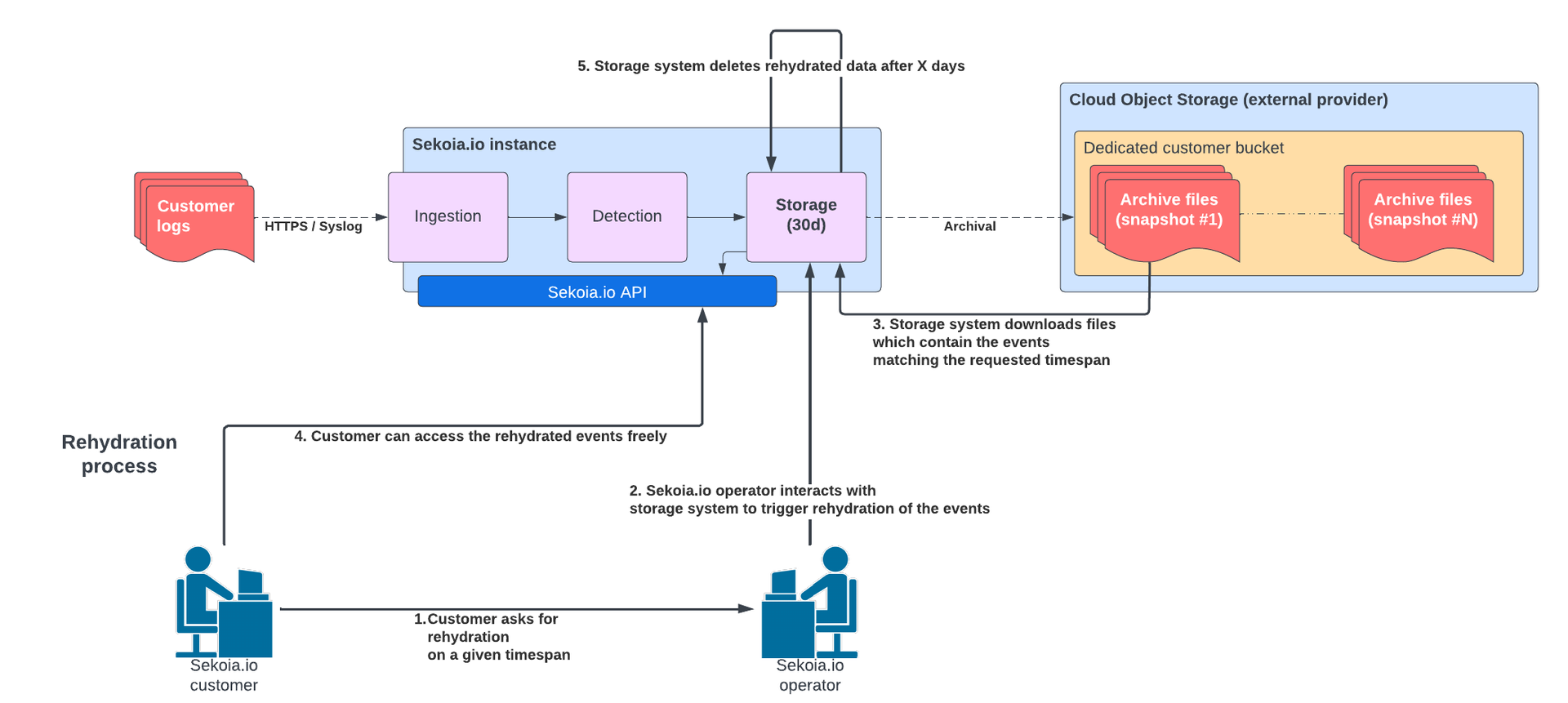
Rehydration is the process of moving archived events from cold storage back into hot storage. This process allows you to search and analyze historical data that is no longer immediately available in the Intelligence Center.
Prerequisites
- An active Sekoia.io subscription including Cold storage.
- The target data must be within your contractual retention period (less than 365 days old). You can check if your subscription include Archiving period in Sekoia > Settings > Subscriptions.
Restoration Scope
It is not possible to restore specific query results or a selection of intakes. The process restores all events for the entire requested timespan.
Request data rehydration
To trigger the restoration of your archives, you must contact Sekoia.io Support.
- Identify the timespan (start and end dates) required for your investigation.
- Identify the Community name or ID.
- Determine the retention duration for the restored data (how long you need the data to remain searchable).
- Send a formal request to Sekoia.io Support containing these three elements.
Processing times
Once the request is received, the Support team evaluates the volume:
- Volume < 30 TB and stored in FRA1 region: The rehydration process starts within 48 working hours.
- Volume > 30 TB and/or not stored in FRA1 region: Support will provide a custom solution and an estimated time of completion (ETA).
Access restored data
Once rehydrated, the events are accessible via the Sekoia.io API or the search interface. (For volumes > 30TB, other alternatives may be suggested by Support on a case-by-case basis.)
Automatic Deletion
Restored data is temporary. Sekoia.io deletes rehydrated events after 30 days (or less if specified in your request) to optimize storage performance.