SentinelOne EDR
Overview
SentinelOne is an Endpoint Detection and Response (EDR) solution that provides comprehensive endpoint protection and monitoring. This setup guide shows how to forward device assets monitored by SentinelOne EDR to Sekoia.io for centralized asset management and security operations.
- Vendor: SentinelOne
- Product: SentinelOne EDR
- Supported environment: SaaS
Configure
How to create an API token
To connect SentinelOne to Sekoia.io, you need to generate an API token from the SentinelOne Management Console. We recommend creating a Service User to use a dedicated account for the integration.
Important: If you have multiple SentinelOne Management Consoles, you must generate an API Token for each one.
Note
The API token you generate is time-limited. To generate a new token (and invalidate the old one), you will need to copy the Service User. Please refer to the SentinelOne documentation to obtain guidance on how to do this action.
Follow these steps to create an API token:
-
In the SentinelOne management console, go to Policies and settings, select User management, and then select Service Users.
-
Create a new New Service User by specifying a name and an expiration date.
-
Choose the Scope of the Service User:
Global,AccountorSite, select the appropriate Account(s) or Site(s) and the role to grant to the Viewer. -
Select Create User and copy the generated API token to a safe place.
Warning
- A Service User with the
Site AdminorIR Teamrole is recommended for full functionality. - The API token is displayed only once at creation. Save it securely; if you lose it, you must generate a new one.
- When copying the API token, ensure you copy the complete token value.
Create your asset connector
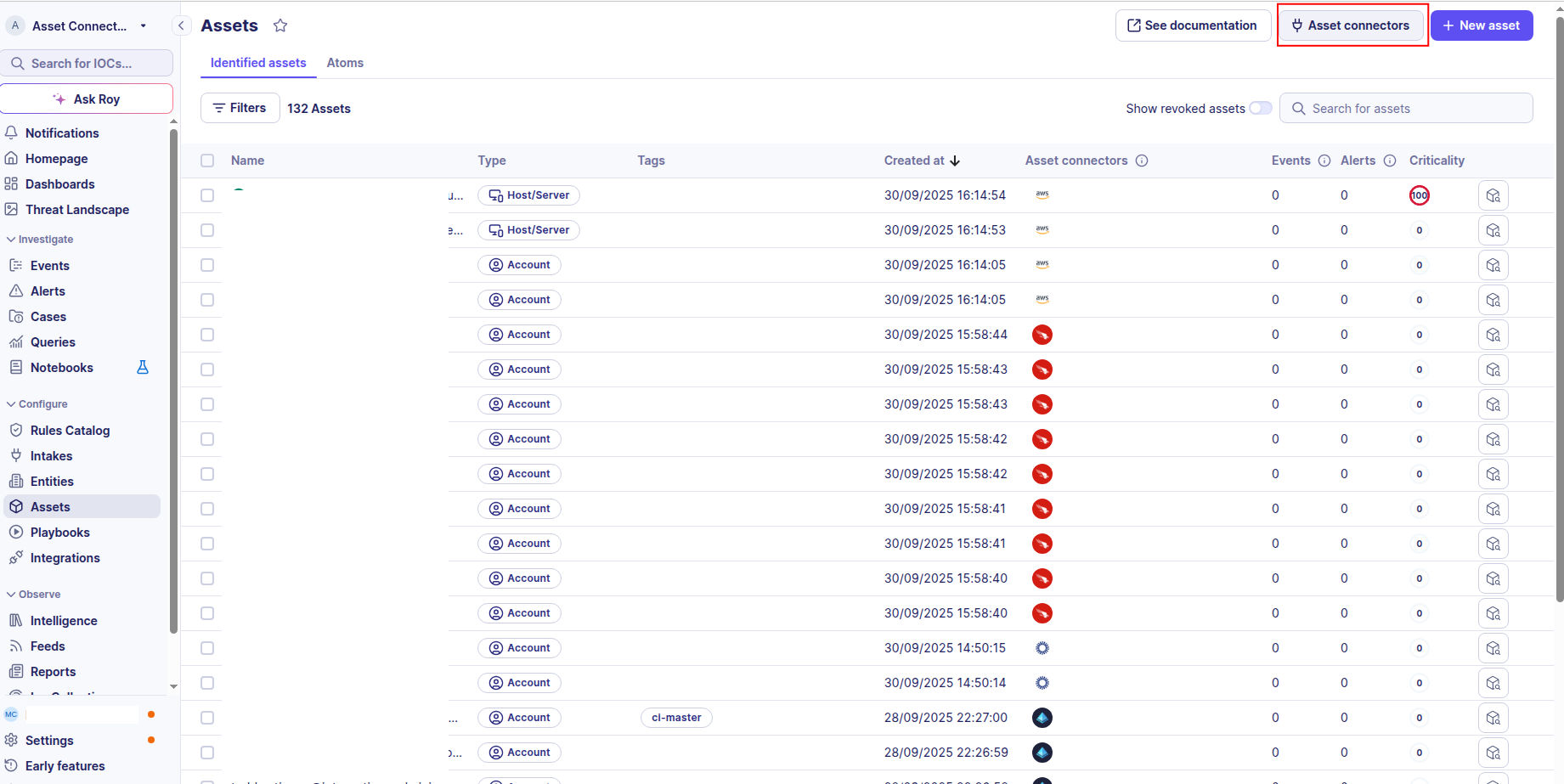
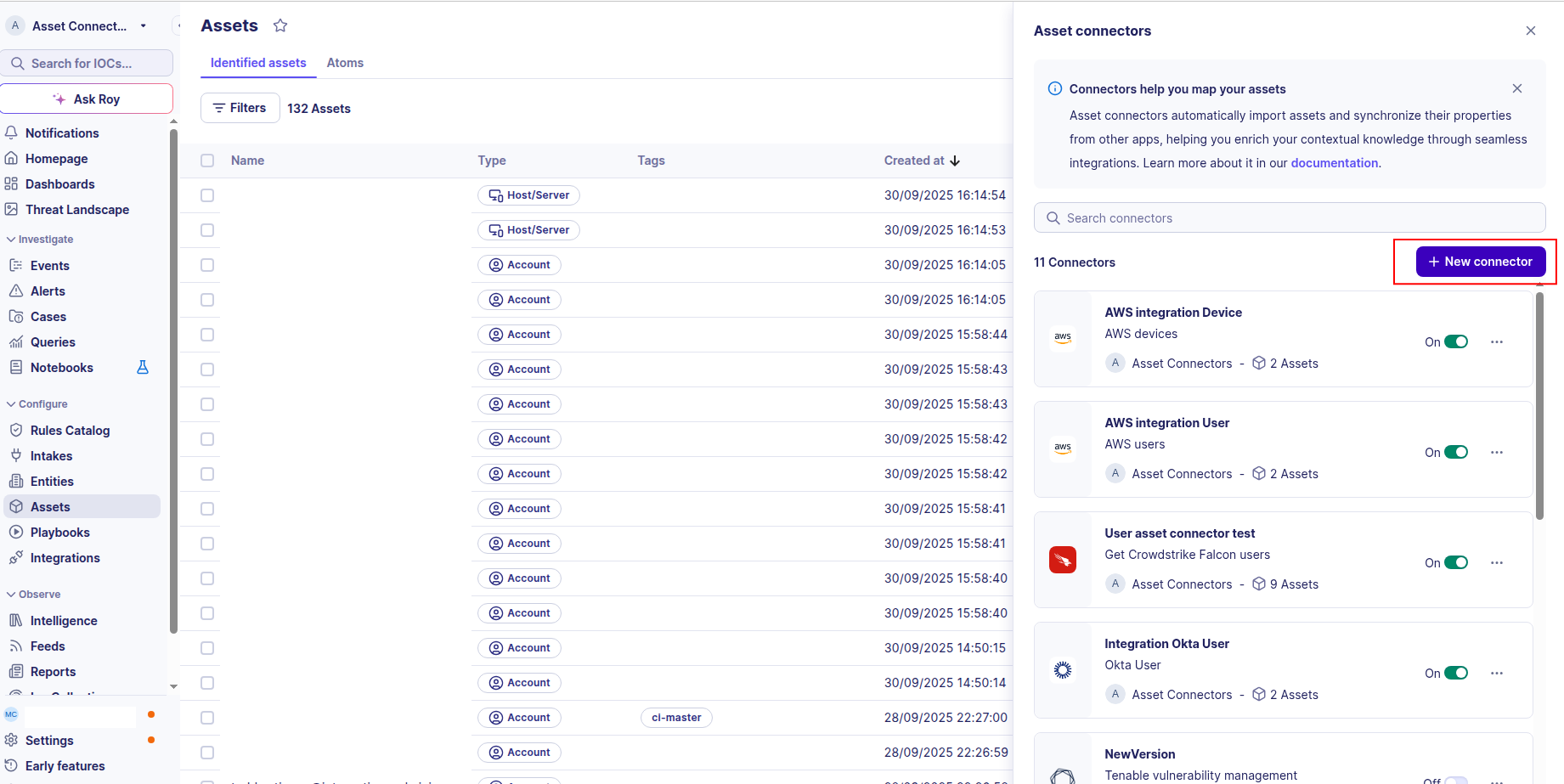
To start getting your SentinelOne assets into Sekoia.io, you need to create an asset connector on the Assets page. To do so, follow these steps:
-
Click the Asset connectors button to create a new connector.
-
Click the + New connector button.
-
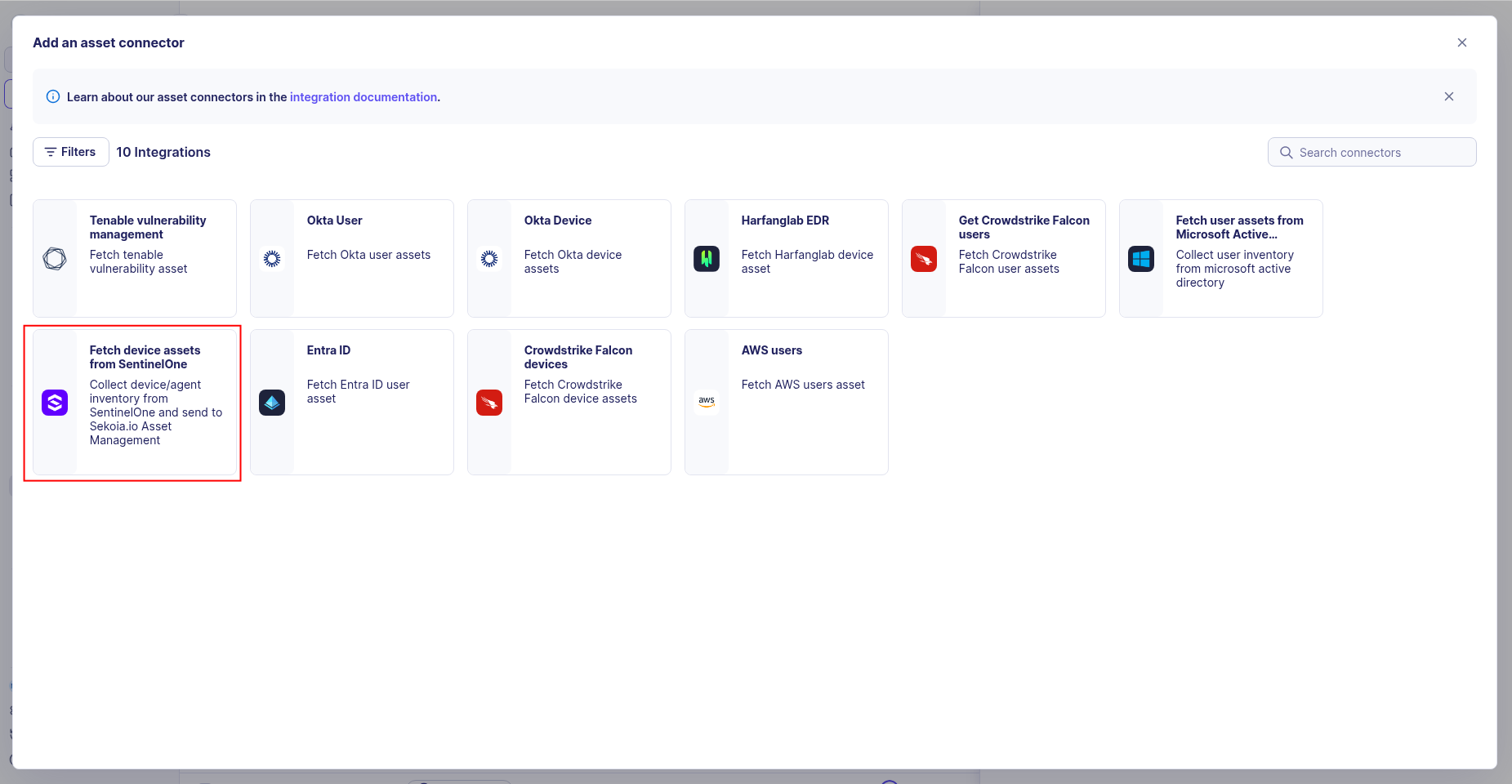
Choose SentinelOne EDR, give it a name, and fill the required fields:
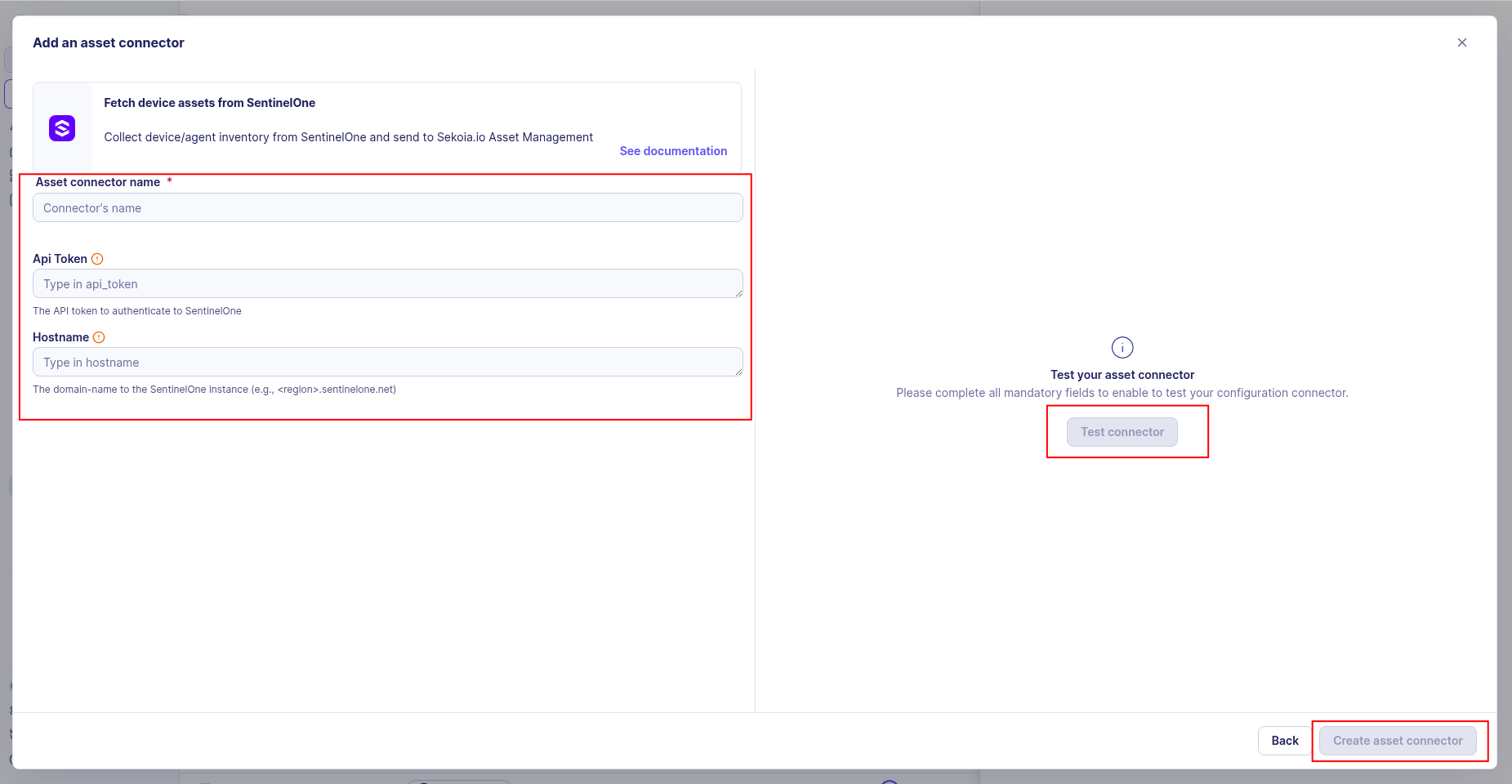
- API Token: The API token you generated from the SentinelOne Management Console
- URL Domain: Your SentinelOne Management Console URL (e.g.,
https://your-instance.sentinelone.net)
-
Test the connection by clicking the Test connector button.
-
Click the Create asset connector button.
Warning
- Ensure you have the correct URL Domain for your SentinelOne Management Console.
- The API token must have sufficient permissions to read endpoint and agent information.
OCSF Mapping for SentinelOne Devices
OCSF Class: device_inventory_info
Class UID: 5001
Information Collected
The SentinelOne Devices fetches comprehensive information and transforms it into the OCSF (Open Cybersecurity Schema Framework) format for standardized security monitoring and asset management.
API Response Examples
SentinelOne Active Device
SentinelOne device with active status and protection enabled
{
  "id": "475482087580431375",
  "name": "LAPTOP-JOHN-DEV",
  "type": "computer",
  "osType": "windows",
  "osVersion": "Windows 10 Pro",
  "osRevision": "22H2",
  "machineType": "laptop",
  "manufacturer": "Dell",
  "modelName": "Latitude 5540",
  "serialNumber": "ABC123DEF456GHI",
  "processorCount": 8,
  "coreCount": 8,
  "memorySize": 16384,
  "ipv4Addresses": [
    "192.168.1.100",
    "10.0.0.50"
  ],
  "ipv6Addresses": [
    "fe80::1234:5678:90ab:cdef"
  ],
  "macAddresses": [
    "00:1A:2B:3C:4D:5E"
  ],
  "isActive": true,
  "isOnline": true,
  "lastActiveDate": "2025-08-26T09:30:00.000Z",
  "createdDate": "2023-06-04T10:00:00.000Z",
  "updatedDate": "2025-08-26T09:30:00.000Z",
  "agentVersion": "23.4.1.1001",
  "agentStatus": "active",
  "threatLevel": "good",
  "encryptionEnabled": true,
  "isFirewallEnabled": true,
  "isTamperProtectionEnabled": true,
  "lastIncidentDate": null,
  "threatCount": 0,
  "domain": "example.com",
  "computerName": "LAPTOP-JOHN-DEV",
  "uuid": "ff819e70af13be381993075eb0ce5f2f6de05be2",
  "accountId": "226494730938493000",
  "accountName": "Acme Corp",
  "externalId": "ext-475482087580431375",
  "activeThreats": 0,
  "infected": false,
  "isUpToDate": true,
  "userId": "u1234567890abcdef",
  "userName": "john.developer@example.com",
  "userFullName": "John Developer"
}
SentinelOne Inactive Device
SentinelOne device with inactive status
{
  "id": "475482087580431376",
  "name": "SERVER-OLD-PROD",
  "type": "server",
  "osType": "linux",
  "osVersion": "Ubuntu 18.04.6 LTS",
  "osRevision": "5.4.0-42-generic",
  "machineType": "server",
  "manufacturer": "HP",
  "modelName": "ProLiant DL380 Gen10",
  "serialNumber": "SG12345678",
  "processorCount": 16,
  "coreCount": 32,
  "memorySize": 131072,
  "ipv4Addresses": [
    "10.0.0.200"
  ],
  "ipv6Addresses": [],
  "macAddresses": [
    "00:30:48:2E:3A:A8"
  ],
  "isActive": false,
  "isOnline": false,
  "lastActiveDate": "2025-06-01T14:30:00.000Z",
  "createdDate": "2021-03-15T08:00:00.000Z",
  "updatedDate": "2025-08-26T09:30:00.000Z",
  "agentVersion": "21.8.2.998",
  "agentStatus": "inactive",
  "threatLevel": "unknown",
  "encryptionEnabled": false,
  "isFirewallEnabled": true,
  "isTamperProtectionEnabled": false,
  "lastIncidentDate": "2025-05-20T10:00:00.000Z",
  "threatCount": 0,
  "domain": "example.com",
  "computerName": "SERVER-OLD-PROD",
  "userId": null,
  "userName": null,
  "userFullName": null
}
Data Mapping Table
The following table shows how source data is mapped to OCSF model fields:
| Source Field | OCSF Field Path | Description | Data Type | Logic |
|---|---|---|---|---|
static: 2 |
activity_id |
OCSF activity ID for inventory collection | integer |
Always 2 for 'Collect' activity |
static: Collect |
activity_name |
OCSF activity name | string |
Always 'Collect' |
static: Discovery |
category_name |
OCSF category name | string |
Always 'Discovery' |
static: 5 |
category_uid |
OCSF category UID | integer |
Always 5 for Discovery category |
static: Device Inventory Info |
class_name |
OCSF class name | string |
Always 'Device Inventory Info' |
static: 5001 |
class_uid |
OCSF class UID | integer |
Always 5001 for Device Inventory Info |
static: 500102 |
type_uid |
OCSF type UID | integer |
Always 500102 for Device Inventory Info: Collect |
static: Device Inventory Info: Collect |
type_name |
OCSF type name | string |
Always 'Device Inventory Info: Collect' |
static: Informational |
severity |
Event severity level | string |
Always 'Informational' for inventory events |
static: 1 |
severity_id |
OCSF severity ID | integer |
Always 1 for Informational severity |
createdAt |
time |
OCSF event timestamp (device creation time) | integer |
Convert ISO 8601 to Unix epoch for OCSF event timestamp |
static: SentinelOne |
metadata.product.name |
Source product name | string |
Always 'SentinelOne' |
static: SentinelOne |
metadata.product.vendor_name |
Source product vendor name | string |
Always 'SentinelOne' |
agentVersion |
metadata.product.version |
SentinelOne agent version stored in metadata.product.version | string |
Direct mapping of agent version; fallback to 'N/A' if absent |
static: 1.6.0 |
metadata.version |
OCSF schema version | string |
Fixed OCSF schema version |
uuid || id |
device.uid |
Device unique identifier (UUID preferred, id as fallback) | string |
Use uuid as primary UID if present, otherwise fall back to id |
id |
device.uid_alt |
Alternate device identifier (SentinelOne agent id) | string |
Set to id only when uuid is used as primary uid; null otherwise |
externalId |
device.eid |
External identifier for the device | string |
Direct mapping of external/third-party identifier |
computerName |
device.hostname |
Device hostname | string |
Direct mapping of computer name |
computerName |
device.name |
Device name | string |
Direct mapping of computer name |
domain |
device.domain |
Network domain name | string |
Direct mapping of domain |
machineType |
device.type |
Device type (DeviceTypeStr) | string |
Map machineType to DeviceTypeStr: 'desktop'->Desktop, 'laptop'->Laptop, 'server'->Server, 'tablet'->Tablet, 'mobile'->Mobile, 'virtual'->Virtual, else->Other |
machineType |
device.type_id |
OCSF device type ID (DeviceTypeId) | integer |
Map machineType to DeviceTypeId: Desktop=2, Laptop=3, Server=1, Tablet=4, Mobile=5, Virtual=6, Other=99 |
osName + ' ' + osRevision |
device.os.name |
Operating system display name (combined from osName and osRevision) | string |
Combine osName and osRevision into display string; fallback chain: osName only, osRevision only, osType, 'Unknown' |
osType |
device.os.type |
Operating system type (OSTypeStr) | string |
Map osType to OSTypeStr: 'windows'->windows, 'macos'->macos, 'linux'->linux, 'ios'->ios, 'android'->android, else->other |
osType |
device.os.type_id |
OCSF operating system type ID (OSTypeId) | integer |
Map osType to OSTypeId: Windows=100, macOS=300, Linux=200, iOS=301, Android=201, Other=99 |
externalIp |
device.ip |
Primary device IP (external IP from SentinelOne) | string |
Direct mapping of external IP address |
groupIp |
device.subnet |
Network subnet/range (Device.subnet) | string |
Direct mapping of group IP range as subnet reference (e.g., '31.155.5.x') |
networkInterfaces |
device.network_interfaces |
Network interfaces (NetworkInterface objects) | array[object] |
Map each NetworkInterface: name=name, mac=physical, ip=inet[0] if inet exists, uid=id |
modelName |
device.model |
Device model name | string |
Direct mapping of device model name |
modelName |
device.vendor_name |
Device vendor name (mapped from modelName) | string |
Direct mapping of modelName as vendor_name (Device.vendor_name) |
createdAt |
device.created_time |
Device creation timestamp (Unix epoch) | integer |
Convert ISO 8601 to Unix epoch |
registeredAt |
device.first_seen_time |
Device first seen timestamp from registeredAt (Unix epoch) | integer |
Convert ISO 8601 to Unix epoch; null if absent |
lastActiveDate |
device.last_seen_time |
Device last active timestamp (Unix epoch) | integer |
Convert ISO 8601 to Unix epoch; null if never active |
osStartTime |
device.boot_time |
Device boot time from osStartTime (Unix epoch) | timestamp |
Convert ISO 8601 to Unix epoch; null if absent |
static: True |
device.is_managed |
Whether device is under active management | boolean |
Always true — SentinelOne agents are managed by definition |
isUpToDate |
device.is_compliant |
Whether device agent is up to date (compliance proxy) | boolean |
Direct mapping of isUpToDate as compliance status; null if absent |
siteName |
device.region |
Device region (mapped from siteName) | string |
Direct mapping of site name as region |
groupName |
device.groups[].name |
Device group name (Group.name) | string |
Create a single Group with name=groupName; omit if both groupName and groupId are absent |
groupId || groupName |
device.groups[].uid |
Device group UID (Group.uid) | string |
Use groupId as uid; fallback to groupName if groupId absent |
locations[0].name |
device.location.city |
Device location city (GeoLocation.city from locations[0].name) | string |
Use first location name as GeoLocation.city; null if locations list is absent or empty |
accountName / accountId |
device.org |
SentinelOne account mapped as the device's organization | object |
Build Organization(name=accountName or accountId, uid=accountId) when either field is present |
infected + activeThreats |
device.risk_level / device.risk_level_id |
Risk level derived from infection state and active threat count | string / integer |
Derived: infected=True → Critical (4); |
| activeThreats > 0 → High (3); otherwise → Info (0) | ||||
activeThreats |
device.risk_score |
Raw risk score (number of active threats) | integer |
Direct mapping of active threat count as raw risk score |
static: Firewall |
enrichments[0].name |
Firewall enrichment name | string |
Always 'Firewall' for firewall enrichment; only created if firewallEnabled is not null |
firewallEnabled |
enrichments[0].value |
Firewall status string value | string |
'Enabled' if firewallEnabled is true, 'Disabled' if false |
firewallEnabled |
enrichments[0].data.Firewall_status |
Firewall status in enrichment data (DeviceDataObject.Firewall_status) | string |
'Enabled' if firewallEnabled is true, 'Disabled' if false (DeviceDataObject.Firewall_status) |
static: Users |
enrichments[1].name |
Users enrichment name | string |
Always 'Users'; only created if lastLoggedInUserName or osUsername is present |
lastLoggedInUserName + osUsername |
enrichments[1].value |
Users enrichment value (comma-joined user list) | string |
Comma-joined list of lastLoggedInUserName and osUsername (deduplicated) |
lastLoggedInUserName + osUsername |
enrichments[1].data.Users |
User list in enrichment data (DeviceDataObject.Users) | array[string] |
Deduplicated list of [lastLoggedInUserName, osUsername] (DeviceDataObject.Users) |
static: Update Status |
enrichments[2].name |
Update status enrichment name | string |
Always 'Update Status'; only created if isUpToDate is not null |
isUpToDate |
enrichments[2].value |
Update status value | string |
'Up to Date' if isUpToDate is true, 'Update Required' if false |
static: Active Threats |
enrichments[3].name |
Active threats enrichment name | string |
Always 'Active Threats'; only created if activeThreats is not null |
activeThreats |
enrichments[3].value |
Active threats count as string value | string |
String representation of activeThreats count |
static: Infection Status |
enrichments[4].name |
Infection status enrichment name | string |
Always 'Infection Status'; only created if infected is not null |
infected |
enrichments[4].value |
Infection status value | string |
'Infected' if infected is true, 'Clean' if false |
OCSF Model Structure
Device Inventory Info: Collect
Transformed SentinelOne device to OCSF Device Inventory Info event
{
  "activity_id": 2,
  "activity_name": "Collect",
  "category_name": "Discovery",
  "category_uid": 5,
  "class_name": "Device Inventory Info",
  "class_uid": 5001,
  "type_name": "Device Inventory Info: Collect",
  "type_uid": 500102,
  "severity": "Informational",
  "severity_id": 1,
  "time": 1685854800,
  "metadata": {
    "product": {
      "name": "SentinelOne"
    },
    "version": "1.6.0"
  },
  "device": {
    "uid": "ff819e70af13be381993075eb0ce5f2f6de05be2",
    "uid_alt": "475482087580431375",
    "name": "LAPTOP-JOHN-DEV",
    "hostname": "LAPTOP-JOHN-DEV",
    "eid": "ext-475482087580431375",
    "domain": "example.com",
    "type": "Desktop",
    "type_id": 2,
    "model": "Latitude 5540",
    "vendor_name": "Latitude 5540",
    "ip": "192.168.1.100",
    "subnet": null,
    "is_managed": true,
    "is_compliant": true,
    "risk_level": "Info",
    "risk_level_id": 0,
    "risk_score": 0,
    "org": {
      "name": "Acme Corp",
      "uid": "226494730938493000"
    },
    "region": null,
    "created_time": 1685854800,
    "last_seen_time": 1725184200,
    "os": {
      "name": "Windows 10 Pro 22H2",
      "type": "windows",
      "type_id": 100
    }
  },
  "enrichments": [
    {
      "name": "Firewall",
      "value": "Enabled",
      "data": {
        "Firewall_status": "Enabled"
      }
    },
    {
      "name": "Domain",
      "value": "example.com",
      "data": {
        "Full_qualified_domain_name": "example.com"
      }
    },
    {
      "name": "Users",
      "value": "john.developer@example.com",
      "data": {
        "Users": ["john.developer@example.com"]
      }
    },
    {
      "name": "Update Status",
      "value": "Up to Date",
      "data": {}
    },
    {
      "name": "Active Threats",
      "value": "0",
      "data": {}
    },
    {
      "name": "Infection Status",
      "value": "Clean",
      "data": {}
    }
  ]
}