Microsoft Entra ID
Overview
Microsoft Entra ID (formerly Azure Active Directory) is a cloud-based identity and access management service that provides secure authentication, authorization, and user management services. Entra ID helps organizations manage user identities across Microsoft and third-party applications, providing single sign-on (SSO), multi-factor authentication (MFA), and comprehensive user lifecycle management.
- Vendor: Microsoft
- Product: Microsoft Entra ID
- Supported environment: Cloud
Configure
How to create an app registration with proper permissions
To connect Microsoft Entra ID to Sekoia.io, you need to create an app registration with the necessary permissions to access Entra ID users and groups. Follow these steps:
-
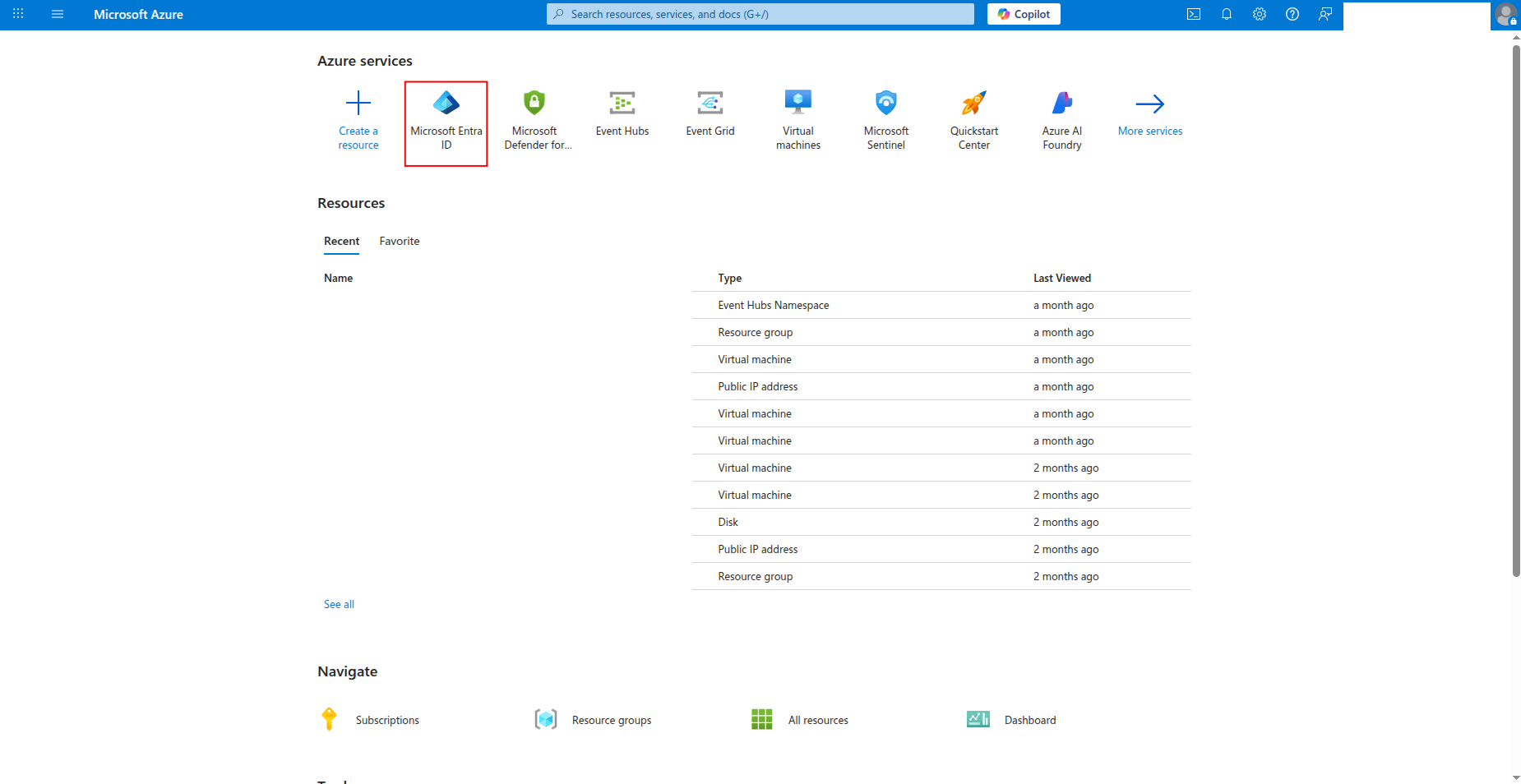
Sign in to the Azure portal and navigate to Microsoft Entra ID.
-
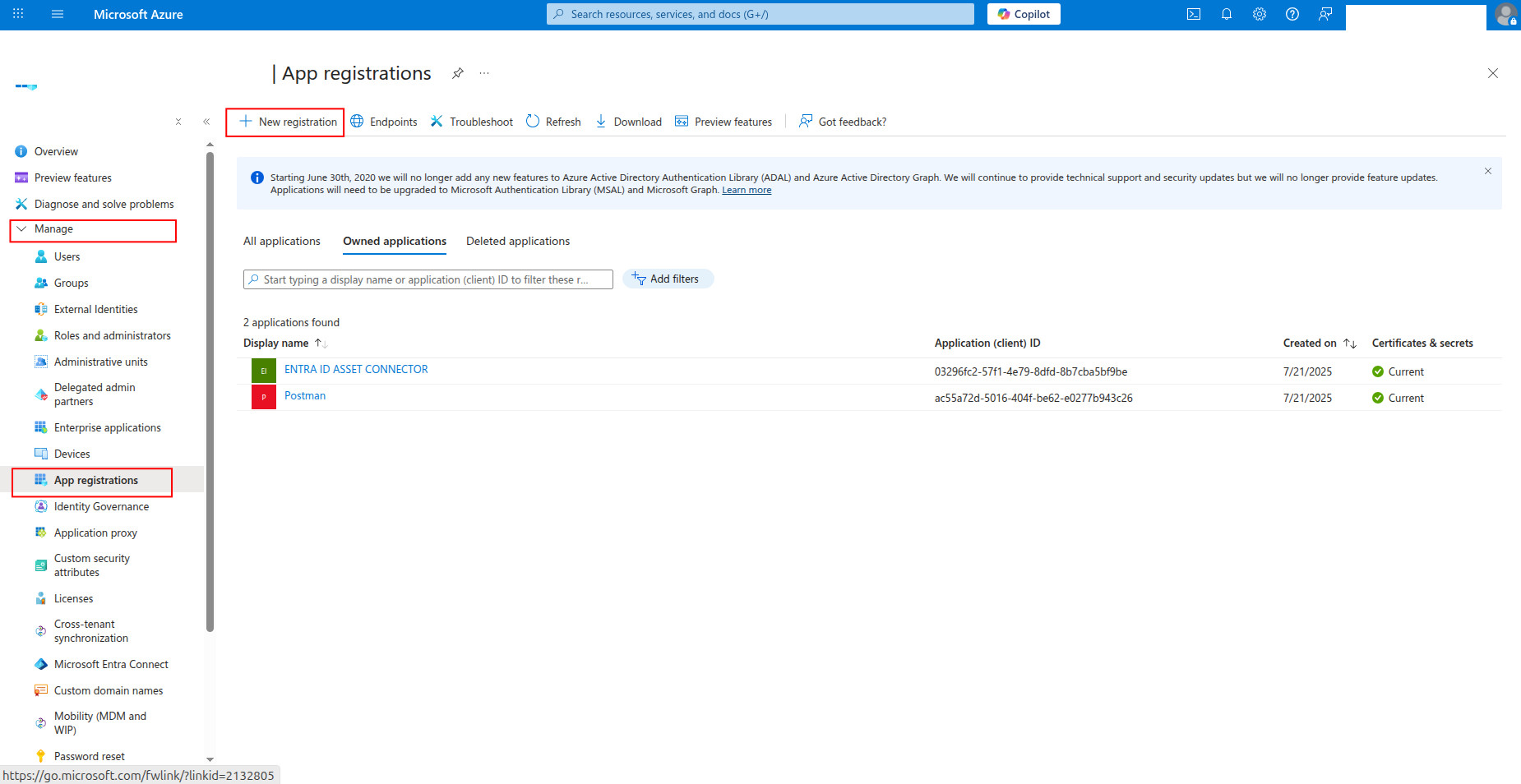
Click App registrations in the left navigation pane, then click New registration.
-
Enter a name for the application (e.g.,
sekoia-user-reader) and click Register.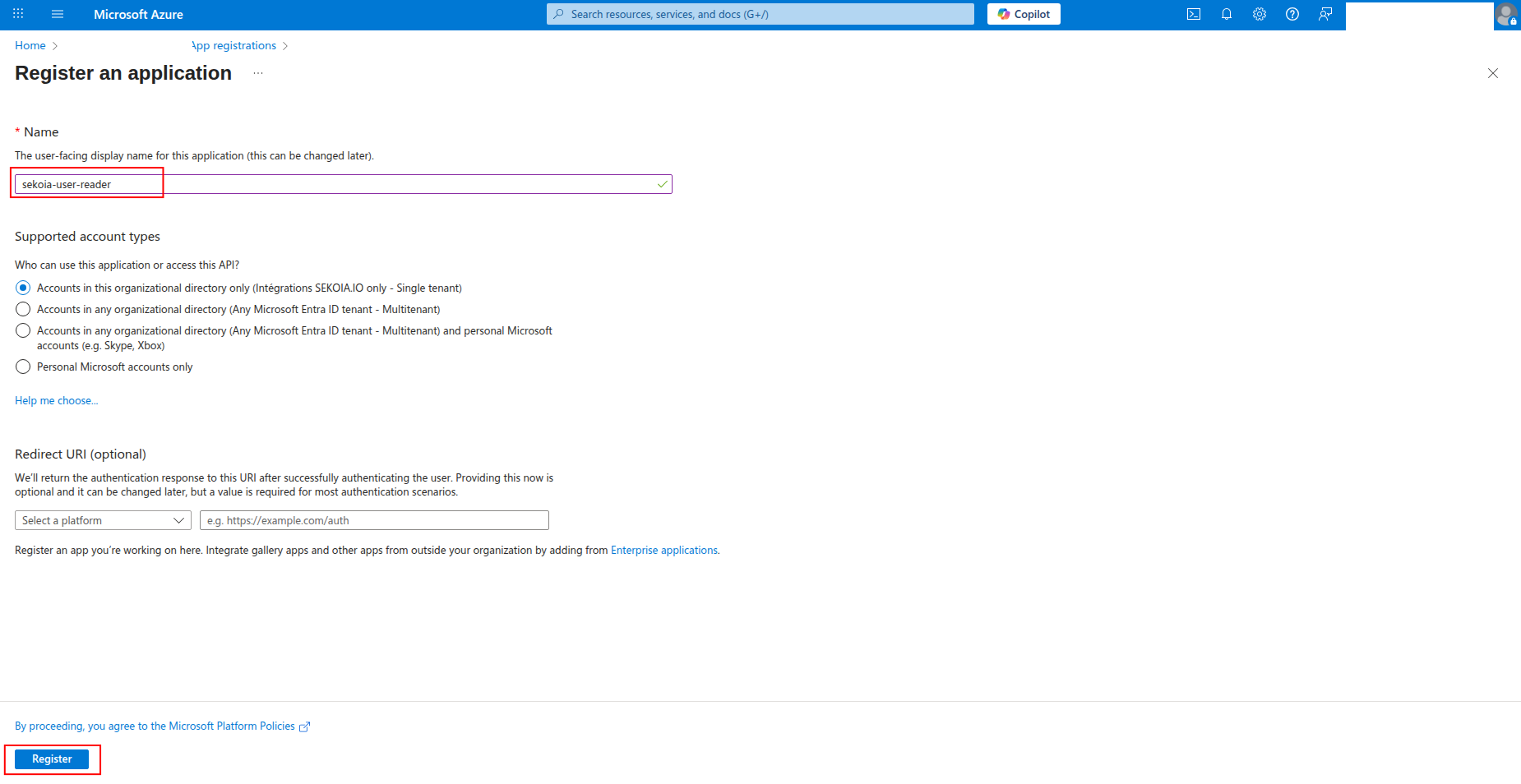
-
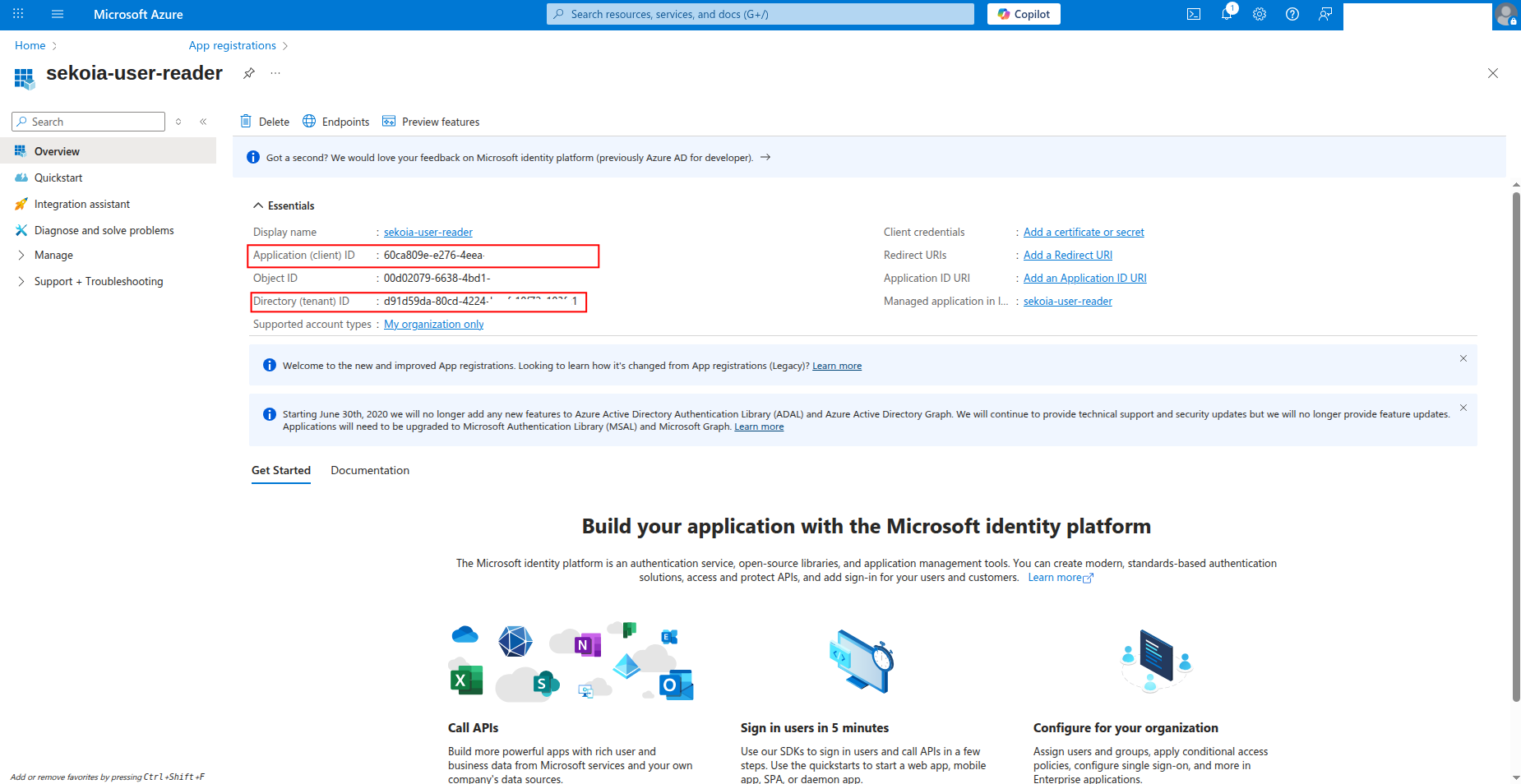
Copy the Application (client) ID and Directory (tenant) ID to a safe location. You'll need these values to configure the connector in Sekoia.io.
How to generate a client secret
After creating the app registration, you need to generate a client secret for authentication:
-
Click Certificates & secrets in the left navigation pane.
-
Click New client secret to generate a new secret.

-
Enter a description for the secret (e.g.,
sekoia-connector-secret) and select an expiration period, then click Add.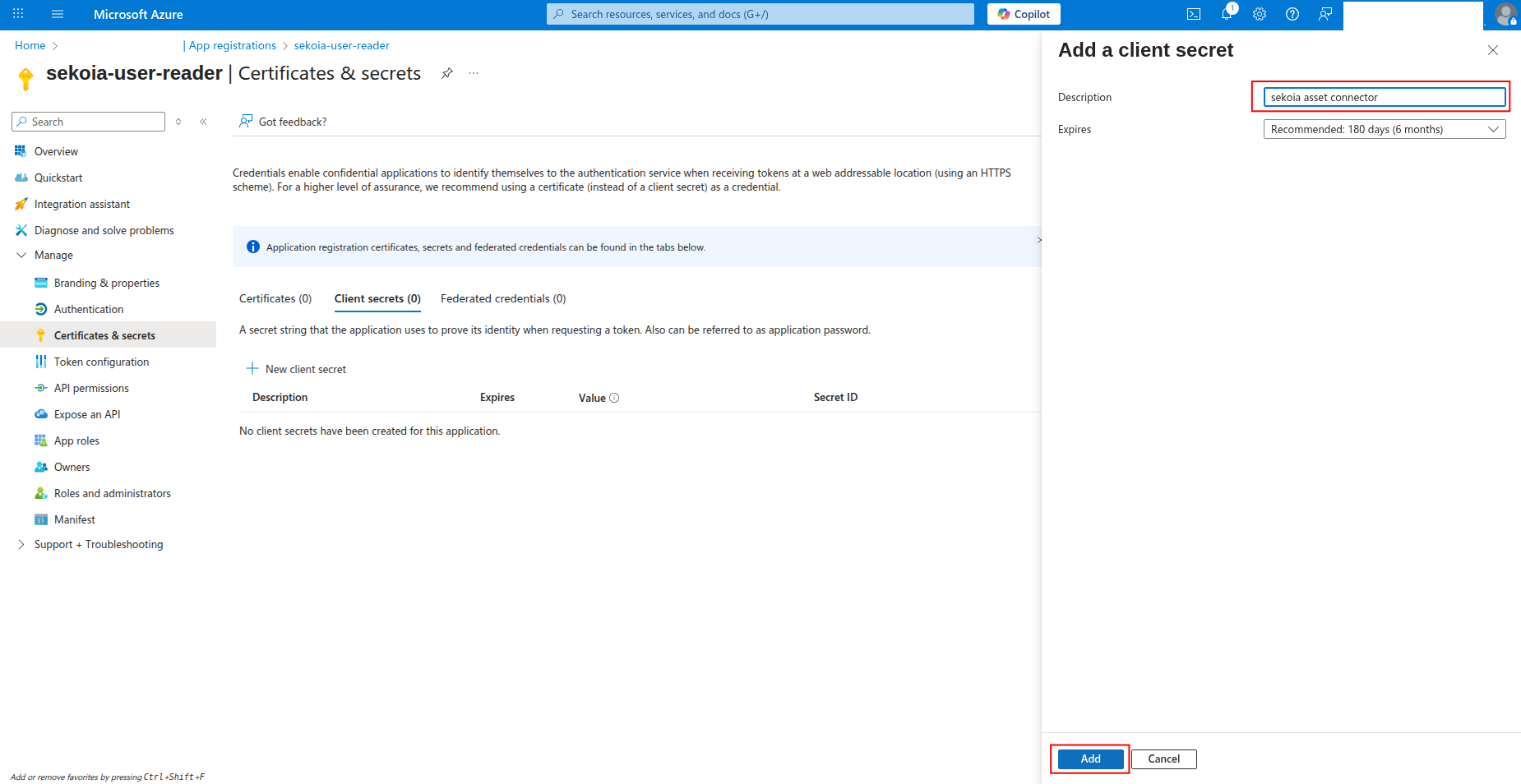
-
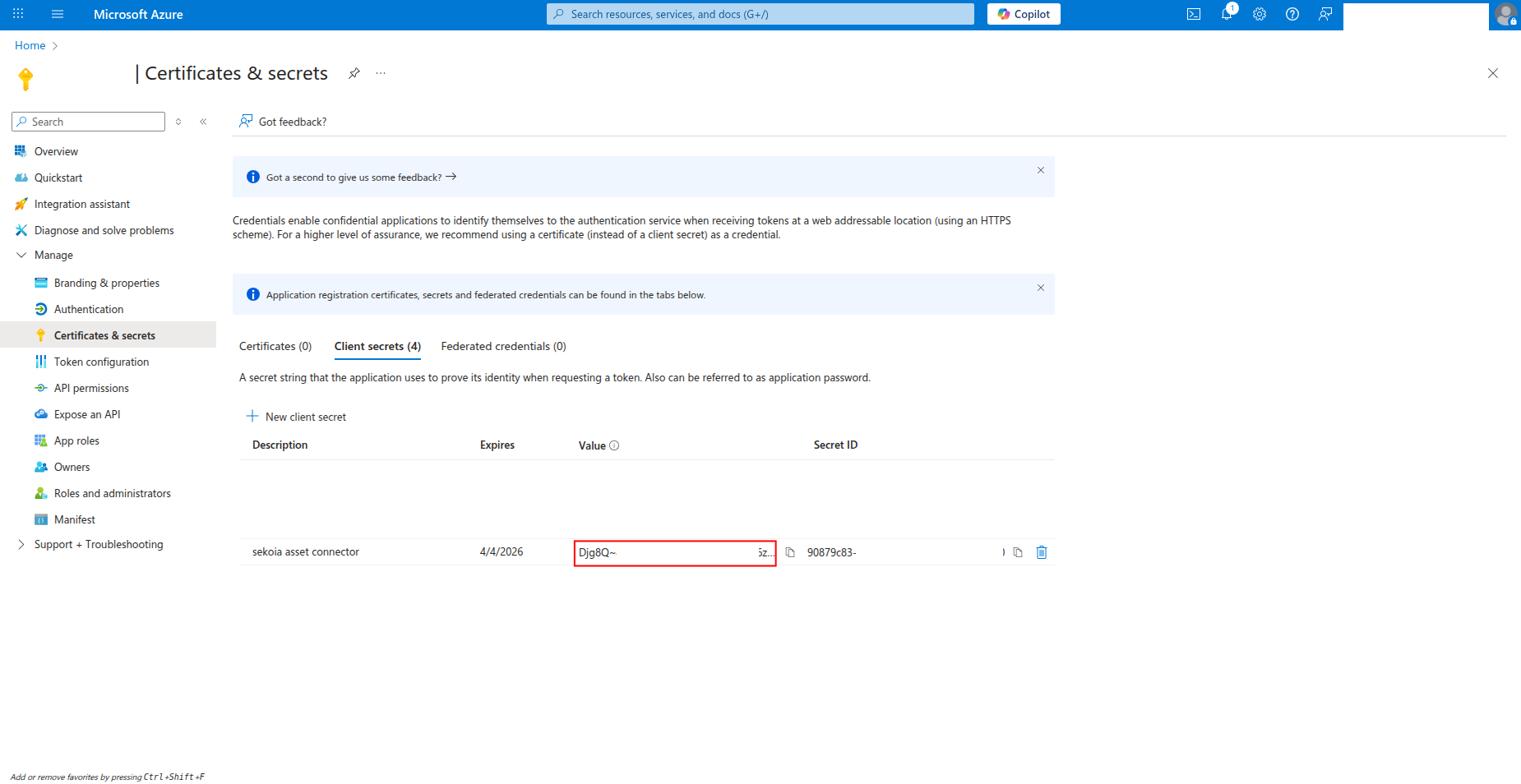
Copy the Value of the client secret to a safe location. You'll need this secret to configure the connector in Sekoia.io.
Warning
- The client secret value is only shown when you create it. If you lose it, you must create a new client secret.
- Store this secret securely and never share it publicly.
- Consider rotating client secrets regularly for security best practices.
Required API permissions
The app registration must have the following permissions to successfully fetch Entra ID users and groups:
{
    "permissions": [
        "User.Read.All",
        "Group.Read.All",
        "GroupMember.Read.All",
        "Directory.Read.All",
        "UserAuthenticationMethod.Read.All",
        "AuditLog.Read.All"
    ]
}
Required Permissions:
User.Read.All: Read user profiles and attributesGroup.Read.All: Read group information and membershipsGroupMember.Read.All: Read group membershipsDirectory.Read.All: Read directory dataUserAuthenticationMethod.Read.All: Read user authentication methodsAuditLog.Read.All: Read Sign-in for users
How to grant API permissions
To grant the required permissions to your app registration:
-
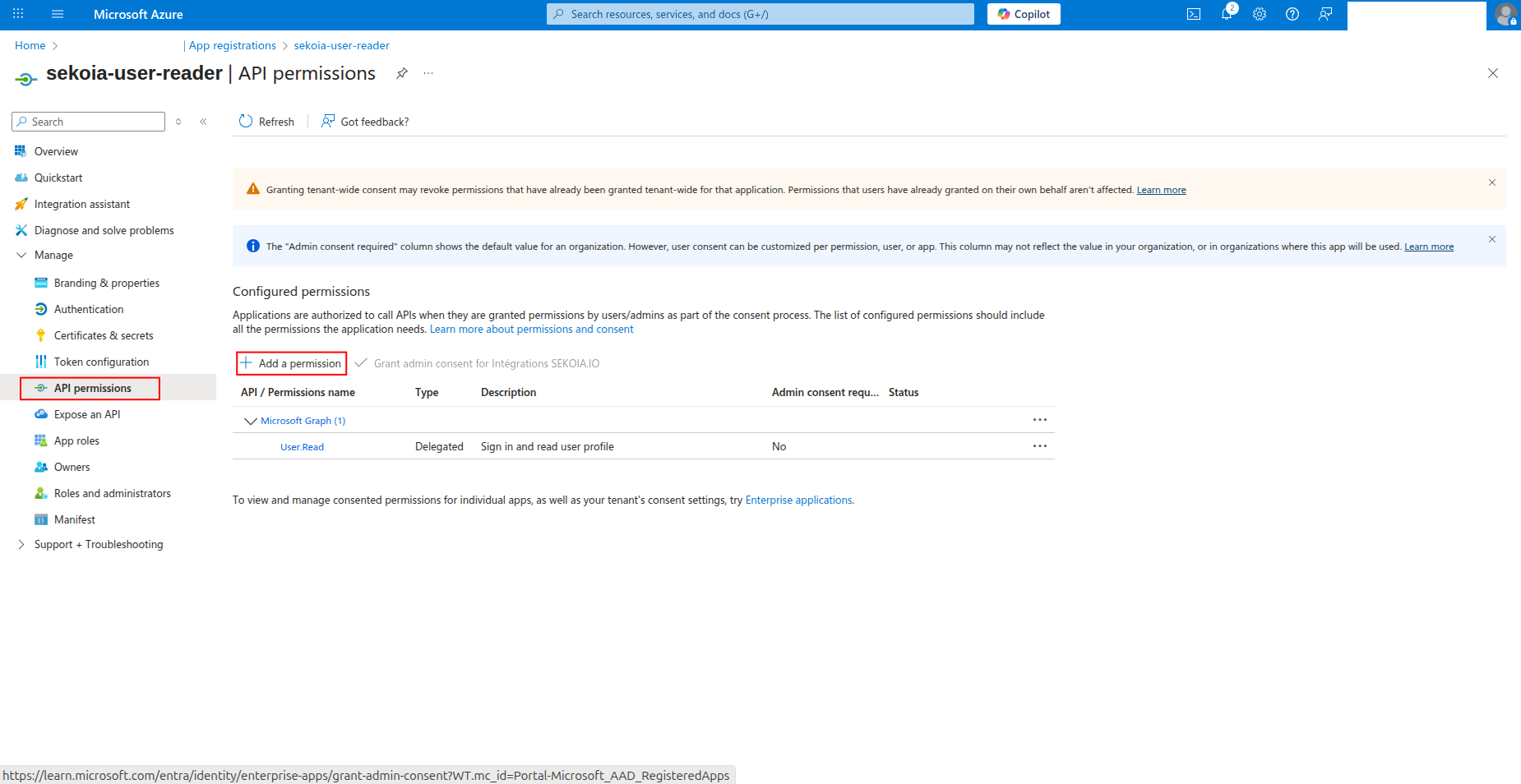
Click API permissions in the left navigation pane.
-
Click Add a permission to add new permissions.
-
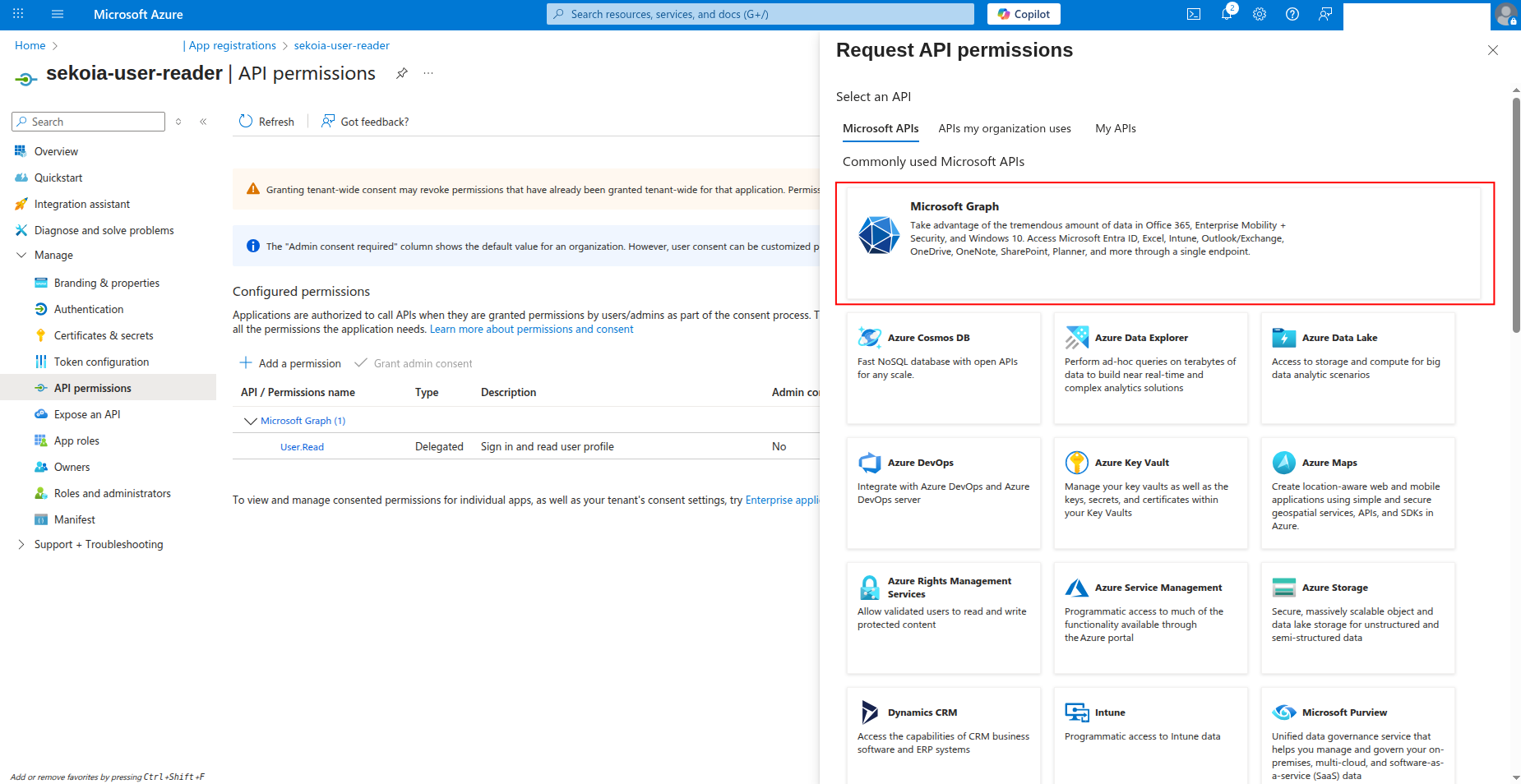
Select Microsoft Graph as the API.
-
Select Application permissions and search for the required permissions:
User.Read.AllGroup.Read.AllGroupMember.Read.AllDirectory.Read.AllUserAuthenticationMethod.Read.AllAuditLog.Read.All
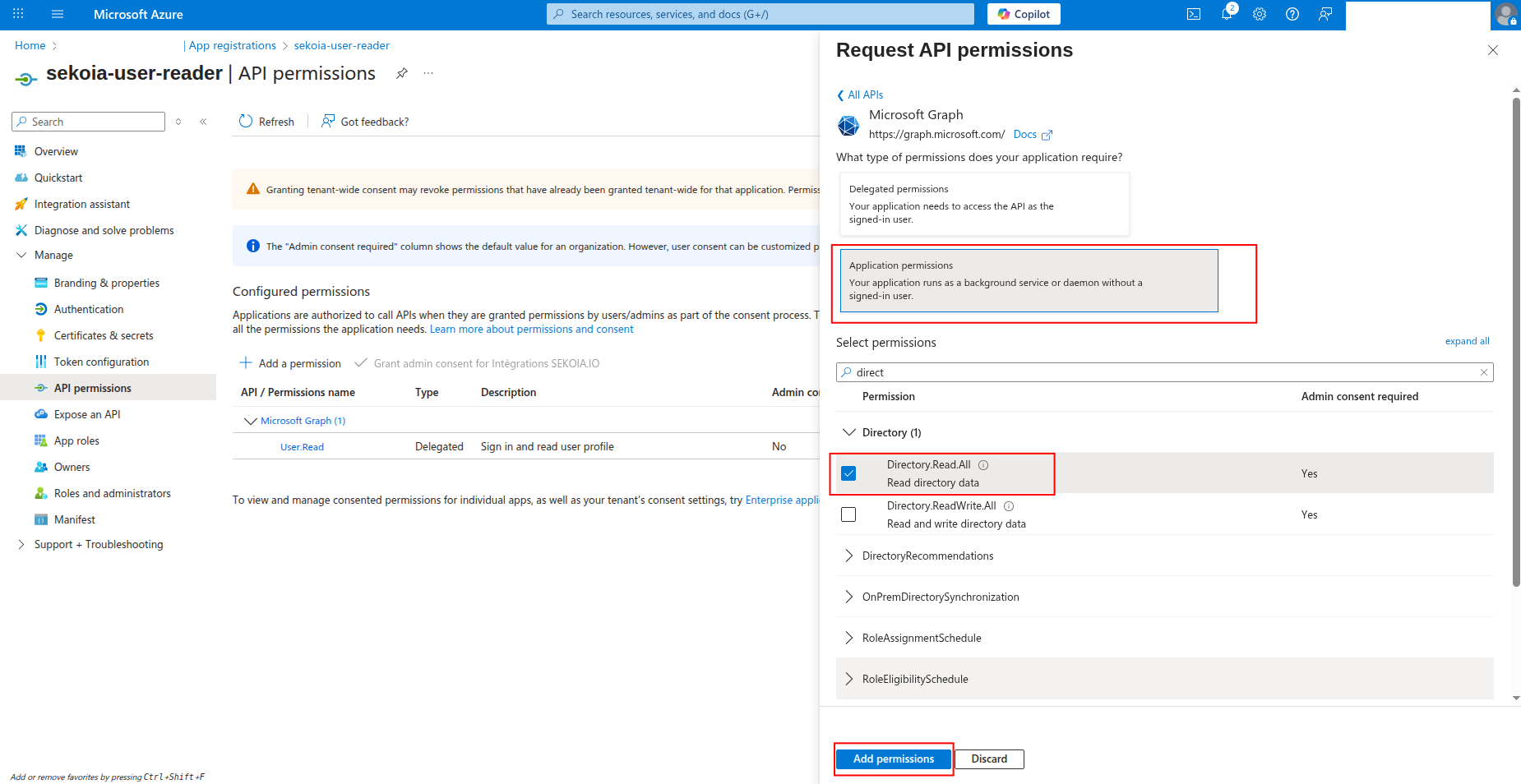
-
Click Add permissions to add the selected permissions.
-
Click Grant admin consent to grant the permissions (requires admin privileges).
Create your asset
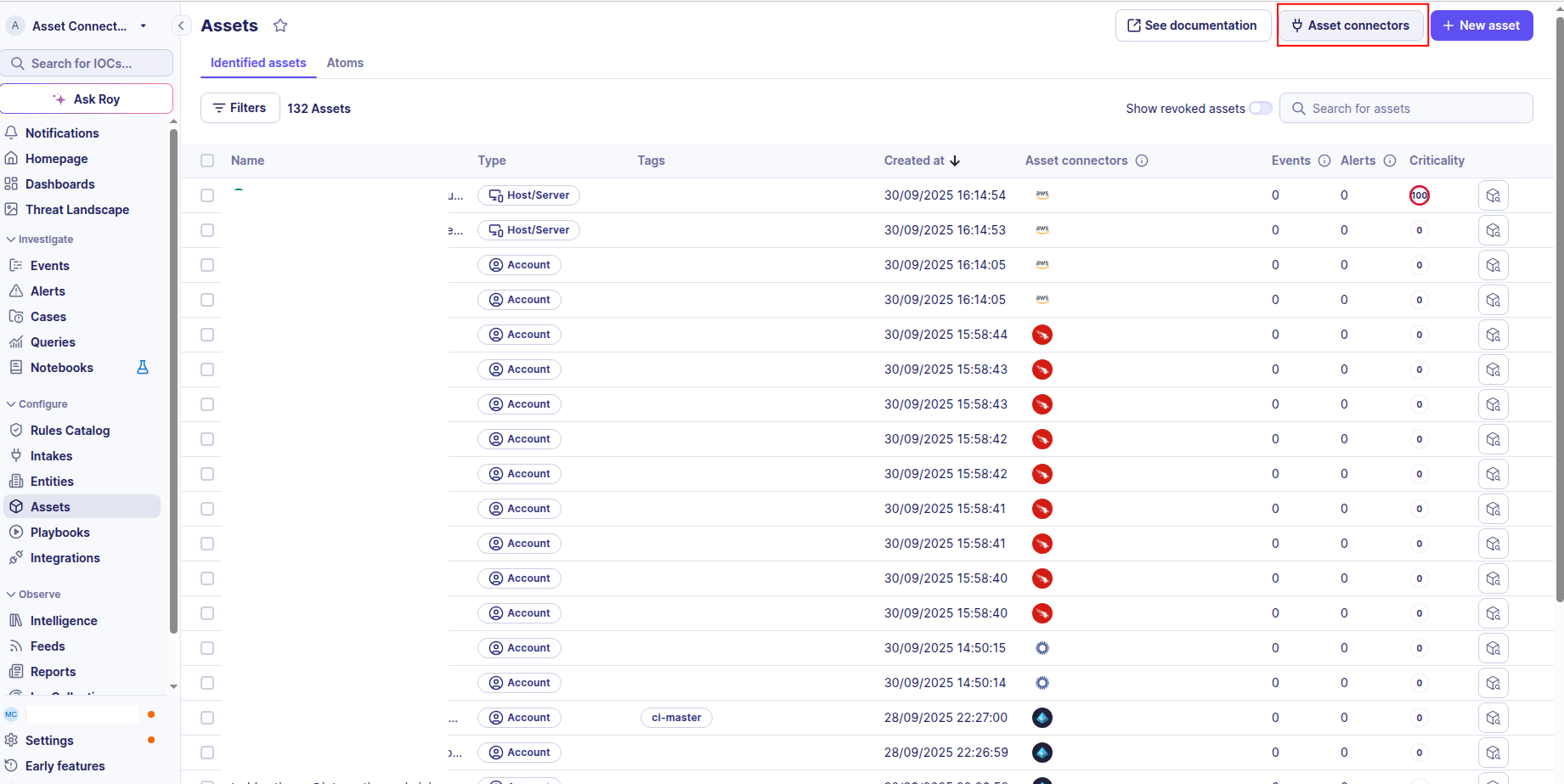
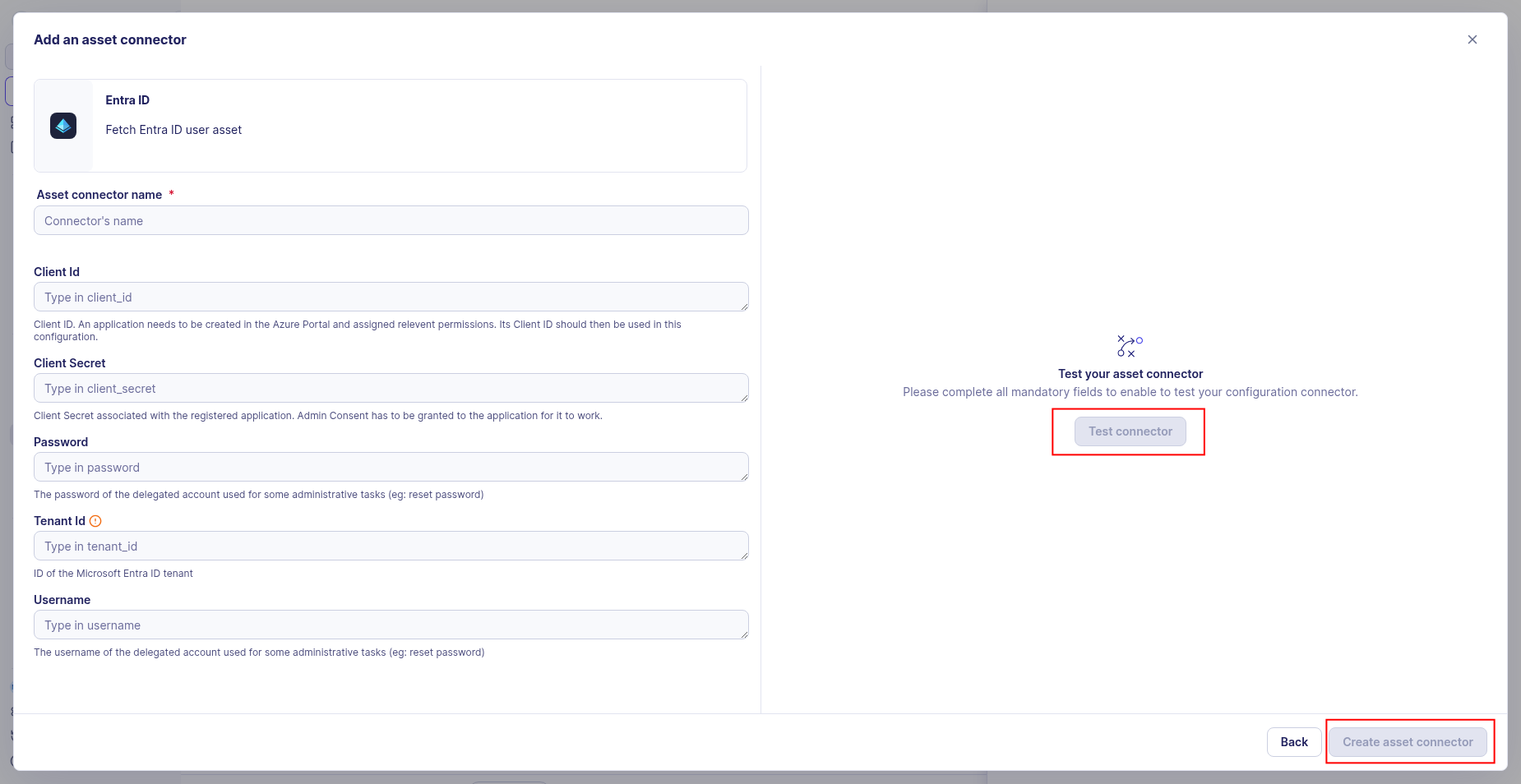
To start getting your Microsoft Entra ID users into Sekoia.io, you need to create an asset connector on the Assets page. To do so, follow these steps:
-
Click the Asset connectors button to create a new connector.
-
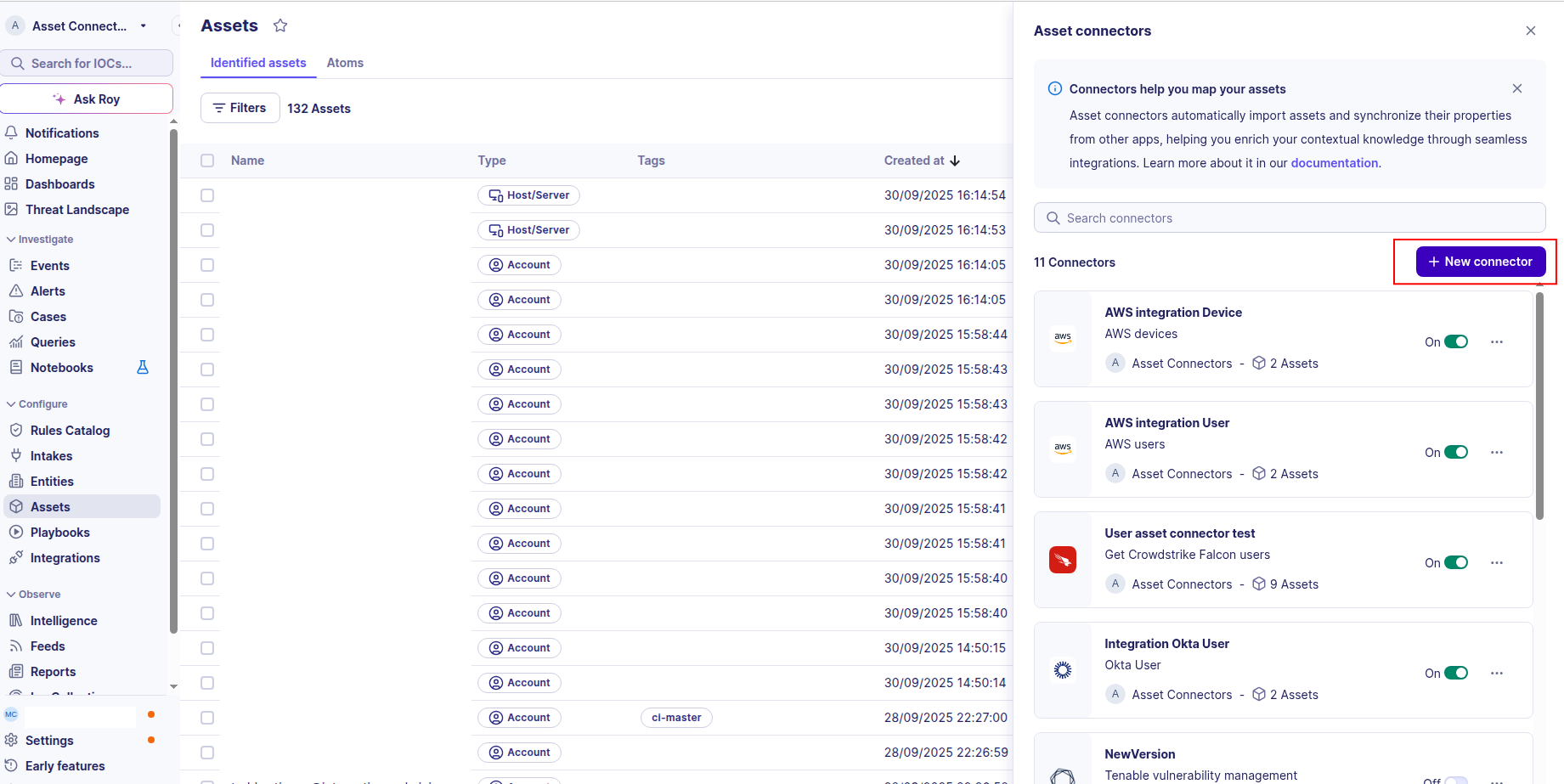
Click the + New connector button.
-
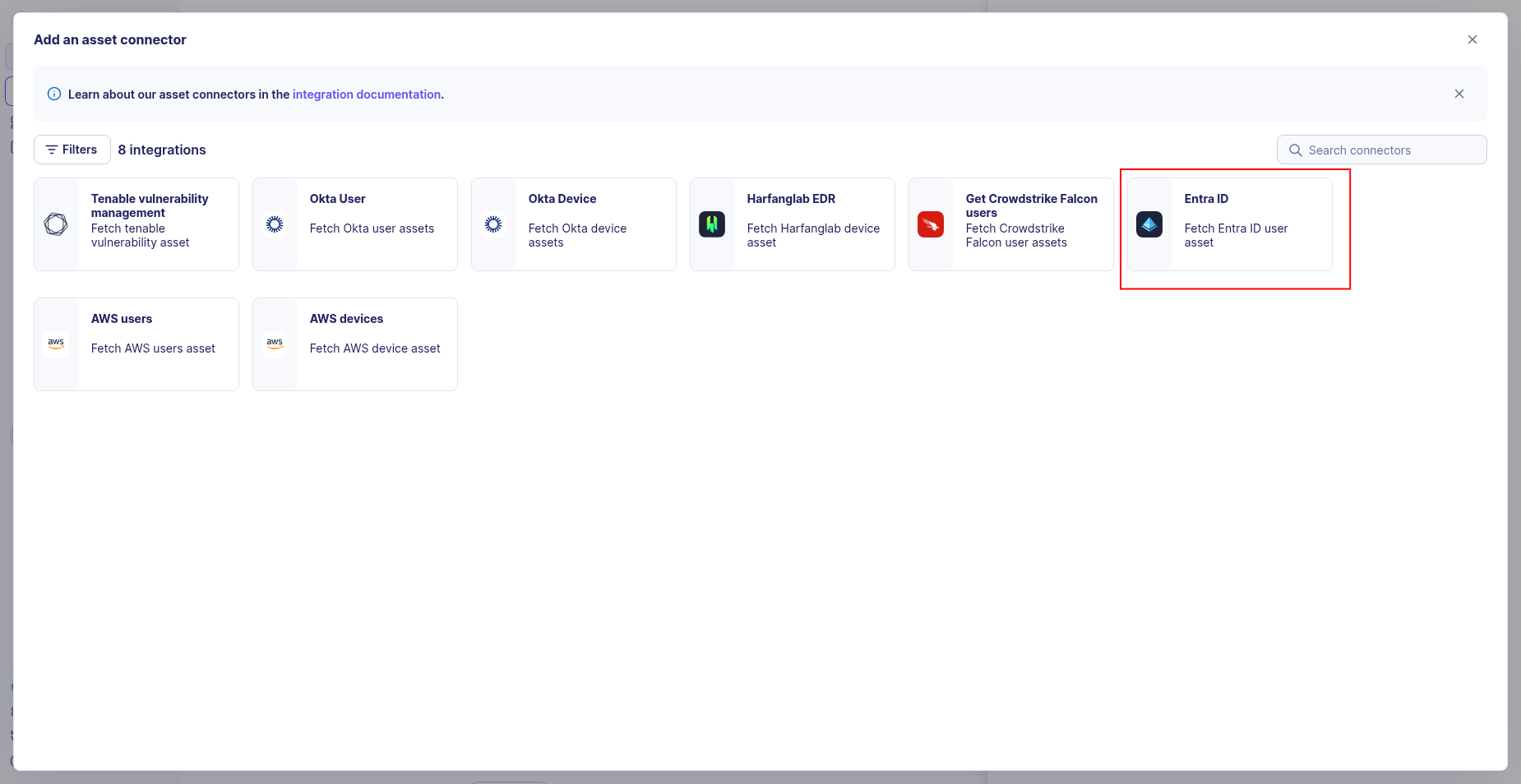
Choose Microsoft Entra ID User, give it a name, and fill the required fields:
-
Enter the following information:
- Tenant ID: The Directory (tenant) ID from your app registration
- Client ID: The Application (client) ID from your app registration
- Client Secret: The client secret value you generated
-
Test the connection by clicking the Test connector button.
-
Click the Create asset connector button.
OCSF Mapping for Microsoft Entra ID Users
OCSF Class: user_inventory_info
Class UID: 5003
Information Collected
The Microsoft Entra ID Users fetches comprehensive information and transforms it into the OCSF (Open Cybersecurity Schema Framework) format for standardized security monitoring and asset management.
API Response Examples
Entra ID Active User
Microsoft Entra ID user with console access and group membership
{
  "id": "a1b2c3d4-e5f6-7890-abcd-ef1234567890",
  "userPrincipalName": "mary.jones@example.com",
  "displayName": "Mary Jones",
  "mail": "mary.jones@example.com",
  "jobTitle": "Financial Analyst",
  "department": "Finance",
  "officeLocation": "New York, NY",
  "companyName": "Example Corp",
  "createdDateTime": "2020-06-04T10:00:00Z",
  "signInActivity": {
    "lastSignInDateTime": "2025-08-26T09:30:00Z"
  },
  "accountEnabled": true,
  "employeeId": "EMP456",
  "employeeType": "Employee",
  "onPremisesSamAccountName": "mary.jones",
  "lastPasswordChangeDateTime": "2025-01-15T08:00:00Z",
  "memberOf": [
    { "id": "g1", "displayName": "Finance Users" },
    { "id": "g2", "displayName": "All Users" }
  ]
}
Entra ID Disabled User
Microsoft Entra ID user with account disabled
{
  "id": "b2c3d4e5-f6a7-8901-bcde-f12345678901",
  "userPrincipalName": "robert.smith@example.com",
  "displayName": "Robert Smith",
  "mail": "robert.smith@example.com",
  "jobTitle": "Senior Software Engineer",
  "department": "Engineering",
  "officeLocation": "San Francisco, CA",
  "companyName": "Example Corp",
  "createdDateTime": "2020-06-04T10:00:00Z",
  "signInActivity": {
    "lastSignInDateTime": "2025-06-10T14:00:00Z"
  },
  "accountEnabled": false,
  "employeeId": "EMP789",
  "onPremisesSamAccountName": "robert.smith",
  "lastPasswordChangeDateTime": "2024-11-01T12:00:00Z",
  "memberOf": [
    { "id": "g3", "displayName": "Engineering Users" }
  ]
}
Data Mapping Table
The following table shows how source data is mapped to OCSF model fields:
| Source Field | OCSF Field Path | Description | Data Type | Logic |
|---|---|---|---|---|
static: 2 |
activity_id |
OCSF activity ID for inventory collection | integer |
Always 2 for 'Collect' activity |
static: Collect |
activity_name |
OCSF activity name | string |
Always 'Collect' |
static: Discovery |
category_name |
OCSF category name | string |
Always 'Discovery' |
static: 5 |
category_uid |
OCSF category UID | integer |
Always 5 for Discovery category |
static: User Inventory Info |
class_name |
OCSF class name | string |
Always 'User Inventory Info' |
static: 5003 |
class_uid |
OCSF class UID | integer |
Always 5003 for User Inventory Info |
static: 500302 |
type_uid |
OCSF type UID | integer |
Always 500302 for User Inventory Info |
static: User Inventory Info: Collect |
type_name |
OCSF type name | string |
Always 'User Inventory Info: Collect' |
static: Informational |
severity |
Event severity level | string |
Always 'Informational' for inventory events |
static: 1 |
severity_id |
OCSF severity ID | integer |
Always 1 for Informational severity |
createdDateTime |
time |
OCSF event timestamp (user discovery time) | integer |
Convert ISO 8601 to Unix epoch for OCSF event timestamp |
static: Microsoft Entra ID |
metadata.product.name |
Source product name | string |
Always 'Microsoft Entra ID' |
static: 1.0 |
metadata.product.version |
Source product version | string |
Unknown version, using 1.0 as default |
static: 1.6.0 |
metadata.version |
OCSF schema version | string |
Fixed OCSF schema version |
id |
user.has_mfa |
User MFA enabled status (requires additional API call using user ID) | boolean |
Fetch MFA status using user.id; true if user has MFA enabled, false otherwise |
userPrincipalName |
user.name |
User principal name | string |
Direct mapping of user principal name or unknown if not available |
id |
user.uid |
Microsoft Entra ID user unique identifier (UUID) | string |
Direct mapping of Microsoft Entra ID user UUID |
id |
user.groups |
Group memberships | array[object] |
Create Group objects with group name as uid and name |
displayName |
user.full_name |
User full name | string |
Direct mapping of full name |
mail |
user.email_addr |
User email address | string |
Direct mapping of email address |
id |
user.account.uid |
Microsoft Entra ID account unique identifier (UUID) | string |
Direct mapping of the 'id' field as the unique identifier for the Entra ID account |
userPrincipalName |
user.account.name |
Account username (UPN) | string |
Direct mapping of user principal name |
static: Azure AD Account |
user.account.type |
OCSF Azure AD account type identifier | string |
Always 'Azure AD Account' |
static: 6 |
user.account.type_id |
OCSF account type ID | integer |
Always 6 for Azure AD Account account type |
displayName |
user.display_name |
User display name | string |
Direct mapping of display name |
userPrincipalName |
user.domain |
Domain of the user account | string |
Extract domain from userPrincipalName |
computed: userType |
user.type_id |
User type id classification | integer |
If user is admin so type_id is 2, otherwise 1 |
computed: userTypeID |
user.type |
User type classification | string |
If user is admin so type_id is ADMIN, otherwise USER |
companyName |
user.org.name |
Organization name | string |
Direct mapping of organization name |
officeLocation |
user.org.ou_name |
Office location as organizational unit | string |
Direct mapping of office location |
onPremisesSamAccountName |
user.uid_alt |
Alternate user identifier (on-premises SAM account name) | string |
Direct mapping of on-premises SAM account name |
static: account |
enrichments[0].name |
Enrichment name for user access information | string |
Always 'account' for user access information enrichment |
static: status |
enrichments[0].value |
Enrichment value for user access information | string |
Always 'status' for user access information enrichment |
accountEnabled |
enrichments[0].data.is_enabled |
Whether the user account is enabled | boolean |
Direct mapping of account enabled status |
signInActivity.lastSignInDateTime |
enrichments[0].data.last_logon |
Last logon datetime in ISO 8601 format | string |
Direct mapping of ISO 8601 last sign-in datetime; return null if never signed in |
lastPasswordChangeDateTime |
enrichments[0].data.last_time_password_change |
Last time password was changed as Unix epoch timestamp | string |
If lastPasswordChangeDateTime is available, convert to Unix epoch; otherwise return null |
OCSF Model Structure
User Inventory Info: Collect
Transformed Entra ID user to OCSF User Inventory Info event
{
  "activity_id": 2,
  "activity_name": "Collect",
  "category_name": "Discovery",
  "category_uid": 5,
  "class_name": "User Inventory Info",
  "class_uid": 5003,
  "type_name": "User Inventory",
  "type_uid": 500302,
  "severity": "Informational",
  "severity_id": 1,
  "time": 1591254000.0,
  "metadata": {
    "product": {
      "name": "Microsoft Entra ID",
      "version": "1.0"
    },
    "version": "1.6.0"
  },
  "user": {
    "uid": "a1b2c3d4-e5f6-7890-abcd-ef1234567890",
    "name": "mary.jones@example.com",
    "full_name": "Mary Jones",
    "display_name": "Mary Jones",
    "email_addr": "mary.jones@example.com",
    "domain": "example.com",
    "uid_alt": "mary.jones",
    "has_mfa": true,
    "type_id": 1,
    "type": "User",
    "account": {
      "uid": "a1b2c3d4-e5f6-7890-abcd-ef1234567890",
      "name": "mary.jones@example.com",
      "type": "Azure AD Account",
      "type_id": 6
    },
    "groups": [
      {
        "uid": "g1",
        "name": "Finance Users"
      },
      {
        "uid": "g2",
        "name": "All Users"
      }
    ],
    "org": {
      "name": "Example Corp",
      "ou_name": "New York, NY"
    }
  },
  "enrichments": [
    {
      "name": "account",
      "value": "status",
      "data": {
        "is_enabled": true,
        "last_logon": "2025-08-26T09:30:00+00:00",
        "last_time_password_change": 1736928000.0
      }
    },
    {
      "name": "employment",
      "value": "Finance - Financial Analyst",
      "data": {}
    }
  ]
}