Okta
Overview
Okta is a cloud-based identity and access management platform that provides secure authentication, authorization, and device management services. Okta helps organizations manage device identities across multiple applications and systems, providing device trust, device compliance, and comprehensive device lifecycle management.
- Vendor: Okta
- Product: Okta Identity Platform
- Supported environment: Cloud
Configure
How to create an API token with proper permissions
To connect Okta to Sekoia.io, you need to create an API token with the necessary permissions to access Okta devices and device trust information. Follow these steps:
-
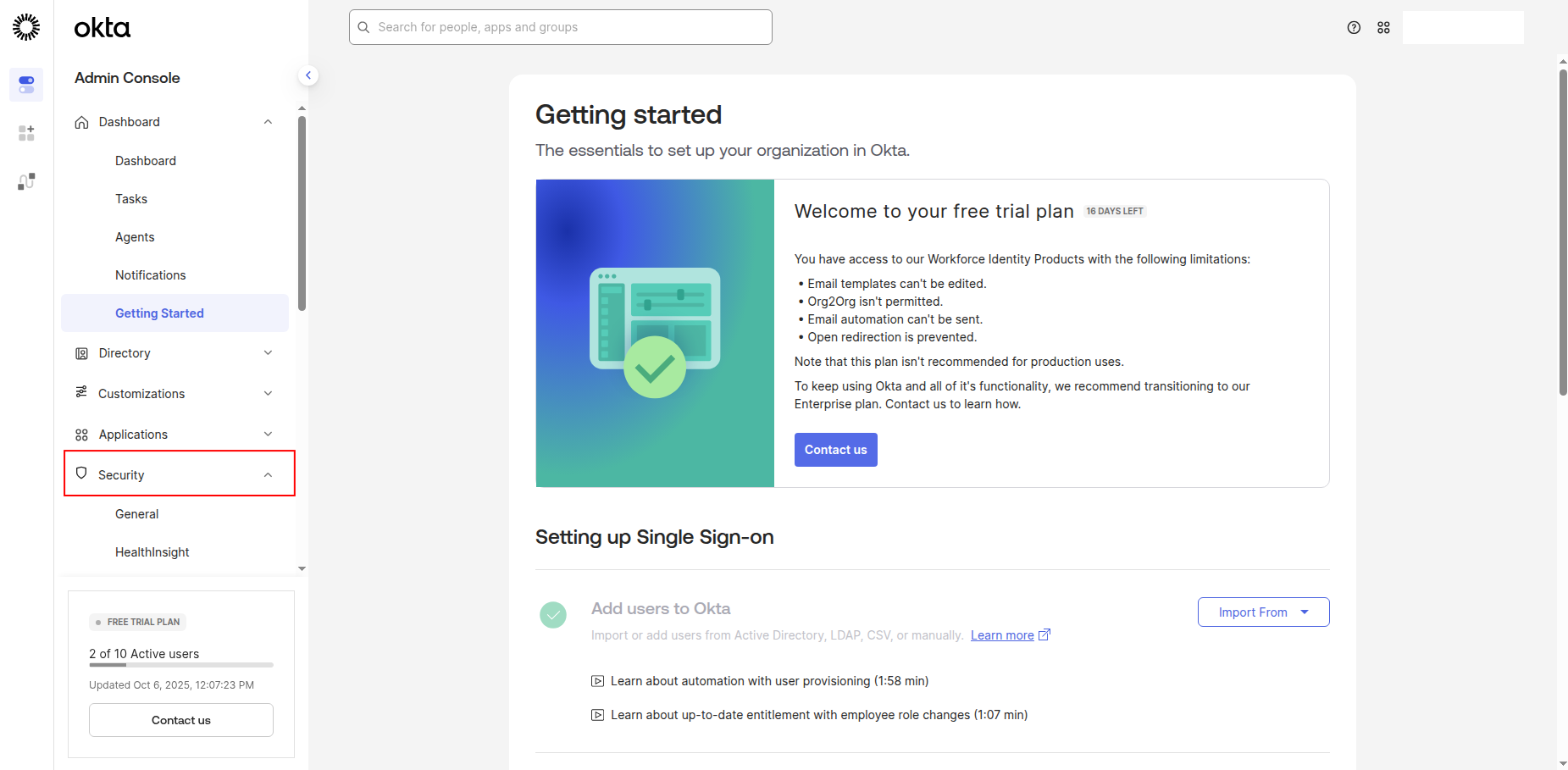
Sign in to your Okta Admin Console and navigate to the Security section.
-
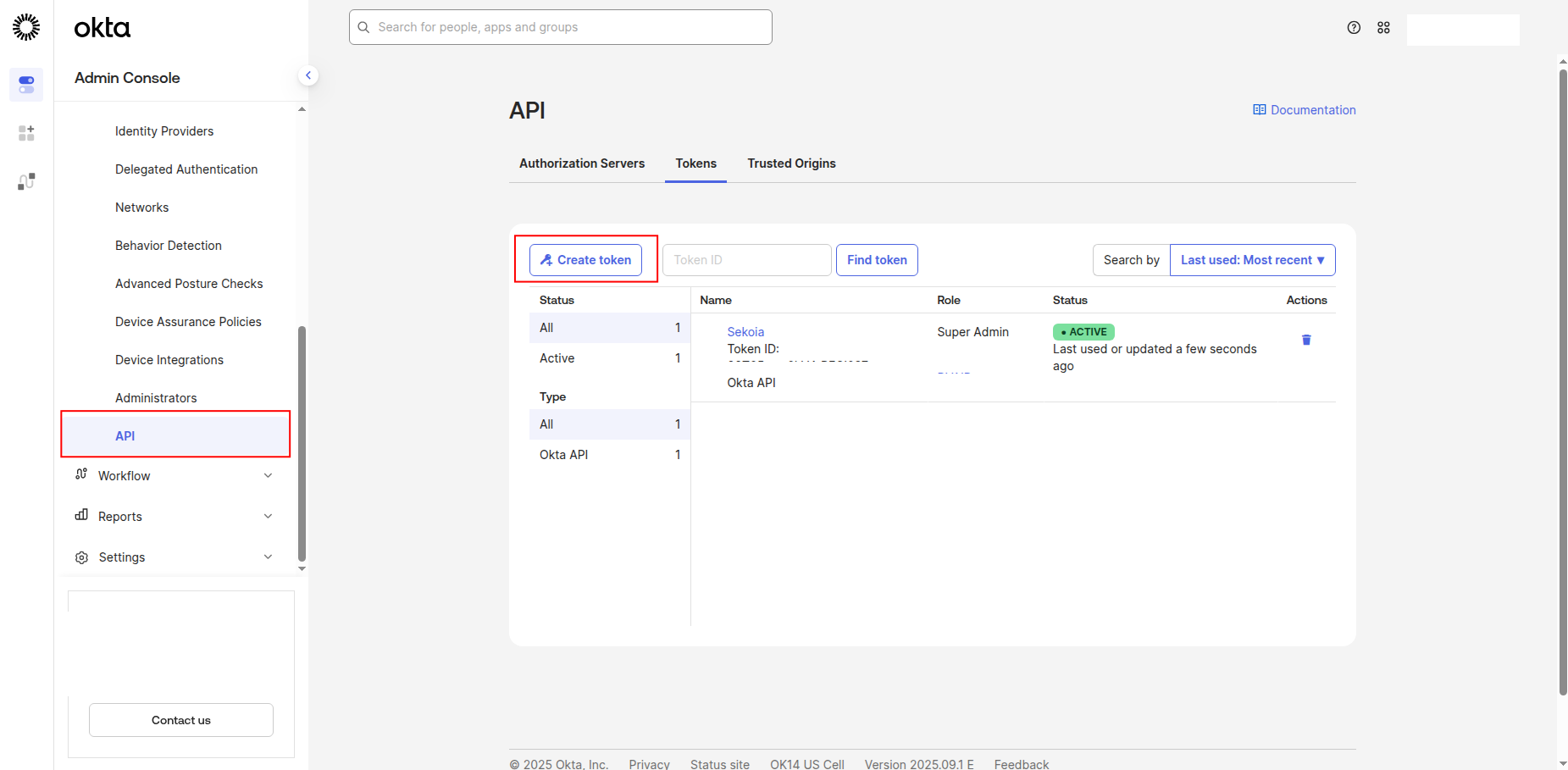
Click API in the left navigation pane, then click Tokens.
-
Click Create Token to generate a new API token.
-
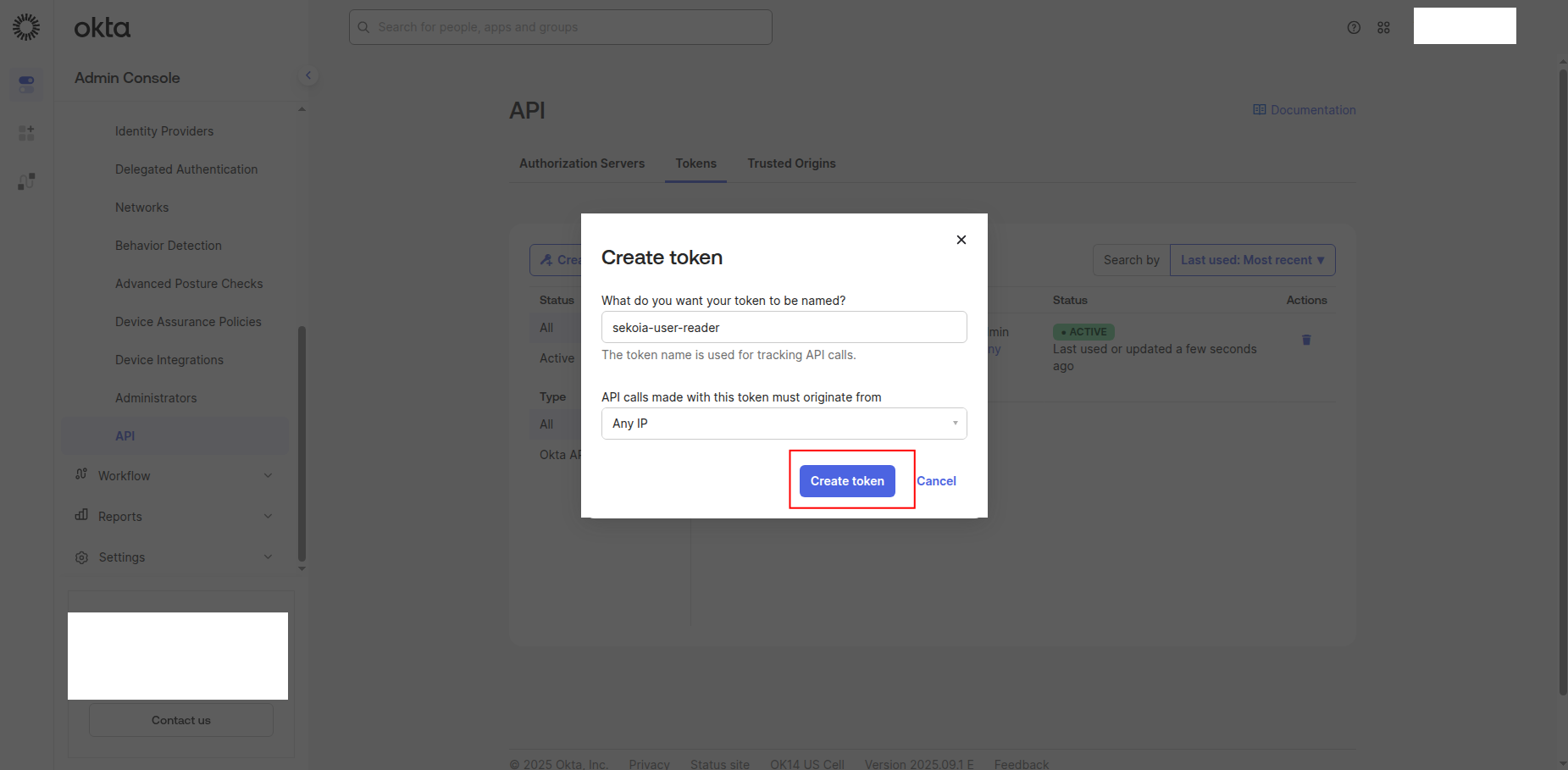
Enter a name for the token (e.g.,
sekoia-reader) -
Click Create Token to generate the API token.
-
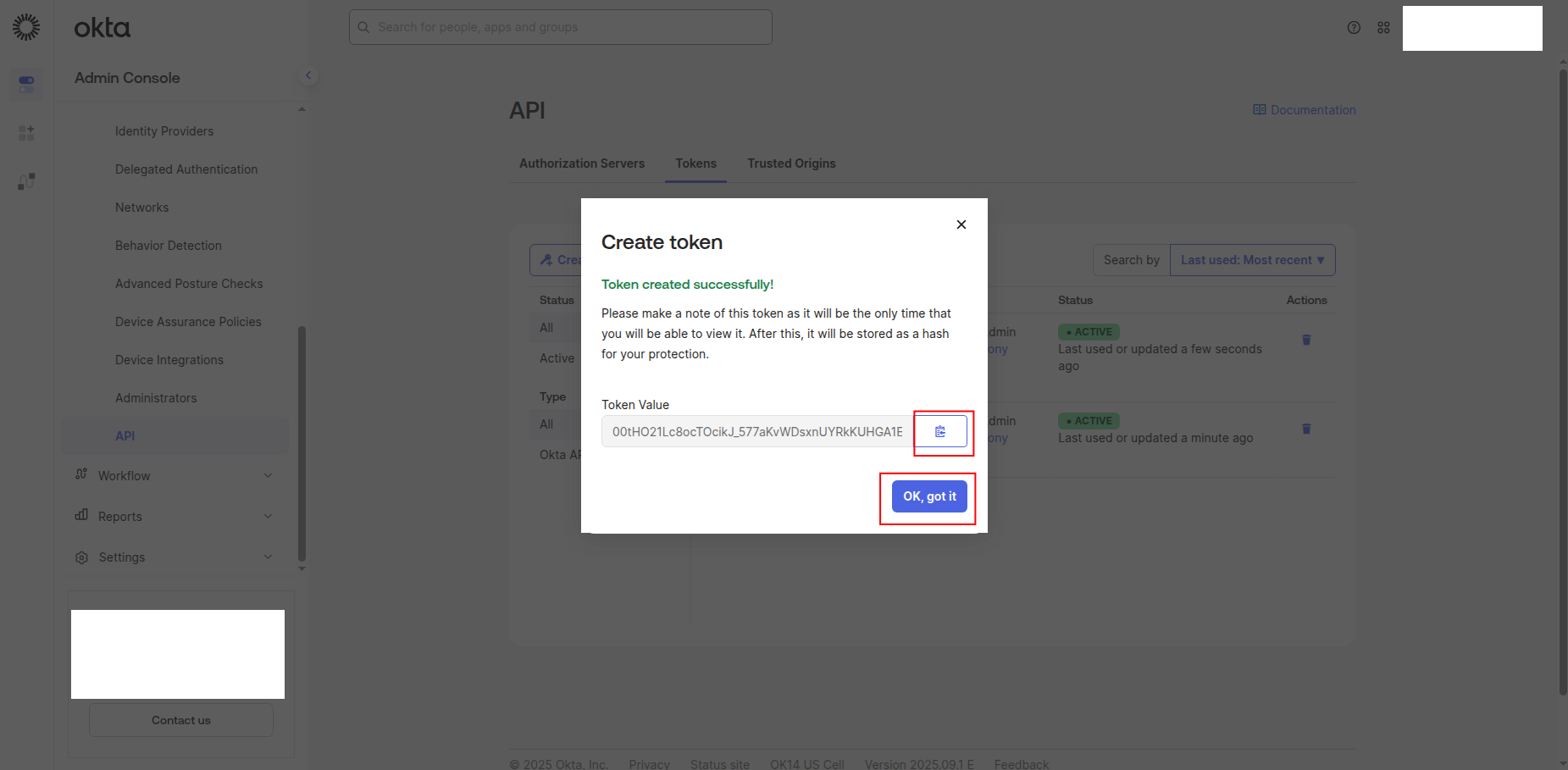
Copy the Token Value to a safe location. You'll need this token to configure the connector in Sekoia.io.
Warning
- The token value is only shown when you create it. If you lose it, you must create a new token.
- Store this token securely and never share it publicly.
- Consider rotating API tokens regularly for security best practices.
Required API permissions
The API token must have the following scopes to successfully fetch Okta devices and device trust information:
{
    "scopes": [
        "okta.devices.read",
        "okta.deviceTrust.read",
        "okta.devices.manage"
    ]
}
Required Scopes:
okta.devices.read: Read device information and attributesokta.deviceTrust.read: Read device trust and compliance statusokta.devices.manage: Full device management capabilities
Create your asset
To start getting your Okta devices into Sekoia.io, you need to create an asset connector on the Assets page. To do so, follow these steps:
-
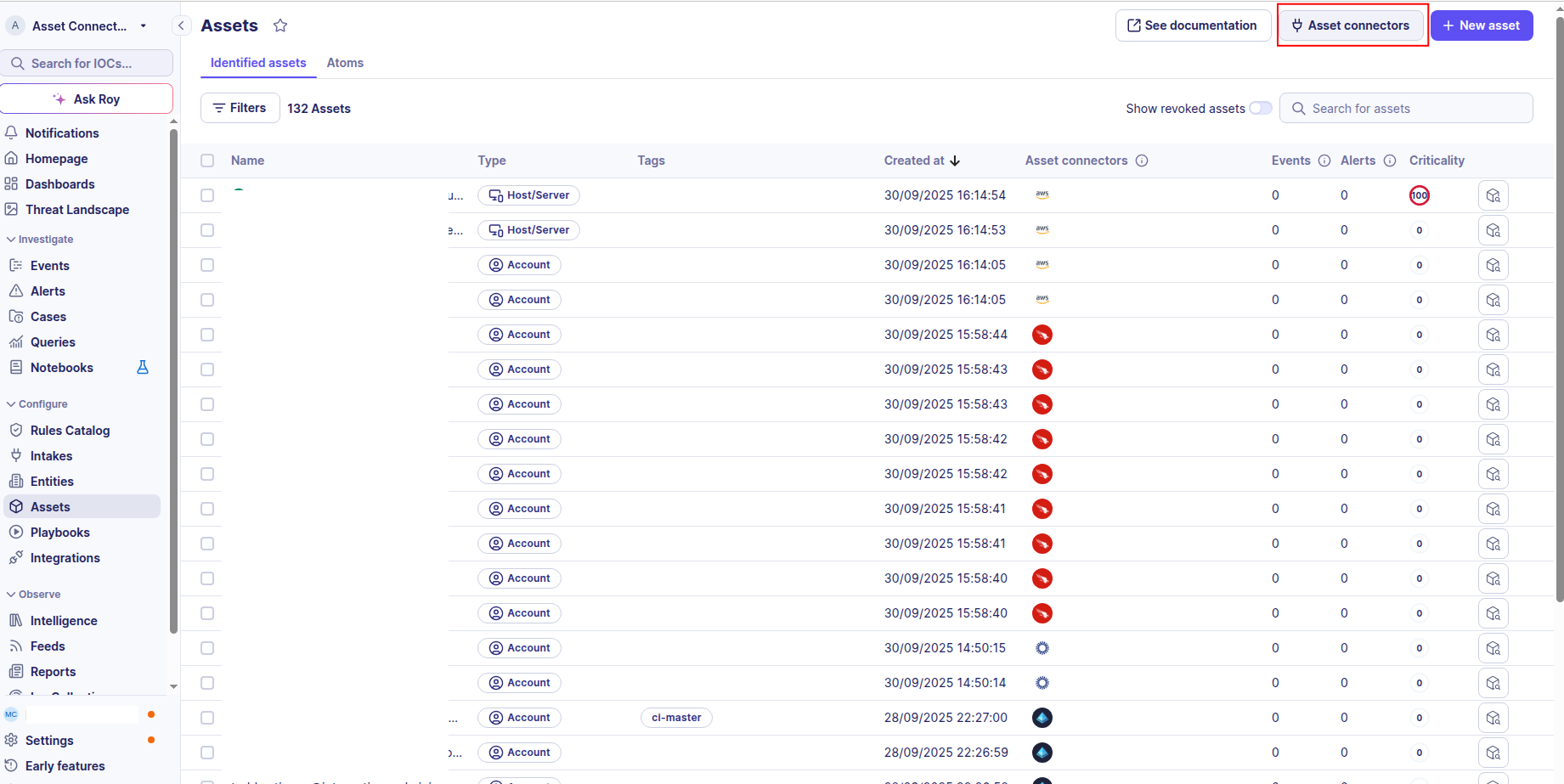
Click the Asset connectors button to create a new connector.
-
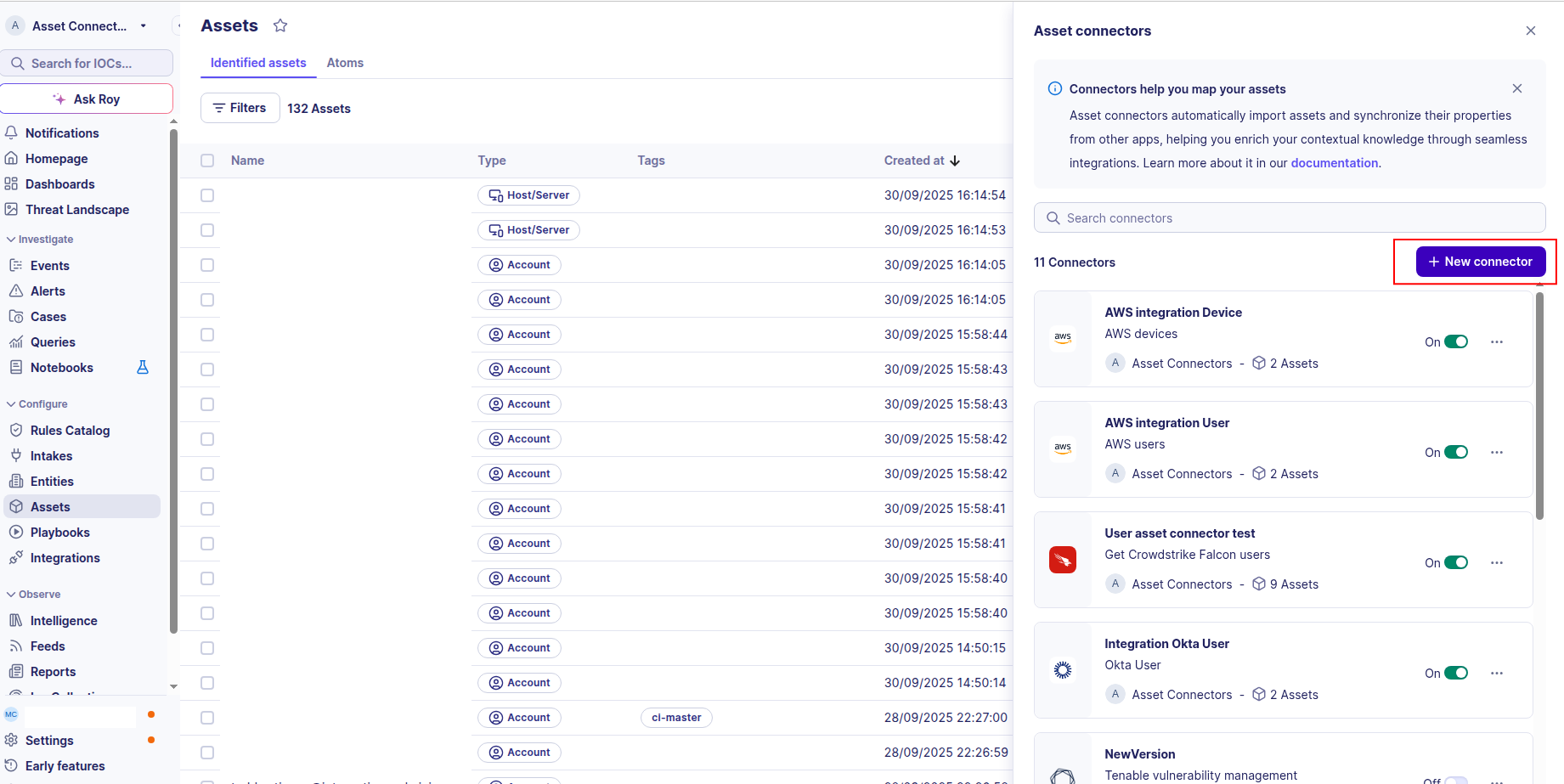
Click the + New connector button.
-
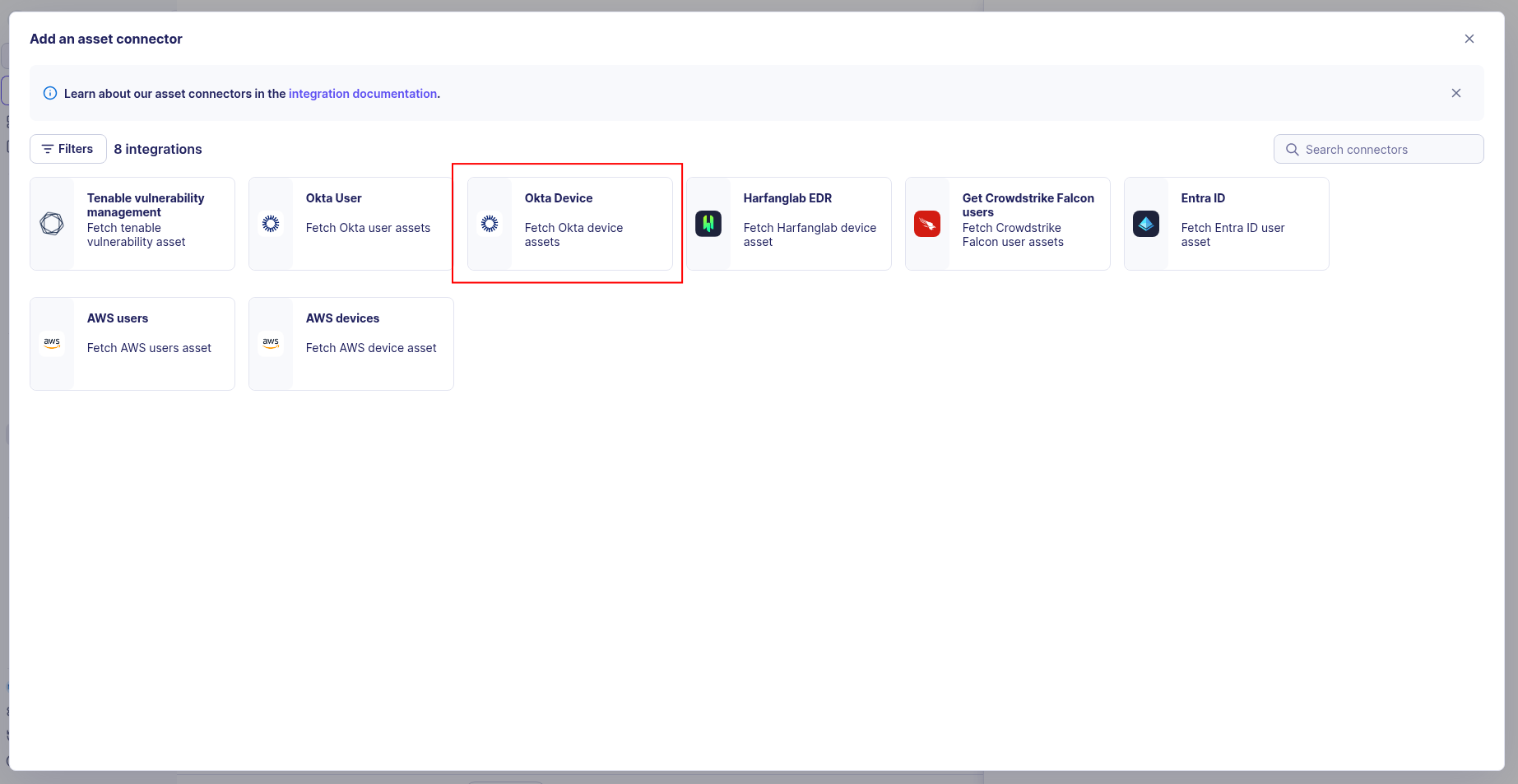
Choose Okta Device, give it a name, and fill the required fields:
-
Enter the following information:
- API Token: The API token value from your Okta organization
- Base URL: Your Okta organization’s base URL (e.g.,
https://your-domain.okta.com)
-
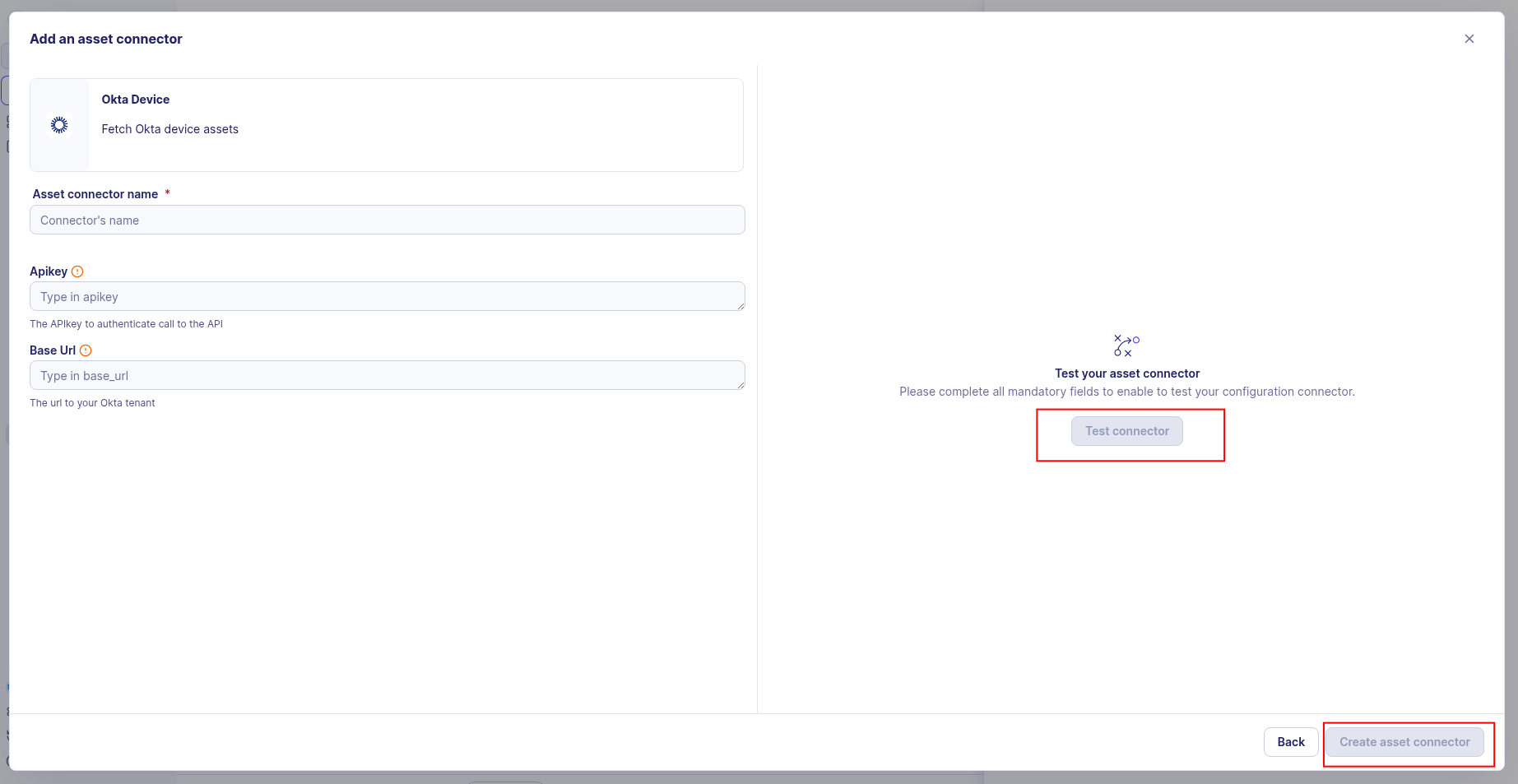
Test the connection by clicking the Test connector button.
-
Click the Create asset connector button.
OCSF Mapping for Okta Devices
OCSF Class: Device Inventory Info
Class UID: 5001
Information Collected
The Okta Devices fetches comprehensive information and transforms it into the OCSF (Open Cybersecurity Schema Framework) format for standardized security monitoring and asset management.
API Response Examples
Okta Managed Device
Okta managed device with active compliance status
{
  "id": "gooabc123defGHIJKL",
  "status": "ACTIVE",
  "created": "2023-06-04T10:00:00.000Z",
  "lastUpdated": "2025-08-26T09:30:00.000Z",
  "lastSeen": "2025-08-26T09:30:00.000Z",
  "profile": {
    "displayName": "LAPTOP-MARY-001",
    "platform": "Windows",
    "osVersion": "10.0.22621",
    "serialNumber": "ABC123DEF456",
    "imei": null,
    "manufacturer": "Dell",
    "model": "Latitude 5540",
    "udid": null,
    "registered": true,
    "secureHardwarePresent": true,
    "diskEncryptionType": "BitLocker",
    "sid": "S-1-5-21-3623811015-3361044348-30300820-1013"
  },
  "_links": {
    "self": [...]
  }
}
Okta iOS Device
Okta managed iOS device
{
  "id": "goodef456ghiJKLMNO",
  "status": "ACTIVE",
  "created": "2023-04-15T08:00:00.000Z",
  "lastUpdated": "2025-08-26T09:30:00.000Z",
  "lastSeen": "2025-08-26T09:30:00.000Z",
  "profile": {
    "displayName": "iPhone-ROBERT-001",
    "platform": "iOS",
    "osVersion": "17.5.1",
    "serialNumber": "A2R4P7B9C1D2E3F4G5",
    "imei": "356938035643809",
    "manufacturer": "Apple",
    "model": "iPhone 14 Pro",
    "udid": "00008120-0015E40A2E59801E",
    "registered": true,
    "secureHardwarePresent": true,
    "diskEncryptionType": "FileVault"
  },
  "_links": {
    "self": [...]
  }
}
Data Mapping Table
The following table shows how source data is mapped to OCSF model fields:
| Source Field | OCSF Field Path | Description | Data Type | Logic |
|---|---|---|---|---|
static: 2 |
activity_id |
OCSF activity ID for inventory collection | integer |
Always 2 for 'Collect' activity |
static: Collect |
activity_name |
OCSF activity name | string |
Always 'Collect' |
static: Discovery |
category_name |
OCSF category name | string |
Always 'Discovery' |
static: 5 |
category_uid |
OCSF category UID | integer |
Always 5 for Discovery category |
static: Device Inventory Info |
class_name |
OCSF class name | string |
Always 'Device Inventory Info' |
static: 5001 |
class_uid |
OCSF class UID | integer |
Always 5001 for Device Inventory Info |
static: 500102 |
type_uid |
OCSF type UID | integer |
Always 500102 for Device Inventory Info: Collect type |
static: Device Inventory Info: Collect |
type_name |
OCSF type name | string |
Always 'Device Inventory Info: Collect' |
static: Informational |
severity |
Event severity level | string |
Always 'Informational' for inventory events |
static: 1 |
severity_id |
OCSF severity ID | integer |
Always 1 for Informational severity |
created |
time |
OCSF event timestamp (device discovery time) | integer |
Convert ISO 8601 to Unix epoch for OCSF event timestamp |
static: Okta |
metadata.product.name |
Source product name | string |
Always 'Okta' |
static: Okta |
metadata.product.vendor_name |
Source product vendor name | string |
Always 'Okta' |
static: N/A |
metadata.product.version |
Source product version | string |
Always 'N/A' since Okta device info is not tied to a specific product version |
static: 1.6.0 |
metadata.version |
OCSF schema version | string |
Fixed OCSF schema version |
profile.displayName |
device.hostname |
Device hostname (from display name) | string |
Direct mapping of display name as hostname |
id |
device.uid |
Okta device unique identifier | string |
Direct mapping of Okta device ID |
profile.displayName |
device.name |
Device display name | string |
Direct mapping of display name |
calculated: profile.platform |
device.type |
Device type | string |
Calculate device type ID based on platform |
calculated: profile.platform |
device.type_id |
Device type ID | integer |
Calculate device type ID based on platform |
profile.platform |
device.os.name |
Operating system platform | string |
Direct mapping of platform (Windows, iOS, Android, MacOS) |
profile.platform |
device.os.type |
Operating system type | string |
Map platform to OS type |
profile.platform |
device.os.type_id |
Operating system type ID | integer |
Map platform to OS type ID |
profile.manufacturer |
device.vendor_name |
Device vendor name | string |
Direct mapping of device vendor name |
profile.model |
device.model |
Device model | string |
Direct mapping of device model |
profile.udid |
device.udid |
Device UDID (applicable for certain platforms like iOS) | string |
Direct mapping of UDID for applicable devices (e.g., iOS) |
profile.imei |
device.imei_list |
International Mobile Equipment Identity list (mobile devices only) | array[string] |
Wrap single IMEI string in a list if not null |
created |
device.created_time |
Device creation timestamp (Unix epoch) | integer |
Convert ISO 8601 to Unix epoch |
lastSeen |
device.last_seen_time |
Last seen timestamp (Unix epoch) | integer |
Convert ISO 8601 to Unix epoch; null if never seen |
calculated: profile.registered |
device.is_managed |
Whether device is managed by Okta | boolean |
Direct mapping of managed status |
calculated: status |
device.is_compliant |
Whether device is compliant | boolean |
Calculate compliance boolean based on status (true if ACTIVE and COMPLIANT, false otherwise) |
profile.secureHardwarePresent |
device.is_trusted |
Whether device is considered trusted based on secure hardware presence | boolean |
Use secure hardware presence as a proxy for device trustworthiness (true if secure hardware is present, false otherwise) |
profile.serialNumber |
device.uid_alt |
Device serial number (alternative UID) | string |
Serial number used as an alternative device identifier |
static: device_info |
enrichments[].name |
Name of the enrichment containing Okta device details | string |
Always 'device_info' to indicate enrichment type for Okta device details |
static: hardware_and_security |
enrichments[].value |
Value of the enrichment indicating hardware and security posture details | string |
Always 'hardware_and_security' to indicate enrichment category for device hardware and security posture |
calculated: diskEncryptionType, serialNumber, secureHardwarePresent and Sid |
enrichments[].data |
Data field of the enrichment containing key Okta device details for additional context on device security posture | string |
Calculate enrichment data with key Okta device details such as encryption type, serial number, secure hardware presence, and compliance status to provide additional context on device security posture |
OCSF Model Structure
Device Inventory Info: Collect (Windows)
Transformed Okta Windows device to OCSF Device Inventory Info event
{
  "activity_id": 2,
  "activity_name": "Collect",
  "category_name": "Discovery",
  "category_uid": 5,
  "class_name": "Device Inventory Info",
  "class_uid": 5001,
  "type_name": "Device Inventory Info: Collect",
  "type_uid": 500102,
  "severity": "Informational",
  "severity_id": 1,
  "time": 1685854800,
  "metadata": {
    "product": {
      "name": "Okta",
      "vendor_name": "Okta",
      "version": "N/A"
    },
    "version": "1.6.0"
  },
  "device": {
    "uid": "gooabc123defGHIJKL",
    "uid_alt": "ABC123DEF456",
    "name": "LAPTOP-MARY-001",
    "hostname": "LAPTOP-MARY-001",
    "type": "Desktop",
    "type_id": 2,
    "vendor_name": "Dell",
    "model": "Latitude 5540",
    "udid": null,
    "imei_list": null,
    "is_managed": true,
    "is_compliant": true,
    "is_trusted": true,
    "created_time": 1685854800,
    "first_seen_time": 1685854800,
    "last_seen_time": 1725184200,
    "os": {
      "name": "Windows",
      "type": "windows",
      "type_id": 100
    }
  },
  "enrichments": [
    {
      "name": "device_info",
      "value": "hardware_and_security",
      "data": {
        "Storage_encryption": {
          "partitions": {
            "full": "Enabled"
          }
        },
        "Users": ["windows_sid:S-1-5-21-3623811015-3361044348-30300820-1013"]
      }
    }
  ]
}
Device Inventory Info: Collect (iOS)
Transformed Okta iOS device to OCSF Device Inventory Info event
{
  "activity_id": 2,
  "activity_name": "Collect",
  "category_name": "Discovery",
  "category_uid": 5,
  "class_name": "Device Inventory Info",
  "class_uid": 5001,
  "type_name": "Device Inventory Info: Collect",
  "type_uid": 500102,
  "severity": "Informational",
  "severity_id": 1,
  "time": 1681545600,
  "metadata": {
    "product": {
      "name": "Okta",
      "vendor_name": "Okta",
      "version": "N/A"
    },
    "version": "1.6.0"
  },
  "device": {
    "uid": "goodef456ghiJKLMNO",
    "uid_alt": "A2R4P7B9C1D2E3F4G5",
    "name": "iPhone-ROBERT-001",
    "hostname": "iPhone-ROBERT-001",
    "type": "Mobile",
    "type_id": 5,
    "vendor_name": "Apple",
    "model": "iPhone 14 Pro",
    "udid": "00008120-0015E40A2E59801E",
    "imei_list": ["356938035643809"],
    "is_managed": true,
    "is_compliant": true,
    "is_trusted": true,
    "created_time": 1681545600,
    "first_seen_time": 1681545600,
    "last_seen_time": 1725184200,
    "os": {
      "name": "iOS",
      "type": "ios",
      "type_id": 301
    }
  },
  "enrichments": [
    {
      "name": "device_info",
      "value": "hardware_and_security",
      "data": {
        "Storage_encryption": {
          "partitions": {
            "full": "Enabled"
          }
        }
      }
    }
  ]
}