AWS EC2
Overview
Amazon Elastic Compute Cloud (EC2) is a web service that provides secure, resizable compute capacity in the cloud. It is designed to make web-scale cloud computing easier for developers by providing a simple web service interface that allows you to obtain and configure capacity with minimal friction.
- Vendor: Amazon
- Product: AWS EC2
- Supported environment: Cloud
Configure
Sekoia.io supports two authentication methods to access your AWS resources. Choose the one that best fits your security requirements:
| Method | Summary | When to use |
|---|---|---|
| IAM Role with OIDC (Recommended) | Sekoia.io assumes an IAM Role using short-lived credentials issued via OpenID Connect (OIDC). No long-lived access keys are stored. | Preferred for new setups and security-conscious environments |
| Static Access Keys | A dedicated IAM user authenticates with a static access key and secret. | Existing setups or environments where OIDC federation is not available |
Step 1 — Register Sekoia.io as an OIDC Identity Provider in AWS IAM
- Open the IAM console and navigate to Identity providers.
- Click Add provider and select OpenID Connect.
- Fill in the form:
- Provider URL:
https://app.sekoia.io/api/v1/symphony/oidc - Audience:
sts.amazonaws.com
- Provider URL:
- Click Add provider to confirm.
Once created, note the Provider ARN (e.g. arn:aws:iam::XXXXXXXXXXXX:oidc-provider/app.sekoia.io/api/v1/symphony/oidc).
Step 2 — Create an IAM Role for Sekoia.io
- In the IAM console, navigate to Roles and click Create role.
- Select Web identity as the trusted entity type.
- Choose the
app.sekoia.io/api/v1/symphony/oidcidentity provider and set the audience tosts.amazonaws.com. -
Replace the trust policy with the following, substituting your AWS account ID and community/connector UUIDs:
{ "Version": "2012-10-17", "Statement": [ { "Effect": "Allow", "Principal": { "Federated": "arn:aws:iam::XXXXXXXXXXXX:oidc-provider/app.sekoia.io/api/v1/symphony/oidc" }, "Action": "sts:AssumeRoleWithWebIdentity", "Condition": { "StringEquals": { "app.sekoia.io/api/v1/symphony/oidc:aud": "sts.amazonaws.com" }, "StringLike": { "app.sekoia.io/api/v1/symphony/oidc:sub": "community:<COMMUNITY_UUID>:modconf:<MODULE_CONFIGURATION_UUID>" } } } ] } -
Attach the permissions from the Required IAM permissions section to the role.
- Note the Role ARN (e.g.
arn:aws:iam::XXXXXXXXXXXX:role/ROLE_NAME). You will need it when configuring the connector in Sekoia.io.
How to create an IAM user with proper permissions
To connect AWS EC2 to Sekoia.io, you need to create an IAM user with the necessary permissions to access EC2 instances. Follow these steps:
-
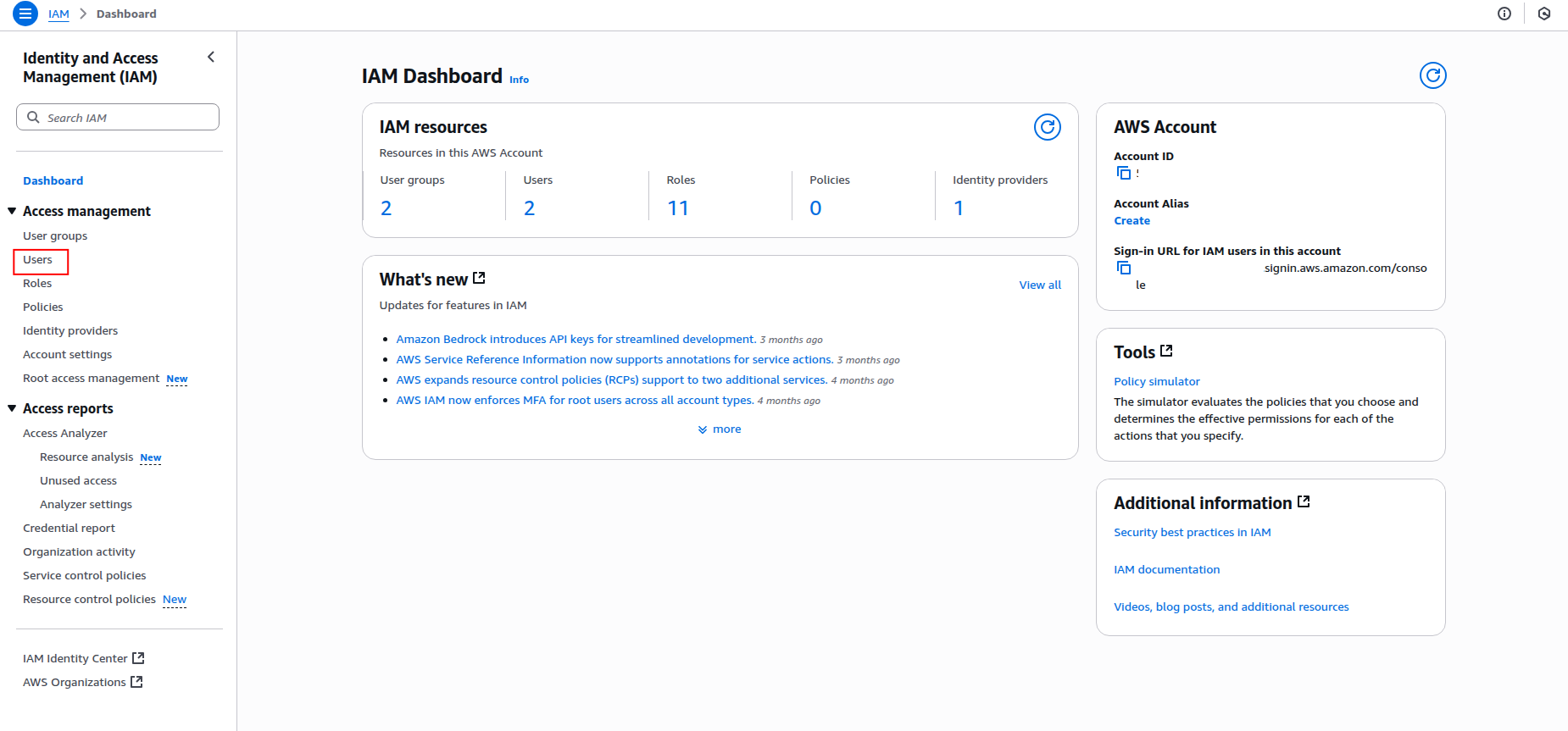
Sign in to the AWS Management Console and navigate to the IAM service.
-
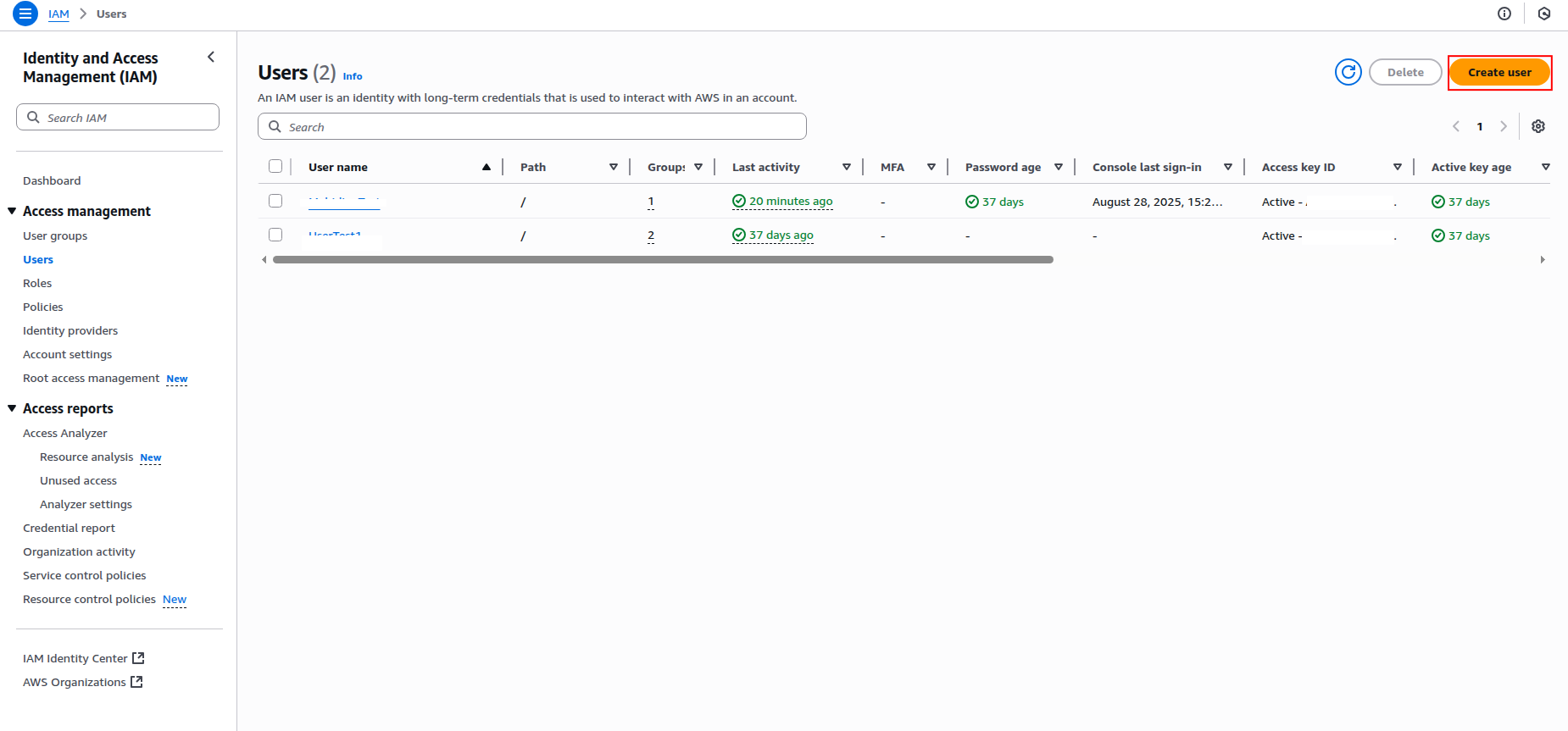
Click Users in the left navigation pane, then click Create user.
-
Enter a username for the IAM user (e.g.,
sekoia-ec2-reader) and click Next.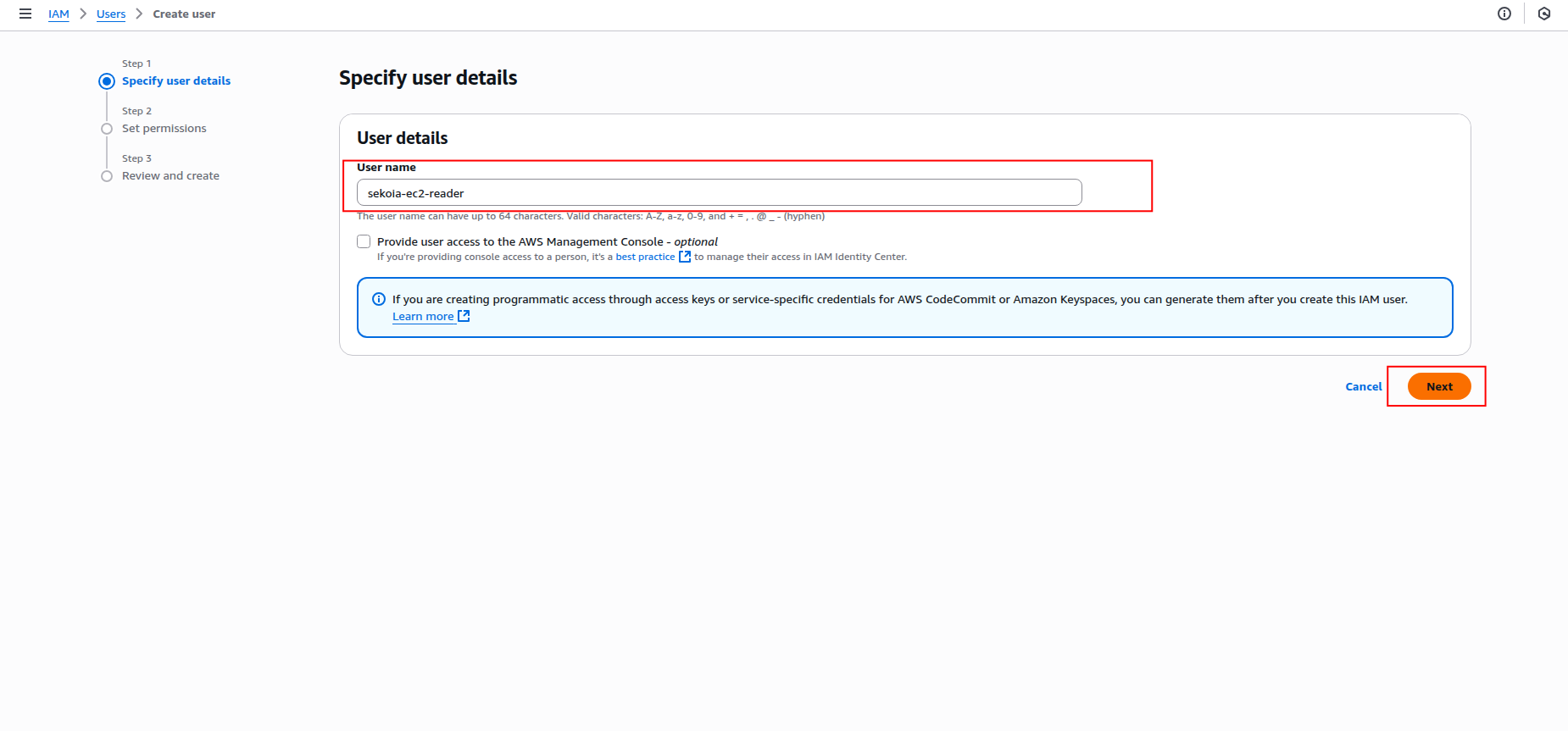
-
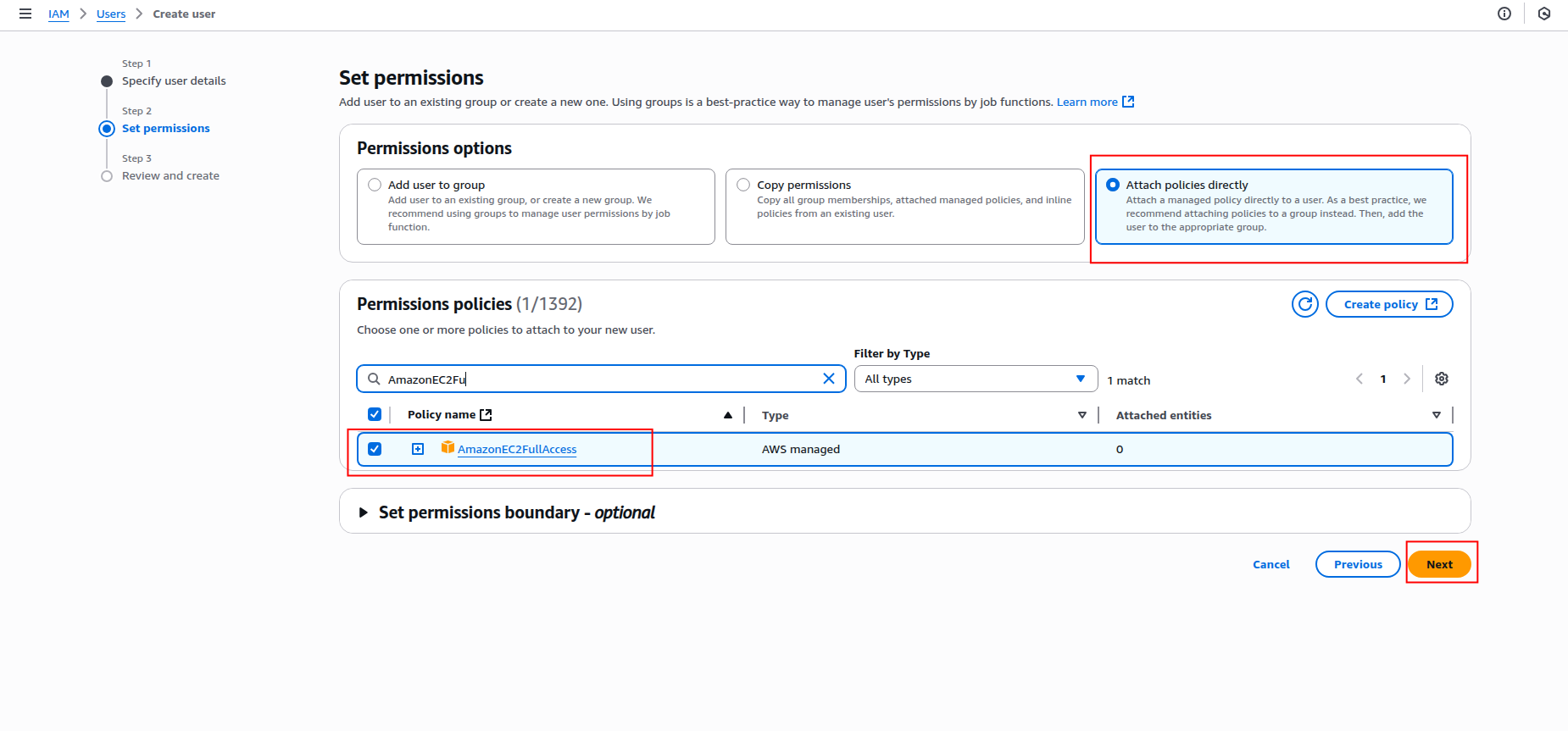
In the Set permissions step, select Attach policies directly and search for the following policies:
AmazonEC2ReadOnlyAccess(for basic EC2 read access)AmazonEC2FullAccess(if you need full EC2 access)
Warning
- Granting
AmazonEC2FullAccessprovides extensive permissions that may pose security risks. Only use it if absolutely necessary and ensure to follow the principle of least privilege. - Do not attach both policies to the same user, as this could lead to permission conflicts.
-
Click Next to review, then click Create user.
How to generate access keys
After creating the IAM user, you need to generate access keys for programmatic access:
-
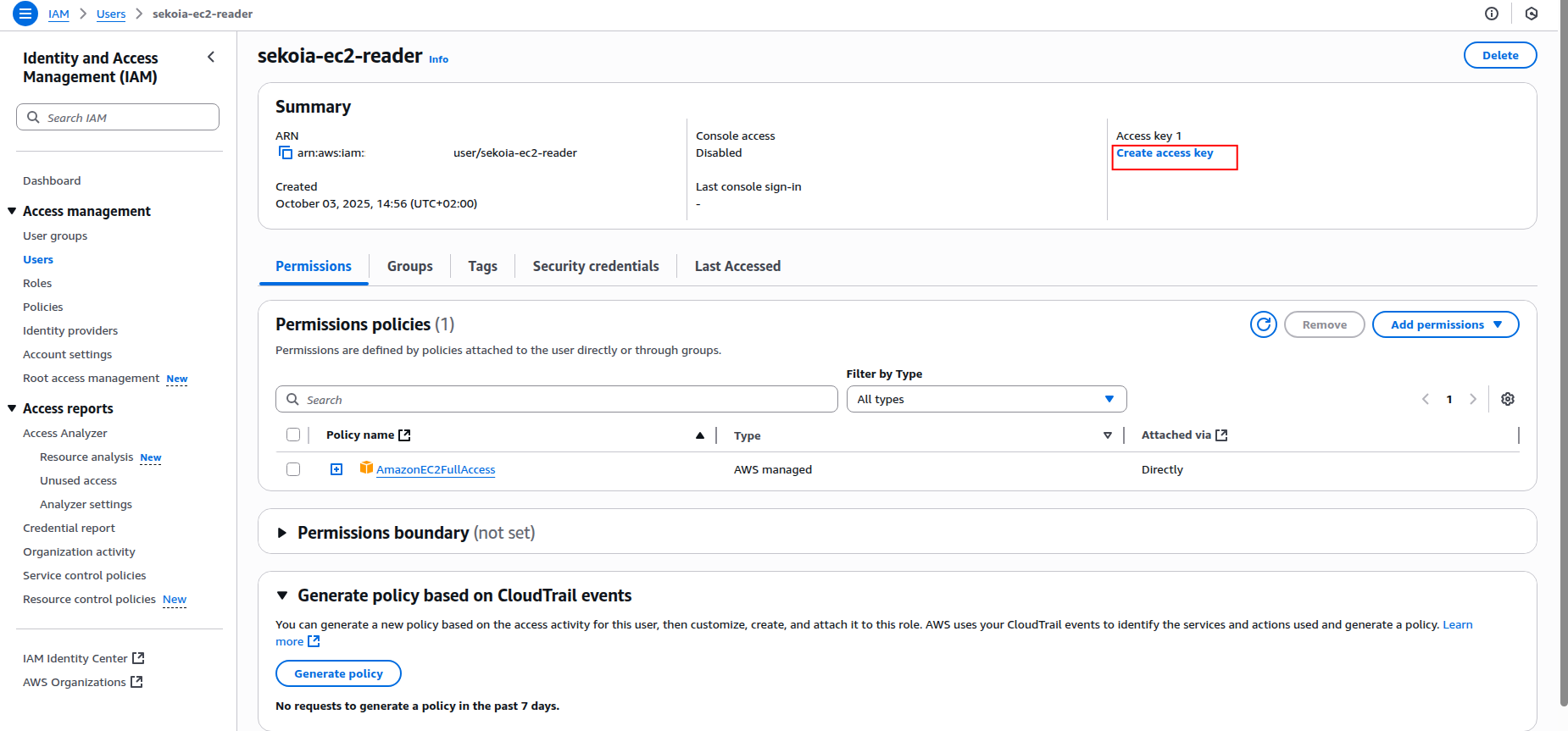
Click on the created user name to open the user details page.
-
Click the Create an access key button.
-
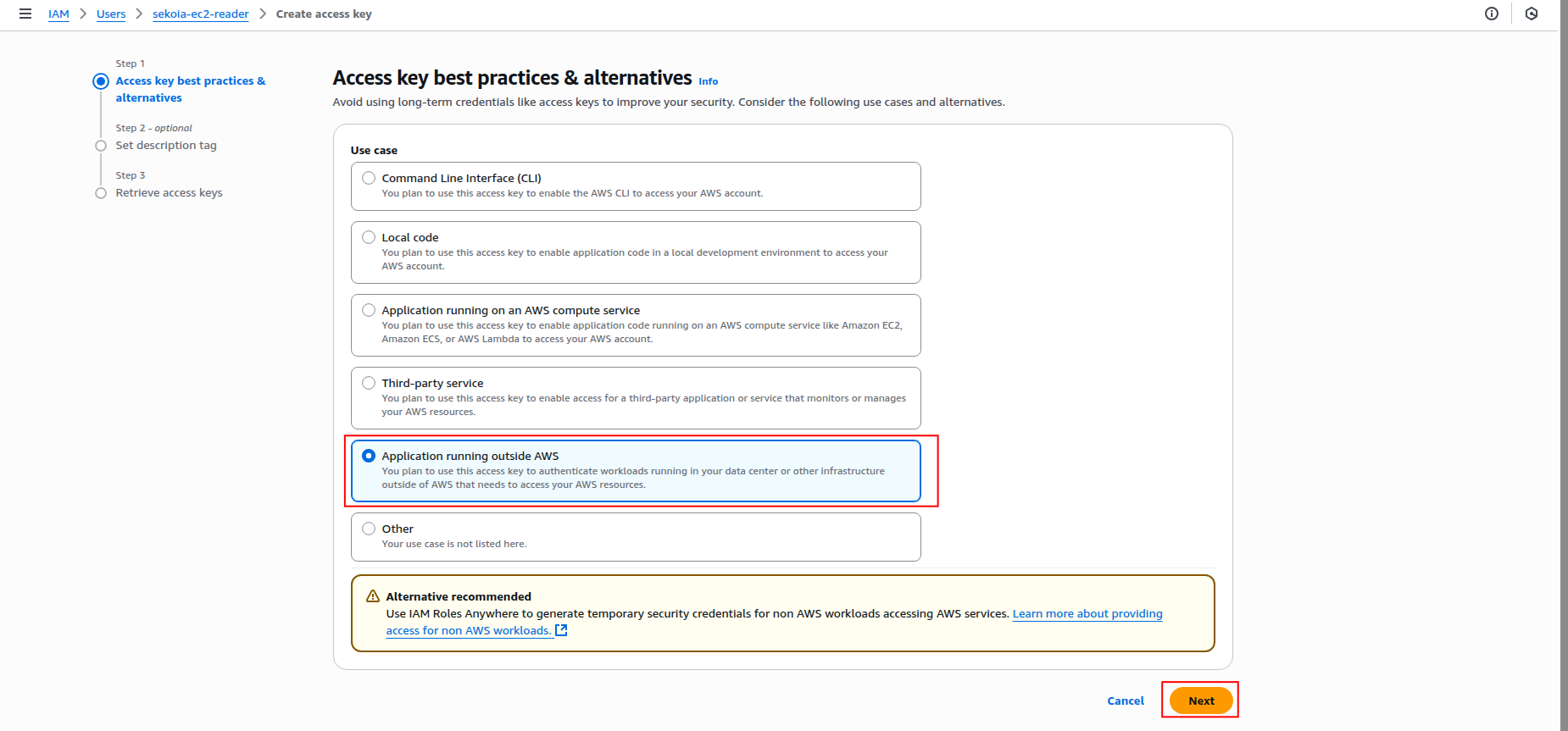
Select Application running outside AWS as the use case and click Next.
-
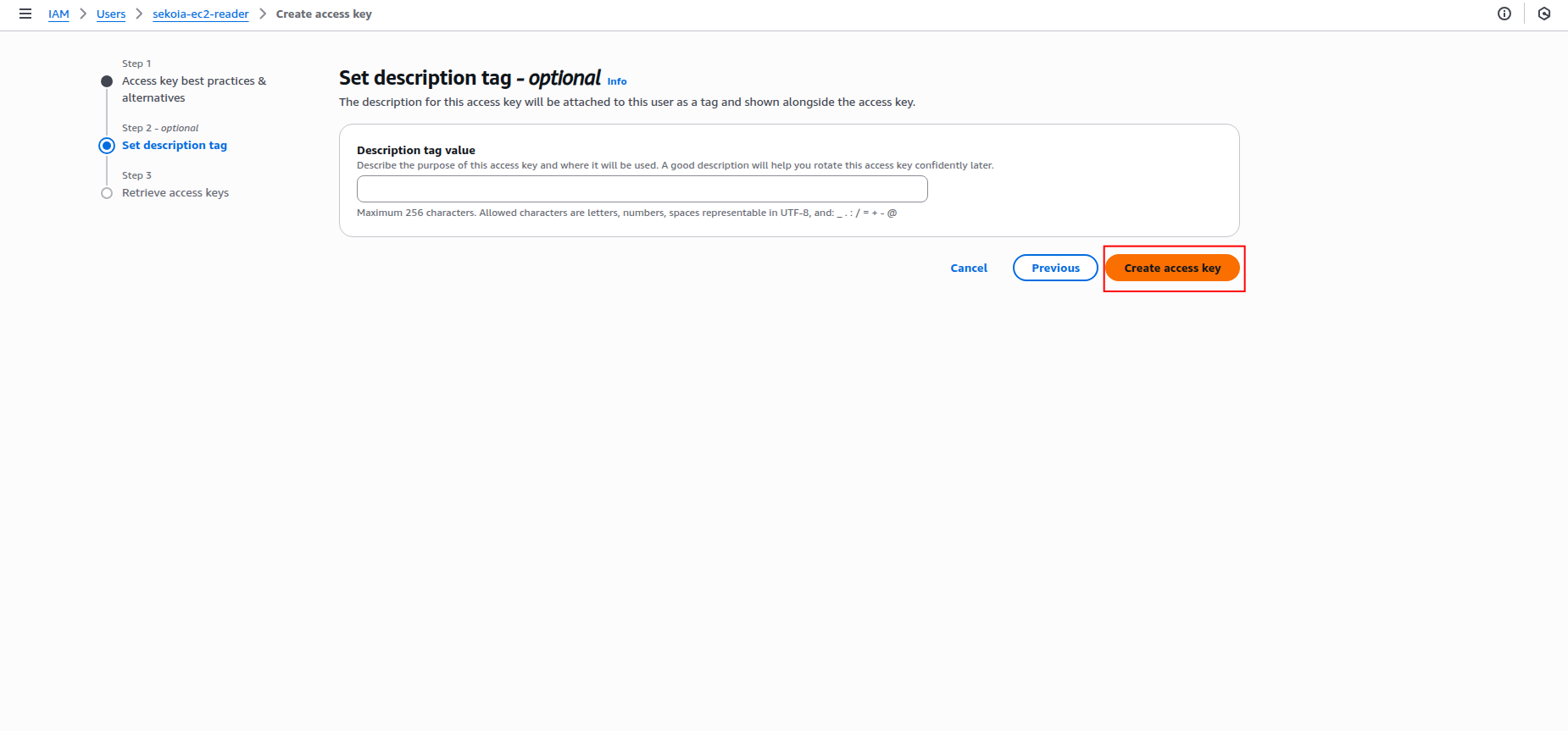
Add a description tag (optional) and click Create access key.
-
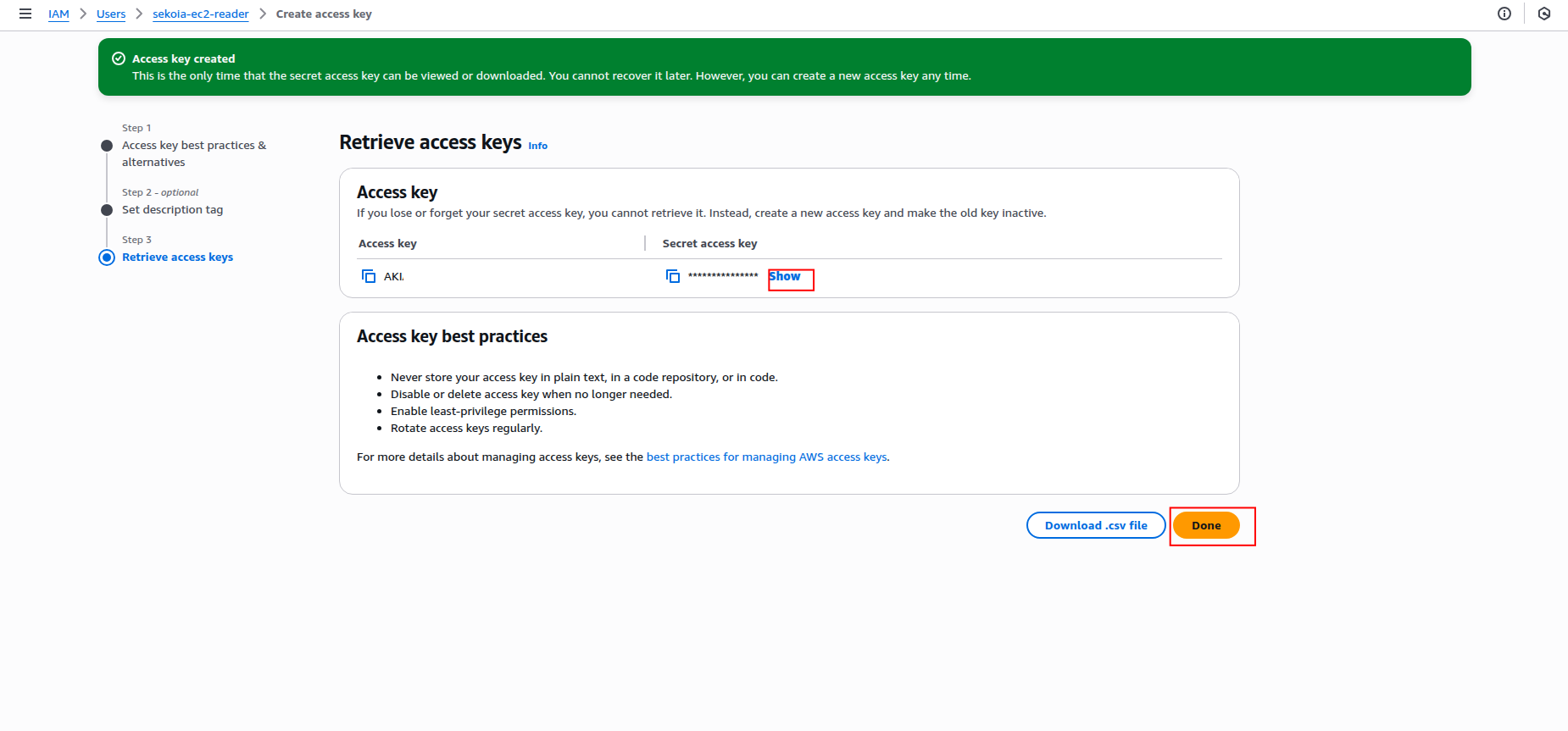
Copy the Access key ID and Secret access key to a safe location. You'll need these credentials to configure the connector in Sekoia.io.
Warning
- The secret access key is only shown when you create it. If you lose it, you must create a new access key.
- Store these credentials securely and never share them publicly.
- Consider rotating access keys regularly for security best practices.
Required IAM permissions
Both the IAM Role (OIDC) and IAM user (static keys) must have the following permissions to successfully fetch EC2 devices:
{
    "Version": "2012-10-17",
    "Statement": [
        {
            "Effect": "Allow",
            "Action": [
                "ec2:DescribeInstances",
                "ec2:DescribeImages",
                "ec2:DescribeSecurityGroups",
                "ec2:DescribeVpcs",
                "ec2:DescribeSubnets",
                "ec2:DescribeVolumes",
                "ec2:DescribeNetworkInterfaces",
                "ec2:DescribeTags"
            ],
            "Resource": "*"
        }
    ]
}
Supported AWS regions
The AWS EC2 connector supports all AWS regions where EC2 is available. Common regions include:
- US East (N. Virginia):
us-east-1 - US West (Oregon):
us-west-2 - Europe (Ireland):
eu-west-1 - Europe (London):
eu-west-2 - Asia Pacific (Tokyo):
ap-northeast-1 - Asia Pacific (Singapore):
ap-southeast-1
For a complete list of available regions, refer to the AWS Global Infrastructure documentation.
Create your asset
To start getting your AWS EC2 instances into Sekoia.io, you need to create an asset connector on the Assets page. To do so, follow these steps:
-
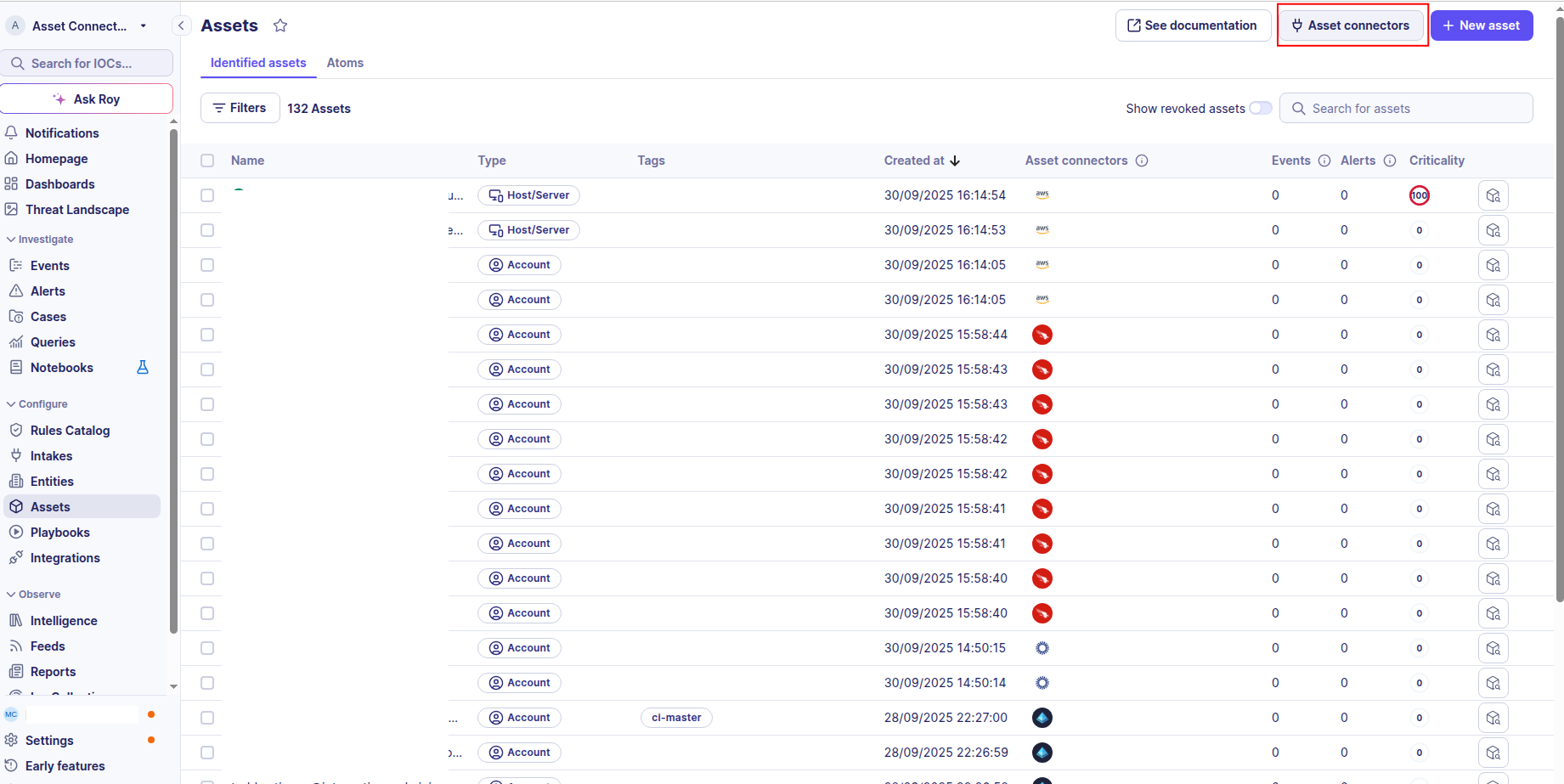
Click the Asset connectors button to create a new connector.
-
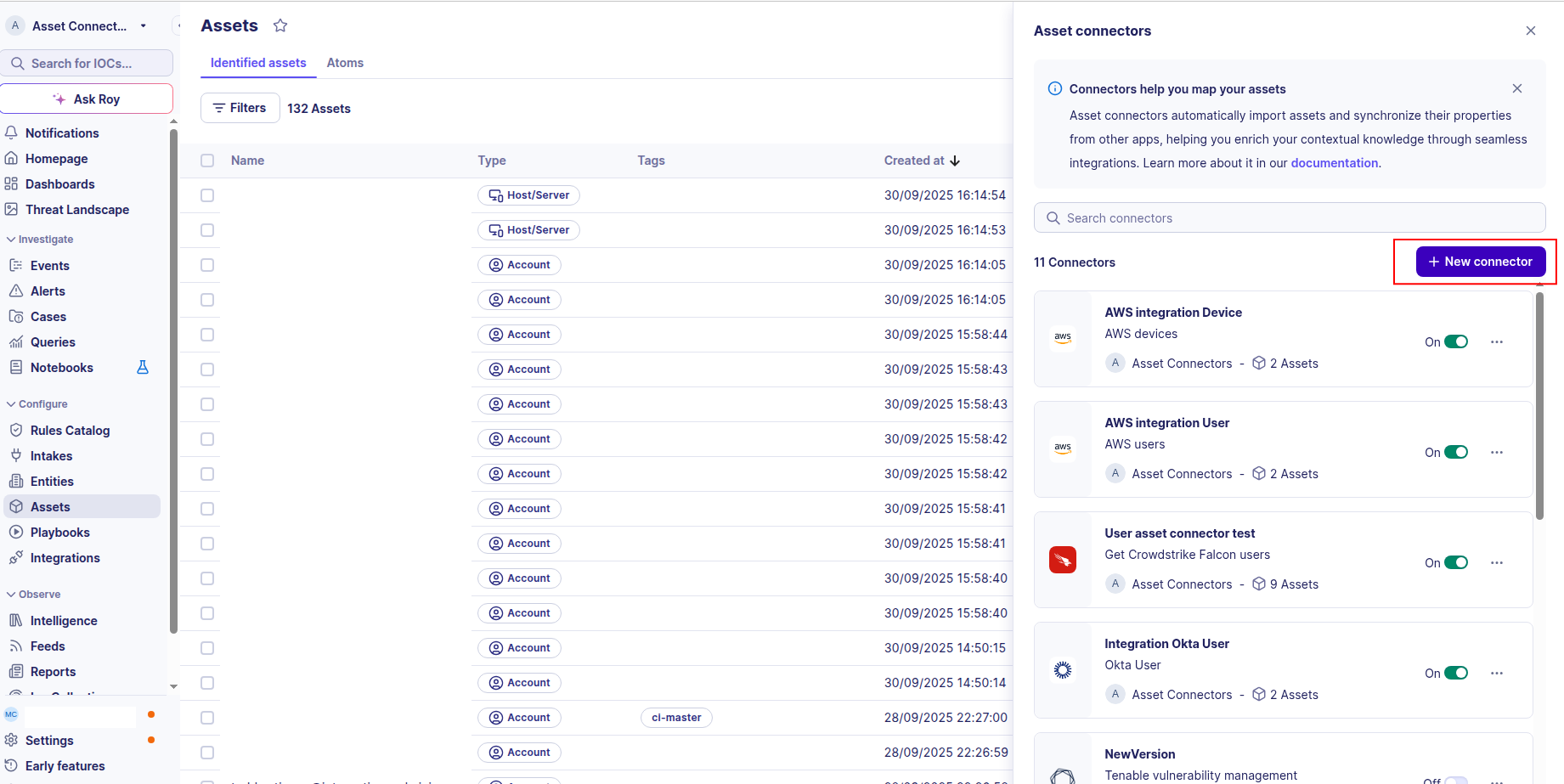
Click the + New connector button.
-
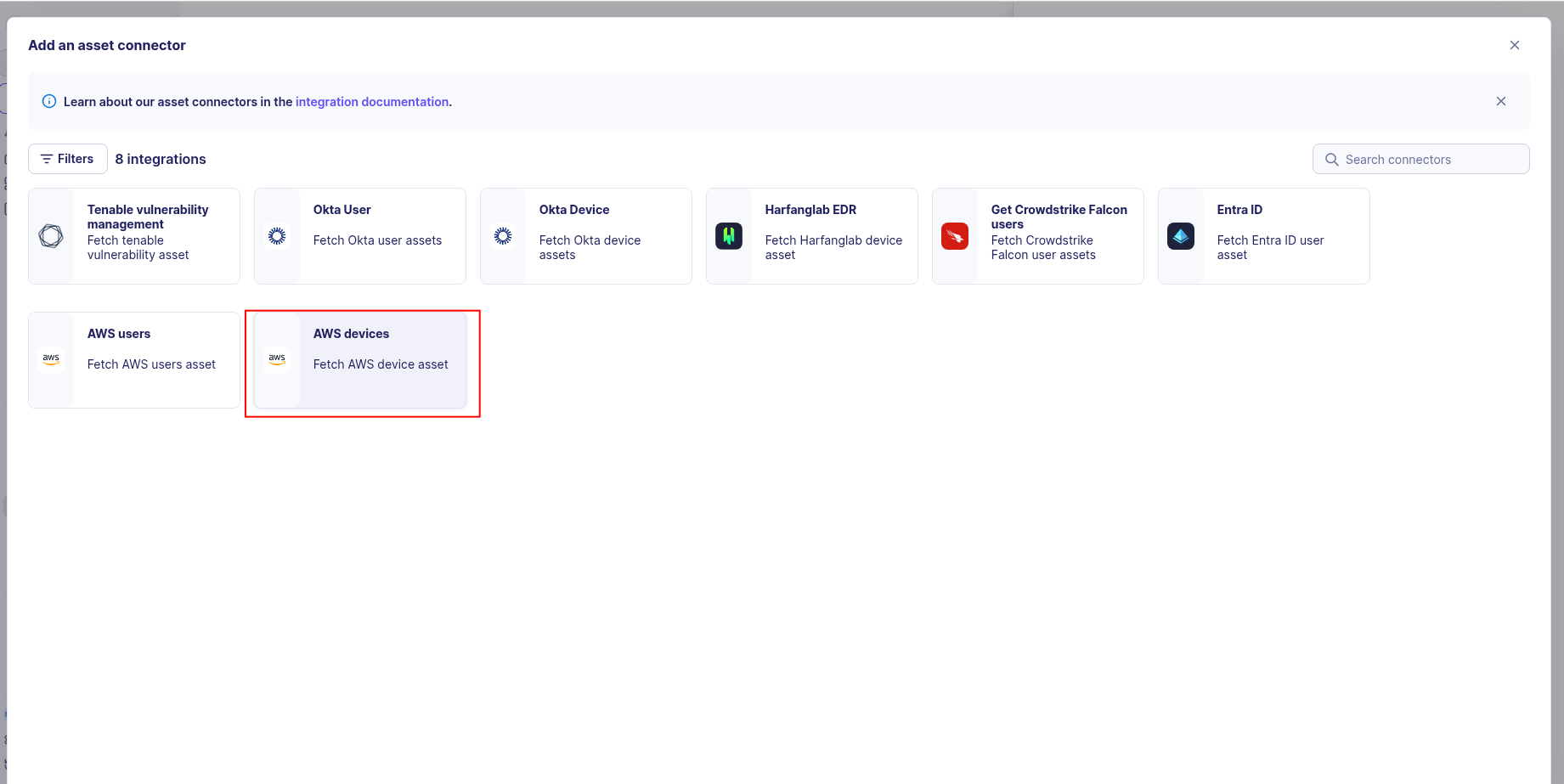
Choose AWS devices, give it a name, and fill the required fields:
-
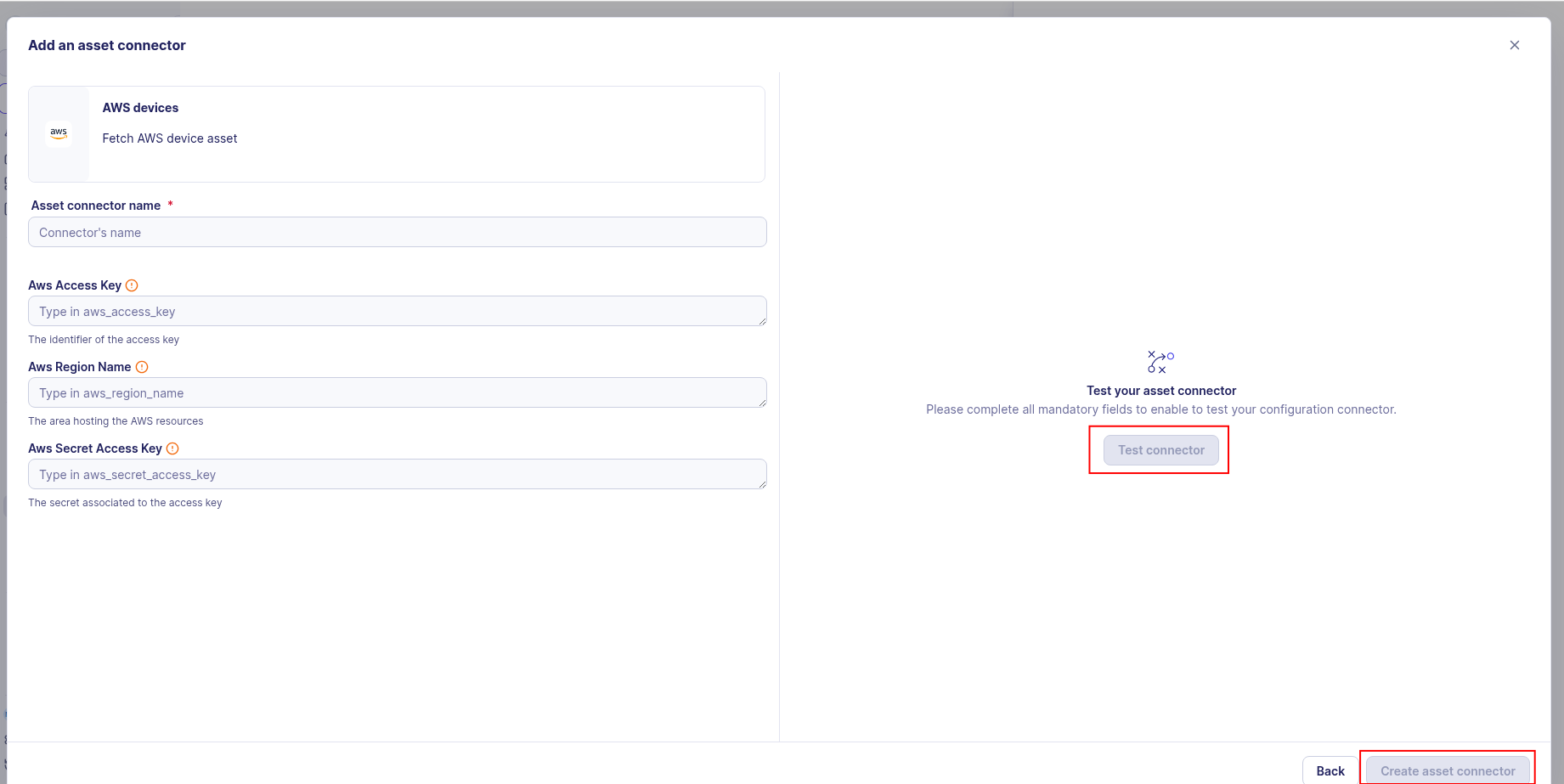
Enter the following information:
- Region: The AWS region where your EC2 instances are located (e.g.,
us-east-1) - For OIDC (Recommended): set the Role ARN to the ARN of the role you created
- For Static Access Keys: set the Access Key ID and Secret Access Key from your IAM user
- Region: The AWS region where your EC2 instances are located (e.g.,
-
Test the connection by clicking the Test connector button.
-
Click the Create asset connector button.
OCSF Mapping for AWS Devices
OCSF Class: Device Inventory Info
Class UID: 5001
OCSF Version: 1.6.0
Information Collected
The AWS Devices fetches comprehensive information and transforms it into the OCSF (Open Cybersecurity Schema Framework) format for standardized security monitoring and asset management.
API Response Examples
AWS EC2 Instance
EC2 instance with network interfaces, security groups, and organizational context
{
  "InstanceId": "i-0abcd1234efgh5678",
  "InstanceType": "t3.medium",
  "ImageId": "ami-0c55b159cbfafe1f0",
  "State": {
    "Name": "running",
    "Code": 16
  },
  "PublicDnsName": "ec2-11-22-44-66.compute-1.amazonaws.com",
  "PublicIpAddress": "1.2.3.4",
  "PrivateDnsName": "ip-11-00-1-15.ec2.internal",
  "PrivateIpAddress": "11.00.1.15",
  "PlatformDetails": "Linux/UNIX",
  "LaunchTime": "2025-08-26T14:34:38.000Z",
  "Hypervisor": "xen",
  "SubnetId": "subnet-0123abcd",
  "VpcId": "vpc-12345678",
  "Tags": [
    {
      "Key": "Name",
      "Value": "web-server-prod-01"
    },
    {
      "Key": "aws:autoscaling:groupName",
      "Value": "asg-web-servers"
    }
  ],
  "SecurityGroups": [
    {
      "GroupId": "sg-0123abcd",
      "GroupName": "web-sg"
    },
    {
      "GroupId": "sg-0123efgh",
      "GroupName": "default"
    }
  ],
  "NetworkInterfaces": [
    {
      "NetworkInterfaceId": "eni-0123abcd",
      "Description": "Primary network interface",
      "MacAddress": "01:01:ac:00:01:96",
      "PrivateIpAddress": "11.00.1.15",
      "PrivateDnsName": "ip-11-00-1-15.ec2.internal"
    }
  ],
  "IamInstanceProfile": {
    "Arn": "arn:aws:iam::123456789012:instance-profile/ec2-role"
  },
  "BlockDeviceMappings": [
    {
      "DeviceName": "/dev/xvda",
      "Ebs": {
        "VolumeId": "vol-0123abcd",
        "AttachTime": "2025-08-26T14:34:38.000Z",
        "DeleteOnTermination": true,
        "Status": "attached"
      }
    }
  ]
}
AWS EC2 Instance Minimal
EC2 instance with minimal configuration
{
  "InstanceId": "i-1234567890abcdef0",
  "InstanceType": "t2.micro",
  "ImageId": "ami-12345678",
  "State": {
    "Name": "running"
  },
  "PrivateDnsName": "ip-2-3-0-1.ec2.internal",
  "PrivateIpAddress": "2.3.0.1",
  "PlatformDetails": "Linux/UNIX",
  "LaunchTime": "2025-06-15T10:00:00.000Z",
  "Hypervisor": "xen",
  "SubnetId": "subnet-default",
  "VpcId": "vpc-default",
  "Tags": [],
  "SecurityGroups": [
    {
      "GroupId": "sg-default",
      "GroupName": "default"
    }
  ],
  "NetworkInterfaces": [
    {
      "NetworkInterfaceId": "eni-default",
      "MacAddress": "02:ab:cd:ef:12:34",
      "PrivateIpAddress": "1.2.3.4",
      "PrivateDnsName": "ip-1-2-3-4.ec2.internal"
    }
  ]
}
Data Mapping Table
The following table shows how source data is mapped to OCSF model fields:
| Source Field | OCSF Field Path | Description | Data Type | Logic |
|---|---|---|---|---|
static: 2 |
activity_id |
OCSF activity ID | integer |
Always 2 for 'Collect' activity |
static: Collect |
activity_name |
OCSF activity name | string |
Always 'Collect' for asset inventory |
static: Discovery |
category_name |
OCSF category name | string |
Always 'Discovery' |
static: 5 |
category_uid |
OCSF category UID | integer |
Always 5 for Discovery category |
static: Device Inventory Info |
class_name |
OCSF class name | string |
Always 'Device Inventory Info' |
static: 5001 |
class_uid |
OCSF class UID | integer |
Always 5001 for Device Inventory Info |
static: 500102 |
type_uid |
OCSF type UID | integer |
Always 500102 for Device Inventory Info: Collect type |
static: Device Inventory Info: Collect |
type_name |
OCSF type name | string |
Concatenate 'Device Inventory Info: Collect' |
static: Informational |
severity |
Event severity | string |
Always 'Informational' for inventory events |
static: 1 |
severity_id |
OCSF severity ID | integer |
Always 1 for Informational severity |
LaunchTime |
time |
OCSF event timestamp | timestamp |
Convert ISO 8601 to Unix epoch for OCSF event timestamp |
static: AWS EC2 |
metadata.product.name |
Product name | string |
Always 'AWS EC2' |
static: N/A |
metadata.product.version |
Product version) | string |
Always N/A |
static: 1.6.0 |
metadata.version |
OCSF schema version | string |
Fixed OCSF schema version |
static: Server |
device.type |
OCSF device type | string |
Always 'Server' for EC2 instances |
static: 1 |
device.type_id |
OCSF device type ID | integer |
Always 1 for Server type |
InstanceId |
device.uid |
Unique EC2 instance identifier | string |
Direct mapping of EC2 instance ID |
PublicDnsName || PrivateDnsName || InstanceId |
device.hostname |
Device hostname or DNS name | string |
One of Public DNS, Private DNS, or Instance ID (in that order) as hostname |
Tags[Key='Name'].Value |
device.name |
Device name from tags | string |
Extract 'Name' tag value; if absent, use InstanceId |
PlatformDetails |
device.os.name |
Operating system name | string |
Direct mapping (e.g., 'Linux/UNIX', 'Windows', 'macOS') |
PlatformDetails |
device.os.type |
Operating system type | string |
Parse OS: 'windows'→Windows, 'linux'/'unix'→Linux, 'mac'→macOS, else→Unknown |
PlatformDetails |
device.os.type_id |
OCSF OS type ID | integer |
Map OS type: Windows→100, Linux→200, macOS→300, Unknown→0 |
NetworkInterfaces[] |
device.network_interfaces[] |
List of network interfaces attached to device | object |
Iterate over network interfaces; map each field according to sub-mappings below |
NetworkInterfaces[].NetworkInterfaceId |
device.network_interfaces[].uid |
Network interface unique ID | string |
Direct mapping of ENI ID |
NetworkInterfaces[].Description |
device.network_interfaces[].name |
Interface description or name | string |
Direct mapping; fallback to 'Primary network interface' if empty |
NetworkInterfaces[].MacAddress |
device.network_interfaces[].mac |
MAC address | string |
Direct mapping |
NetworkInterfaces[].PrivateIpAddress |
device.network_interfaces[].ip |
Network interface IP address | ip |
Direct mapping of private IP |
NetworkInterfaces[].PrivateDnsName |
device.network_interfaces[].hostname |
Network interface hostname | string |
Direct mapping of private DNS name |
static: Wired |
device.network_interfaces[].type |
Interface type | string |
Always 'Wired' for EC2 network interfaces |
static: 1 |
device.network_interfaces[].type_id |
Interface type ID | integer |
Always 1 for Wired interface type |
SecurityGroups[].GroupId |
device.groups[].uid |
Security group unique ID | string |
Direct mapping of security group ID |
SecurityGroups[].GroupName |
device.groups[].name |
Security group name | string |
Direct mapping of security group name |
PublicIpAddress || PrivateIpAddress |
device.ip |
Primary device IP address | ip |
Prefer public IP; fallback to private IP |
Placement.AvailabilityZone |
device.region |
AWS availability zone (region) | string |
Extract availability zone (e.g., 'us-east-1a') |
SubnetId |
device.subnet |
VPC subnet ID | string |
Direct mapping of subnet ID |
VpcId |
device.domain |
VPC ID for network domain | string |
Direct mapping of VPC ID (mapped as domain) |
Hypervisor |
device.hypervisor |
Hypervisor type | string |
Direct mapping (e.g., 'xen', 'nitro') |
static: Amazon Web Services |
device.vendor_name |
Device vendor name | string |
Always 'Amazon Web Services' |
InstanceType |
device.model |
EC2 instance type | string |
Direct mapping (e.g., 't3.medium', 'm5.large') |
LaunchTime |
device.boot_time |
Instance launch/boot time | timestamp |
Convert ISO 8601 to string (ISO format preferred) |
BlockDeviceMappings[0].Ebs.AttachTime || LaunchTime |
device.created_time |
Device creation timestamp | timestamp |
Use EBS attachment time if available; fallback to launch time; convert to Unix epoch |
IamInstanceProfile |
device.is_managed |
Whether instance has IAM role (managed by policies) | boolean |
true if IamInstanceProfile is present and not empty; false otherwise |
Tags[Key='aws:autoscaling:groupName'].Value |
device.autoscale_uid |
Auto Scaling group name | string |
Extract 'aws:autoscaling:groupName' tag value if present |
ImageId + State.Name |
device.desc |
Device description with image and state | string |
Concatenate as 'AMI: |
OwnerId |
device.org.uid |
AWS account ID | string |
Direct mapping of AWS account ID |
OwnerId |
device.org.name |
Organization/Account name | string |
Format as 'AWS Account |
OCSF Model Structure
Device Inventory Info: Collect
Transformed EC2 instance to OCSF Device Inventory Info event
{
  "activity_id": 2,
  "activity_name": "Collect",
  "category_name": "Discovery",
  "category_uid": 5,
  "class_name": "Device Inventory Info",
  "class_uid": 5001,
  "type_name": "Device Inventory Info: Collect",
  "type_uid": 500102,
  "severity": "Informational",
  "severity_id": 1,
  "time": 1725011678,
  "metadata": {
    "product": {
      "name": "AWS EC2",
      "version": "1.6.0"
    },
    "version": "1.6.0"
  },
  "device": {
    "uid": "i-0abcd1234efgh5678",
    "name": "web-server-prod-01",
    "hostname": "ec2-11-22-44-66.compute-1.amazonaws.com",
    "type": "Server",
    "type_id": 1,
    "vendor_name": "Amazon Web Services",
    "ip": "1.2.3.4",
    "model": "t3.medium",
    "image_id": "ami-0c55b159cbfafe1f0",
    "state": "running",
    "region": "us-east-1a",
    "subnet": "subnet-0123abcd",
    "domain": "vpc-12345678",
    "hypervisor": "xen",
    "is_managed": true,
    "autoscale_uid": "asg-web-servers",
    "boot_time": "2025-08-26T14:34:38Z",
    "created_time": 1725011678,
    "os": {
      "name": "Linux/UNIX",
      "type": "Linux",
      "type_id": 200
    },
    "network_interfaces": [
      {
        "uid": "eni-0123abcd",
        "name": "Primary network interface",
        "ip": "11.00.1.15",
        "hostname": "ip-11-00-1-15.ec2.internal",
        "mac": "01:01:ac:00:01:96",
        "type": "Wired",
        "type_id": 1
      }
    ],
    "groups": [
      {
        "uid": "sg-0123abcd",
        "name": "web-sg"
      },
      {
        "uid": "sg-0123efgh",
        "name": "default"
      }
    ],
    "org": {
      "uid": "123456789012",
      "name": "AWS Account 123456789012"
    },
    "desc": "AMI: ami-0c55b159cbfafe1f0, State: running"
  }
}