Query Builder reference
This page provides a detailed reference for all clauses, operators, and properties available within the Query Builder Form mode. Use these tables to look up specific parameters for your hunting sessions.
Clauses
The Query Builder comes with the following clauses:
| Clause | Description |
|---|---|
| SELECT | Choose columns you want to display |
| AGGREGATION | Aggregate rows with average / count / min / max / sum / unique count |
| WHERE | Define query conditions |
| GROUP BY | Group rows by identical data |
| ORDER BY | Order rows by a specific value |
| LIMIT | Limit the number of rows in results |
Aggregation
Create an aggregation by using the Aggregate clause. Select a type of aggregation, a column and a label for your aggregation.
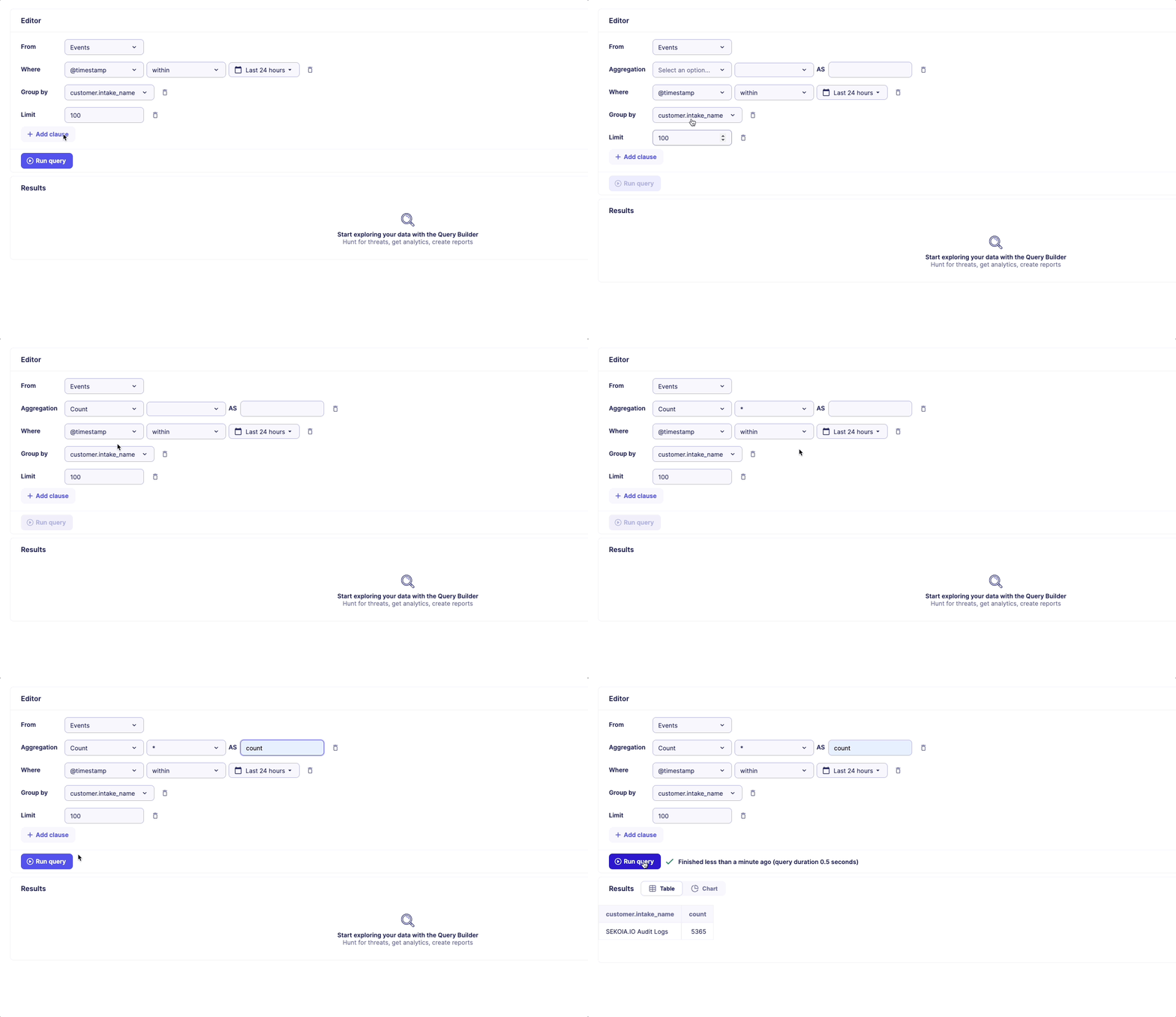
The following aggregation types are available.
| Aggregation type | Description |
|---|---|
| Average | Average of a set |
| Count | Count the number of rows in a set |
| Min | Find the minimum value in a set |
| Max | Find the maximum value in a set |
| Sum | Sum of a set |
| Unique count | Count unique values of a set |
Operators
Use the following operators to define your conditions in the WHERE clause.
| Operator | Description |
|---|---|
| is | Equals (case-sensitive) |
| is not | Not equals (case-sensitive) |
| starts with | Starts with the specified value (case-sensitive) |
| does not start with | Does not start with the specified value (case-sensitive) |
| ends with | Ends with the specified value (case-sensitive) |
| does not end with | Does not end with the specified value (case-sensitive) |
| contains | Contains the specified value (case-sensitive) |
| does not contain | Does not contain the specified value (case-sensitive) |
| exists | Has a value |
| does not exists | Does not have a value |
| within | Within the specified date range |
| < | Strictly less than |
| <= | Less than or equal to |
| > | Strictly more than |
| >= | More than or equal to |
Alert properties
When using the Query Builder with Alerts as a source, users can filter and manipulate queries based on the following alert properties:
| Alert Property | Description |
|---|---|
| Creation date | The date and time when the alert was initially created. |
| Update date | The date and time when the alert was last updated. |
| Entity UUID | A unique identifier representing the entity associated with the alert. |
| Entity name | The name of the entity linked to the alert. |
| Rule UUID | A unique identifier for the rule that generated the alert. |
| Rule name | The name assigned to the rule that triggered the alert. |
| Status | The current state of the alert (e.g., open, acknowledged, resolved). |
| Urgency | The level of urgency assigned to the alert. |
| Similar | Properties related to similar alerts. |
| Short ID | A concise identifier for quick reference to the alert. |
| Time to detect | Duration taken to identify the alert from its occurrence in seconds. |
| Time to acknowledge | Time elapsed from detection to official acknowledgment of the alert in seconds. |
| Time to respond | Duration taken to take action after acknowledgment in seconds. |
| Time to resolve | The total time taken to completely resolve the alert in seconds. |
| Time to ingest | The duration from alert generation to its final ingestion into the system in seconds. |
| Detection type | The method by which the alert was detected. |
| Community UUID | A unique identifier for the community the alert belongs to. |
Case properties
When using the Query Builder with Cases as a source, users can filter and manipulate queries based on the following case properties:
| Property | Description |
|---|---|
| Case Status Name | The name of the status associated with the case. |
| Community UUID | A unique identifier for the community related to the case. |
| Created at | The date and time when the case was created. |
| Created by | The user or system that created the case. |
| Created by type | The type of entity that created the case (e.g., user, automated system). |
| Description | A detailed description outlining the case's context or issues. |
| First seen at | The date and time when the case was first detected. |
| Last seen at | The date and time when the case was last observed or updated. |
| Priority | The importance level assigned to the case, indicating its urgency. |
| Short ID | A concise identifier for quick reference to the case. |
| Tags | The names of tags associated with the case for categorization and filtering. |
| Title | The title or subject line of the case. |
| Updated at | The date and time when the case was last updated. |
| Updated by | The user or system that last updated the case. |