BeyondTrust PRA Team
Overview
BeyondTrust Privileged Remote Access enables secure, controlled remote access to critical systems for employees and vendors, focusing on protecting privileged credentials and sessions.
This integration collects the Team logs.
Warning
Important note - This format is currently in beta. We highly value your feedback to improve its performance.
- Vendor: BeyondTrust
- Supported environment: SaaS
- Detection based on: Telemetry
- Supported application or feature:
- Team Activity
Configure
How to create an API token
-
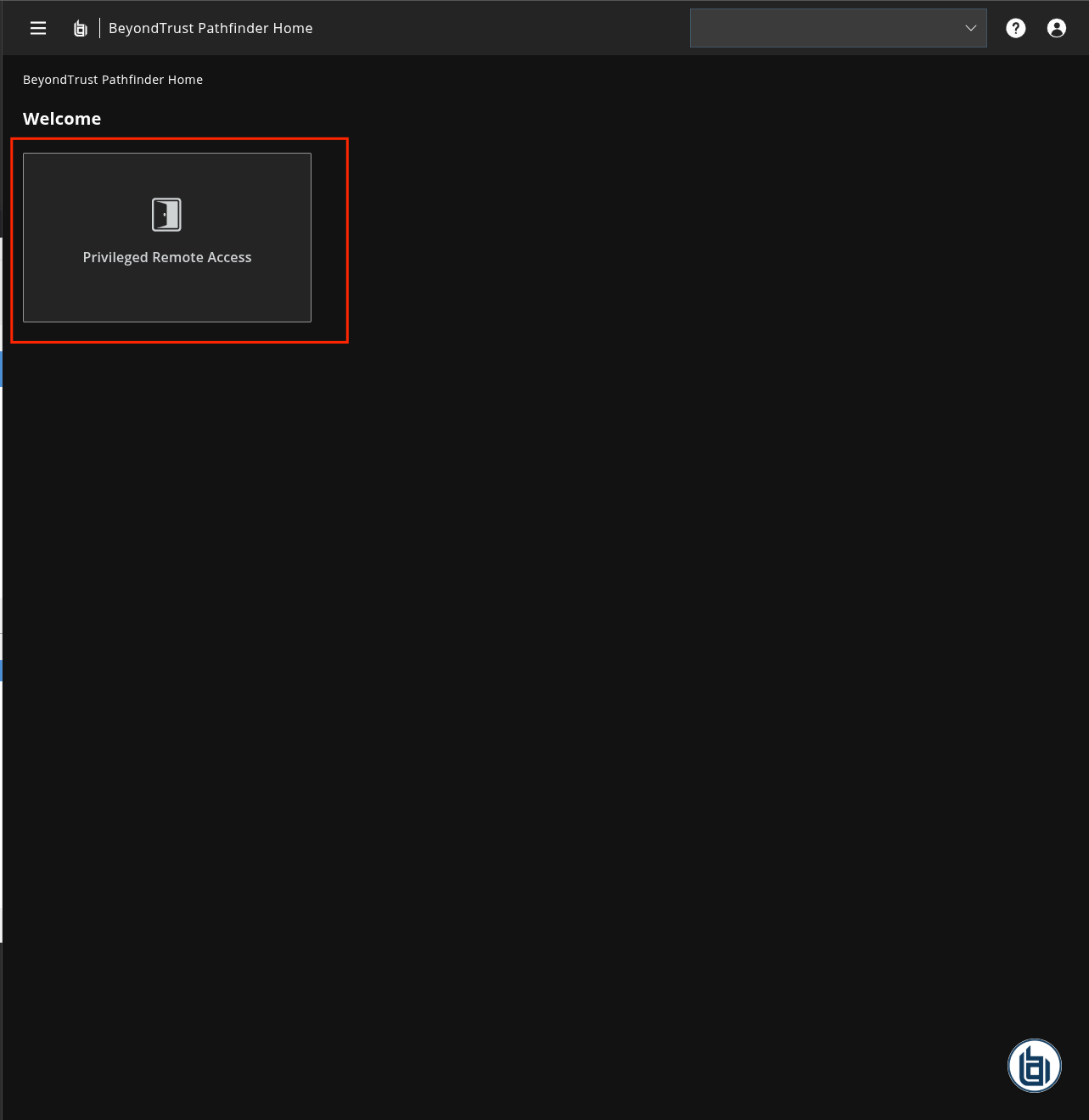
Log in the BeyondTrust Privileged Remote Access console
-
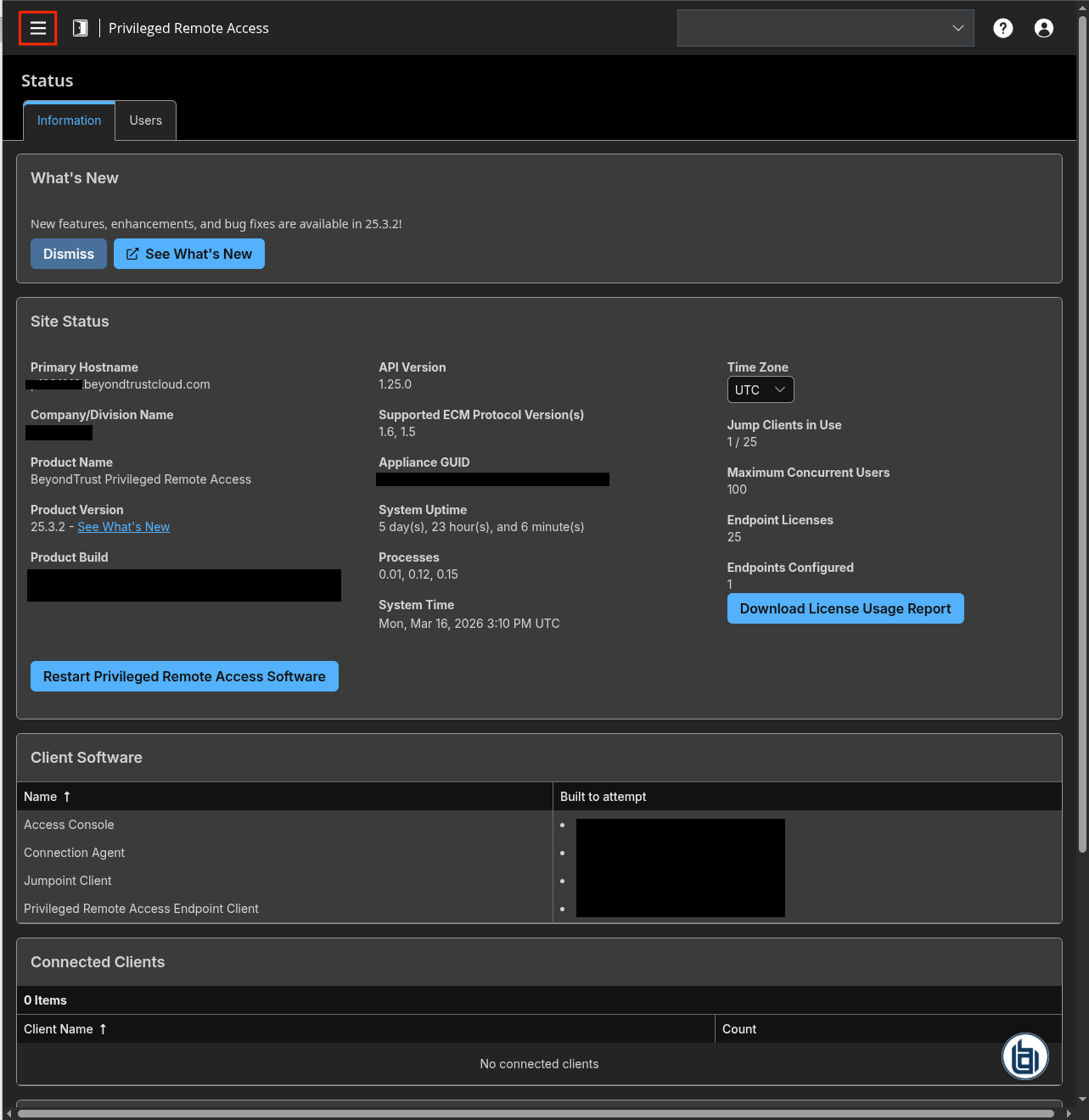
Click the Burger menu
-
On the left panel, click
Management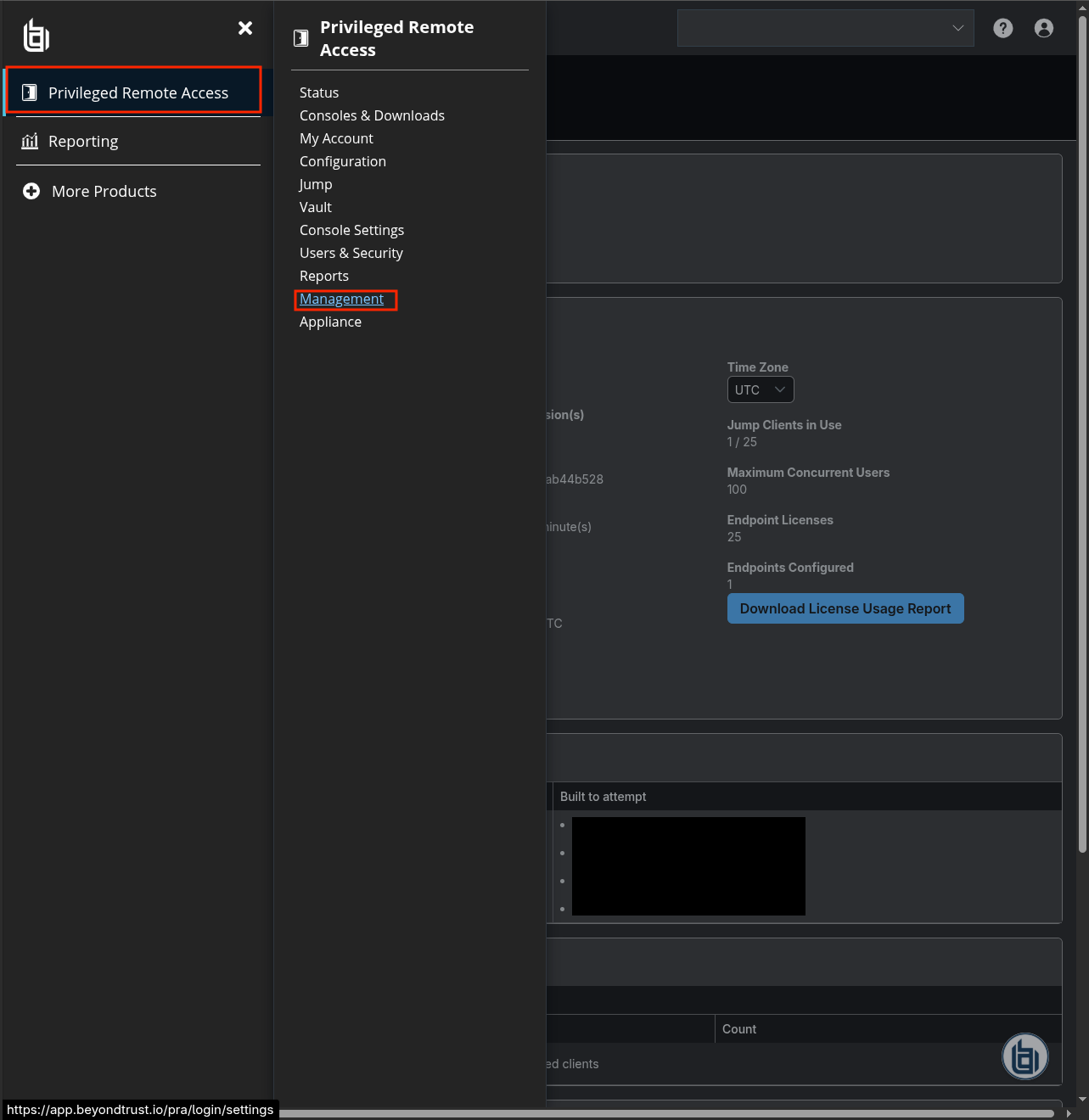
-
Click
API Configuration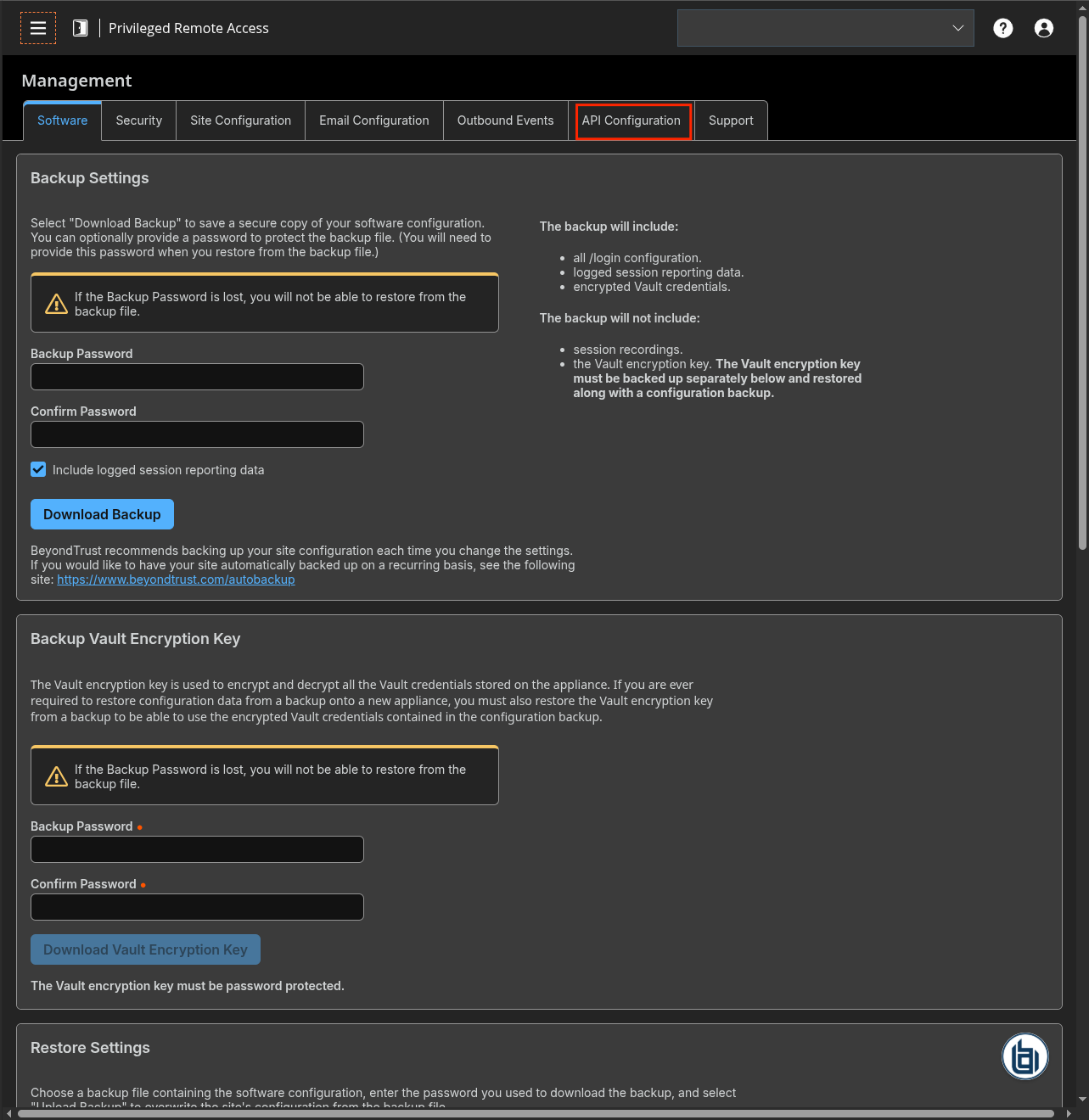
-
Check
Enable XML APIand click+ Add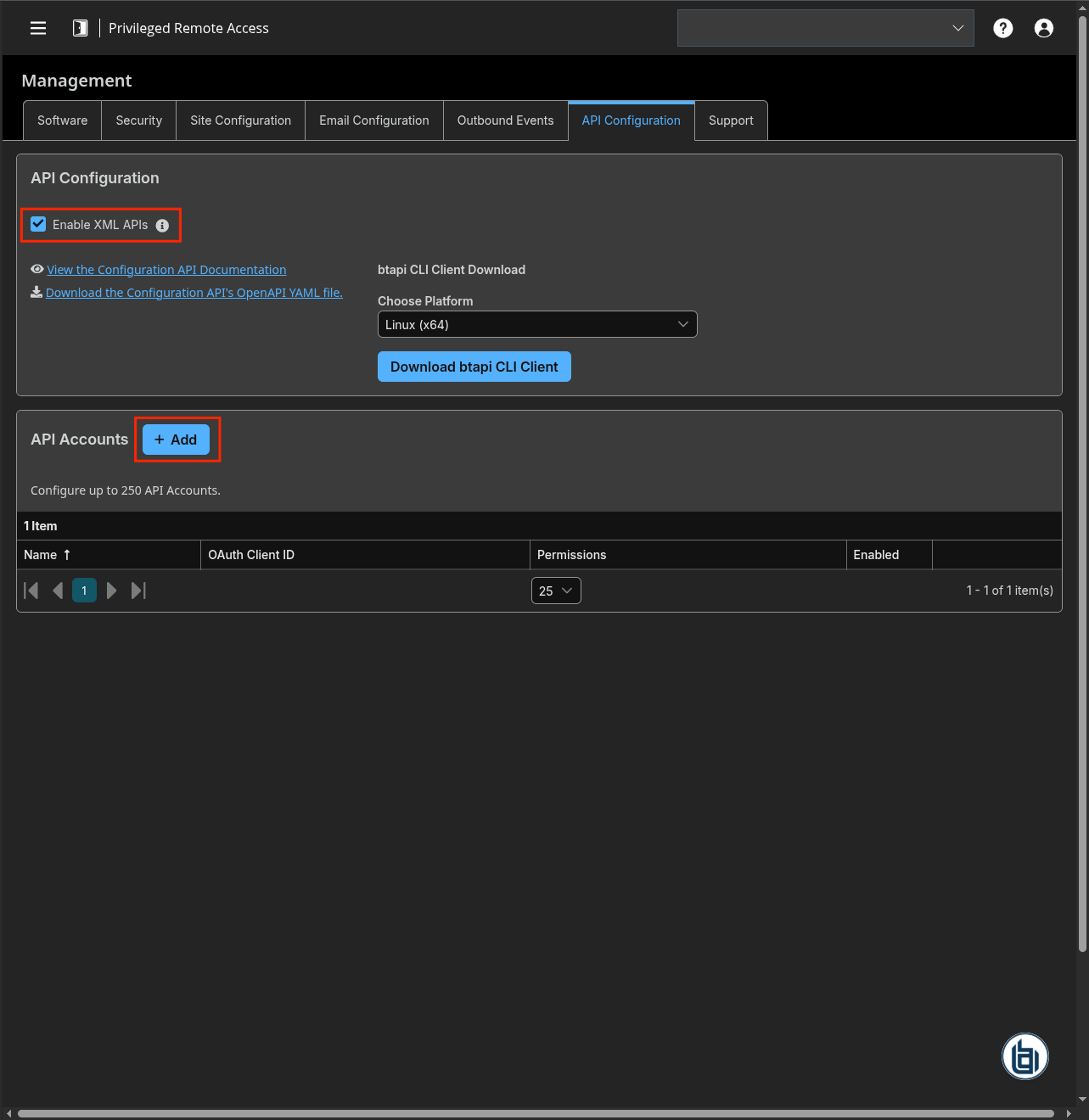
-
Check
Enable - Type a name for the API Account and add a comment (optional)
- Check
Reporting > Allow Access to Access Session Reports and Recordings - Copy the OAuth client ID and the OAuth client Secret
-
Click
Save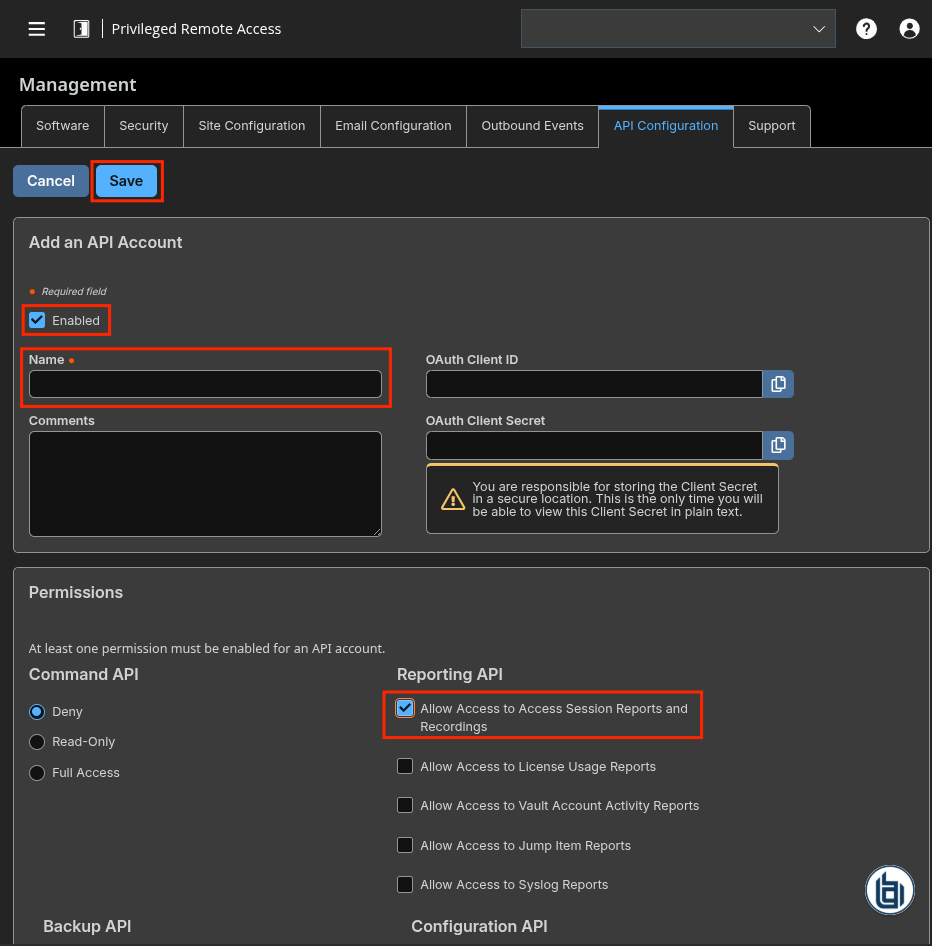
Create an intake
- Go to the intake page and create a new intake from the format BeyondTrust PRA Vault Account Activity.
- Set up the intake configuration with the Base URL, Client ID and Client Secret
Raw Events Samples
In this section, you will find examples of raw logs as generated natively by the source. These examples are provided to help integrators understand the data format before ingestion into Sekoia.io. It is crucial for setting up the correct parsing stages and ensuring that all relevant information is captured.
{
    "timestamp": "1773679963",
    "team": {
        "name": "Integration",
        "id": "1"
    },
    "performed_by": {
        "name": "John Doe",
        "type": "representative"
    },
    "event_type": "Conference Member Added",
    "data": {
        "private_ip": "1.2.3.4",
        "private_name": "John Doe",
        "public_ip": "4.3.2.1:41286",
        "public_name": "John Doe",
        "support_teams": "Integration",
        "os": "Unknown"
    }
}
{
    "timestamp": "1773679963",
    "team": {
        "name": "Integration",
        "id": "1"
    },
    "performed_by": {
        "name": "John Doe",
        "type": "representative"
    },
    "event_type": "Conference Member State Changed",
    "data": {
        "private_ip": "Unknown",
        "public_ip": "4.3.2.1:41286",
        "state": "connected"
    }
}
Detection section
The following section provides information for those who wish to learn more about the detection capabilities enabled by collecting this intake. It includes details about the built-in rule catalog, event categories, and ECS fields extracted from raw events. This is essential for users aiming to create custom detection rules, perform hunting activities, or pivot in the events page.
Related Built-in Rules
The following Sekoia.io built-in rules match the intake BeyondTrust PRA Team [BETA]. This documentation is updated automatically and is based solely on the fields used by the intake which are checked against our rules. This means that some rules will be listed but might not be relevant with the intake.
SEKOIA.IO x BeyondTrust PRA Team [BETA] on ATT&CK Navigator
Account Added To A Security Enabled Group
Detection in order to investigate who has added a specific Domain User in Domain Admins or Group Policy Creator Owners (Security event 4728)
- Effort: master
Account Removed From A Security Enabled Group
Detection in order to investigate who has removed a specific Domain User in Domain Admins or Group Policy Creator Owners (Security event 4729)
- Effort: master
Adidnsdump Enumeration
Detects use of the tool adidnsdump for enumeration and discovering DNS records.
- Effort: advanced
Advanced IP Scanner
Detects the use of Advanced IP Scanner. Seems to be a popular tool for ransomware groups.
- Effort: master
Autorun Keys Modification
Detects modification of autostart extensibility point (ASEP) in registry. Prerequisites are Logging for Registry events in the Sysmon configuration (events 12 and 13).
- Effort: master
Blue Mockingbird Malware
Attempts to detect system changes made by Blue Mockingbird
- Effort: elementary
Burp Suite Tool Detected
Burp Suite is a cybersecurity tool. When used as a proxy service, its purpose is to intercept packets and modify them to send them to the server. Burp Collaborator is a network service that Burp Suite uses to help discover many kinds of vulnerabilities (vulnerabilities scanner).
- Effort: intermediate
COM Hijack Via Sdclt
Detects changes to 'HKCU\Software\Classes\Folder\shell\open\command\DelegateExecute', to bypass UAC using 'sdclt.exe'.
- Effort: intermediate
CVE-2020-0688 Microsoft Exchange Server Exploit
Detects the exploitation of CVE-2020-0688. The POC exploit a .NET serialization vulnerability in the Exchange Control Panel (ECP) web page. The vulnerability is due to Microsoft Exchange Server not randomizing the keys on a per-installation basis resulting in them using the same validationKey and decryptionKey values. With knowledge of these, values an attacker can craft a special viewstate to use an OS command to be executed by NT_AUTHORITY\SYSTEM using .NET deserialization. To exploit this vulnerability, an attacker needs to leverage the credentials of an account it had already compromised to authenticate to OWA.
- Effort: elementary
CVE-2020-17530 Apache Struts RCE
Detects the exploitation of the Apache Struts RCE vulnerability (CVE-2020-17530).
- Effort: intermediate
CVE-2021-20021 SonicWall Unauthenticated Administrator Access
Detects the exploitation of SonicWall Unauthenticated Admin Access.
- Effort: advanced
CVE-2021-20023 SonicWall Arbitrary File Read
Detects Arbitrary File Read, which can be used with other vulnerabilities as a mean to obtain outputs generated by attackers, or sensitive data.
- Effort: advanced
CVE-2021-22893 Pulse Connect Secure RCE Vulnerability
Detects potential exploitation of the authentication by-pass vulnerability that can allow an unauthenticated user to perform remote arbitrary file execution on the Pulse Connect Secure gateway. It is highly recommended to apply the Pulse Secure mitigations and seach for indicators of compromise on affected servers if you are in doubt over the integrity of your Pulse Connect Secure product.
- Effort: intermediate
Certify Or Certipy
Detects the use of certify and certipy which are two different tools used to enumerate and abuse Active Directory Certificate Services.
- Effort: advanced
Cobalt Strike Default Beacons Names
Detects the default names of Cobalt Strike beacons / payloads.
- Effort: intermediate
Computer Account Deleted
Detects computer account deletion.
- Effort: master
Cookies Deletion
Detects when cookies are deleted by a suspicious process.
- Effort: master
Correlation Admin Files Checked On Network Share
Detects requests to multiple admin files on a network share. This could be an attacker performing reconnaissance steps on the system.
- Effort: advanced
Correlation Priv Esc Via Remote Thread
Detect a process that obtains system privilege via a remote thread
- Effort: intermediate
Credential Dump Tools Related Files
Detects processes or file names related to credential dumping tools and the dropped files they generate by default.
- Effort: advanced
Cron Files Alteration
Cron Files and Cron Directory alteration used by attacker for persistency or privilege escalation. To ensure full performance on this rule, auditbeat intake must be configure with the module file_integrity containing path mentionned in the pattern.
- Effort: advanced
Cryptomining
Detection of domain names potentially related to cryptomining activities.
- Effort: master
DHCP Callout DLL Installation
Detects the installation of a Callout DLL via CalloutDlls and CalloutEnabled parameter in Registry, which can be used to execute code in context of the DHCP server (restart required).
- Effort: intermediate
DLL Load via LSASS Registry Key
Detects a method to load DLL via LSASS process using an undocumented Registry key. Prerequisites are logging for Registry events. This can be done with Sysmon events 12, 13 and 14 and monitor SYSTEM\CurrentControlSet\Services.
- Effort: intermediate
DNS ServerLevelPluginDll Installation
Detects the installation of a plugin DLL via ServerLevelPluginDll parameter in Windows Registry or in command line, which can be used to execute code in context of the DNS server (restart required). To fully use this rule, prerequesites are logging for Registry events in the Sysmon configuration (events 12, 13 and 14).
- Effort: master
Detect requests to Konni C2 servers
This rule detects requests to Konni C2 servers. These patterns come from an analysis done in 2022, September.
- Effort: elementary
Disable .NET ETW Through COMPlus_ETWEnabled
Detects potential adversaries stopping ETW providers recording loaded .NET assemblies. Prerequisites are logging for Registry events or logging command line parameters (both is better). Careful for registry events, if SwiftOnSecurity's SYSMON default configuration is used, you will need to update the configuration to include the .NETFramework registry key path. Same issue with Windows 4657 EventID logging, the registry path must be specified.
- Effort: intermediate
Disable Task Manager Through Registry Key
Detects commands used to disable the Windows Task Manager by modifying the proper registry key in order to impair security tools. This technique is used by the Agent Tesla RAT, among others.
- Effort: elementary
Disable Workstation Lock
Registry change in order to disable the ability to lock the computer by using CTRL+ALT+DELETE or CTRL+L. This registry key does not exist by default. Its creation is suspicious and the value set to "1" means an activation. It has been used by FatalRAT, but other attacker/malware could probably use it. This rule needs Windows Registry changes (add,modification,deletion) logging which can be done through Sysmon Event IDs 12,13,14.
- Effort: elementary
Disabling SmartScreen Via Registry
Detects when a user disables smartscreen.
- Effort: elementary
Discord Suspicious Download
Discord is a messaging application. It allows users to create their own communities to share messages and attachments. Those attachments have little to no overview and can be downloaded by almost anyone, which has been abused by attackers to host malicious payloads.
- Effort: advanced
Domain Trust Created Or Removed
A trust was created or removed to a domain. An attacker could perform that in order to do lateral movement easily between domains or shutdown the ability of two domains to communicate.
- Effort: advanced
Dynamic DNS Contacted
Detect communication with dynamic dns domain. This kind of domain is often used by attackers. This rule can trigger false positive in non-controlled environment because dynamic dns is not always malicious.
- Effort: master
Exfiltration Domain
Detects traffic toward a domain flagged as a possible exfiltration vector.
- Effort: master
FlowCloud Malware
Detects FlowCloud malware from threat group TA410. This requires Windows Event registry logging.
- Effort: elementary
Formbook File Creation DB1
Detects specific file creation (Users*\AppData\Local\Temp\DB1) to store data to exfiltrate (Formbook behavior). Logging for Sysmon event 11 is usually used for this detection.
- Effort: intermediate
HTA Infection Chains
Detect the creation of a ZIP file and an HTA file as it is often used in infection chains. Furthermore it also detects the use of suspicious processes launched by explorer.exe combined with the creation of an HTA file, since it is also often used in infection chains (LNK - HTA for instance).
- Effort: advanced
HTML Smuggling Suspicious Usage
Based on several samples from different botnets, this rule aims at detecting HTML infection chain by looking for HTML created files followed by suspicious files being executed.
- Effort: advanced
HackTools Suspicious Names
Quick-win rule to detect the default process names or file names of several HackTools.
- Effort: advanced
ISO LNK Infection Chain
Detection of an ISO (or any other similar archive file) downloaded file, followed by a child-process of explorer, which is characteristic of an infection using an ISO containing an LNK file. For events with host.name.
- Effort: master
Impacket Addcomputer
Detects suspicious computer account creation based on impacket default pattern
- Effort: intermediate
Koadic MSHTML Command
Detects Koadic payload using MSHTML module
- Effort: intermediate
LanManServer Registry Modify
Detects when the LanManServer registry sub-key MaxMpxCt is modified. An attacker can modified this value to increase the maximum number of outstanding client requests supported.
- Effort: elementary
Leviathan Registry Key Activity
Detects registry key used by Leviathan APT in Malaysian focused campaign.
- Effort: elementary
Linux Masquerading Space After Name
This detection rule identifies a process created from an executable with a space appended to the end of the name.
- Effort: intermediate
Linux Shared Lib Injection Via Ldso Preload
Detect ld.so.preload modification for shared lib injection, technique used by attackers to load arbitrary code into process
- Effort: intermediate
Logon Scripts (UserInitMprLogonScript)
Detects creation or execution of UserInitMprLogonScript persistence method. The rule requires to log for process command lines and registry creations or update, which can be done using Sysmon Event IDs 1, 12, 13 and 14.
- Effort: advanced
Microsoft Defender Antivirus Disable SecurityHealth
The rule detects attempts to deactivate/disable Windows Defender SecurityHealth through command line, PowerShell scripts, and registry. To fully use this rule Windows Registry logging is recommended.
- Effort: intermediate
Microsoft Defender Antivirus Exclusion Configuration
Detects when an exclusion configuration change is made to Microsoft Windows Defender (adding either a path or process bypass)
- Effort: master
Microsoft Office Macro Security Registry Modifications
Detects registry changes allowing an attacker to make Microsoft Office products runs Macros without warning. Events are collected either from ETW/Sysmon/EDR depending of the integration.
- Effort: master
NTDS.dit File In Suspicious Directory
The file NTDS.dit is supposed to be located mainly in C:\Windows\NTDS. The rule checks whether the file is in a legitimate directory or not (through file creation events). This is usually really suspicious and could indicate an attacker trying copy the file to then look for users password hashes.
- Effort: advanced
NetNTLM Downgrade Attack
Detects changes in Windows Registry key (LMCompatibilityLevel, NTLMMinClientSec or RestrictSendingNTLMTraffic) which can lead to NetNTLM downgrade attack. The rule requires to log registry keys creation or update, it can be done using Sysmon's Event ID 12,13 and 14.
- Effort: intermediate
New DLL Added To AppCertDlls Registry Key
Dynamic-link libraries (DLLs) that are specified in the AppCertDLLs value in the Registry key can be abused to obtain persistence and privilege escalation by causing a malicious DLL to be loaded and run in the context of separate processes on the computer. Logging for Registry events is needed in the Sysmon configuration (events 12 and 13).
- Effort: intermediate
NjRat Registry Changes
Detects changes for the RUN registry key which happen when a victim is infected by NjRAT. Please note that even if NjRat is well-known for the behavior the rule catches, the rule is a bit larger and could catch other malwares.
- Effort: master
Njrat Registry Values
Detects specifis registry values that are related to njRat usage.
- Effort: intermediate
OceanLotus Registry Activity
Detects registry keys created in OceanLotus (also known as APT32) attack. Logging for Registry events is needed in the Sysmon configuration (events 12 and 13).
- Effort: intermediate
Office Application Startup Office Test
Detects the addition of office test registry that allows a user to specify an arbitrary DLL that will be executed everytime an Office application is started. An adversaries may abuse the Microsoft Office "Office Test" Registry key to obtain persistence on a compromised system.
- Effort: elementary
OneNote Embedded File
Detects creation or uses of OneNote embedded files with unusual extensions.
- Effort: intermediate
Package Manager Alteration
Package manager (eg: apt, yum) can be altered to install malicious software. To ensure full performance on this rule, auditbeat intake must be configure with the module file_integrity containing path mentionned in the pattern.
- Effort: advanced
Pandemic Windows Implant
Detects Pandemic Windows Implant through registry keys or specific command lines. Prerequisites: Logging for Registry events is needed, which can be done in the Sysmon configuration (events 12 and 13).
- Effort: master
Password Change On Directory Service Restore Mode (DSRM) Account
The Directory Service Restore Mode (DSRM) account is a local administrator account on Domain Controllers. Attackers may change the password to gain persistence.
- Effort: intermediate
PasswordDump SecurityXploded Tool
Detects the execution of the PasswordDump SecurityXploded Tool
- Effort: elementary
Phorpiex Process Masquerading
Detects specific process executable path used by the Phorpiex botnet to masquerade its system process network activity. It looks for a pattern of a system process executable name that is not legitimate and running from a folder that is created via a random algorithm 13-15 numbers long.
- Effort: elementary
Possible Malicious File Double Extension
Detects request to potential malicious file with double extension
- Effort: elementary
Possible Replay Attack
This event can be a sign of Kerberos replay attack or, among other things, network device configuration or routing problems.
- Effort: master
Powershell Winlogon Helper DLL
Detects modifications to the Winlogon Registry keys, which may cause Winlogon to load and execute malicious DLLs and/or executables.
- Effort: master
Process Trace Alteration
PTrace syscall provides a means by which one process ("tracer") may observe and control the execution of another process ("tracee") and examine and change the tracee's memory and registers. Attacker might want to abuse ptrace functionnality to analyse memory process. It requires to be admin or set ptrace_scope to 0 to allow all user to trace any process.
- Effort: advanced
ProxyShell Microsoft Exchange Suspicious Paths
Detects suspicious calls to Microsoft Exchange resources, in locations related to webshells observed in campaigns using this vulnerability.
- Effort: elementary
RDP Sensitive Settings Changed
Detects changes to RDP terminal service sensitive settings. Logging for registry events is needed in the Sysmon configuration (events 12 and 13).
- Effort: advanced
RTLO Character
Detects RTLO (Right-To-Left character) in file and process names.
- Effort: elementary
RUN Registry Key Created From Suspicious Folder
Detects the suspicious RUN keys created by software located in Download or temporary Outlook/Internet Explorer directories. Prerequisites are logging for Registry events, which can be done with Sysmon (events 12 and 13).
- Effort: advanced
Raccoon Stealer 2.0 Legitimate Third-Party DLL Download URL
Detects Raccoon Stealer 2.0 malware downloading legitimate third-party DLLs from its C2 server. These legitimate DLLs are used by the information stealer to collect data on the compromised hosts.
- Effort: elementary
RedMimicry Winnti Playbook Registry Manipulation
Detects actions caused by the RedMimicry Winnti playbook. Logging for Registry events is needed in the Sysmon configuration (events 12 and 13).
- Effort: elementary
Registry Persistence Using 'Image File Execution' And 'SilentProcessExit' Keys
Detects persistence registry keys. Logging for Registry events is needed, it can be done in the Sysmon configuration (events 12 and 13).
- Effort: master
Remote Access Tool Domain
Detects traffic toward a domain flagged as a Remote Administration Tool (RAT).
- Effort: master
Remote Monitoring and Management Software - AnyDesk
Detect artifacts related to the installation or execution of the Remote Monitoring and Management tool AnyDesk.
- Effort: master
Remote Monitoring and Management Software - Atera
Detect artifacts related to the installation or execution of the Remote Monitoring and Management tool Atera.
- Effort: master
SEKOIA.IO Intelligence Feed
Detect threats based on indicators of compromise (IOCs) collected by SEKOIA's Threat and Detection Research team.
- Effort: elementary
SSH Authorized Key Alteration
The file authorized_keys is used by SSH server to identify SSH keys that are authorized to connect to the host, alteration of one of those files might indicate a user compromision.
- Effort: advanced
Security Support Provider (SSP) Added to LSA Configuration
Detects the addition of a SSP to the registry. This is commonly used for persistence. Upon a reboot or API call, SSP DLLs gain access to encrypted and plaintext passwords stored in Windows. Logging for Registry events is needed for this rule to work (this can be done through Sysmon EventIDs 12 and 13).
- Effort: elementary
Sekoia.io EICAR Detection
Detects observables in Sekoia.io CTI tagged as EICAR, which are fake samples meant to test detection.
- Effort: master
Sticky Key Like Backdoor Usage
Detects the usage and installation of a backdoor that uses an option to register a malicious debugger for built-in tools that are accessible in the login screen. Prerequisites are logging for Registry events, which can be done with Sysmon (events 12 and 13).
- Effort: elementary
Stop Backup Services
Detects adversaries attempts to stop backups services or disable Windows previous files versions feature. This could be related to ransomware operators or legit administrators. This rule relies Windows command line logging and registry logging, and PowerShell (ID 4103, 4104).
- Effort: master
Suspicious ADSI-Cache Usage By Unknown Tool
Detects the usage of ADSI (LDAP) operations by tools. This may also detect tools like LDAPFragger. It needs file monitoring capabilities (Sysmon Event ID 11 with .sch file creation logging).
- Effort: advanced
Suspicious Download Links From Legitimate Services
Detects users clicking on Google docs links to download suspicious files. This technique was used a lot by Bazar Loader in the past.
- Effort: intermediate
Suspicious Driver Loaded
Checks the registry key for suspicious driver names that are vulnerable most of the time and loaded in a specific location by the KDU tool from hfiref0x. Some drivers are used by several SysInternals tools, which should have been whitelisted in the filter condition. The driver named "DBUtilDrv2" has been removed as it caused too many false positives unfortunately. It can be added under "drv_name" if more coverage is wanted. This rule needs registry key monitoring (can be done with Sysmon Event IDs 12,13 and 14).
- Effort: intermediate
Suspicious File Name
Detects suspicious file name possibly linked to malicious tool.
- Effort: advanced
Suspicious New Printer Ports In Registry
Detects a suspicious printer port creation in Registry that could be an attempt to exploit CVE-2020-1048. The CVE-2020-1048 consists in gaining persistence, privilege by abusing a flaw in the Print Spooler service to execute a payload whose path is stored in the registry key. To fully use this rule, prerequesites are logging for Registry events in the Sysmon configuration (events 12, 13 and 14).
- Effort: master
Suspicious PROCEXP152.sys File Created In Tmp
Detects the creation of the PROCEXP152.sys file in the application-data local temporary folder. This driver is used by Sysinternals Process Explorer but also by KDU (https://github.com/hfiref0x/KDU) or Ghost-In-The-Logs (https://github.com/bats3c/Ghost-In-The-Logs), which uses KDU. Note - Clever attackers may easily bypass this detection by just renaming the driver filename. Therefore just Medium-level and don't rely on it.
- Effort: advanced
Suspicious TOR Gateway
Detects suspicious TOR gateways. Gateways are often used by the victim to pay and decrypt the encrypted files without installing TOR. Tor intercepts the network traffic from one or more apps on user’s computer, usually the user web browser, and shuffles it through a number of randomly-chosen computers before passing it on to its destination. This disguises user location, and makes it harder for servers to pick him/her out on repeat visits, or to tie together separate visits to different sites, this making tracking and surveillance more difficult. Before a network packet starts its journey, user’s computer chooses a random list of relays and repeatedly encrypts the data in multiple layers, like an onion. Each relay knows only enough to strip off the outermost layer of encryption, before passing what’s left on to the next relay in the list.
- Effort: advanced
Suspicious URI Used In A Lazarus Campaign
Detects suspicious requests to a specific URI, usually on an .asp page. The website is often compromised.
- Effort: intermediate
Suspicious desktop.ini Action
Detects unusual processes accessing desktop.ini, which can be leveraged to alter how Explorer displays a folder's content (i.e. renaming files) without changing them on disk.
- Effort: advanced
Svchost Modification
Detects the modification of svchost in the registry.
- Effort: advanced
TOR Usage Generic Rule
Detects TOR usage globally, whether the IP is a destination or source. TOR is short for The Onion Router, and it gets its name from how it works. TOR intercepts the network traffic from one or more apps on user’s computer, usually the user web browser, and shuffles it through a number of randomly-chosen computers before passing it on to its destination. This disguises user location, and makes it harder for servers to pick him/her out on repeat visits, or to tie together separate visits to different sites, this making tracking and surveillance more difficult. Before a network packet starts its journey, user’s computer chooses a random list of relays and repeatedly encrypts the data in multiple layers, like an onion. Each relay knows only enough to strip off the outermost layer of encryption, before passing what’s left on to the next relay in the list.
- Effort: master
UAC Bypass Using Fodhelper
Detects UAC bypass method using Fodhelper after setting the proper registry key, used in particular by Agent Tesla (RAT) or more recently by Earth Luscas. Prerequisites are logging for Registry events in the Sysmon configuration (events 12 and 13).
- Effort: intermediate
UAC Bypass Via Sdclt
Detects changes to HKCU\Software\Classes\exefile\shell\runas\command\isolatedCommand by an attacker in order to bypass User Account Control (UAC)
- Effort: elementary
UAC Bypass via Event Viewer
Detects UAC bypass method using Windows event viewer.
- Effort: intermediate
Ursnif Registry Key
Detects a new registry key created by Ursnif malware. The rule requires to log for Registry Events, which can be done using SYsmon's Event IDs 12,13 and 14.
- Effort: elementary
Usage Of Sysinternals Tools
Detects the usage of Sysinternals Tools due to accepteula key being added to Registry. The rule detects it either from the command line usage or from the regsitry events. For the later prerequisite is logging for registry events in the Sysmon configuration (events 12 and 13).
- Effort: master
User Account Created
Detects user creation on windows servers, which shouldn't happen in an Active Directory environment. Apply this on your windows server logs and not on your DC logs. One default account defaultuser0 is excluded as only used during Windows set-up. This detection use Security Event ID 4720.
- Effort: master
User Account Deleted
Detects local user deletion
- Effort: master
WCE wceaux.dll Creation
Detects wceaux.dll creation while Windows Credentials Editor (WCE) is executed.
- Effort: intermediate
Webshell Creation
Detects possible webshell file creation. It requires File Creation monitoring, which can be done using Sysmon's Event ID 11. However the recommended SwiftOnSecurity configuration does not fully cover the needs for this rule, it needs to be updated with the proper file names extensions.
- Effort: master
Windows Credential Editor Registry Key
Detects the use of Windows Credential Editor (WCE). Prerequisites are logging for Registry events in the Sysmon configuration (events 12 and 13).
- Effort: elementary
Windows Defender Logging Modification Via Registry
Detects when the logging for defender is disabled in the registry.
- Effort: elementary
Windows Registry Persistence COM Key Linking
Detects COM object hijacking via TreatAs subkey. Logging for Registry events is needed in the Sysmon configuration with this kind of rule <TargetObject name="testr12" condition="end with">\TreatAs\(Default)</TargetObject>.
- Effort: master
ZIP LNK Infection Chain
Detection of an ZIP download followed by a child-process of explorer, followed by multiple Windows processes.This is widely used as an infection chain mechanism.
- Effort: advanced
Event Categories
The following table lists the data source offered by this integration.
| Data Source | Description |
|---|---|
Third-party application logs |
None |
In details, the following table denotes the type of events produced by this integration.
| Name | Values |
|---|---|
| Kind | `` |
| Category | configuration, file, registry, session |
| Type | change, delete, end, info, start |
Transformed Events Samples after Ingestion
This section demonstrates how the raw logs will be transformed by our parsers. It shows the extracted fields that will be available for use in the built-in detection rules and hunting activities in the events page. Understanding these transformations is essential for analysts to create effective detection mechanisms with custom detection rules and to leverage the full potential of the collected data.
{
    "message": "{\"timestamp\": \"1773679963\", \"team\": {\"name\": \"Integration\", \"id\": \"1\"}, \"performed_by\": {\"name\": \"John Doe\", \"type\": \"representative\"}, \"event_type\": \"Conference Member Added\", \"data\": {\"private_ip\": \"1.2.3.4\", \"private_name\": \"John Doe\", \"public_ip\": \"4.3.2.1:41286\", \"public_name\": \"John Doe\", \"support_teams\": \"Integration\", \"os\": \"Unknown\"}}",
    "event": {
        "category": [
            "configuration"
        ],
        "code": "Conference Member Added",
        "dataset": "Team",
        "type": [
            "change"
        ]
    },
    "@timestamp": "2026-03-16T16:52:43Z",
    "beyondtrust": {
        "pra": {
            "performed_by": {
                "type": "representative"
            }
        }
    },
    "group": {
        "id": "1",
        "name": "Integration"
    },
    "observer": {
        "product": "Privileged Remote Access",
        "vendor": "BeyondTrust"
    },
    "related": {
        "ip": [
            "1.2.3.4",
            "4.3.2.1"
        ],
        "user": [
            "John Doe"
        ]
    },
    "source": {
        "address": "1.2.3.4",
        "ip": "1.2.3.4",
        "nat": {
            "ip": "4.3.2.1",
            "port": 41286
        }
    },
    "user": {
        "name": "John Doe"
    }
}
{
    "message": "{\"timestamp\": \"1773679963\", \"team\": {\"name\": \"Integration\", \"id\": \"1\"}, \"performed_by\": {\"name\": \"John Doe\", \"type\": \"representative\"}, \"event_type\": \"Conference Member State Changed\", \"data\": {\"private_ip\": \"Unknown\", \"public_ip\": \"4.3.2.1:41286\", \"state\": \"connected\"}}",
    "event": {
        "category": [
            "configuration"
        ],
        "code": "Conference Member State Changed",
        "dataset": "Team",
        "type": [
            "change"
        ]
    },
    "@timestamp": "2026-03-16T16:52:43Z",
    "beyondtrust": {
        "pra": {
            "performed_by": {
                "type": "representative"
            },
            "state": "connected"
        }
    },
    "group": {
        "id": "1",
        "name": "Integration"
    },
    "observer": {
        "product": "Privileged Remote Access",
        "vendor": "BeyondTrust"
    },
    "related": {
        "ip": [
            "4.3.2.1"
        ],
        "user": [
            "John Doe"
        ]
    },
    "source": {
        "nat": {
            "ip": "4.3.2.1",
            "port": 41286
        }
    },
    "user": {
        "name": "John Doe"
    }
}
Extracted Fields
The following table lists the fields that are extracted, normalized under the ECS format, analyzed and indexed by the parser. It should be noted that infered fields are not listed.
| Name | Type | Description |
|---|---|---|
@timestamp |
date |
Date/time when the event originated. |
beyondtrust.pra.owner |
keyword |
|
beyondtrust.pra.performed_by.type |
keyword |
|
beyondtrust.pra.state |
keyword |
|
event.action |
keyword |
The action captured by the event. |
event.category |
keyword |
Event category. The second categorization field in the hierarchy. |
event.code |
keyword |
Identification code for this event. |
event.dataset |
keyword |
Name of the dataset. |
event.reason |
keyword |
Reason why this event happened, according to the source |
event.type |
keyword |
Event type. The third categorization field in the hierarchy. |
file.name |
keyword |
Name of the file including the extension, without the directory. |
file.path |
keyword |
Full path to the file, including the file name. |
group.id |
keyword |
Unique identifier for the group on the system/platform. |
group.name |
keyword |
Name of the group. |
host.name |
keyword |
Name of the host. |
host.os.full |
keyword |
Operating system name, including the version or code name. |
observer.product |
keyword |
The product name of the observer. |
observer.vendor |
keyword |
Vendor name of the observer. |
process.executable |
keyword |
Absolute path to the process executable. |
process.title |
keyword |
Process title. |
registry.data.strings |
wildcard |
List of strings representing what was written to the registry. |
registry.data.type |
keyword |
Standard registry type for encoding contents |
registry.key |
keyword |
Hive-relative path of keys. |
registry.value |
keyword |
Name of the value written. |
source.ip |
ip |
IP address of the source. |
source.nat.ip |
ip |
Source NAT ip |
source.nat.port |
long |
Source NAT port |
url.original |
wildcard |
Unmodified original url as seen in the event source. |
user.name |
keyword |
Short name or login of the user. |
user.target.id |
keyword |
Unique identifier of the user. |
user.target.name |
keyword |
Short name or login of the user. |
For more information on the Intake Format, please find the code of the Parser, Smart Descriptions, and Supported Events here.