BeyondTrust PRA Syslog
Overview
BeyondTrust Privileged Remote Access enables secure, controlled remote access to critical systems for employees and vendors, focusing on protecting privileged credentials and sessions.
Warning
This format is currently in beta. We highly value your feedback to improve its performance.
- Vendor: BeyondTrust
- Supported environment: SaaS
- Detection based on: Telemetry
- Supported application or feature:
- Syslog events:
- Authentication (login, token)
- Configuration changes (setting_changed)
- User management (user_changed)
- API account management (api_account_added)
- Syslog events:
Configure
How to create an API token
-
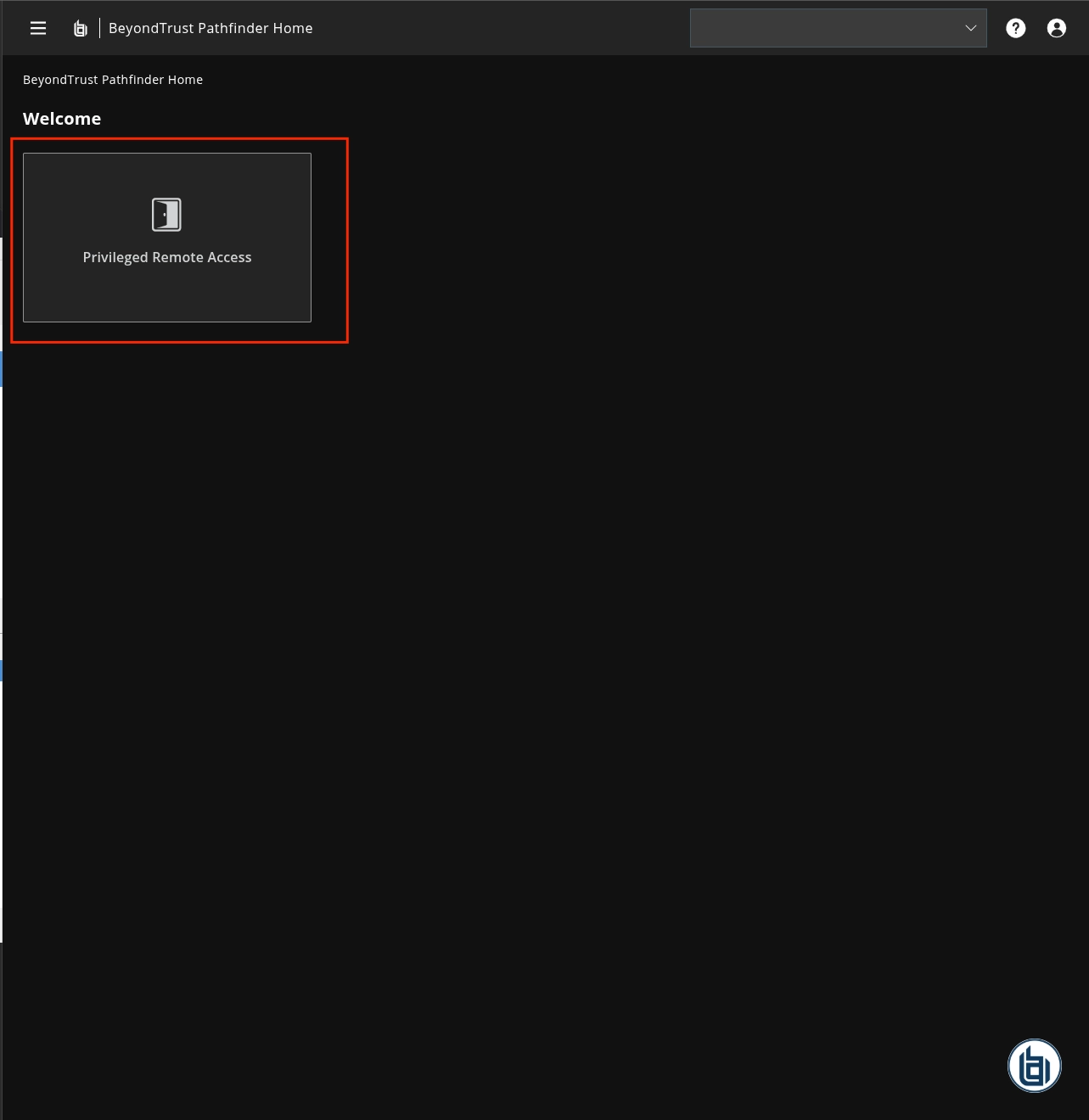
Log in the BeyondTrust Privileged Remote Access console
-
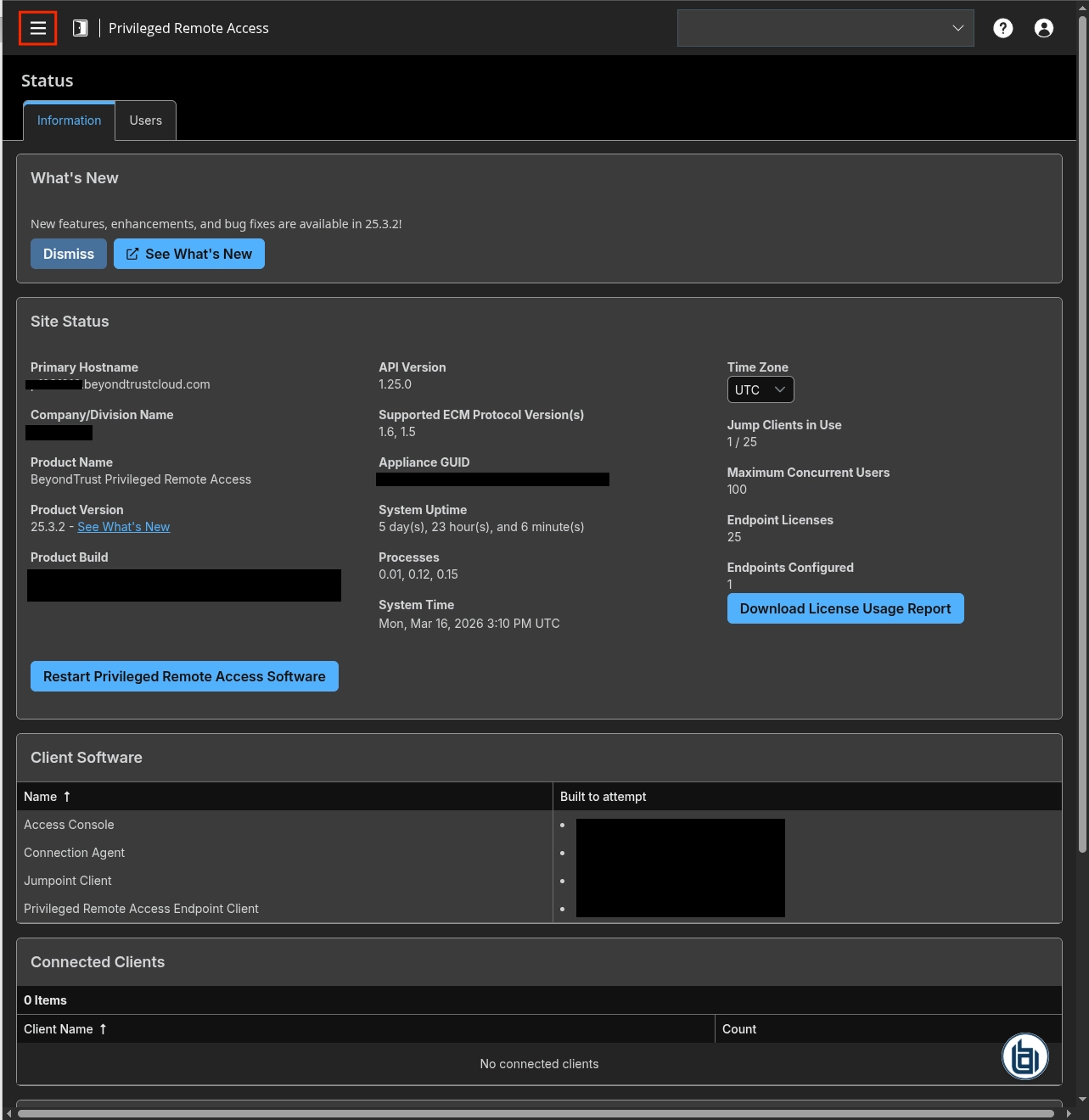
Click the Burger menu
-
On the left panel, click
Management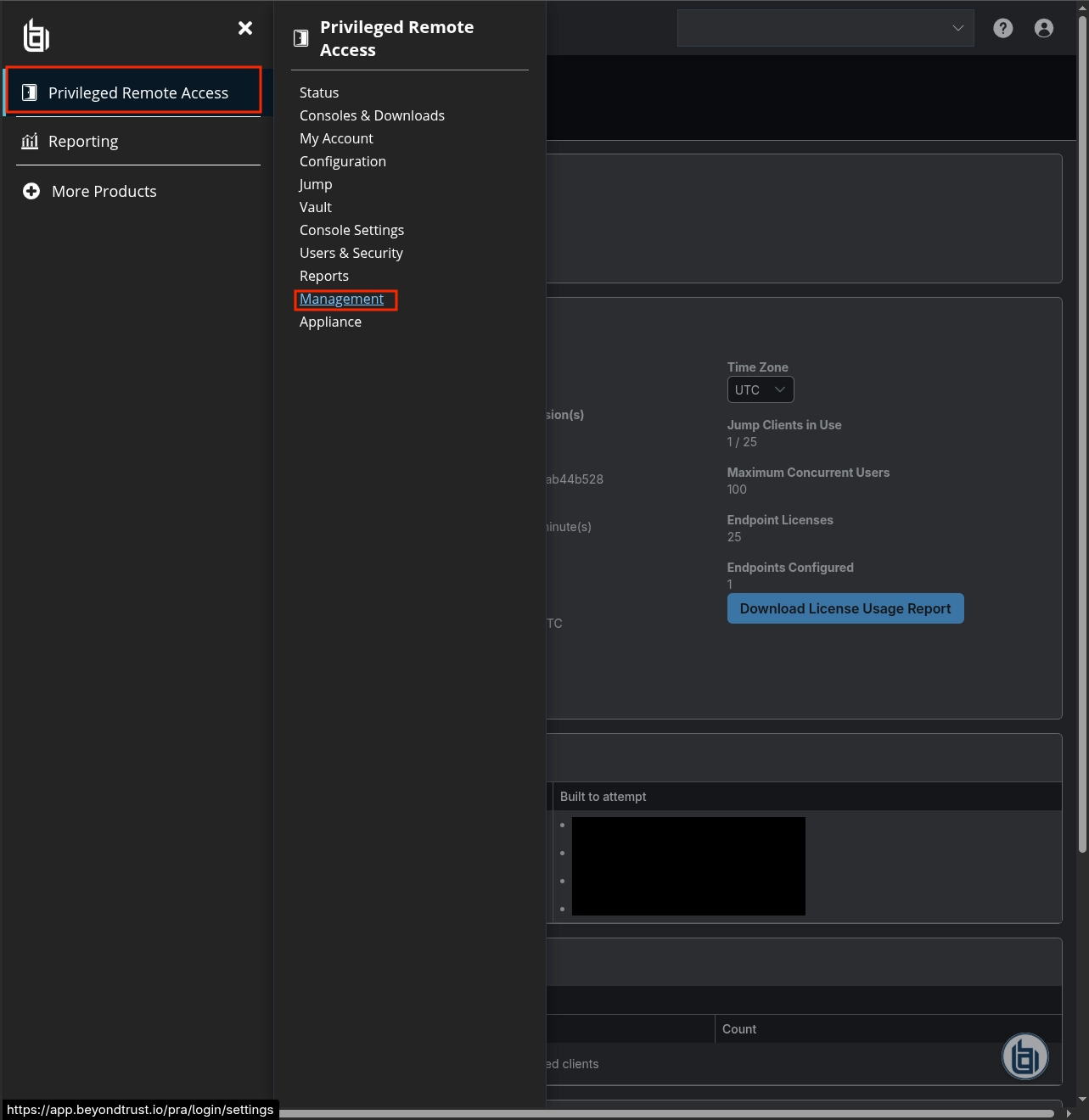
-
Click
API Configuration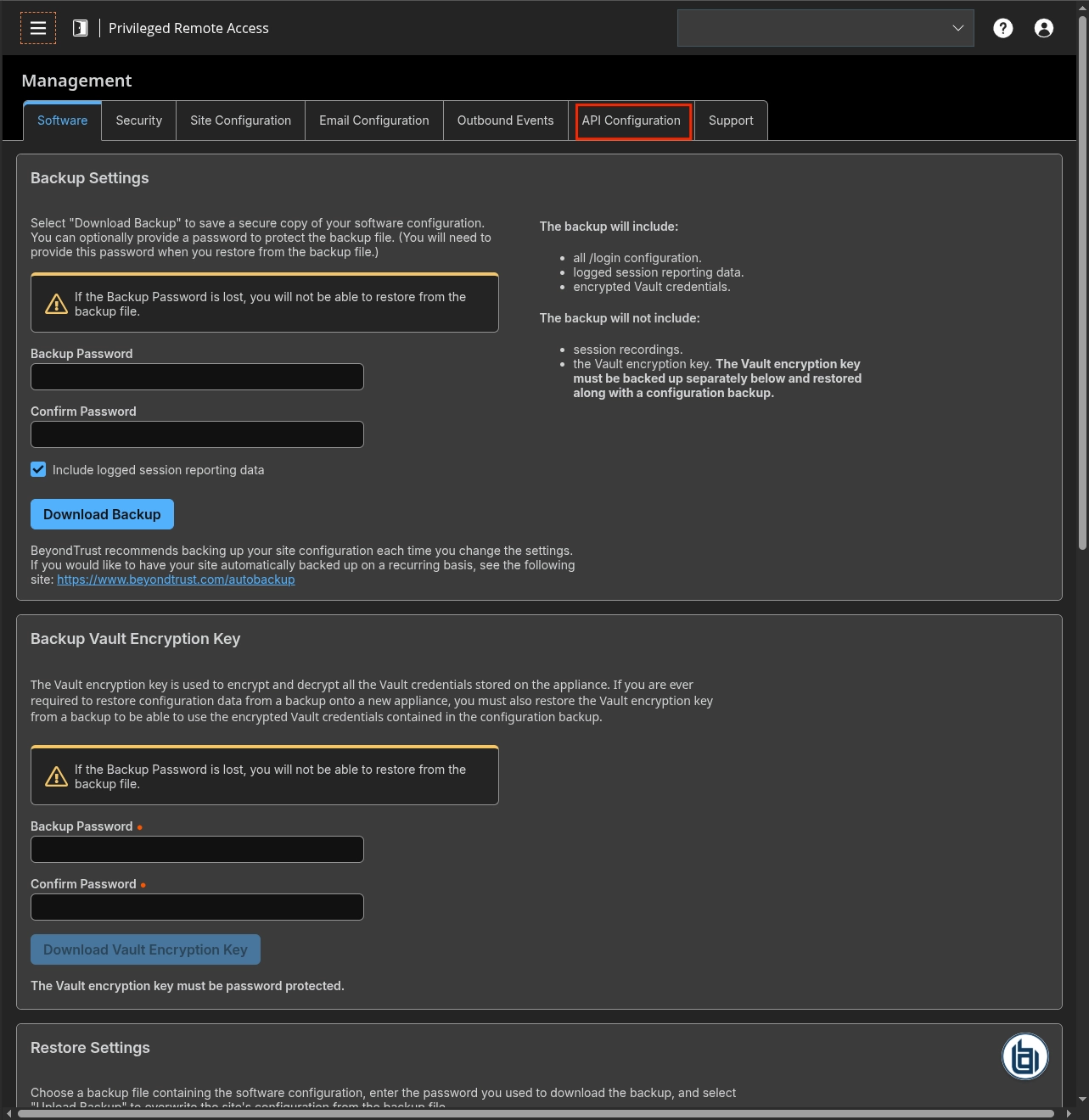
-
Check
Enable XML APIand click+ Add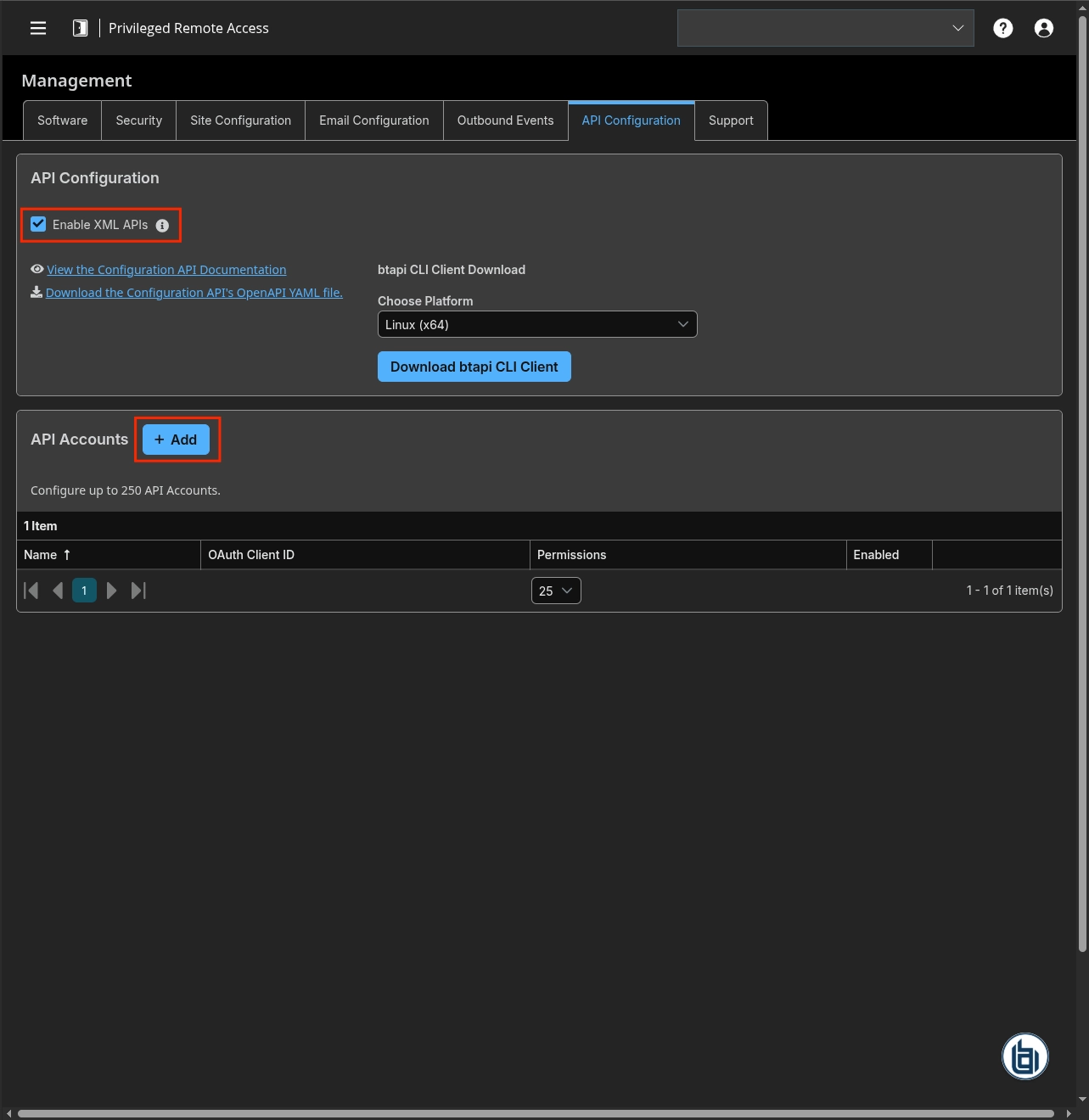
-
Check
Enable - Type a name for the API Account and add a comment (optional)
- Check
Reporting > Allow Access to Syslog Reports - Copy the OAuth client ID and the OAuth client Secret
-
Click
Save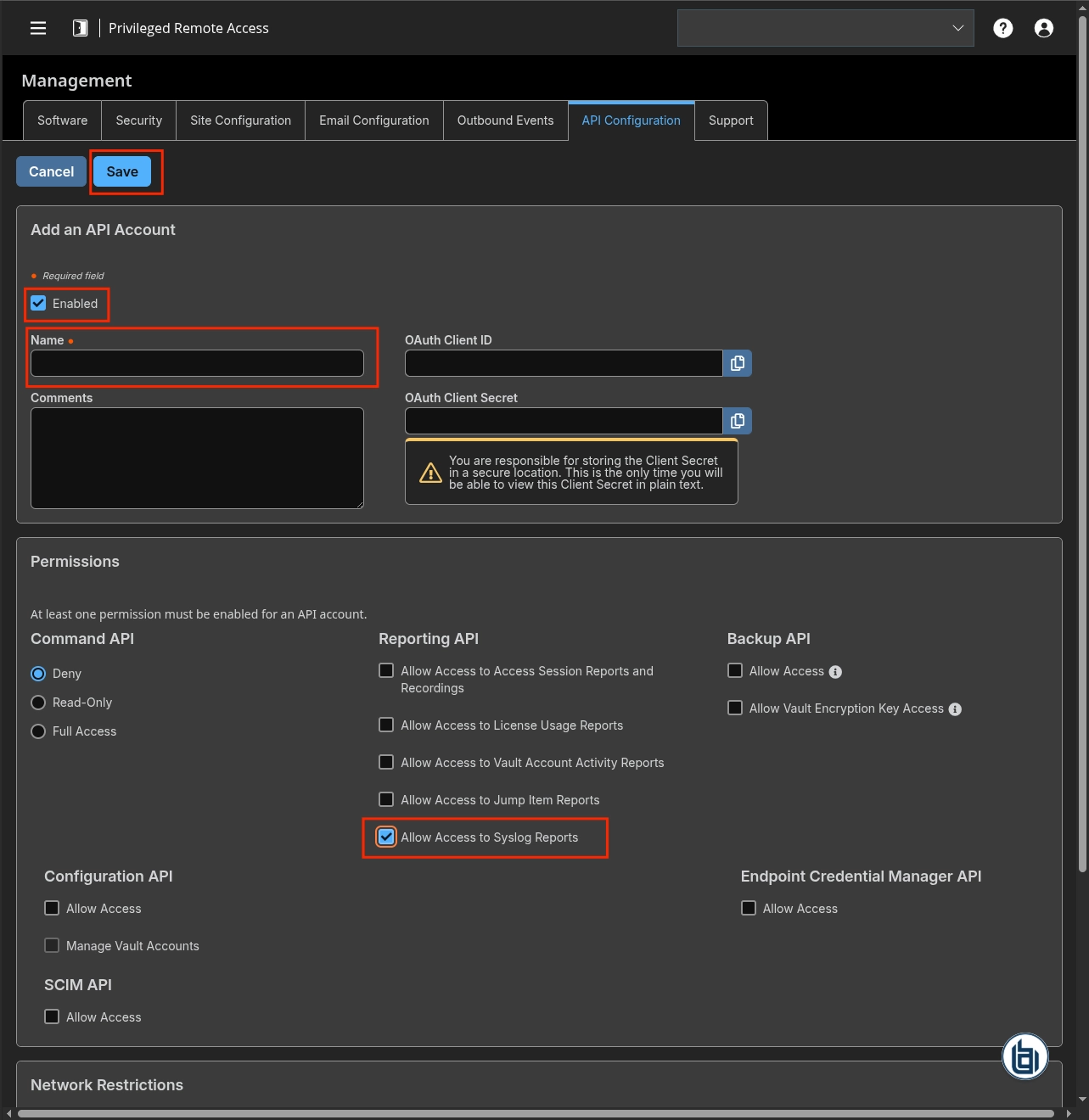
Instruction on Sekoia
Raw Events Samples
In this section, you will find examples of raw logs as generated natively by the source. These examples are provided to help integrators understand the data format before ingestion into Sekoia.io. It is crucial for setting up the correct parsing stages and ensuring that all relevant information is captured.
site=test.beyondtrustcloud.com;when=1773657955;who=John Doe (john.doe@example.com);who_ip=203.0.113.20;event=api_account_added;client_id=11111111111111111111111111111111111;client_secret=***NEW***;comments=;ecm_group=1;enabled=1;id=1;internal=0;ip_addresses=;name=Integration;permissions:backup=0;permissions:command=deny;permissions:configuration=0;permissions:configuration_vault_account=0;permissions:ecm=0;permissions:real_time_state=0;permissions:reporting:archive=0;permissions:reporting:jump_item=1;permissions:reporting:license=0;permissions:reporting:support=1;permissions:reporting:syslog=1;permissions:reporting:vault=1;permissions:scim=0;permissions:vault_backup=0
site=test.beyondtrustcloud.com;when=1773658193;who=Sekoia.io Integration (11111111111111111111111111111111111);who_ip=198.51.100.10;event=token;target=web/api;status=success
site=test.beyondtrustcloud.com;when=1773161700;who=JOHN DOE (john.doe@example.org);who_ip=192.0.2.1;event=setting_changed;old_api=0;new_api=1
site=test.beyondtrustcloud.com;when=1773648636;who=Jane Doe (jane.doe@example.com);who_ip=198.51.100.5;event=user_changed;old_account:comments=;old_account:disabled=0;old_account:expiration=never;old_account:will_expire=0;old_provider:name=3;old_provider:id=BeyondTrust-Pathfinder;old_username=jane.doe@example.com;old_account:created=2026-03-16 08:10:27.506202;old_permissions:jump_item_role:default:id=2;old_permissions:jump_item_role:default:name=Start Sessions Only;old_display_number=2;old_account:email:address=jane.doe@example.com;old_account:email:locale=en-us;old_account:failed_logins=0;old_id=2;old_login_schedule:timezone=UTC;old_permissions:jump_item_role:teams:id=1;old_permissions:jump_item_role:teams:name=No Access;old_permissions:jump_item_role:personal:id=3;old_permissions:jump_item_role:personal:name=Administrator;old_public_display_name=Jane Doe;old_permissions:jump_item_role:system:id=1;old_permissions:jump_item_role:system:name=No Access;old_permissions:admin=1;old_permissions:support:accept_team_sessions=0;new_permissions:support:accept_team_sessions=1
Detection section
The following section provides information for those who wish to learn more about the detection capabilities enabled by collecting this intake. It includes details about the built-in rule catalog, event categories, and ECS fields extracted from raw events. This is essential for users aiming to create custom detection rules, perform hunting activities, or pivot in the events page.
Related Built-in Rules
The following Sekoia.io built-in rules match the intake BeyondTrust Privileged Remote Access Syslog [BETA]. This documentation is updated automatically and is based solely on the fields used by the intake which are checked against our rules. This means that some rules will be listed but might not be relevant with the intake.
SEKOIA.IO x BeyondTrust Privileged Remote Access Syslog [BETA] on ATT&CK Navigator
Cryptomining
Detection of domain names potentially related to cryptomining activities.
- Effort: master
Dynamic DNS Contacted
Detect communication with dynamic dns domain. This kind of domain is often used by attackers. This rule can trigger false positive in non-controlled environment because dynamic dns is not always malicious.
- Effort: master
Exfiltration Domain
Detects traffic toward a domain flagged as a possible exfiltration vector.
- Effort: master
Remote Access Tool Domain
Detects traffic toward a domain flagged as a Remote Administration Tool (RAT).
- Effort: master
SEKOIA.IO Intelligence Feed
Detect threats based on indicators of compromise (IOCs) collected by SEKOIA's Threat and Detection Research team.
- Effort: elementary
Sekoia.io EICAR Detection
Detects observables in Sekoia.io CTI tagged as EICAR, which are fake samples meant to test detection.
- Effort: master
TOR Usage Generic Rule
Detects TOR usage globally, whether the IP is a destination or source. TOR is short for The Onion Router, and it gets its name from how it works. TOR intercepts the network traffic from one or more apps on user’s computer, usually the user web browser, and shuffles it through a number of randomly-chosen computers before passing it on to its destination. This disguises user location, and makes it harder for servers to pick him/her out on repeat visits, or to tie together separate visits to different sites, this making tracking and surveillance more difficult. Before a network packet starts its journey, user’s computer chooses a random list of relays and repeatedly encrypts the data in multiple layers, like an onion. Each relay knows only enough to strip off the outermost layer of encryption, before passing what’s left on to the next relay in the list.
- Effort: master
Event Categories
The following table lists the data source offered by this integration.
| Data Source | Description |
|---|---|
Authentication logs |
BeyondTrust PRA syslog provides authentication events |
Application logs |
BeyondTrust PRA syslog provides administrative and audit events |
In details, the following table denotes the type of events produced by this integration.
| Name | Values |
|---|---|
| Kind | `` |
| Category | authentication, configuration |
| Type | change, creation, start |
Transformed Events Samples after Ingestion
This section demonstrates how the raw logs will be transformed by our parsers. It shows the extracted fields that will be available for use in the built-in detection rules and hunting activities in the events page. Understanding these transformations is essential for analysts to create effective detection mechanisms with custom detection rules and to leverage the full potential of the collected data.
{
    "message": "site=test.beyondtrustcloud.com;when=1773657955;who=John Doe (john.doe@example.com);who_ip=203.0.113.20;event=api_account_added;client_id=11111111111111111111111111111111111;client_secret=***NEW***;comments=;ecm_group=1;enabled=1;id=1;internal=0;ip_addresses=;name=Integration;permissions:backup=0;permissions:command=deny;permissions:configuration=0;permissions:configuration_vault_account=0;permissions:ecm=0;permissions:real_time_state=0;permissions:reporting:archive=0;permissions:reporting:jump_item=1;permissions:reporting:license=0;permissions:reporting:support=1;permissions:reporting:syslog=1;permissions:reporting:vault=1;permissions:scim=0;permissions:vault_backup=0",
    "event": {
        "action": "api_account_added",
        "category": [
            "configuration"
        ],
        "dataset": "syslog",
        "type": [
            "creation"
        ]
    },
    "@timestamp": "2026-03-16T10:45:55Z",
    "beyondtrust": {
        "pra": {
            "syslog": {
                "client_id": "11111111111111111111111111111111111",
                "enabled": "1",
                "name": "Integration",
                "reporting": {
                    "archive": "0",
                    "jump_item": "1",
                    "license": "0",
                    "support": "1",
                    "syslog": "1",
                    "vault": "1"
                }
            }
        }
    },
    "host": {
        "name": "test.beyondtrustcloud.com"
    },
    "observer": {
        "product": "Privileged Remote Access",
        "vendor": "BeyondTrust"
    },
    "related": {
        "ip": [
            "203.0.113.20"
        ]
    },
    "source": {
        "address": "203.0.113.20",
        "ip": "203.0.113.20"
    },
    "user": {
        "full_name": "John Doe",
        "id": "john.doe@example.com"
    }
}
{
    "message": "site=test.beyondtrustcloud.com;when=1773658193;who=Sekoia.io Integration (11111111111111111111111111111111111);who_ip=198.51.100.10;event=token;target=web/api;status=success",
    "event": {
        "action": "token",
        "category": [
            "authentication"
        ],
        "dataset": "syslog",
        "outcome": "success",
        "reason": "web/api",
        "type": [
            "start"
        ]
    },
    "@timestamp": "2026-03-16T10:49:53Z",
    "host": {
        "name": "test.beyondtrustcloud.com"
    },
    "observer": {
        "product": "Privileged Remote Access",
        "vendor": "BeyondTrust"
    },
    "related": {
        "ip": [
            "198.51.100.10"
        ]
    },
    "source": {
        "address": "198.51.100.10",
        "ip": "198.51.100.10"
    },
    "user": {
        "full_name": "Sekoia.io Integration",
        "id": "11111111111111111111111111111111111"
    }
}
{
    "message": "site=test.beyondtrustcloud.com;when=1773161700;who=JOHN DOE (john.doe@example.org);who_ip=192.0.2.1;event=setting_changed;old_api=0;new_api=1",
    "event": {
        "action": "setting_changed",
        "category": [
            "configuration"
        ],
        "dataset": "syslog",
        "type": [
            "change"
        ]
    },
    "@timestamp": "2026-03-10T16:55:00Z",
    "host": {
        "name": "test.beyondtrustcloud.com"
    },
    "observer": {
        "product": "Privileged Remote Access",
        "vendor": "BeyondTrust"
    },
    "related": {
        "ip": [
            "192.0.2.1"
        ]
    },
    "source": {
        "address": "192.0.2.1",
        "ip": "192.0.2.1"
    },
    "user": {
        "full_name": "JOHN DOE",
        "id": "john.doe@example.org"
    }
}
{
    "message": "site=test.beyondtrustcloud.com;when=1773648636;who=Jane Doe (jane.doe@example.com);who_ip=198.51.100.5;event=user_changed;old_account:comments=;old_account:disabled=0;old_account:expiration=never;old_account:will_expire=0;old_provider:name=3;old_provider:id=BeyondTrust-Pathfinder;old_username=jane.doe@example.com;old_account:created=2026-03-16 08:10:27.506202;old_permissions:jump_item_role:default:id=2;old_permissions:jump_item_role:default:name=Start Sessions Only;old_display_number=2;old_account:email:address=jane.doe@example.com;old_account:email:locale=en-us;old_account:failed_logins=0;old_id=2;old_login_schedule:timezone=UTC;old_permissions:jump_item_role:teams:id=1;old_permissions:jump_item_role:teams:name=No Access;old_permissions:jump_item_role:personal:id=3;old_permissions:jump_item_role:personal:name=Administrator;old_public_display_name=Jane Doe;old_permissions:jump_item_role:system:id=1;old_permissions:jump_item_role:system:name=No Access;old_permissions:admin=1;old_permissions:support:accept_team_sessions=0;new_permissions:support:accept_team_sessions=1",
    "event": {
        "action": "user_changed",
        "category": [
            "configuration"
        ],
        "dataset": "syslog",
        "type": [
            "change"
        ]
    },
    "@timestamp": "2026-03-16T08:10:36Z",
    "beyondtrust": {
        "pra": {
            "syslog": {
                "admin": "1"
            }
        }
    },
    "host": {
        "name": "test.beyondtrustcloud.com"
    },
    "observer": {
        "product": "Privileged Remote Access",
        "vendor": "BeyondTrust"
    },
    "related": {
        "ip": [
            "198.51.100.5"
        ]
    },
    "source": {
        "address": "198.51.100.5",
        "ip": "198.51.100.5"
    },
    "user": {
        "changes": {
            "user": {
                "email": "jane.doe@example.com",
                "full_name": "Jane Doe",
                "roles": [
                    "Administrator",
                    "Start Sessions Only"
                ]
            }
        },
        "full_name": "Jane Doe",
        "id": "jane.doe@example.com"
    }
}
Extracted Fields
The following table lists the fields that are extracted, normalized under the ECS format, analyzed and indexed by the parser. It should be noted that infered fields are not listed.
| Name | Type | Description |
|---|---|---|
@timestamp |
date |
Date/time when the event originated. |
beyondtrust.pra.syslog.admin |
keyword |
Whether the user has admin permissions |
beyondtrust.pra.syslog.client_id |
keyword |
The API client identifier |
beyondtrust.pra.syslog.enabled |
keyword |
Whether the entity is enabled |
beyondtrust.pra.syslog.name |
keyword |
The name of the entity |
beyondtrust.pra.syslog.reporting.archive |
keyword |
Archive reporting permission |
beyondtrust.pra.syslog.reporting.jump_item |
keyword |
Jump item reporting permission |
beyondtrust.pra.syslog.reporting.license |
keyword |
License reporting permission |
beyondtrust.pra.syslog.reporting.support |
keyword |
Support reporting permission |
beyondtrust.pra.syslog.reporting.syslog |
keyword |
Syslog reporting permission |
beyondtrust.pra.syslog.reporting.vault |
keyword |
Vault reporting permission |
event.action |
keyword |
The action captured by the event. |
event.category |
keyword |
Event category. The second categorization field in the hierarchy. |
event.dataset |
keyword |
Name of the dataset. |
event.outcome |
keyword |
The outcome of the event. The lowest level categorization field in the hierarchy. |
event.reason |
keyword |
Reason why this event happened, according to the source |
event.type |
keyword |
Event type. The third categorization field in the hierarchy. |
host.name |
keyword |
Name of the host. |
observer.product |
keyword |
The product name of the observer. |
observer.vendor |
keyword |
Vendor name of the observer. |
source.ip |
ip |
IP address of the source. |
user.changes.user.email |
keyword |
The previous email address of the changed user |
user.changes.user.full_name |
keyword |
The previous display name of the changed user |
user.changes.user.roles |
keyword |
The previous roles assigned to the changed user |
user.full_name |
keyword |
User's full name, if available. |
user.id |
keyword |
Unique identifier of the user. |
For more information on the Intake Format, please find the code of the Parser, Smart Descriptions, and Supported Events here.