BeyondTrust PRA Vault Account Activity
Overview
BeyondTrust Privileged Remote Access enables secure, controlled remote access to critical systems for employees and vendors, focusing on protecting privileged credentials and sessions.
This integration collects the VaultAccountActivity logs.
Warning
Important note - This format is currently in beta. We highly value your feedback to improve its performance.
- Vendor: BeyondTrust
- Supported environment: SaaS
- Detection based on: Telemetry
- Supported application or feature:
- Vault Account Activity
Configure
How to create an API token
-
Log in the BeyondTrust Privileged Remote Access console
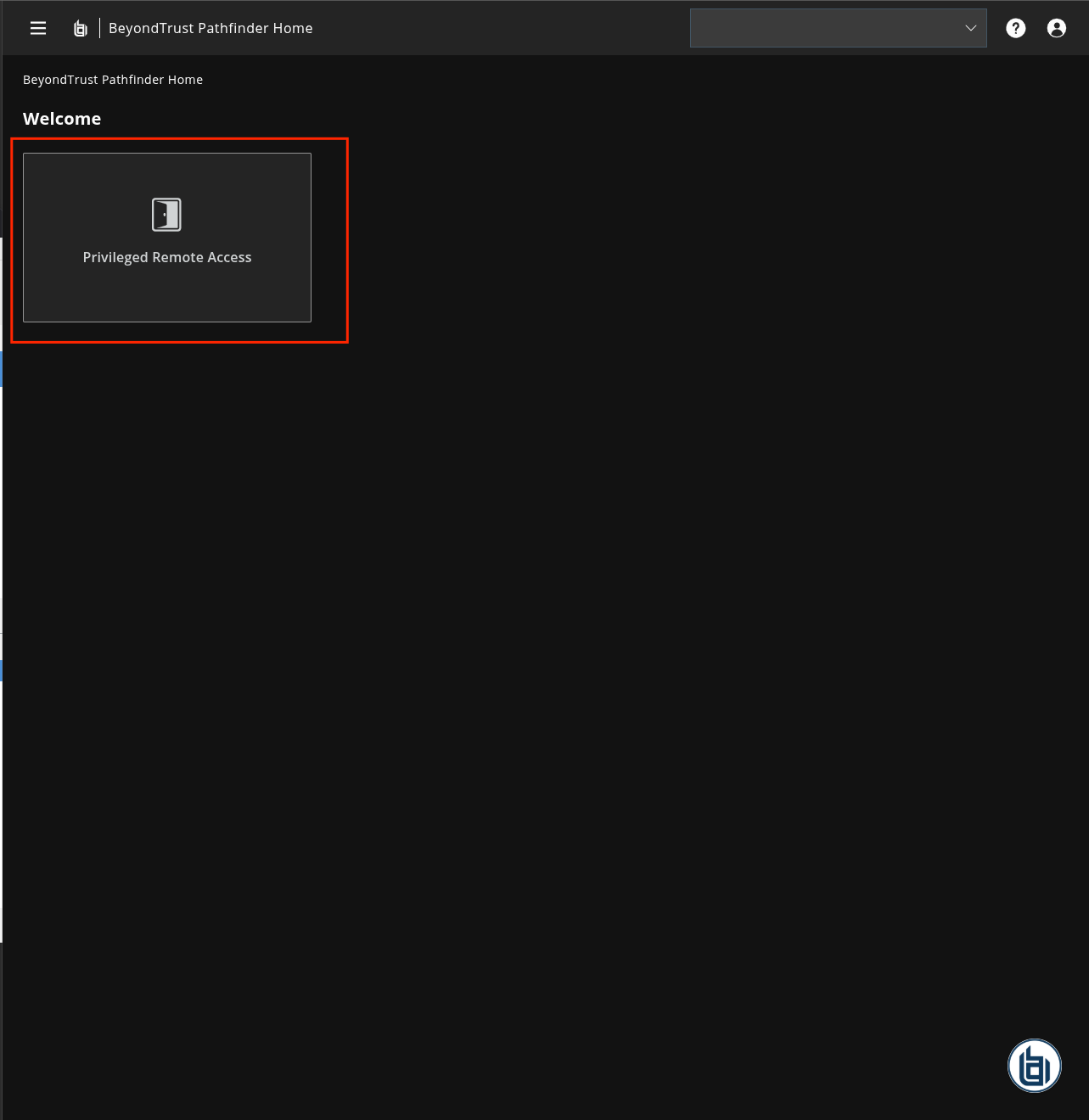
-
Click the Burger menu
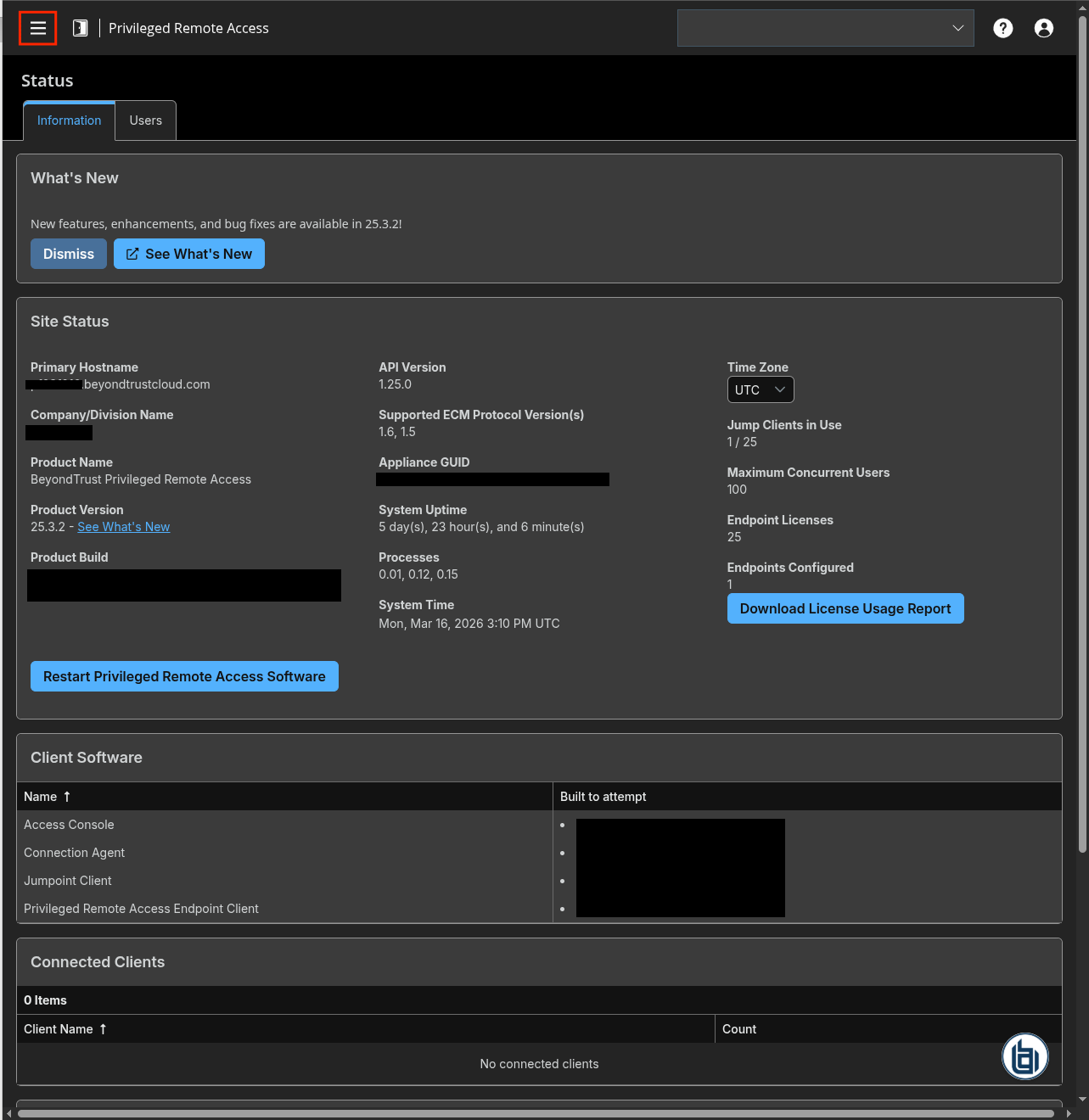
-
On the left panel, click
Management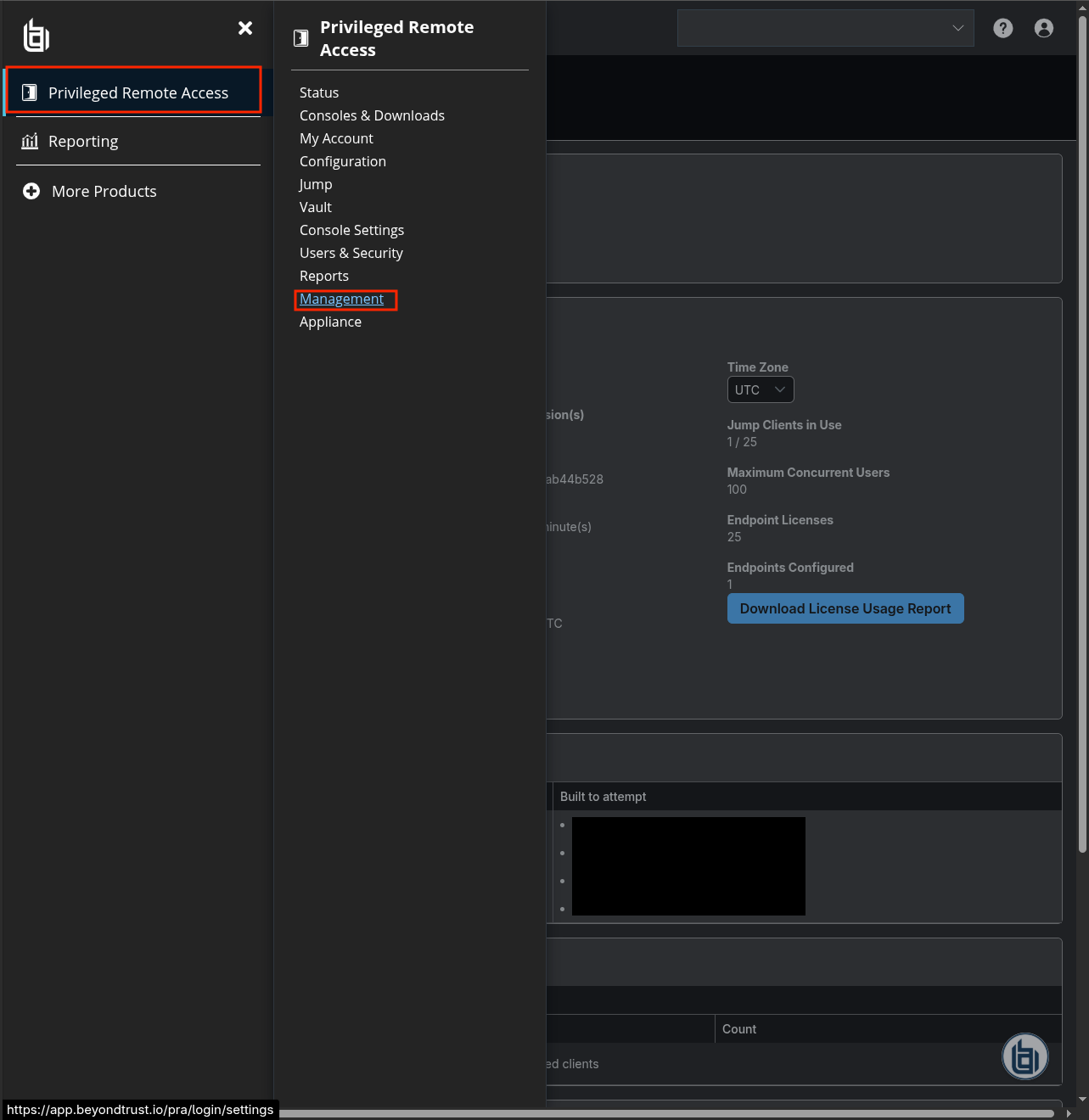
-
Click
API Configuration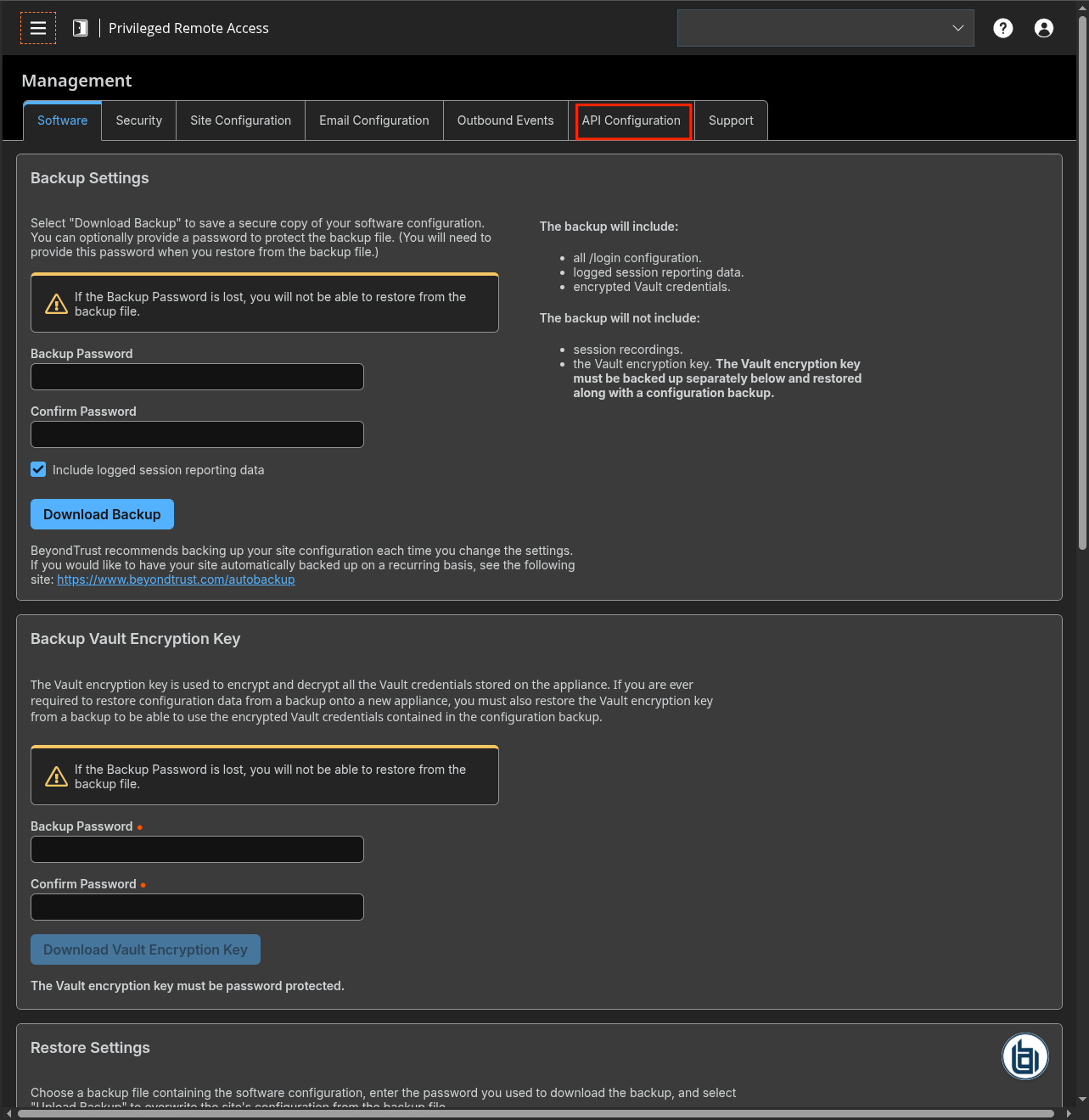
-
Check
Enable XML APIand click+ Add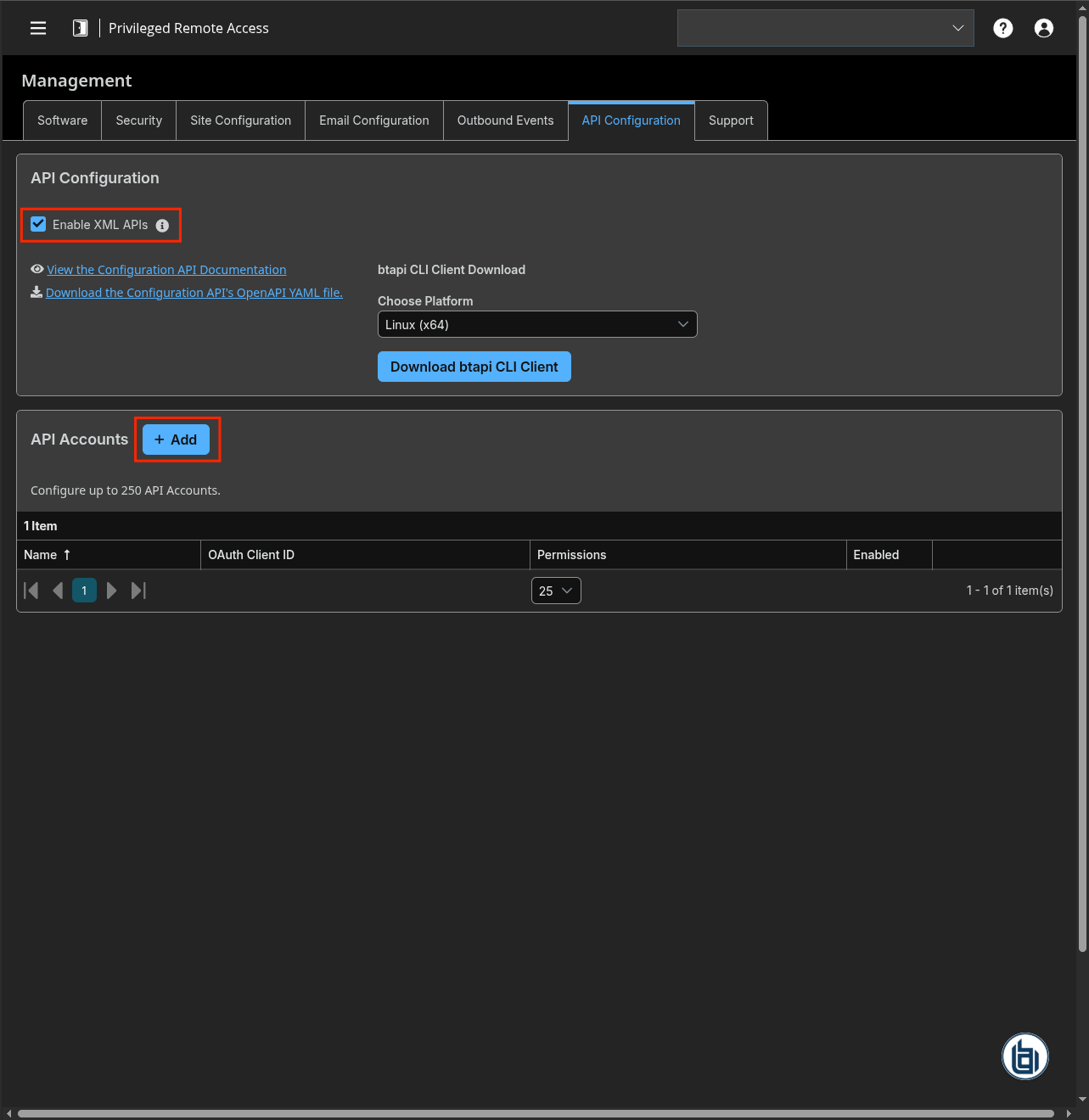
-
Check
Enable - Type a name for the API Account and add a comment (optional)
- Check
Reporting > Allow Access to Vault Account Activity Reports - Copy the OAuth client ID and the OAuth client Secret
-
Click
Save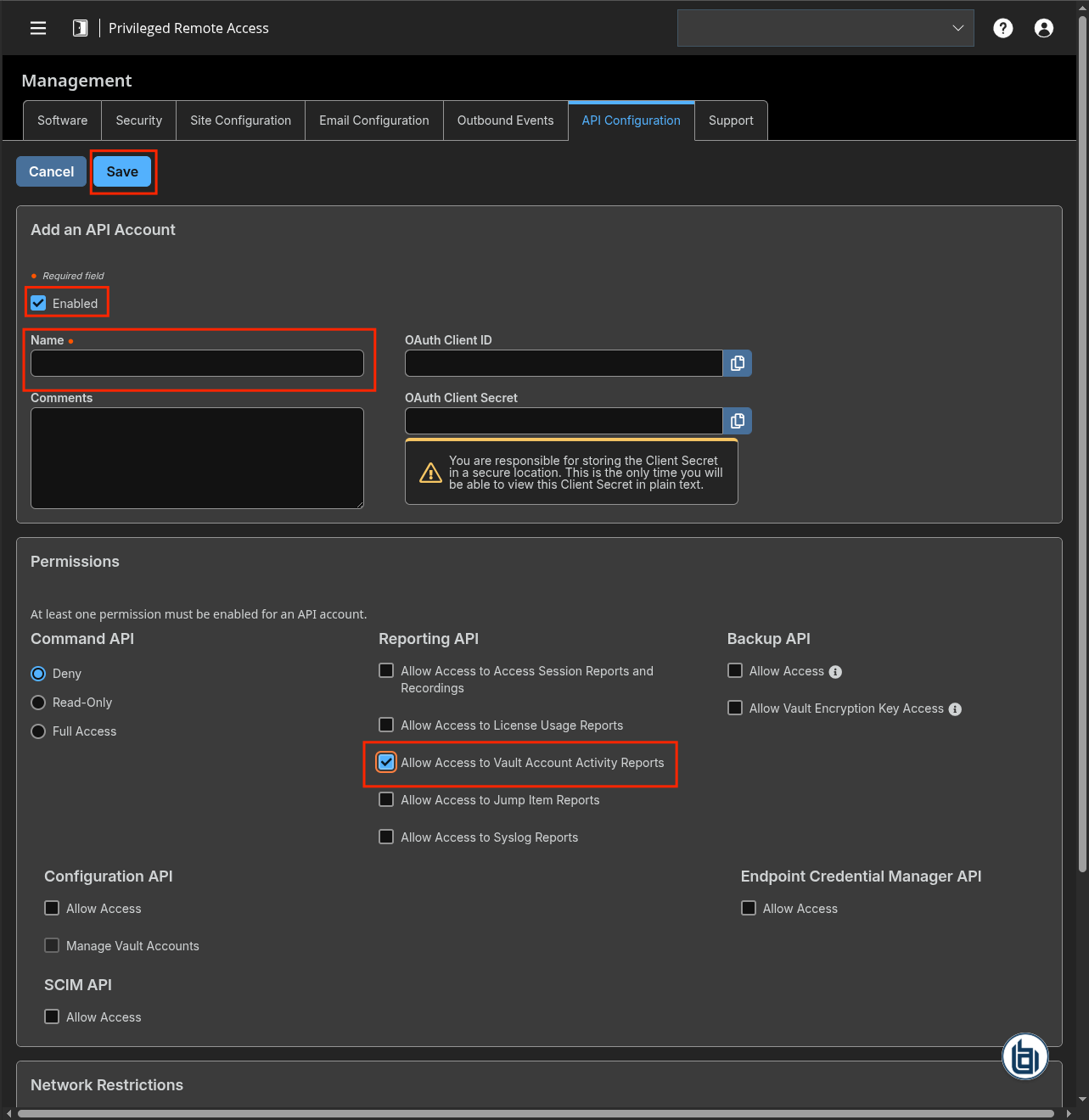
Create an intake
- Go to the intake page and create a new intake from the format BeyondTrust PRA Vault Account Activity.
- Set up the intake configuration with the Base URL, Client ID and Client Secret
Raw Events Samples
In this section, you will find examples of raw logs as generated natively by the source. These examples are provided to help integrators understand the data format before ingestion into Sekoia.io. It is crucial for setting up the correct parsing stages and ensuring that all relevant information is captured.
{
    "timestamp": "1773671926",
    "event_type": "Account Created",
    "account_id": "1",
    "performed_by": {
        "id": "2",
        "type": "User",
        "name": "John Doe"
    },
    "data": null
}
{
    "timestamp": "1773672107",
    "event_type": "Account Deleted",
    "account_id": "1",
    "performed_by": {
        "id": "2",
        "type": "User",
        "name": "John Doe"
    },
    "data": null
}
{
    "timestamp": "1773672020",
    "event_type": "Password Changed",
    "account_id": "1",
    "performed_by": {
        "id": "2",
        "type": "User",
        "name": "John Doe"
    },
    "data": "Manually Edited"
}
Detection section
The following section provides information for those who wish to learn more about the detection capabilities enabled by collecting this intake. It includes details about the built-in rule catalog, event categories, and ECS fields extracted from raw events. This is essential for users aiming to create custom detection rules, perform hunting activities, or pivot in the events page.
Related Built-in Rules
The following Sekoia.io built-in rules match the intake BeyondTrust PRA Vault Account Activity [BETA]. This documentation is updated automatically and is based solely on the fields used by the intake which are checked against our rules. This means that some rules will be listed but might not be relevant with the intake.
SEKOIA.IO x BeyondTrust PRA Vault Account Activity [BETA] on ATT&CK Navigator
Account Added To A Security Enabled Group
Detection in order to investigate who has added a specific Domain User in Domain Admins or Group Policy Creator Owners (Security event 4728)
- Effort: master
Account Removed From A Security Enabled Group
Detection in order to investigate who has removed a specific Domain User in Domain Admins or Group Policy Creator Owners (Security event 4729)
- Effort: master
Computer Account Deleted
Detects computer account deletion.
- Effort: master
Domain Trust Created Or Removed
A trust was created or removed to a domain. An attacker could perform that in order to do lateral movement easily between domains or shutdown the ability of two domains to communicate.
- Effort: advanced
Password Change On Directory Service Restore Mode (DSRM) Account
The Directory Service Restore Mode (DSRM) account is a local administrator account on Domain Controllers. Attackers may change the password to gain persistence.
- Effort: intermediate
Possible Replay Attack
This event can be a sign of Kerberos replay attack or, among other things, network device configuration or routing problems.
- Effort: master
User Account Created
Detects user creation on windows servers, which shouldn't happen in an Active Directory environment. Apply this on your windows server logs and not on your DC logs. One default account defaultuser0 is excluded as only used during Windows set-up. This detection use Security Event ID 4720.
- Effort: master
User Account Deleted
Detects local user deletion
- Effort: master
Event Categories
The following table lists the data source offered by this integration.
| Data Source | Description |
|---|---|
Third-party application logs |
None |
In details, the following table denotes the type of events produced by this integration.
| Name | Values |
|---|---|
| Kind | `` |
| Category | iam |
| Type | info |
Transformed Events Samples after Ingestion
This section demonstrates how the raw logs will be transformed by our parsers. It shows the extracted fields that will be available for use in the built-in detection rules and hunting activities in the events page. Understanding these transformations is essential for analysts to create effective detection mechanisms with custom detection rules and to leverage the full potential of the collected data.
{
    "message": "{\"timestamp\": \"1773671926\", \"event_type\": \"Account Created\", \"account_id\": \"1\", \"performed_by\": {\"id\": \"2\", \"type\": \"User\", \"name\": \"John Doe\"}, \"data\": null}",
    "event": {
        "category": [
            "iam"
        ],
        "code": "Account Created",
        "dataset": "Vault Account Activity",
        "type": [
            "info"
        ]
    },
    "@timestamp": "2026-03-16T14:38:46Z",
    "beyondtrust": {
        "pra": {
            "performed_by": {
                "type": "User"
            }
        }
    },
    "observer": {
        "product": "Privileged Remote Access",
        "vendor": "BeyondTrust"
    },
    "related": {
        "user": [
            "John Doe"
        ]
    },
    "user": {
        "id": "2",
        "name": "John Doe",
        "target": {
            "id": "1"
        }
    }
}
{
    "message": "{\"timestamp\": \"1773672107\", \"event_type\": \"Account Deleted\", \"account_id\": \"1\", \"performed_by\": {\"id\": \"2\", \"type\": \"User\", \"name\": \"John Doe\"}, \"data\": null}",
    "event": {
        "category": [
            "iam"
        ],
        "code": "Account Deleted",
        "dataset": "Vault Account Activity",
        "type": [
            "info"
        ]
    },
    "@timestamp": "2026-03-16T14:41:47Z",
    "beyondtrust": {
        "pra": {
            "performed_by": {
                "type": "User"
            }
        }
    },
    "observer": {
        "product": "Privileged Remote Access",
        "vendor": "BeyondTrust"
    },
    "related": {
        "user": [
            "John Doe"
        ]
    },
    "user": {
        "id": "2",
        "name": "John Doe",
        "target": {
            "id": "1"
        }
    }
}
{
    "message": "{\"timestamp\": \"1773672020\", \"event_type\": \"Password Changed\", \"account_id\": \"1\", \"performed_by\": {\"id\": \"2\", \"type\": \"User\", \"name\": \"John Doe\"}, \"data\": \"Manually Edited\"}",
    "event": {
        "category": [
            "iam"
        ],
        "code": "Password Changed",
        "dataset": "Vault Account Activity",
        "reason": "Manually Edited",
        "type": [
            "info"
        ]
    },
    "@timestamp": "2026-03-16T14:40:20Z",
    "beyondtrust": {
        "pra": {
            "performed_by": {
                "type": "User"
            }
        }
    },
    "observer": {
        "product": "Privileged Remote Access",
        "vendor": "BeyondTrust"
    },
    "related": {
        "user": [
            "John Doe"
        ]
    },
    "user": {
        "id": "2",
        "name": "John Doe",
        "target": {
            "id": "1"
        }
    }
}
Extracted Fields
The following table lists the fields that are extracted, normalized under the ECS format, analyzed and indexed by the parser. It should be noted that infered fields are not listed.
| Name | Type | Description |
|---|---|---|
@timestamp |
date |
Date/time when the event originated. |
beyondtrust.pra.performed_by.type |
keyword |
|
event.category |
keyword |
Event category. The second categorization field in the hierarchy. |
event.code |
keyword |
Identification code for this event. |
event.dataset |
keyword |
Name of the dataset. |
event.reason |
keyword |
Reason why this event happened, according to the source |
event.type |
keyword |
Event type. The third categorization field in the hierarchy. |
observer.product |
keyword |
The product name of the observer. |
observer.vendor |
keyword |
Vendor name of the observer. |
user.id |
keyword |
Unique identifier of the user. |
user.name |
keyword |
Short name or login of the user. |
user.target.id |
keyword |
Unique identifier of the user. |
For more information on the Intake Format, please find the code of the Parser, Smart Descriptions, and Supported Events here.