Akamai Guardicore On-Premises
Overview
Akamai Guardicore delivers application-centric microsegmentation and breach detection to prevent lateral movement across on-premises and cloud environments. With process-level visibility, dynamic policy orchestration and automated workflows, it enforces Zero Trust controls at scale. Simplify network segmentation, accelerate threat response and maintain continuous compliance for critical assets.
- Vendor: Akamai
- Supported environment: On-Premises
- Version compatibility: V51 and above
- Detection based on: Alert, Telemetry
- Supported application or feature: see section below
Warning
Important note - This format is currently in beta. We highly value your feedback to improve its performance.
Akamai Guardicore event types supported
Here is a list of all the Akamai Guardicore event types supported by this integration:
- Incident
- Audit log
- Network log
Specification
Prerequisites
- Resource:
- Self-managed syslog forwarder
- Network:
- Outbound traffic allowed
- Permissions:
- Administrator or Root access to the Akamai Guardicore Console
- Root access to the Linux server with the syslog forwarder
Transport Protocol/Method
- Indirect Syslog
Logs details
- Supported functionalities: See section Overview
- Supported type(s) of structure: CEF
- Supported verbosity level: Informational
Note
Log levels are based on the taxonomy of RFC5424. Adapt according to the terminology used by the editor.
Configure
This setup guide will show you how to forward your Akamai Guardicore events to Sekoia.io.
Steps to follow
- Create an intake
- Set up the forwarding for Events
- Set up the forwarding for Network Logs
Instructions on Sekoia
Configure Your Intake
This section will guide you through creating the intake object in Sekoia, which provides a unique identifier called the "Intake key." The Intake key is essential for later configuration, as it references the Community, Entity, and Parser (Intake Format) used when receiving raw events on Sekoia.
- Go to the Sekoia Intake page.
- Click on the
+ New Intakebutton at the top right of the page. - Search for your Intake by the product name in the search bar.
- Give it a Name and associate it with an Entity (and a Community if using multi-tenant mode).
- Click on
Create.
Note
For more details on how to use the Intake page and to find the Intake key you just created, refer to this documentation.
Configure a forwarder
To forward events using syslog to Sekoia.io, you need to update the syslog header with the intake key you previously created. Here is an example of your message before the forwarder
<%pri%>1 %timestamp:::date-rfc3339% %hostname% %app-name% %procid% LOG RAW_MESSAGE
<%pri%>1 %timestamp:::date-rfc3339% %hostname% %app-name% %procid% LOG [SEKOIA@53288 intake_key=\"YOUR_INTAKE_KEY\"] RAW_MESSAGE
To achieve this you can:
- Use the Sekoia.io forwarder which is the official supported way to collect data using the syslog protocol in Sekoia.io. In charge of centralizing data coming from many equipments/sources and forwarding them to Sekoia.io with the apporpriated format, it is a prepackaged option. You only have to provide your intake key as parameter.
- Use your own Syslog service instance. Maybe you already have an intance of one of these components on your side and want to reuse it in order to centralize data before forwarding them to Sekoia.io. When using this mode, you have to configure and maintain your component in order to respect the expected Sekoia.io format.
Warning
Only the Sekoia.io forwarder is officially supported. Other options are documented for reference purposes but do not have official support.
Set up the forwarding for Events
- Log in to the Akamai Guardicore console
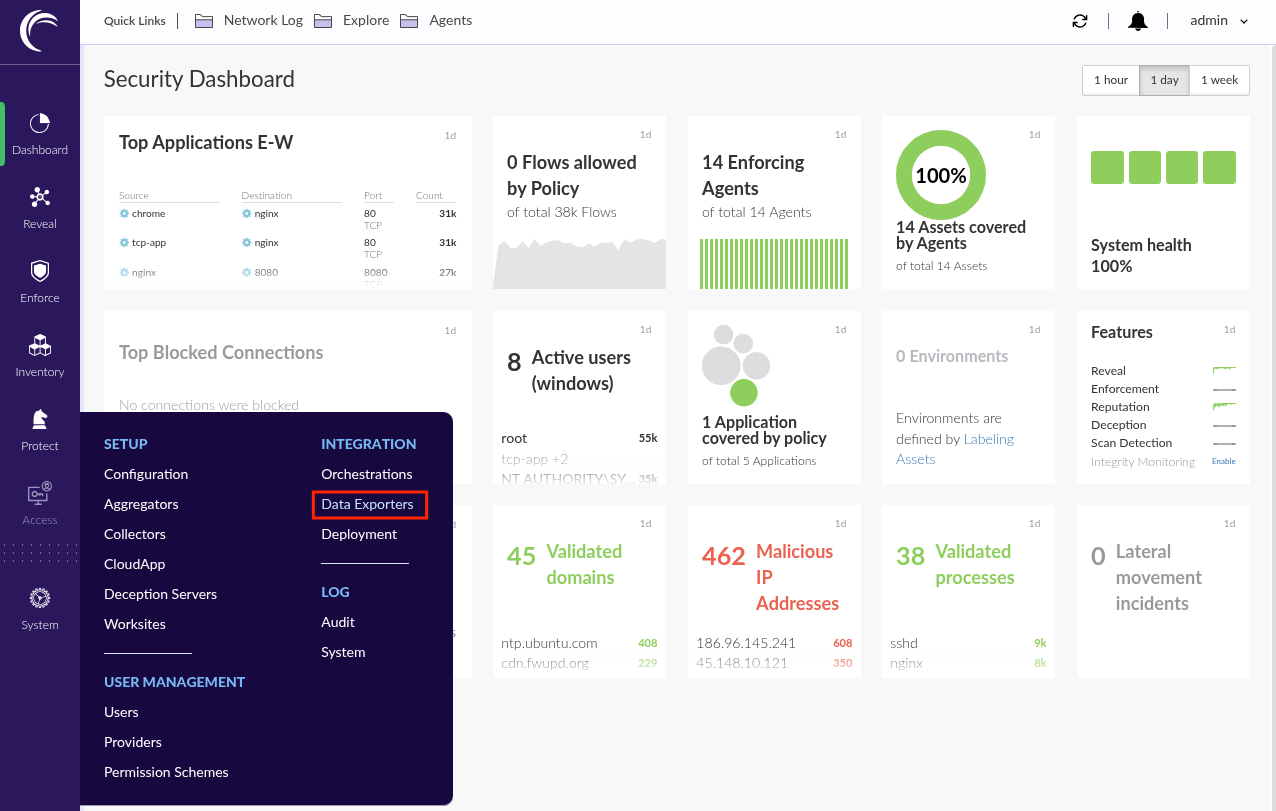
- In the left panel, go to
System>INTEGRATION>Data Exporters
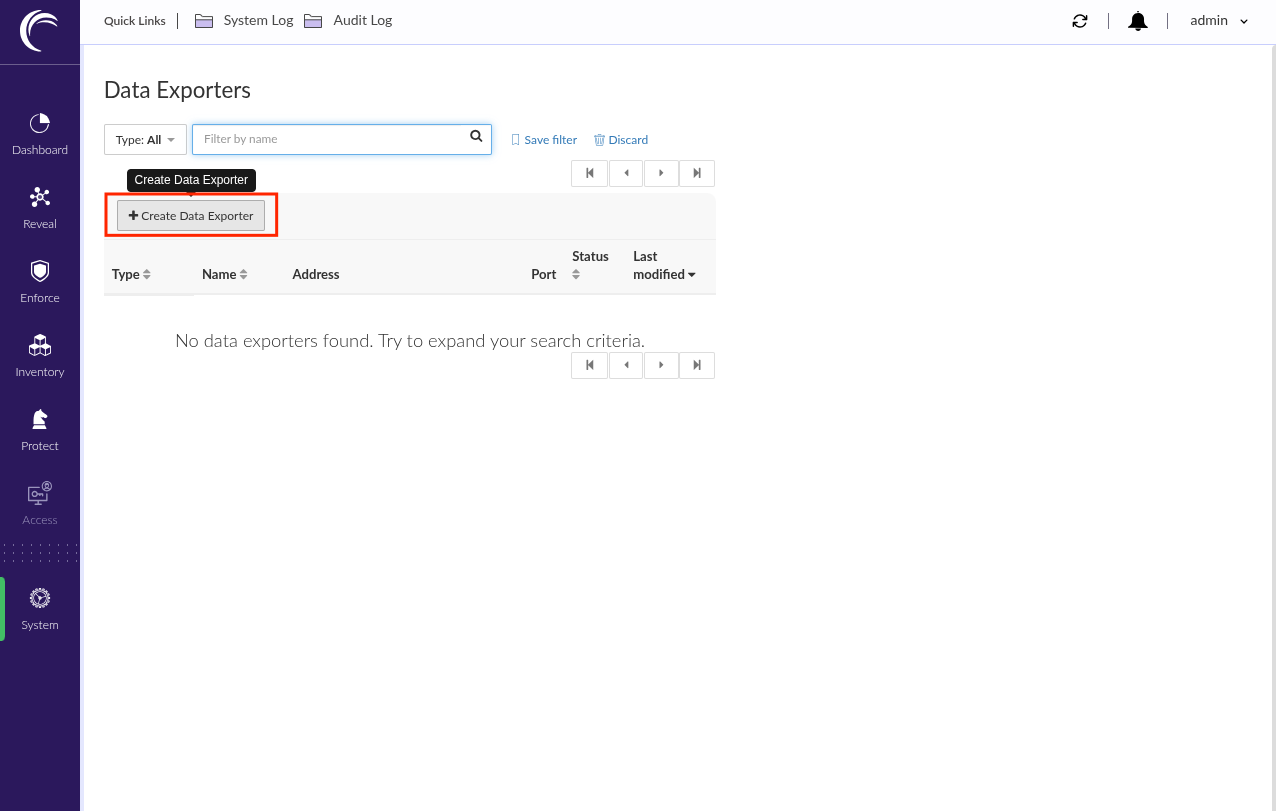
- Click
+ Create Data Exporter
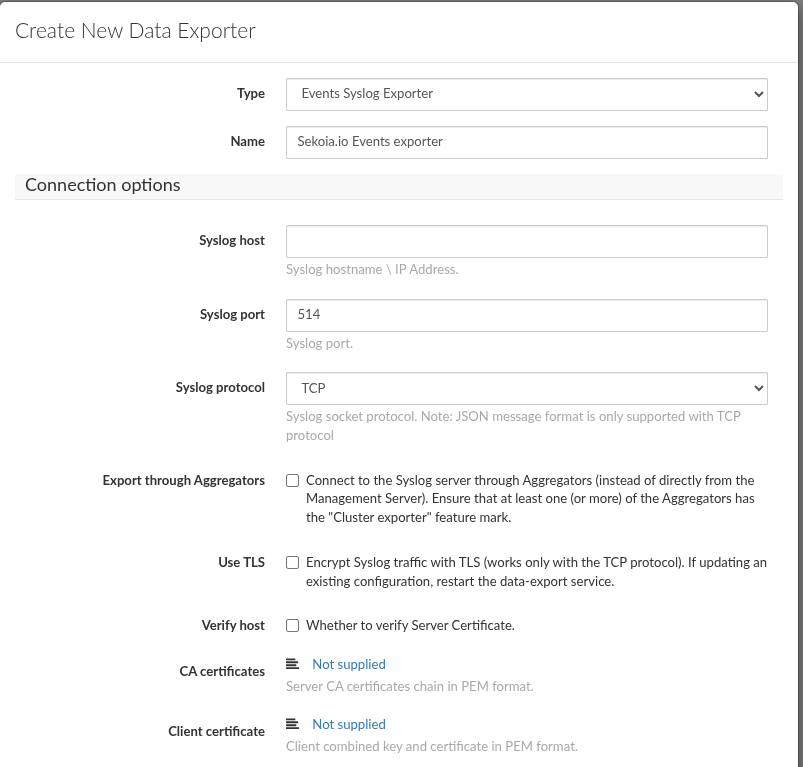
- Select
Events syslog Exporter - Type a name for the exporter configuration (e.g:
Sekoia.io Events exporter) -
In the
Connection optionssection:- Type the address of the syslog concentrator as
Syslog host - Type the port of the syslog concentrator as
Syslog port - Select the matching protocol for the syslog concentrator as
Syslog protocol - Disable
Verify host
- Type the address of the syslog concentrator as
-
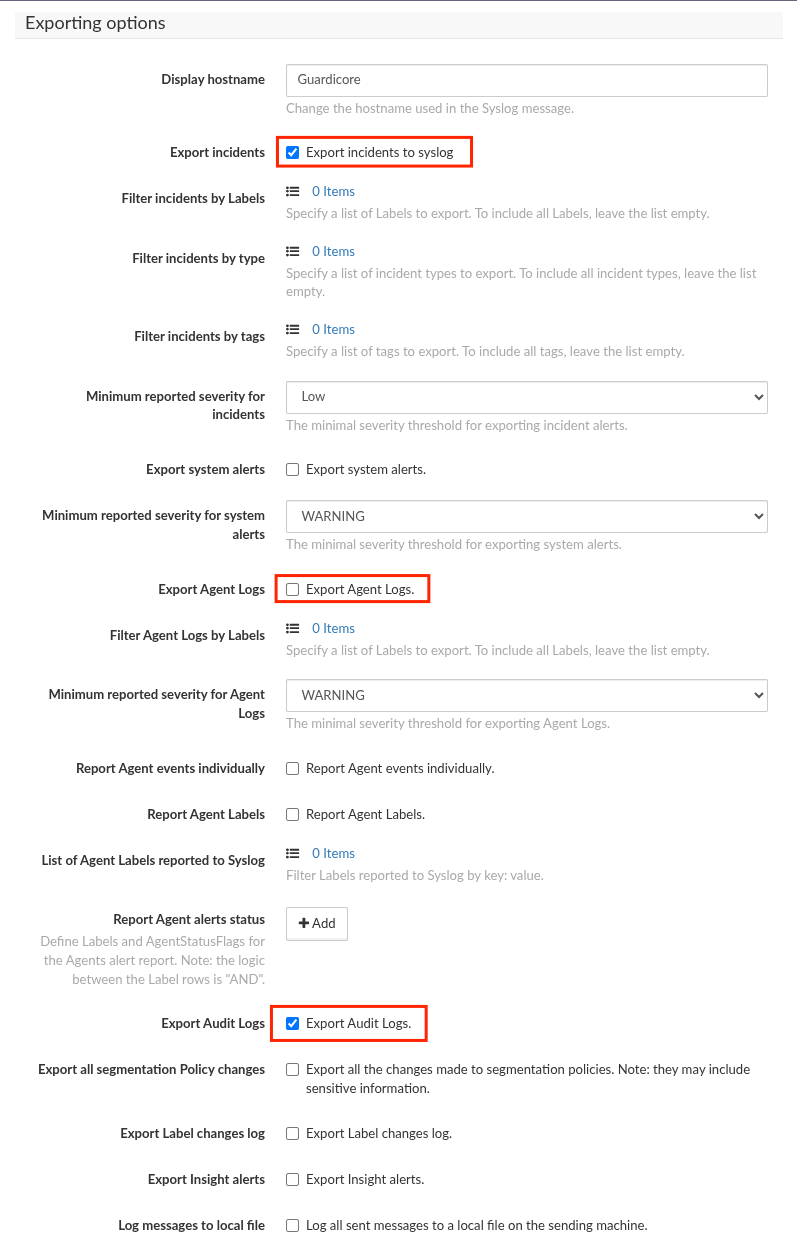
In the
Exporting optionssection:- Enable
Export incidents - Disable
Export Agent Logs - Enable
Audit Logs
- Enable
-
In the
Message formatsection:- Select
CEFasMessage format - Select
ISO8601 (including milliseconds)asFormat log timestamp - Click
Test Connection - Click
Save
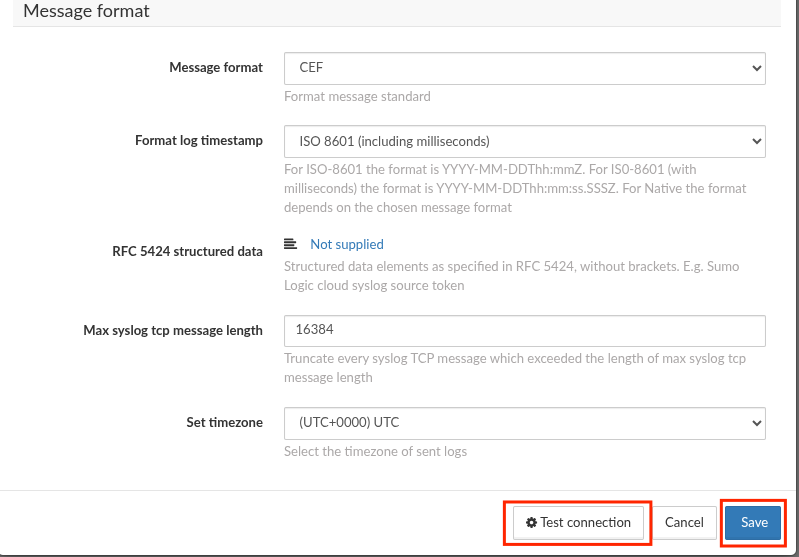
- Select
Set up the forwarding for Network logs
- Click
+ Create Data Exporter
- Select
Network Log syslog Exporter - Type a name for the exporter configuration (e.g:
Sekoia.io Network Log exporter) -
In the
Connection optionssection:- Type the address of the syslog concentrator as
Syslog host - Type the port of the syslog concentrator as
Syslog port - Select the matching protocol for the syslog concentrator as
Syslog protocol - Disable
Verify host
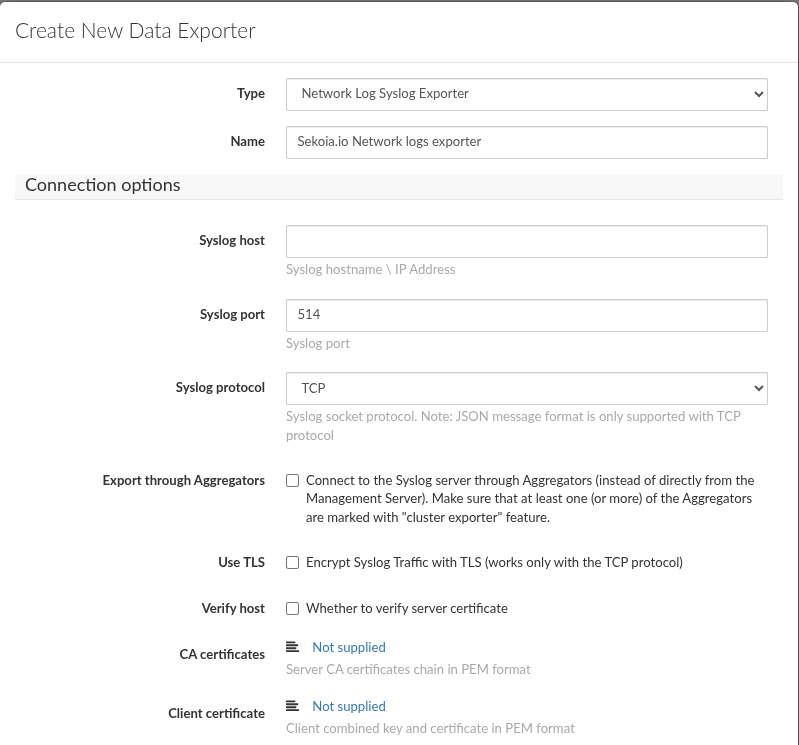
- Type the address of the syslog concentrator as
-
In the
Exporting optionssection:- Click
+ Add - Create
export verdictsfor:AllowedBlockedAlertedAllowed and Encrypted
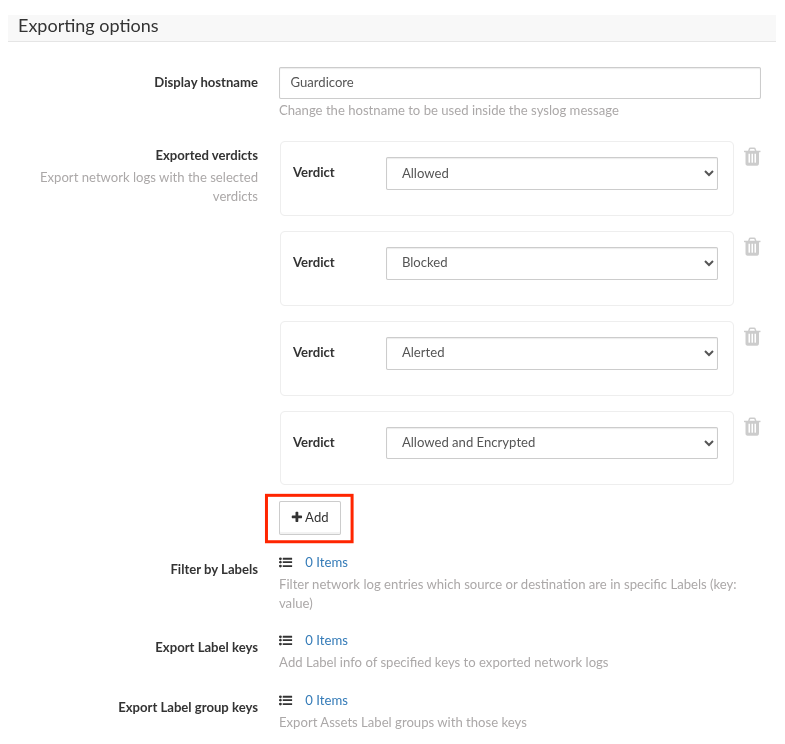
- Click
-
In the
Message formatsection:- Select
CEFasMessage format - Select
ISO8601 (including milliseconds)asFormat log timestamp - Click
Test Connection - Click
Save
- Select
Raw Events Samples
In this section, you will find examples of raw logs as generated natively by the source. These examples are provided to help integrators understand the data format before ingestion into Sekoia.io. It is crucial for setting up the correct parsing stages and ensuring that all relevant information is captured.
CEF:0|Guardicore|Centra|52|Audit Record|Audit Record|INFO|request=/api/v3.0/integration act=Adding new Data Exporter Integration configuration suser=jdoe msg=Data Exporter Integration 'Myexporter' creation: host: 198.51.100.10, port: 6514, protocol: TCP, use TLS: False, export audit log: True src=192.0.2.1
0|Guardicore|Centra|52|Audit Record|Audit Record|INFO|request=/api/v3.0/authenticate act=User authentication suser=j.doe msg=User j.doe authenticated successfully src=192.0.2.1
CEF:0|Guardicore|Centra|52|Audit Record|Audit Record|INFO|request=/api/v3.0/integration act=Adding new Data Exporter Integration configuration suser=jdoe msg=Data Exporter Integration 'Myexporter' creation: host: 198.51.100.4, port: 6514, protocol: TCP, use TLS: False src=192.0.2.1
CEF:0|Guardicore|Centra|52|Audit Record|Audit Record|INFO|request=/api/v3.0/integration/00000000-0000-0000-0000-000000000000 act=Updating Data Exporter Integration configuration suser=jdoe msg=Data Exporter Integration 'Myexporter' modifications src=192.0.2.1
CEF:0|Guardicore|Centra|52|Audit Record|Audit Record|INFO|request=/api/v3.0/integration/test-connection act=Run Data Exporter Integration Test Connections suser=jdoe src=192.0.2.1
CEF:0|Guardicore|Centra|42|Audit Record|Audit Record|Unknown|request=/api/v3.0/integration act=Adding new Syslog integration configuration suser=jdoe msg=Syslog integration 'test2 - incidents' creation: host: lab.test.com, port: 514, protocol: UDP, use TLS: False, export audit log: False src=198.51.100.19
CEF:0|Guardicore|Centra|42|Audit Record|Audit Record|Unknown|request=/api/v3.0/visibility/label-groups act=Create label group suser=jdoe msg=Created label group Role: App (id: 00000000-0000-0000-0000-000000000000) src=198.51.100.189
0|Guardicore|Centra|52|Audit Record|Audit Record|INFO|request=/api/v3.0/integration/00000000-0000-0000-0000-000000000000 act=Updating Data Exporter Integration configuration suser=jdoe msg=Data Exporter Integration 'Myexporter' modifications src=192.0.2.1
0|Guardicore|Centra|52|Audit Record|Audit Record|INFO|request=/api/v3.0/logout act=Logout suser=jdoe msg=User jdoe logged out src=192.0.2.1
0|Guardicore|Centra|52|Audit Record|Audit Record|INFO|request=/api/v3.0/authenticate act=User authentication suser=j.doe msg=User j.doe tried to login but failed due to the following reason: password mismatch src=192.0.2.1
CEF:0|Guardicore|Centra|52|Test connection|Test connection|SeverityLogLevel.INFO|start=2026-04-07T09:14Z dvc=192.0.2.1 dvchost=N/A act=Run Data Exporter Integration Test Connections
CEF:0|Guardicore|Centra|52|Bad Reputation|A request was made to an IP address with a bad reputation|3|start=2026-04-07T06:39Z dvc=192.0.2.1 dvchost=N/A act=ALERTED_BY_MANAGEMENT cs1Label=IncidentUUID cs1=00000000-0000-0000-0000-000000000000 cs2Label=IncidentURI cs2=https://lab.example.com/overview/incidents/00000000-0000-0000-0000-000000000000 cs3Label=IncidentTags cs3=Known Phishing,Known Malware cs4Label=AssetId cs4=N/A cs5Label=AssetLabels cs5= cs6Label=RuleID cs6=No rule cs7Label=Direction cs7=Inbound
CEF:0|Guardicore|Centra|52|Bad Reputation|A request was made to an IP address with a bad reputation|3|start=2026-04-07T06:39Z dvc=N/A dvchost=test.example.com act=ALERTED_BY_MANAGEMENT cs1Label=IncidentUUID cs1=11111111-1111-1111-1111-111111111111 cs2Label=IncidentURI cs2=https://lab.example.com/overview/incidents/11111111-1111-1111-1111-111111111111 cs3Label=IncidentTags cs3=Known Phishing,Known Malware cs4Label=AssetId cs4=22222222-2222-2222-2222-222222222222 cs5Label=AssetLabels cs5=Terraform: True,os_name: Ubuntu 24.04.4 LTS,Worksite: Default,Role: BE,App: SWIFT,Environment: Production,os_type: Linux cs6Label=RuleID cs6=No rule cs7Label=Direction cs7=Inbound
CEF:0|Guardicore|Centra|52|Bad Reputation|A request was made to an IP address with a bad reputation|3|start=2026-04-07T08:19Z dvc=192.0.2.1 dvchost=N/A act=ALERTED_BY_MANAGEMENT cs1Label=IncidentUUID cs1=33333333-3333-3333-3333-333333333333 cs2Label=IncidentURI cs2=https://lab.example.com/overview/incidents/33333333-3333-3333-3333-333333333333 cs3Label=IncidentTags cs3=Known Phishing,Known Malware cs4Label=AssetId cs4=N/A cs5Label=AssetLabels cs5= cs6Label=RuleID cs6=44444444-4444-4444-4444-444444444444 cs7Label=Direction cs7=Outbound
0|Guardicore|Centra|52|Bad Reputation|A request was made to an IP address with a bad reputation|3|start=2026-04-07T06:39Z dvc=N/A dvchost=test.example.com act=ALERTED_BY_MANAGEMENT cs1Label=IncidentUUID cs1=11111111-1111-1111-1111-111111111111 cs2Label=IncidentURI cs2=https://lab.example.com/overview/incidents/11111111-1111-1111-1111-111111111111 cs3Label=IncidentTags cs3=Known Phishing,Known Malware cs4Label=AssetId cs4=22222222-2222-2222-2222-222222222222 cs5Label=AssetLabels cs5=Terraform: True,os_name: Ubuntu 24.04.4 LTS,Worksite: Default,Role: BE,App: SWIFT,Environment: Production,os_type: Linux cs6Label=RuleID cs6=No rule cs7Label=Direction cs7=Inbound
CEF:0|Guardicore|Centra|42|Network Log|Network Log|None|id=11111111 act=Allowed cnt=1 start=1656596452843 src=192.0.2.4 shost=localhost suser=LOCALHOST\JDOE dst=192.0.2.8 dpt=67 dhost=Unknown proto=UDP cs1Label=connection_type cs1=SUCCESSFUL cs3Label=source_process cs3=C:\Windows\System32\svchost.exe cs6Label=connection_verdict cs6=allowed cs7Label=policy_rule cs7=default
0|Guardicore|Centra|42|Network Log|Network Log|None|id=11111111 act=Allowed cnt=1 start=1656596452843 src=192.0.2.4 shost=localhost suser=LOCALHOST\JDOE dst=192.0.2.8 dpt=67 dhost=Unknown proto=UDP cs1Label=connection_type cs1=SUCCESSFUL cs3Label=source_process cs3=C:\Windows\System32\svchost.exe cs6Label=connection_verdict cs6=allowed cs7Label=policy_rule cs7=default
CEF:0|Guardicore|Centra|42|Network Log|Network Log|None|id=11111111 act=Blocked cnt=1 start=1656596452843 src=192.0.2.4 shost=lab.test.com suser=LOCALHOST\JDOE duser=LOCALHOST\JDOE dst=192.0.2.8 dpt=67 dhost=Unknown proto=UDP cs1Label=connection_type cs1=SUCCESSFUL cs3Label=destination_process_full_path cs3=C:\Windows\System32\svchost.exe cs6Label=connection_verdict cs6=blocked by source cs7Label=policy_ruleset cs7=test
Detection section
The following section provides information for those who wish to learn more about the detection capabilities enabled by collecting this intake. It includes details about the built-in rule catalog, event categories, and ECS fields extracted from raw events. This is essential for users aiming to create custom detection rules, perform hunting activities, or pivot in the events page.
Related Built-in Rules
The following Sekoia.io built-in rules match the intake Akamai Guardicore On-Prem [BETA]. This documentation is updated automatically and is based solely on the fields used by the intake which are checked against our rules. This means that some rules will be listed but might not be relevant with the intake.
SEKOIA.IO x Akamai Guardicore On-Prem [BETA] on ATT&CK Navigator
Active Directory Data Export Using Csvde
Detects the use of Csvde, a command-line tool from Windows Server that can be used to export Active Directory data to CSV files. This export doesn't include password hashes, but can be used as a discovery tool to enumerate users, machines and group memberships.
- Effort: elementary
AdFind Usage
Detects the usage of the AdFind tool. AdFind.exe is a free tool that extracts information from Active Directory. Wizard Spider (Bazar, TrickBot, Ryuk), FIN6 and MAZE operators have used AdFind.exe to collect information about Active Directory organizational units and trust objects
- Effort: elementary
Adexplorer Usage
Detects the usage of Adexplorer, a legitimate tool from the Sysinternals suite that could be abused by attackers as it can saves snapshots of the Active Directory Database.
- Effort: advanced
Advanced IP Scanner
Detects the use of Advanced IP Scanner. Seems to be a popular tool for ransomware groups.
- Effort: master
Aspnet Compiler
Detects the starts of aspnet compiler.
- Effort: advanced
AutoIt3 Execution From Suspicious Folder
Detects AutoIt3 execution from an unusual/suspicious folder. Legitimate folders are "Program Files" and "AppData\Local". AutoIt3.exe is a legitimate process used to execute AutoIt program files, which are used by legitimate software, custom scripts, but also malware. Finding AutoIt3 execution from unusual/suspicious folder can help detect malware activities, such as DarkGate execution. The detection rule can be tailored to your environment and your use of AutoIt3 by filtering out folder's execution of legitimate applications or scripts.
- Effort: advanced
Bloodhound and Sharphound Tools Usage
Detects default process names and default command line parameters used by Bloodhound and Sharphound tools.
- Effort: intermediate
Burp Suite Tool Detected
Burp Suite is a cybersecurity tool. When used as a proxy service, its purpose is to intercept packets and modify them to send them to the server. Burp Collaborator is a network service that Burp Suite uses to help discover many kinds of vulnerabilities (vulnerabilities scanner).
- Effort: intermediate
Certificate Authority Modification
Installation of new certificate(s) in the Certificate Authority can be used to trick user when spoofing website or to add trusted destinations.
- Effort: master
Certify Or Certipy
Detects the use of certify and certipy which are two different tools used to enumerate and abuse Active Directory Certificate Services.
- Effort: advanced
Cobalt Strike Default Beacons Names
Detects the default names of Cobalt Strike beacons / payloads.
- Effort: intermediate
Correlation Potential DNS Tunnel
Detects domain name which is longer than 62 characters and requested at least 50 times in a 10 minutes range time. Long domain names are distinctive of DNS tunnels.
- Effort: advanced
Cryptomining
Detection of domain names potentially related to cryptomining activities.
- Effort: master
DNS Query For Iplookup
Detects dns query of observables tagged as iplookup.
- Effort: master
Discord Suspicious Download
Discord is a messaging application. It allows users to create their own communities to share messages and attachments. Those attachments have little to no overview and can be downloaded by almost anyone, which has been abused by attackers to host malicious payloads.
- Effort: advanced
Dynamic DNS Contacted
Detect communication with dynamic dns domain. This kind of domain is often used by attackers. This rule can trigger false positive in non-controlled environment because dynamic dns is not always malicious.
- Effort: master
Enable Root Account With Dsenableroot
Detects when root is enabled. Attackers can use this as a mean of persistence since root is disabled by default.
- Effort: elementary
EvilProxy Phishing Domain
Detects subdomains potentially generated by the EvilProxy adversary-in-the-middle phishing platform. Inspect the other subdomains of the domain to identify the landing page, and determine if the user submitted credentials. This rule has a small percentage of false positives on legitimate domains.
- Effort: intermediate
Exfiltration And Tunneling Tools Execution
Execution of well known tools for data exfiltration and tunneling
- Effort: advanced
Exfiltration Domain
Detects traffic toward a domain flagged as a possible exfiltration vector.
- Effort: master
HackTools Suspicious Names
Quick-win rule to detect the default process names or file names of several HackTools.
- Effort: advanced
Internet Scanner
Detects known scanner IP addresses. Alert is only raised when the scan hits an opened port, on TCP or UDP. This could be a very noisy rule, so be careful to check your detection perimeter before activation.
- Effort: master
Internet Scanner Target
Detects known scanner IP addresses. Alert is only raised when the scan hits an opened port, on TCP or UDP and group by target address. This could be a very noisy rule, so be careful to check your detection perimeter before activation.
- Effort: master
Kernel Module Alteration
Kernel module installation can be used to configure system settings to automatically execute a program during system boot or logon to maintain persistence or gain higher-level privileges on compromised systems. The prerequisites are to enable monitoring of the finit_module, init_module, delete_module syscalls using Auditbeat.
- Effort: advanced
Koadic MSHTML Command
Detects Koadic payload using MSHTML module
- Effort: intermediate
Legitimate Process Execution From Unusual Folder
Detects the execution of a legitimate, windows built-in process name from an unusual / suspicious folder. Legitimate folders are c:\windows\system32\, \SystemRoot\system32\, c:\windows\syswow64\ and c:\windows\winsxs. Many malwares/attackers use legitimate names to masquerade but if they are not Administrator yet, they often can't write file into these legitimate folders.
- Effort: advanced
Linux Masquerading Space After Name
This detection rule identifies a process created from an executable with a space appended to the end of the name.
- Effort: intermediate
Network Scanning and Discovery
Tools and command lines used for network discovery from current system
- Effort: advanced
Network Sniffing
List of common tools used for network packages sniffing
- Effort: advanced
Network Sniffing Windows
Network sniffing refers to using the network interface on a system to monitor or capture information sent over a wired or wireless connection. An adversary may place a network interface into promiscuous mode to passively access data in transit over the network, or use span ports to capture a larger amount of data.
- Effort: intermediate
NlTest Usage
Detects attempts to gather information on domain trust relationships that may be used to identify lateral movement opportunities. These command lines were observed in numerous attacks, but also sometimes from legitimate administrators for debugging purposes. The rule does not cover very basics commands but rather the ones that are interesting for attackers to gather information on a domain.
- Effort: advanced
PasswordDump SecurityXploded Tool
Detects the execution of the PasswordDump SecurityXploded Tool
- Effort: elementary
Phorpiex Process Masquerading
Detects specific process executable path used by the Phorpiex botnet to masquerade its system process network activity. It looks for a pattern of a system process executable name that is not legitimate and running from a folder that is created via a random algorithm 13-15 numbers long.
- Effort: elementary
Potential Azure AD Phishing Page (Adversary-in-the-Middle)
Detects an HTTP request to an URL typical of the Azure AD authentication flow, but towards a domain that is not one the legitimate Microsoft domains used for Azure AD authentication.
- Effort: intermediate
Potential DNS Tunnel
Detects domain name which is longer than 62 characters. Long domain names are distinctive of DNS tunnels.
- Effort: advanced
PsExec Process
Detects PsExec execution, command line which contains pstools or installation of the PsExec service. PsExec is a SysInternals which can be used to execute a program on another computer. The tool is as much used by attackers as by administrators.
- Effort: advanced
RDP Session Discovery
Detects use of RDP session discovery via qwinsta or quser. Used by some threat actors to know if someone is working via RDP on a server.
- Effort: advanced
RTLO Character
Detects RTLO (Right-To-Left character) in file and process names.
- Effort: elementary
Remote Access Tool Domain
Detects traffic toward a domain flagged as a Remote Administration Tool (RAT).
- Effort: master
Remote Monitoring and Management Software - AnyDesk
Detect artifacts related to the installation or execution of the Remote Monitoring and Management tool AnyDesk.
- Effort: master
Remote Monitoring and Management Software - Atera
Detect artifacts related to the installation or execution of the Remote Monitoring and Management tool Atera.
- Effort: master
SEKOIA.IO Intelligence Feed
Detect threats based on indicators of compromise (IOCs) collected by SEKOIA's Threat and Detection Research team.
- Effort: elementary
Sekoia.io EICAR Detection
Detects observables in Sekoia.io CTI tagged as EICAR, which are fake samples meant to test detection.
- Effort: master
Suspicious Double Extension
Detects suspicious use of an .exe extension after a non-executable file extension like .pdf.exe, a set of spaces or underlines to cloak the executable file in spearphishing campaigns
- Effort: advanced
Suspicious TOR Gateway
Detects suspicious TOR gateways. Gateways are often used by the victim to pay and decrypt the encrypted files without installing TOR. Tor intercepts the network traffic from one or more apps on user’s computer, usually the user web browser, and shuffles it through a number of randomly-chosen computers before passing it on to its destination. This disguises user location, and makes it harder for servers to pick him/her out on repeat visits, or to tie together separate visits to different sites, this making tracking and surveillance more difficult. Before a network packet starts its journey, user’s computer chooses a random list of relays and repeatedly encrypts the data in multiple layers, like an onion. Each relay knows only enough to strip off the outermost layer of encryption, before passing what’s left on to the next relay in the list.
- Effort: advanced
Suspicious Windows DNS Queries
Detects a suspicious Windows command-line process making a DNS query via known abuse text paste web services. This is based on Microsoft Windows Sysmon events (Event ID 22).
- Effort: advanced
System Info Discovery
System info discovery, attempt to detects basic command use to fingerprint a host.
- Effort: master
TOR Usage
Detects TOR usage, based on the IP address and the destination port (filtered on NTP). TOR is short for The Onion Router, and it gets its name from how it works. TOR intercepts the network traffic from one or more apps on user’s computer, usually the user web browser, and shuffles it through a number of randomly-chosen computers before passing it on to its destination. This disguises user location, and makes it harder for servers to pick him/her out on repeat visits, or to tie together separate visits to different sites, this making tracking and surveillance more difficult. Before a network packet starts its journey, user’s computer chooses a random list of relays and repeatedly encrypts the data in multiple layers, like an onion. Each relay knows only enough to strip off the outermost layer of encryption, before passing what’s left on to the next relay in the list.
- Effort: master
TOR Usage Generic Rule
Detects TOR usage globally, whether the IP is a destination or source. TOR is short for The Onion Router, and it gets its name from how it works. TOR intercepts the network traffic from one or more apps on user’s computer, usually the user web browser, and shuffles it through a number of randomly-chosen computers before passing it on to its destination. This disguises user location, and makes it harder for servers to pick him/her out on repeat visits, or to tie together separate visits to different sites, this making tracking and surveillance more difficult. Before a network packet starts its journey, user’s computer chooses a random list of relays and repeatedly encrypts the data in multiple layers, like an onion. Each relay knows only enough to strip off the outermost layer of encryption, before passing what’s left on to the next relay in the list.
- Effort: master
Telegram Bot API Request
Detects suspicious DNS queries to api.telegram.org used by Telegram Bots of any kind
- Effort: advanced
Event Categories
The following table lists the data source offered by this integration.
| Data Source | Description |
|---|---|
Network device logs |
Akamai Guardicore logs network traffic |
Network protocol analysis |
Akamai Guardicore logs Network traffic |
Third-party application logs |
Akamai Guardicore logs audit activities and incidents |
In details, the following table denotes the type of events produced by this integration.
| Name | Values |
|---|---|
| Kind | alert |
| Category | authentication, configuration, network, threat |
| Type | access, allowed, change, creation, deletion, denied, end, info, start |
Transformed Events Samples after Ingestion
This section demonstrates how the raw logs will be transformed by our parsers. It shows the extracted fields that will be available for use in the built-in detection rules and hunting activities in the events page. Understanding these transformations is essential for analysts to create effective detection mechanisms with custom detection rules and to leverage the full potential of the collected data.
{
    "message": "CEF:0|Guardicore|Centra|52|Audit Record|Audit Record|INFO|request=/api/v3.0/integration act=Adding new Data Exporter Integration configuration suser=jdoe msg=Data Exporter Integration 'Myexporter' creation: host: 198.51.100.10, port: 6514, protocol: TCP, use TLS: False, export audit log: True src=192.0.2.1",
    "event": {
        "action": "Adding new Data Exporter Integration configuration",
        "category": [
            "configuration"
        ],
        "dataset": "audit",
        "reason": "Data Exporter Integration 'Myexporter' creation: host: 198.51.100.10, port: 6514, protocol: TCP, use TLS: False, export audit log: True",
        "type": [
            "creation"
        ]
    },
    "akamai": {
        "guardicore": {
            "signature_id": "Audit Record"
        }
    },
    "observer": {
        "product": "Guardicore",
        "type": "ids",
        "vendor": "Akamai",
        "version": "52"
    },
    "related": {
        "ip": [
            "192.0.2.1"
        ],
        "user": [
            "jdoe"
        ]
    },
    "source": {
        "address": "192.0.2.1",
        "ip": "192.0.2.1"
    },
    "url": {
        "path": "/api/v3.0/integration"
    },
    "user": {
        "name": "jdoe"
    }
}
{
    "message": "0|Guardicore|Centra|52|Audit Record|Audit Record|INFO|request=/api/v3.0/authenticate act=User authentication suser=j.doe msg=User j.doe authenticated successfully src=192.0.2.1",
    "event": {
        "action": "User authentication",
        "category": [
            "authentication"
        ],
        "dataset": "audit",
        "outcome": "success",
        "reason": "User j.doe authenticated successfully",
        "type": [
            "start"
        ]
    },
    "akamai": {
        "guardicore": {
            "signature_id": "Audit Record"
        }
    },
    "observer": {
        "product": "Guardicore",
        "type": "ids",
        "vendor": "Akamai",
        "version": "52"
    },
    "related": {
        "ip": [
            "192.0.2.1"
        ],
        "user": [
            "j.doe"
        ]
    },
    "source": {
        "address": "192.0.2.1",
        "ip": "192.0.2.1"
    },
    "url": {
        "path": "/api/v3.0/authenticate"
    },
    "user": {
        "name": "j.doe"
    }
}
{
    "message": "CEF:0|Guardicore|Centra|52|Audit Record|Audit Record|INFO|request=/api/v3.0/integration act=Adding new Data Exporter Integration configuration suser=jdoe msg=Data Exporter Integration 'Myexporter' creation: host: 198.51.100.4, port: 6514, protocol: TCP, use TLS: False src=192.0.2.1",
    "event": {
        "action": "Adding new Data Exporter Integration configuration",
        "category": [
            "configuration"
        ],
        "dataset": "audit",
        "reason": "Data Exporter Integration 'Myexporter' creation: host: 198.51.100.4, port: 6514, protocol: TCP, use TLS: False",
        "type": [
            "creation"
        ]
    },
    "akamai": {
        "guardicore": {
            "signature_id": "Audit Record"
        }
    },
    "observer": {
        "product": "Guardicore",
        "type": "ids",
        "vendor": "Akamai",
        "version": "52"
    },
    "related": {
        "ip": [
            "192.0.2.1"
        ],
        "user": [
            "jdoe"
        ]
    },
    "source": {
        "address": "192.0.2.1",
        "ip": "192.0.2.1"
    },
    "url": {
        "path": "/api/v3.0/integration"
    },
    "user": {
        "name": "jdoe"
    }
}
{
    "message": "CEF:0|Guardicore|Centra|52|Audit Record|Audit Record|INFO|request=/api/v3.0/integration/00000000-0000-0000-0000-000000000000 act=Updating Data Exporter Integration configuration suser=jdoe msg=Data Exporter Integration 'Myexporter' modifications src=192.0.2.1",
    "event": {
        "action": "Updating Data Exporter Integration configuration",
        "category": [
            "configuration"
        ],
        "dataset": "audit",
        "reason": "Data Exporter Integration 'Myexporter' modifications",
        "type": [
            "change"
        ]
    },
    "akamai": {
        "guardicore": {
            "signature_id": "Audit Record"
        }
    },
    "observer": {
        "product": "Guardicore",
        "type": "ids",
        "vendor": "Akamai",
        "version": "52"
    },
    "related": {
        "ip": [
            "192.0.2.1"
        ],
        "user": [
            "jdoe"
        ]
    },
    "source": {
        "address": "192.0.2.1",
        "ip": "192.0.2.1"
    },
    "url": {
        "path": "/api/v3.0/integration/00000000-0000-0000-0000-000000000000"
    },
    "user": {
        "name": "jdoe"
    }
}
{
    "message": "CEF:0|Guardicore|Centra|52|Audit Record|Audit Record|INFO|request=/api/v3.0/integration/test-connection act=Run Data Exporter Integration Test Connections suser=jdoe src=192.0.2.1",
    "event": {
        "action": "Run Data Exporter Integration Test Connections",
        "category": [
            "configuration"
        ],
        "dataset": "audit",
        "type": [
            "info"
        ]
    },
    "akamai": {
        "guardicore": {
            "signature_id": "Audit Record"
        }
    },
    "observer": {
        "product": "Guardicore",
        "type": "ids",
        "vendor": "Akamai",
        "version": "52"
    },
    "related": {
        "ip": [
            "192.0.2.1"
        ],
        "user": [
            "jdoe"
        ]
    },
    "source": {
        "address": "192.0.2.1",
        "ip": "192.0.2.1"
    },
    "url": {
        "path": "/api/v3.0/integration/test-connection"
    },
    "user": {
        "name": "jdoe"
    }
}
{
    "message": "CEF:0|Guardicore|Centra|42|Audit Record|Audit Record|Unknown|request=/api/v3.0/integration act=Adding new Syslog integration configuration suser=jdoe msg=Syslog integration 'test2 - incidents' creation: host: lab.test.com, port: 514, protocol: UDP, use TLS: False, export audit log: False src=198.51.100.19",
    "event": {
        "action": "Adding new Syslog integration configuration",
        "category": [
            "configuration"
        ],
        "dataset": "audit",
        "reason": "Syslog integration 'test2 - incidents' creation: host: lab.test.com, port: 514, protocol: UDP, use TLS: False, export audit log: False",
        "type": [
            "creation"
        ]
    },
    "akamai": {
        "guardicore": {
            "signature_id": "Audit Record"
        }
    },
    "observer": {
        "product": "Guardicore",
        "type": "ids",
        "vendor": "Akamai",
        "version": "42"
    },
    "related": {
        "ip": [
            "198.51.100.19"
        ],
        "user": [
            "jdoe"
        ]
    },
    "source": {
        "address": "198.51.100.19",
        "ip": "198.51.100.19"
    },
    "url": {
        "path": "/api/v3.0/integration"
    },
    "user": {
        "name": "jdoe"
    }
}
{
    "message": "CEF:0|Guardicore|Centra|42|Audit Record|Audit Record|Unknown|request=/api/v3.0/visibility/label-groups act=Create label group suser=jdoe msg=Created label group Role: App (id: 00000000-0000-0000-0000-000000000000) src=198.51.100.189",
    "event": {
        "action": "Create label group",
        "category": [
            "configuration"
        ],
        "dataset": "audit",
        "reason": "Created label group Role: App (id: 00000000-0000-0000-0000-000000000000)",
        "type": [
            "creation"
        ]
    },
    "akamai": {
        "guardicore": {
            "signature_id": "Audit Record"
        }
    },
    "observer": {
        "product": "Guardicore",
        "type": "ids",
        "vendor": "Akamai",
        "version": "42"
    },
    "related": {
        "ip": [
            "198.51.100.189"
        ],
        "user": [
            "jdoe"
        ]
    },
    "source": {
        "address": "198.51.100.189",
        "ip": "198.51.100.189"
    },
    "url": {
        "path": "/api/v3.0/visibility/label-groups"
    },
    "user": {
        "name": "jdoe"
    }
}
{
    "message": "0|Guardicore|Centra|52|Audit Record|Audit Record|INFO|request=/api/v3.0/integration/00000000-0000-0000-0000-000000000000 act=Updating Data Exporter Integration configuration suser=jdoe msg=Data Exporter Integration 'Myexporter' modifications src=192.0.2.1",
    "event": {
        "action": "Updating Data Exporter Integration configuration",
        "category": [
            "configuration"
        ],
        "dataset": "audit",
        "reason": "Data Exporter Integration 'Myexporter' modifications",
        "type": [
            "change"
        ]
    },
    "akamai": {
        "guardicore": {
            "signature_id": "Audit Record"
        }
    },
    "observer": {
        "product": "Guardicore",
        "type": "ids",
        "vendor": "Akamai",
        "version": "52"
    },
    "related": {
        "ip": [
            "192.0.2.1"
        ],
        "user": [
            "jdoe"
        ]
    },
    "source": {
        "address": "192.0.2.1",
        "ip": "192.0.2.1"
    },
    "url": {
        "path": "/api/v3.0/integration/00000000-0000-0000-0000-000000000000"
    },
    "user": {
        "name": "jdoe"
    }
}
{
    "message": "0|Guardicore|Centra|52|Audit Record|Audit Record|INFO|request=/api/v3.0/logout act=Logout suser=jdoe msg=User jdoe logged out src=192.0.2.1",
    "event": {
        "action": "Logout",
        "category": [
            "authentication"
        ],
        "dataset": "audit",
        "outcome": "success",
        "reason": "User jdoe logged out",
        "type": [
            "end"
        ]
    },
    "akamai": {
        "guardicore": {
            "signature_id": "Audit Record"
        }
    },
    "observer": {
        "product": "Guardicore",
        "type": "ids",
        "vendor": "Akamai",
        "version": "52"
    },
    "related": {
        "ip": [
            "192.0.2.1"
        ],
        "user": [
            "jdoe"
        ]
    },
    "source": {
        "address": "192.0.2.1",
        "ip": "192.0.2.1"
    },
    "url": {
        "path": "/api/v3.0/logout"
    },
    "user": {
        "name": "jdoe"
    }
}
{
    "message": "0|Guardicore|Centra|52|Audit Record|Audit Record|INFO|request=/api/v3.0/authenticate act=User authentication suser=j.doe msg=User j.doe tried to login but failed due to the following reason: password mismatch src=192.0.2.1",
    "event": {
        "action": "User authentication",
        "category": [
            "authentication"
        ],
        "dataset": "audit",
        "outcome": "failure",
        "reason": "User j.doe tried to login but failed due to the following reason: password mismatch",
        "type": [
            "start"
        ]
    },
    "akamai": {
        "guardicore": {
            "signature_id": "Audit Record"
        }
    },
    "observer": {
        "product": "Guardicore",
        "type": "ids",
        "vendor": "Akamai",
        "version": "52"
    },
    "related": {
        "ip": [
            "192.0.2.1"
        ],
        "user": [
            "j.doe"
        ]
    },
    "source": {
        "address": "192.0.2.1",
        "ip": "192.0.2.1"
    },
    "url": {
        "path": "/api/v3.0/authenticate"
    },
    "user": {
        "name": "j.doe"
    }
}
{
    "message": "CEF:0|Guardicore|Centra|52|Test connection|Test connection|SeverityLogLevel.INFO|start=2026-04-07T09:14Z dvc=192.0.2.1 dvchost=N/A act=Run Data Exporter Integration Test Connections",
    "event": {
        "category": [
            "network"
        ],
        "dataset": "test",
        "reason": "Run Data Exporter Integration Test Connections",
        "type": [
            "info"
        ]
    },
    "@timestamp": "2026-04-07T09:14:00Z",
    "akamai": {
        "guardicore": {
            "signature_id": "Test connection"
        }
    },
    "observer": {
        "ip": [
            "192.0.2.1"
        ],
        "product": "Guardicore",
        "type": "ids",
        "vendor": "Akamai",
        "version": "52"
    },
    "related": {
        "ip": [
            "192.0.2.1"
        ]
    }
}
{
    "message": "CEF:0|Guardicore|Centra|52|Bad Reputation|A request was made to an IP address with a bad reputation|3|start=2026-04-07T06:39Z dvc=192.0.2.1 dvchost=N/A act=ALERTED_BY_MANAGEMENT cs1Label=IncidentUUID cs1=00000000-0000-0000-0000-000000000000 cs2Label=IncidentURI cs2=https://lab.example.com/overview/incidents/00000000-0000-0000-0000-000000000000 cs3Label=IncidentTags cs3=Known Phishing,Known Malware cs4Label=AssetId cs4=N/A cs5Label=AssetLabels cs5= cs6Label=RuleID cs6=No rule cs7Label=Direction cs7=Inbound",
    "event": {
        "action": "ALERTED_BY_MANAGEMENT",
        "category": [
            "threat"
        ],
        "dataset": "incident",
        "kind": "alert",
        "reason": "A request was made to an IP address with a bad reputation",
        "reference": "https://lab.example.com/overview/incidents/00000000-0000-0000-0000-000000000000",
        "severity": 3,
        "start": "2026-04-07T06:39:00Z",
        "type": [
            "info"
        ]
    },
    "@timestamp": "2026-04-07T06:39:00Z",
    "akamai": {
        "guardicore": {
            "incident": {
                "id": "00000000-0000-0000-0000-000000000000",
                "severity": "low",
                "tags": [
                    "Known Malware",
                    "Known Phishing"
                ]
            },
            "signature_id": "Bad Reputation"
        }
    },
    "network": {
        "direction": "inbound"
    },
    "observer": {
        "ip": [
            "192.0.2.1"
        ],
        "product": "Guardicore",
        "type": "ids",
        "vendor": "Akamai",
        "version": "52"
    },
    "related": {
        "ip": [
            "192.0.2.1"
        ]
    }
}
{
    "message": "CEF:0|Guardicore|Centra|52|Bad Reputation|A request was made to an IP address with a bad reputation|3|start=2026-04-07T06:39Z dvc=N/A dvchost=test.example.com act=ALERTED_BY_MANAGEMENT cs1Label=IncidentUUID cs1=11111111-1111-1111-1111-111111111111 cs2Label=IncidentURI cs2=https://lab.example.com/overview/incidents/11111111-1111-1111-1111-111111111111 cs3Label=IncidentTags cs3=Known Phishing,Known Malware cs4Label=AssetId cs4=22222222-2222-2222-2222-222222222222 cs5Label=AssetLabels cs5=Terraform: True,os_name: Ubuntu 24.04.4 LTS,Worksite: Default,Role: BE,App: SWIFT,Environment: Production,os_type: Linux cs6Label=RuleID cs6=No rule cs7Label=Direction cs7=Inbound",
    "event": {
        "action": "ALERTED_BY_MANAGEMENT",
        "category": [
            "threat"
        ],
        "dataset": "incident",
        "kind": "alert",
        "reason": "A request was made to an IP address with a bad reputation",
        "reference": "https://lab.example.com/overview/incidents/11111111-1111-1111-1111-111111111111",
        "severity": 3,
        "start": "2026-04-07T06:39:00Z",
        "type": [
            "info"
        ]
    },
    "@timestamp": "2026-04-07T06:39:00Z",
    "akamai": {
        "guardicore": {
            "incident": {
                "affected_assets": [
                    "22222222-2222-2222-2222-222222222222"
                ],
                "environment": "Production",
                "id": "11111111-1111-1111-1111-111111111111",
                "severity": "low",
                "tags": [
                    "Known Malware",
                    "Known Phishing"
                ]
            },
            "signature_id": "Bad Reputation"
        }
    },
    "host": {
        "os": {
            "full": "Ubuntu 24.04.4 LTS",
            "type": "linux"
        }
    },
    "network": {
        "application": "SWIFT",
        "direction": "inbound"
    },
    "observer": {
        "hostname": "test.example.com",
        "product": "Guardicore",
        "type": "ids",
        "vendor": "Akamai",
        "version": "52"
    },
    "related": {
        "hosts": [
            "test.example.com"
        ]
    }
}
{
    "message": "CEF:0|Guardicore|Centra|52|Bad Reputation|A request was made to an IP address with a bad reputation|3|start=2026-04-07T08:19Z dvc=192.0.2.1 dvchost=N/A act=ALERTED_BY_MANAGEMENT cs1Label=IncidentUUID cs1=33333333-3333-3333-3333-333333333333 cs2Label=IncidentURI cs2=https://lab.example.com/overview/incidents/33333333-3333-3333-3333-333333333333 cs3Label=IncidentTags cs3=Known Phishing,Known Malware cs4Label=AssetId cs4=N/A cs5Label=AssetLabels cs5= cs6Label=RuleID cs6=44444444-4444-4444-4444-444444444444 cs7Label=Direction cs7=Outbound",
    "event": {
        "action": "ALERTED_BY_MANAGEMENT",
        "category": [
            "threat"
        ],
        "dataset": "incident",
        "kind": "alert",
        "reason": "A request was made to an IP address with a bad reputation",
        "reference": "https://lab.example.com/overview/incidents/33333333-3333-3333-3333-333333333333",
        "severity": 3,
        "start": "2026-04-07T08:19:00Z",
        "type": [
            "info"
        ]
    },
    "@timestamp": "2026-04-07T08:19:00Z",
    "akamai": {
        "guardicore": {
            "incident": {
                "id": "33333333-3333-3333-3333-333333333333",
                "severity": "low",
                "tags": [
                    "Known Malware",
                    "Known Phishing"
                ]
            },
            "signature_id": "Bad Reputation"
        }
    },
    "network": {
        "direction": "outbound"
    },
    "observer": {
        "ip": [
            "192.0.2.1"
        ],
        "product": "Guardicore",
        "type": "ids",
        "vendor": "Akamai",
        "version": "52"
    },
    "related": {
        "ip": [
            "192.0.2.1"
        ]
    },
    "rule": {
        "id": "44444444-4444-4444-4444-444444444444"
    }
}
{
    "message": "0|Guardicore|Centra|52|Bad Reputation|A request was made to an IP address with a bad reputation|3|start=2026-04-07T06:39Z dvc=N/A dvchost=test.example.com act=ALERTED_BY_MANAGEMENT cs1Label=IncidentUUID cs1=11111111-1111-1111-1111-111111111111 cs2Label=IncidentURI cs2=https://lab.example.com/overview/incidents/11111111-1111-1111-1111-111111111111 cs3Label=IncidentTags cs3=Known Phishing,Known Malware cs4Label=AssetId cs4=22222222-2222-2222-2222-222222222222 cs5Label=AssetLabels cs5=Terraform: True,os_name: Ubuntu 24.04.4 LTS,Worksite: Default,Role: BE,App: SWIFT,Environment: Production,os_type: Linux cs6Label=RuleID cs6=No rule cs7Label=Direction cs7=Inbound",
    "event": {
        "action": "ALERTED_BY_MANAGEMENT",
        "category": [
            "threat"
        ],
        "dataset": "incident",
        "kind": "alert",
        "reason": "A request was made to an IP address with a bad reputation",
        "reference": "https://lab.example.com/overview/incidents/11111111-1111-1111-1111-111111111111",
        "severity": 3,
        "start": "2026-04-07T06:39:00Z",
        "type": [
            "info"
        ]
    },
    "@timestamp": "2026-04-07T06:39:00Z",
    "akamai": {
        "guardicore": {
            "incident": {
                "affected_assets": [
                    "22222222-2222-2222-2222-222222222222"
                ],
                "environment": "Production",
                "id": "11111111-1111-1111-1111-111111111111",
                "severity": "low",
                "tags": [
                    "Known Malware",
                    "Known Phishing"
                ]
            },
            "signature_id": "Bad Reputation"
        }
    },
    "host": {
        "os": {
            "full": "Ubuntu 24.04.4 LTS",
            "type": "linux"
        }
    },
    "network": {
        "application": "SWIFT",
        "direction": "inbound"
    },
    "observer": {
        "hostname": "test.example.com",
        "product": "Guardicore",
        "type": "ids",
        "vendor": "Akamai",
        "version": "52"
    },
    "related": {
        "hosts": [
            "test.example.com"
        ]
    }
}
{
    "message": "CEF:0|Guardicore|Centra|42|Network Log|Network Log|None|id=11111111 act=Allowed cnt=1 start=1656596452843 src=192.0.2.4 shost=localhost suser=LOCALHOST\\JDOE dst=192.0.2.8 dpt=67 dhost=Unknown proto=UDP cs1Label=connection_type cs1=SUCCESSFUL cs3Label=source_process cs3=C:\\Windows\\System32\\svchost.exe cs6Label=connection_verdict cs6=allowed cs7Label=policy_rule cs7=default",
    "event": {
        "action": "allowed",
        "category": [
            "network"
        ],
        "dataset": "network",
        "outcome": "success",
        "type": [
            "allowed"
        ]
    },
    "@timestamp": "2022-06-30T13:40:52.843000Z",
    "akamai": {
        "guardicore": {
            "network": {
                "connection_verdict": "allowed",
                "id": "11111111"
            },
            "signature_id": "Network Log"
        }
    },
    "destination": {
        "address": "192.0.2.8",
        "ip": "192.0.2.8",
        "port": 67
    },
    "network": {
        "transport": "udp"
    },
    "observer": {
        "product": "Guardicore",
        "type": "ids",
        "vendor": "Akamai",
        "version": "42"
    },
    "process": {
        "executable": "C:\\Windows\\System32\\svchost.exe",
        "name": "svchost.exe"
    },
    "related": {
        "hosts": [
            "localhost"
        ],
        "ip": [
            "192.0.2.4",
            "192.0.2.8"
        ],
        "user": [
            "JDOE"
        ]
    },
    "rule": {
        "id": "default"
    },
    "source": {
        "address": "localhost",
        "domain": "localhost",
        "ip": "192.0.2.4"
    },
    "user": {
        "domain": "LOCALHOST",
        "name": "JDOE"
    }
}
{
    "message": "0|Guardicore|Centra|42|Network Log|Network Log|None|id=11111111 act=Allowed cnt=1 start=1656596452843 src=192.0.2.4 shost=localhost suser=LOCALHOST\\JDOE dst=192.0.2.8 dpt=67 dhost=Unknown proto=UDP cs1Label=connection_type cs1=SUCCESSFUL cs3Label=source_process cs3=C:\\Windows\\System32\\svchost.exe cs6Label=connection_verdict cs6=allowed cs7Label=policy_rule cs7=default",
    "event": {
        "action": "allowed",
        "category": [
            "network"
        ],
        "dataset": "network",
        "outcome": "success",
        "type": [
            "allowed"
        ]
    },
    "@timestamp": "2022-06-30T13:40:52.843000Z",
    "akamai": {
        "guardicore": {
            "network": {
                "connection_verdict": "allowed",
                "id": "11111111"
            },
            "signature_id": "Network Log"
        }
    },
    "destination": {
        "address": "192.0.2.8",
        "ip": "192.0.2.8",
        "port": 67
    },
    "network": {
        "transport": "udp"
    },
    "observer": {
        "product": "Guardicore",
        "type": "ids",
        "vendor": "Akamai",
        "version": "42"
    },
    "process": {
        "executable": "C:\\Windows\\System32\\svchost.exe",
        "name": "svchost.exe"
    },
    "related": {
        "hosts": [
            "localhost"
        ],
        "ip": [
            "192.0.2.4",
            "192.0.2.8"
        ],
        "user": [
            "JDOE"
        ]
    },
    "rule": {
        "id": "default"
    },
    "source": {
        "address": "localhost",
        "domain": "localhost",
        "ip": "192.0.2.4"
    },
    "user": {
        "domain": "LOCALHOST",
        "name": "JDOE"
    }
}
{
    "message": "CEF:0|Guardicore|Centra|42|Network Log|Network Log|None|id=11111111 act=Blocked cnt=1 start=1656596452843 src=192.0.2.4 shost=lab.test.com suser=LOCALHOST\\JDOE duser=LOCALHOST\\JDOE dst=192.0.2.8 dpt=67 dhost=Unknown proto=UDP cs1Label=connection_type cs1=SUCCESSFUL cs3Label=destination_process_full_path cs3=C:\\Windows\\System32\\svchost.exe cs6Label=connection_verdict cs6=blocked by source cs7Label=policy_ruleset cs7=test",
    "event": {
        "action": "blocked",
        "category": [
            "network"
        ],
        "dataset": "network",
        "outcome": "failure",
        "type": [
            "denied"
        ]
    },
    "@timestamp": "2022-06-30T13:40:52.843000Z",
    "akamai": {
        "guardicore": {
            "network": {
                "connection_verdict": "blocked by source",
                "destination": {
                    "process": {
                        "name": "svchost.exe",
                        "path": "C:\\Windows\\System32\\svchost.exe"
                    }
                },
                "id": "11111111"
            },
            "signature_id": "Network Log"
        }
    },
    "destination": {
        "address": "192.0.2.8",
        "ip": "192.0.2.8",
        "port": 67,
        "user": {
            "domain": "LOCALHOST",
            "name": "JDOE"
        }
    },
    "network": {
        "transport": "udp"
    },
    "observer": {
        "product": "Guardicore",
        "type": "ids",
        "vendor": "Akamai",
        "version": "42"
    },
    "related": {
        "hosts": [
            "lab.test.com"
        ],
        "ip": [
            "192.0.2.4",
            "192.0.2.8"
        ],
        "user": [
            "JDOE"
        ]
    },
    "rule": {
        "ruleset": "test"
    },
    "source": {
        "address": "lab.test.com",
        "domain": "lab.test.com",
        "ip": "192.0.2.4",
        "registered_domain": "test.com",
        "subdomain": "lab",
        "top_level_domain": "com"
    },
    "user": {
        "domain": "LOCALHOST",
        "name": "JDOE"
    }
}
Extracted Fields
The following table lists the fields that are extracted, normalized under the ECS format, analyzed and indexed by the parser. It should be noted that infered fields are not listed.
| Name | Type | Description |
|---|---|---|
@timestamp |
date |
Date/time when the event originated. |
akamai.guardicore.incident.affected_assets |
array |
List of asset IDs affected by the security incident, as reported by akamai.guardicore. |
akamai.guardicore.incident.environment |
keyword |
Environment label associated with the source asset involved in the incident (e.g., Development, Production, Staging). |
akamai.guardicore.incident.id |
keyword |
Unique identifier of the security incident reported by akamai.guardicore. |
akamai.guardicore.incident.tags |
array |
Tags associated to the security incident. |
akamai.guardicore.network.connection_verdict |
keyword |
Final verdict of the network connection as determined by akamai.guardicore policy enforcement (e.g., blocked_by_destination, allowed_by_policy). |
akamai.guardicore.network.destination.process.name |
keyword |
Name of the process running on the destination asset that received the network connection. |
akamai.guardicore.network.destination.process.path |
keyword |
Full file system path of the process running on the destination asset that received the network connection. |
akamai.guardicore.network.id |
keyword |
Unique identifier of the network connection event reported by akamai.guardicore. |
akamai.guardicore.network.incidents |
array |
Identifiers of security incidents related to this network connection event, as reported by akamai.guardicore. |
akamai.guardicore.signature_id |
keyword |
The signature ID of the event |
destination.domain |
keyword |
The domain name of the destination. |
destination.ip |
ip |
IP address of the destination. |
destination.port |
long |
Port of the destination. |
destination.user.domain |
keyword |
Name of the directory the user is a member of. |
destination.user.name |
keyword |
Short name or login of the user. |
event.action |
keyword |
The action captured by the event. |
event.category |
keyword |
Event category. The second categorization field in the hierarchy. |
event.dataset |
keyword |
Name of the dataset. |
event.end |
date |
event.end contains the date when the event ended or when the activity was last observed. |
event.kind |
keyword |
The kind of the event. The highest categorization field in the hierarchy. |
event.outcome |
keyword |
The outcome of the event. The lowest level categorization field in the hierarchy. |
event.reason |
keyword |
Reason why this event happened, according to the source |
event.reference |
keyword |
Event reference URL |
event.severity |
long |
Numeric severity of the event. |
event.start |
date |
event.start contains the date when the event started or when the activity was first observed. |
event.type |
keyword |
Event type. The third categorization field in the hierarchy. |
host.os.full |
keyword |
Operating system name, including the version or code name. |
host.os.type |
keyword |
Which commercial OS family (one of: linux, macos, unix or windows). |
network.application |
keyword |
Application level protocol name. |
network.direction |
keyword |
Direction of the network traffic. |
network.transport |
keyword |
Protocol Name corresponding to the field iana_number. |
observer.hostname |
keyword |
Hostname of the observer. |
observer.ip |
ip |
IP addresses of the observer. |
observer.product |
keyword |
The product name of the observer. |
observer.type |
keyword |
The type of the observer the data is coming from. |
observer.vendor |
keyword |
Vendor name of the observer. |
observer.version |
keyword |
Observer version. |
process.executable |
keyword |
Absolute path to the process executable. |
process.name |
keyword |
Process name. |
rule.id |
keyword |
Rule ID |
rule.ruleset |
keyword |
Rule ruleset |
source.domain |
keyword |
The domain name of the source. |
source.ip |
ip |
IP address of the source. |
source.port |
long |
Port of the source. |
url.path |
wildcard |
Path of the request, such as "/search". |
user.domain |
keyword |
Name of the directory the user is a member of. |
user.name |
keyword |
Short name or login of the user. |
For more information on the Intake Format, please find the code of the Parser, Smart Descriptions, and Supported Events here.
Troubleshooting
No event is received
In the Akamai Guardicore console, for each data exporter for Sekoia.io, check, in the Message format section:
ISO8601 (including milliseconds)is selected asFormat log timestamp