Microsoft Defender XDR (Microsoft 365 Defender)
Overview
Microsoft Defender for Endpoint is a cloud-based endpoint security platform that provides advanced threat protection, detection, investigation, and response capabilities for enterprise devices. This connector retrieves device inventory information from the Microsoft Defender for Endpoint API and enriches it with device management data from Microsoft Intune via the Microsoft Graph API.
- Vendor: Microsoft
- Product: Microsoft Defender for Endpoint
- Supported environment: Cloud
Configure
How to create an app registration with proper permissions
To connect Microsoft Defender for Endpoint to Sekoia.io, you need to create an app registration with the necessary permissions to access device information. Follow these steps:
-
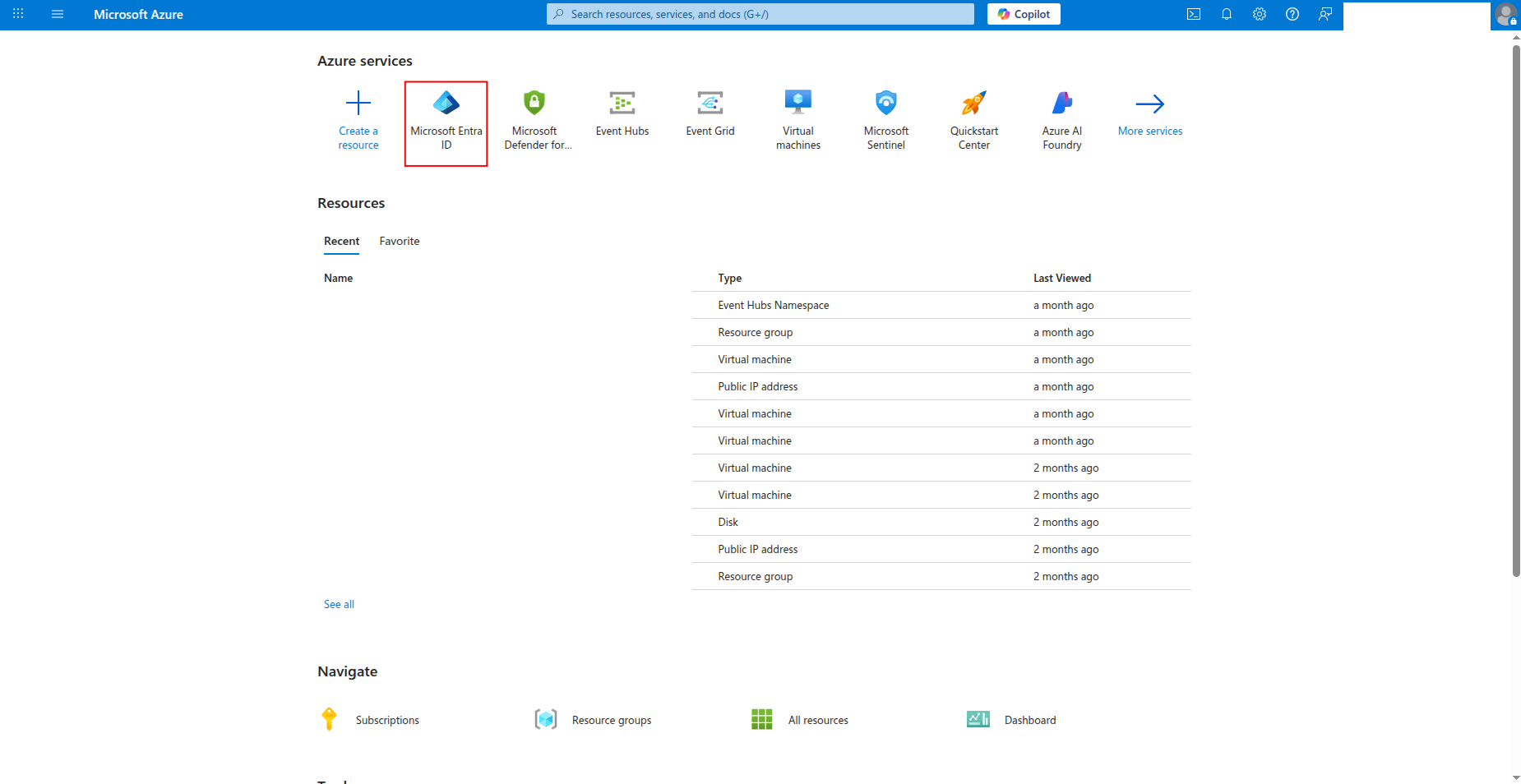
Sign in to the Azure portal and navigate to Microsoft Entra ID.
-
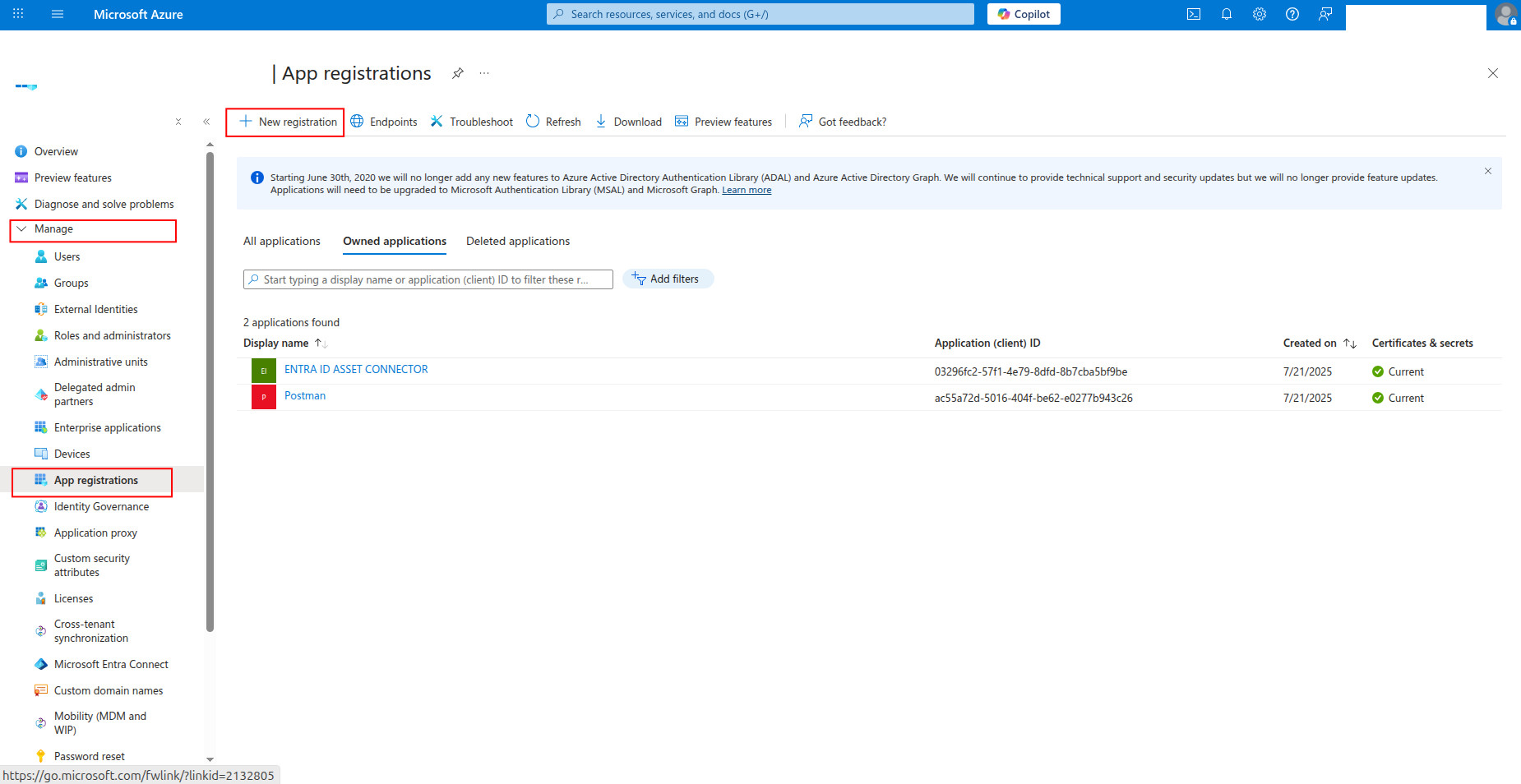
Click App registrations in the left navigation pane, then click New registration.
-
Enter a name for the application (e.g.,
sekoia-defender-reader) and click Register.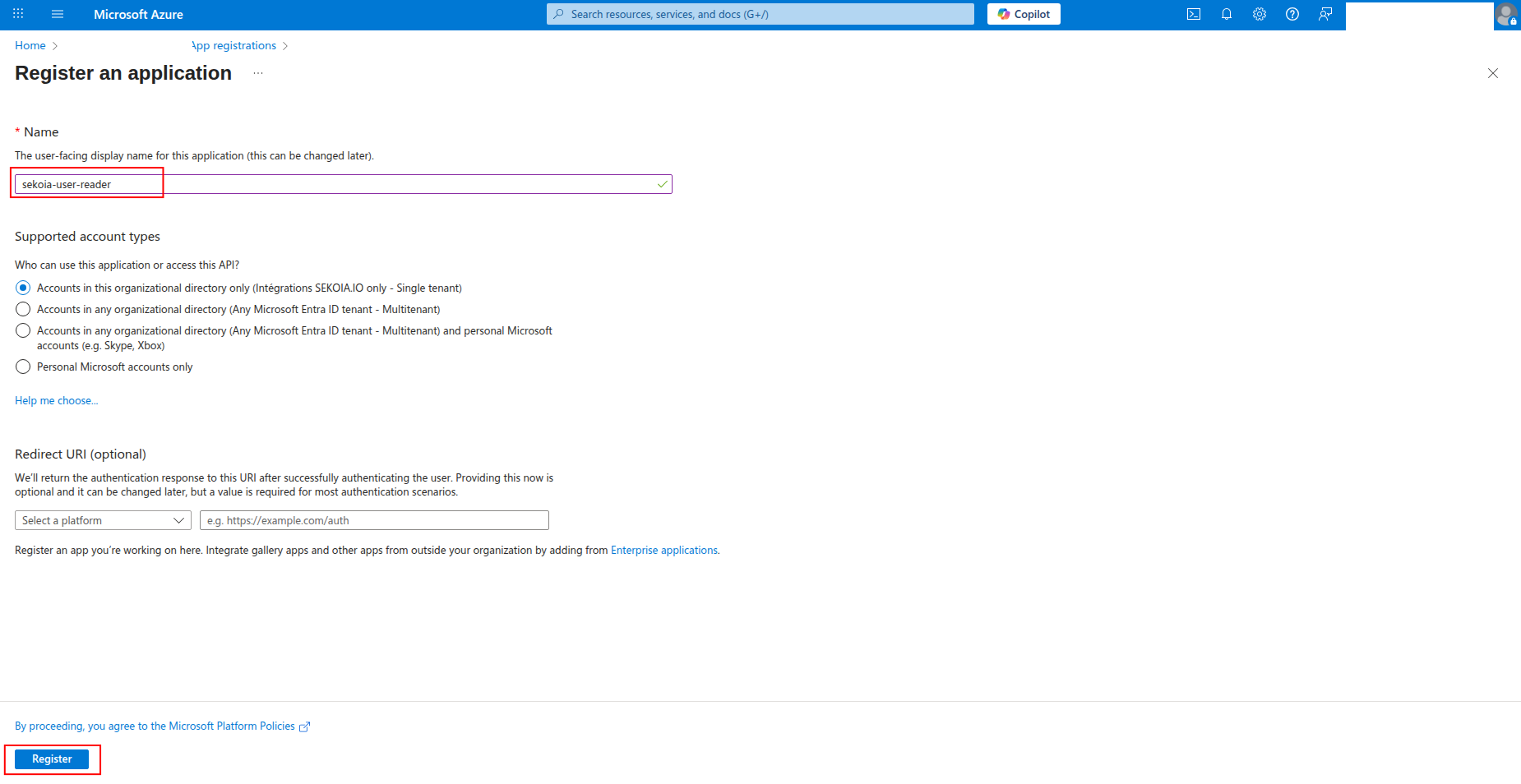
-
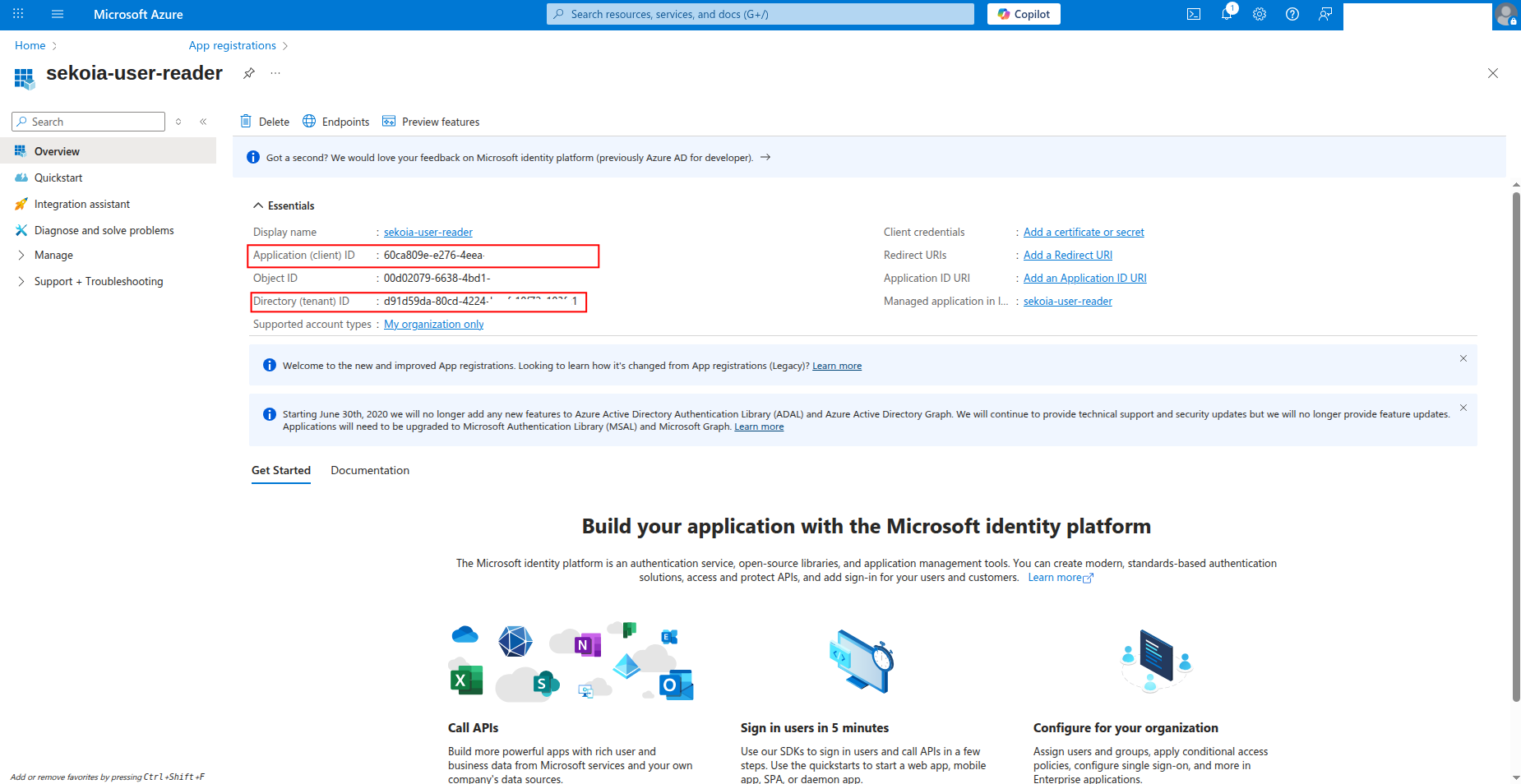
Copy the Application (client) ID and Directory (tenant) ID to a safe location. You'll need these values to configure the connector in Sekoia.io.
How to generate a client secret
After creating the app registration, you need to generate a client secret for authentication:
-
Click Certificates & secrets in the left navigation pane.
-
Click New client secret to generate a new secret.

-
Enter a description for the secret (e.g.,
sekoia-defender-secret) and select an expiration period, then click Add.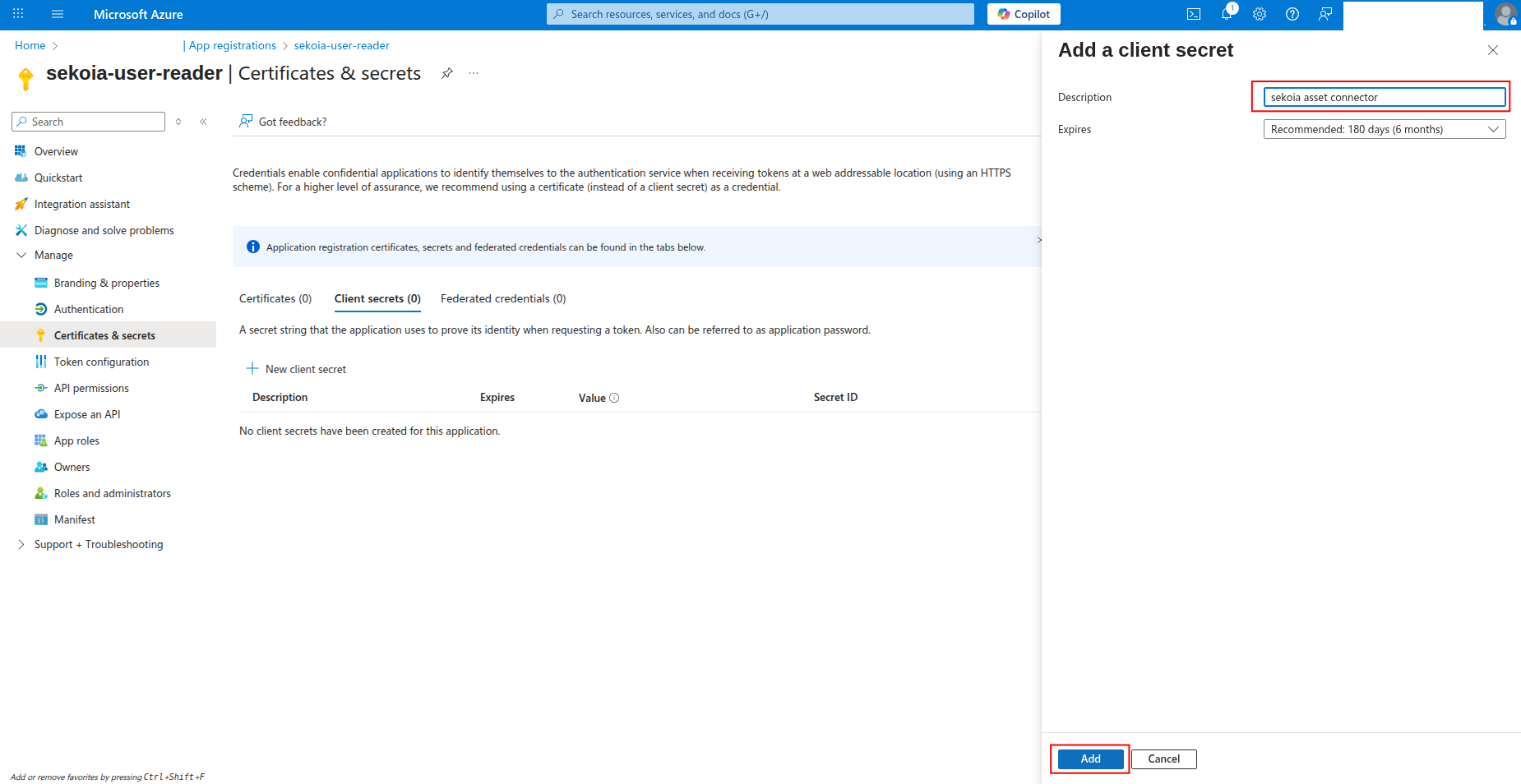
-
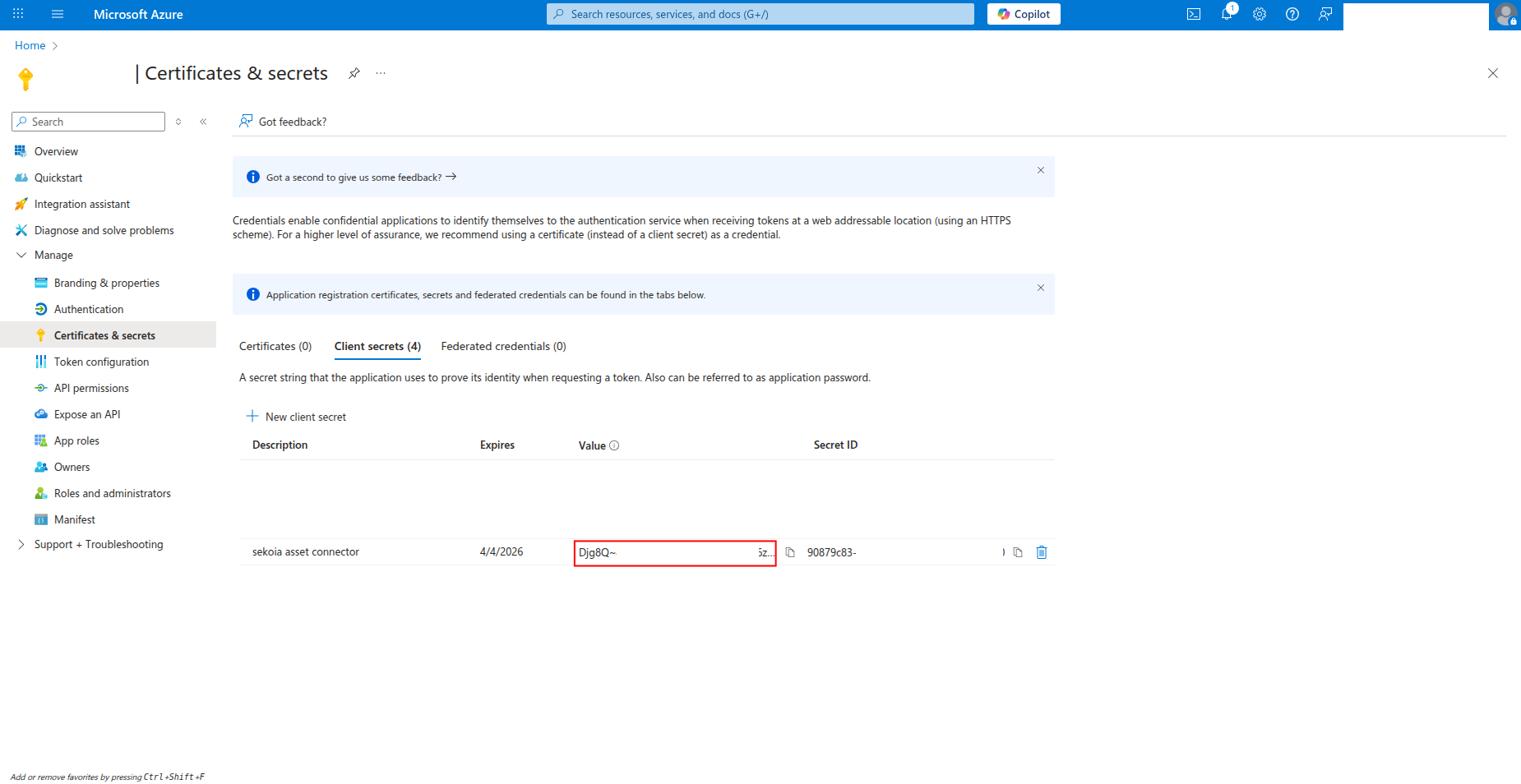
Copy the Value of the client secret to a safe location. You'll need this secret to configure the connector in Sekoia.io.
Warning
- The client secret value is only shown when you create it. If you lose it, you must create a new client secret.
- Store this secret securely and never share it publicly.
- Consider rotating client secrets regularly for security best practices.
Required API permissions
The app registration must have the following application permissions:
How to grant API permissions
To grant the required permissions to your app registration:
-
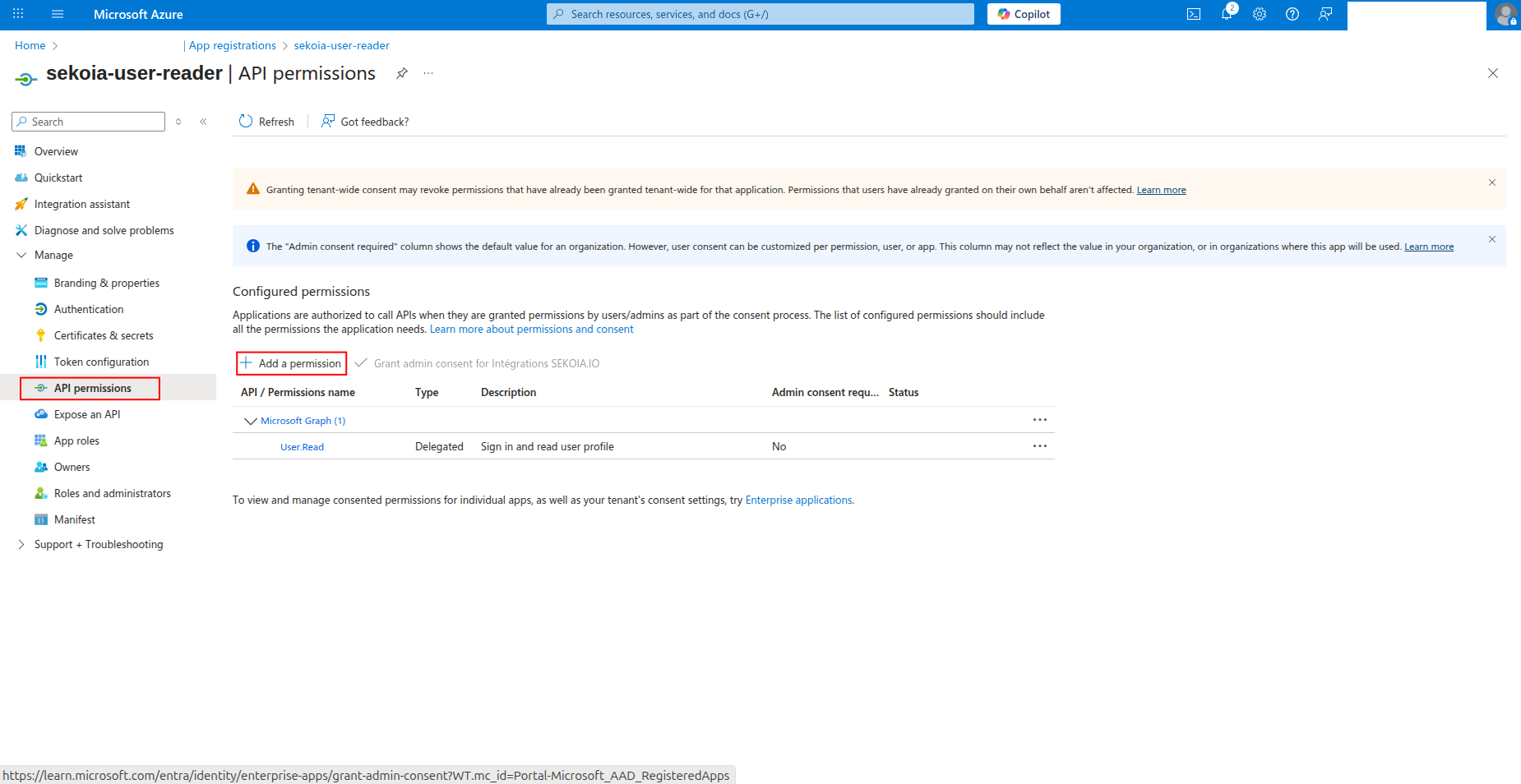
Click API permissions in the left navigation pane.
-
Click Add a permission to add new permissions.
-
Select APIs my organization uses, search for WindowsDefenderATP, and click on it.
-
Select Application permissions and check Machine.Read.All, then click Add permissions.
-
Click Add a permission again, select Microsoft Graph, then select Application permissions and check DeviceManagementManagedDevices.Read.All, then click Add permissions.
-
Click Grant admin consent to grant the permissions (requires admin privileges).
Required API permissions
The App Registration must have the following application permissions:
| API | Permission | Description |
|---|---|---|
| WindowsDefenderATP | Machine.Read.All |
Read all machine information from Microsoft Defender for Endpoint |
| Microsoft Graph | DeviceManagementManagedDevices.Read.All |
Read Microsoft Intune managed device data |
Create your asset
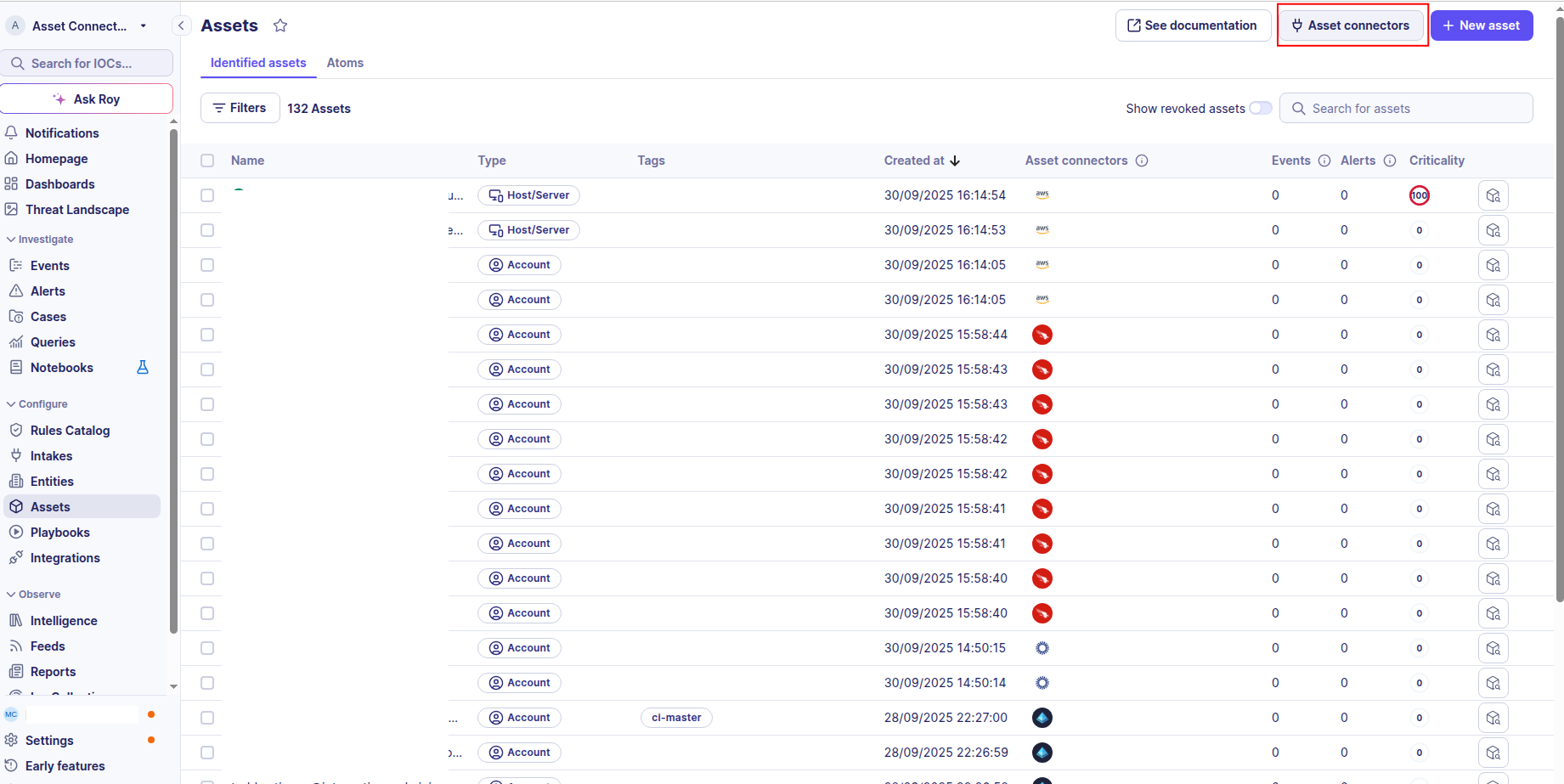
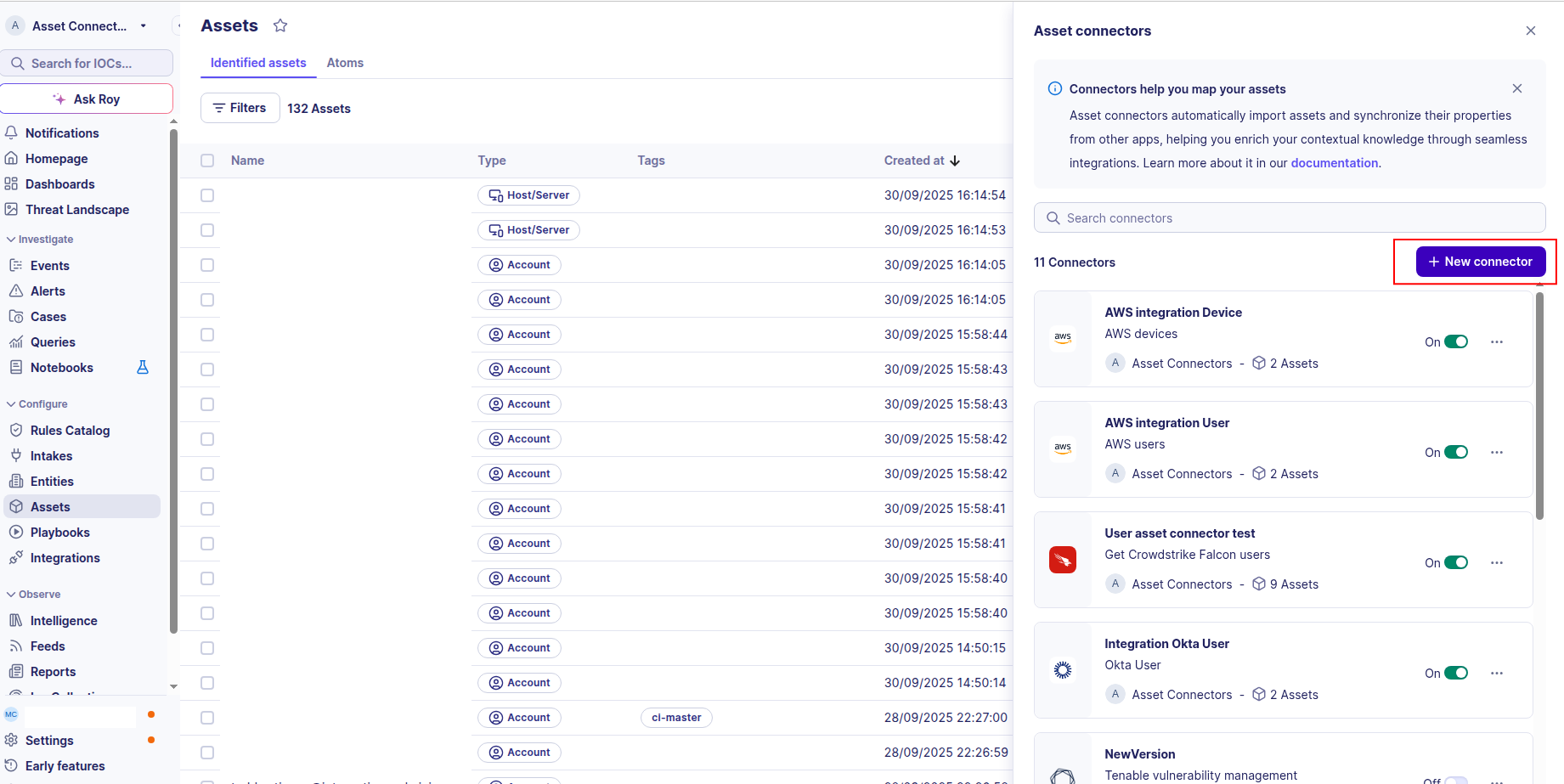
To start getting your Microsoft Defender for Endpoint devices into Sekoia.io, you need to create an asset connector on the Assets page. To do so, follow these steps:
-
Click the Asset connectors button to create a new connector.
-
Click the + New connector button.
-
Choose Microsoft Defender Device, give it a name, and fill the required fields:
-
Enter the following information:
- Tenant ID: Your Azure Directory (tenant) ID
- App ID: The Application (client) ID of your App Registration
- App Secret: The client secret value you created
- Base URL: The Microsoft Defender for Endpoint API base URL (default:
https://api.securitycenter.microsoft.com)
-
Test the connection by clicking the Test connector button.
-
Click the Create asset connector button.
OCSF Mapping for Microsoft Defender Device
OCSF Class: Device Inventory Info
Class UID: 5001
OCSF Version: 1.5.0
Information Collected
The Microsoft Defender Device fetches comprehensive information and transforms it into the OCSF (Open Cybersecurity Schema Framework) format for standardized security monitoring and asset management.
API Response Examples
Defender for Endpoint Machine
A machine from the Defender for Endpoint /api/machines endpoint
{
  "id": "1e5bc9d7e413ddd7902c2932e418702b84d0cc07",
  "computerDnsName": "mymachine1.contoso.com",
  "firstSeen": "2018-08-02T14:55:03.7791856Z",
  "lastSeen": "2024-12-01T10:00:00Z",
  "osPlatform": "Windows10",
  "version": "1709",
  "osProcessor": "x64",
  "osArchitecture": "64-bit",
  "osBuild": 18209,
  "lastIpAddress": "172.17.230.209",
  "lastExternalIpAddress": "167.220.196.71",
  "healthStatus": "Active",
  "onboardingstatus": "Onboarded",
  "rbacGroupId": "140",
  "rbacGroupName": "The-A-Team",
  "riskScore": "Low",
  "exposureLevel": "Medium",
  "aadDeviceId": "80fe8ff8-2624-418e-9591-41f0491218f9",
  "deviceValue": "Normal",
  "machineTags": ["test tag 1", "test tag 2"],
  "ipAddresses": [{"ipAddress": "172.17.230.209", "macAddress": "11:22:33:44:55:66", "type": "Ethernet"}]
}
Intune Managed Device (enrichment)
Matched managed device from Graph API using aadDeviceId
{
  "id": "705c034c-034c-705c-4c03-5c704c035c70",
  "deviceName": "DESKTOP-ABC123",
  "operatingSystem": "Windows",
  "osVersion": "10.0.22631.3880",
  "model": "Surface Pro 9",
  "manufacturer": "Microsoft Corporation",
  "wiFiMacAddress": "AA:BB:CC:DD:EE:FF",
  "ethernetMacAddress": "11:22:33:44:55:66",
  "complianceState": "compliant",
  "managedDeviceOwnerType": "company",
  "userPrincipalName": "user@contoso.com",
  "managementAgent": "mdm",
  "isSupervised": false,
  "azureADDeviceId": "80fe8ff8-2624-418e-9591-41f0491218f9"
}
Data Mapping Table
The following table shows how source data is mapped to OCSF model fields:
| Source Field | OCSF Field Path | Description | Data Type | Logic |
|---|---|---|---|---|
static: 2 |
activity_id |
OCSF activity ID | integer |
Always 2 for 'Collect' activity |
static: Collect |
activity_name |
OCSF activity name | string |
Always 'Collect' |
static: Discovery |
category_name |
OCSF category name | string |
Always 'Discovery' |
static: 5 |
category_uid |
OCSF category UID | integer |
Always 5 for Discovery |
static: 5001 |
class_uid |
OCSF class UID | integer |
Device Inventory Info class |
static: 500102 |
type_uid |
OCSF type UID | integer |
Device Inventory Info: Collect |
machine.id |
device.uid |
Defender machine ID | string |
Direct mapping |
machine.computerDnsName |
device.hostname |
Fully qualified DNS name | string |
Direct mapping |
machine.lastIpAddress |
device.ip |
Last known local IP address | string |
Direct mapping |
machine.osPlatform |
device.os.type |
Operating system type | string |
Map to OCSF OSTypeStr: windows→WINDOWS, linux→LINUX, macos→MACOS, android→ANDROID, ios→IOS |
machine.osPlatform + machine.osBuild || managedDevice.os_version |
device.os.name |
OS version string | string |
Use Intune os_version when available, else '{osPlatform} (Build {osBuild})' |
managedDevice.model |
device.model |
Device hardware model | string |
From Intune if machine has aadDeviceId |
managedDevice.manufacturer |
device.vendor_name |
Device manufacturer | string |
From Intune if machine has aadDeviceId |
machine.firstSeen |
device.first_seen_time |
First seen time (also used as checkpoint) | timestamp |
Convert ISO 8601 to Unix epoch |
machine.lastSeen |
device.last_seen_time |
Last seen time | timestamp |
Convert ISO 8601 to Unix epoch |
machine.riskScore |
device.risk_level / device.risk_level_id |
Risk level as evaluated by Defender | enum |
informational→INFO, low→LOW, medium→MEDIUM, high→HIGH, critical→CRITICAL |
managedDevice.compliance_state |
device.is_compliant |
Whether device is compliant | boolean |
True if complianceState == 'compliant' |
managedDevice.managed_device_owner_type |
device.is_personal |
Whether device is personally owned | boolean |
True if ownerType == 'personal' |
managedDevice.ethernet_mac_address |
device.network_interfaces[].mac |
Ethernet MAC address | string |
Added as ethernet interface if present |
managedDevice.wi_fi_mac_address |
device.network_interfaces[].mac |
WiFi MAC address | string |
Added as wifi interface if present |
machine.aadDeviceId |
enrichments[].value |
Azure AD / Entra device ID | string |
Stored as enrichment name='azure_ad_device_id' |
machine.healthStatus |
enrichments[].value |
Defender health status | string |
Stored as enrichment name='health_status' |
machine.exposureLevel |
enrichments[].value |
Defender exposure level | string |
Stored as enrichment name='exposure_level' |
machine.rbacGroupName |
enrichments[].value |
RBAC group name | string |
Stored as enrichment name='rbac_group_name' |
managedDevice.user_principal_name |
enrichments[].value |
User principal name from Intune | string |
Stored as enrichment name='user_principal_name' |
managedDevice.management_agent |
enrichments[].value |
Management agent type from Intune | string |
Stored as enrichment name='management_agent' |
machine.lastSeen || machine.firstSeen |
time |
OCSF event timestamp | timestamp |
Use lastSeen if available, fallback to firstSeen, then current time |
OCSF Model Structure
Transformed Device Output
OCSF DeviceOCSFModel after merging Defender + Intune data
{
  "activity_id": 2,
  "activity_name": "Collect",
  "category_name": "Discovery",
  "category_uid": 5,
  "class_name": "Device Inventory Info",
  "class_uid": 5001,
  "type_name": "Device Inventory Info: Collect",
  "type_uid": 500102,
  "severity": "Informational",
  "severity_id": 1,
  "time": 1733047200.0,
  "metadata": {
    "product": {
      "name": "Microsoft Defender for Endpoint",
      "version": "1.0"
    },
    "version": "1.5.0"
  },
  "device": {
    "type_id": 2,
    "type": "Desktop",
    "uid": "1e5bc9d7e413ddd7902c2932e418702b84d0cc07",
    "hostname": "mymachine1.contoso.com",
    "ip": "172.17.230.209",
    "os": {
      "name": "10.0.22631.3880",
      "type": "windows",
      "type_id": 100
    },
    "model": "Surface Pro 9",
    "vendor_name": "Microsoft Corporation",
    "first_seen_time": 1533221703.0,
    "last_seen_time": 1733047200.0,
    "risk_level": "Low",
    "risk_level_id": 1,
    "network_interfaces": [
      {"mac": "11:22:33:44:55:66", "name": "ethernet"},
      {"mac": "AA:BB:CC:DD:EE:FF", "name": "wifi"}
    ],
    "is_compliant": true,
    "is_managed": true,
    "is_personal": false,
    "is_supervised": false
  },
  "enrichments": [
    {"name": "azure_ad_device_id", "value": "80fe8ff8-2624-418e-9591-41f0491218f9"},
    {"name": "health_status", "value": "Active"},
    {"name": "exposure_level", "value": "Medium"},
    {"name": "rbac_group_name", "value": "The-A-Team"},
    {"name": "user_principal_name", "value": "user@contoso.com"},
    {"name": "management_agent", "value": "mdm"}
  ]
}